






- ABP Framework version: v8.0.1
- UI Type: MVC
- Database System: EF Core (SQL Server)
- Tiered (for MVC) or Auth Server Separated (for Angular): no
I have updated a .NET Core 7.0 / Abp version 7.4.0 of my commercial ABP application to .NET 8.0 / ABP version 8.0.1. The application will compile correctly, but when I attempt to run the application or generate a new migration script I get the following error. I have looked at the migration documentation but cannot find anything that helps address this issue.
Exception:
Volo.Abp.AbpInitializationException: An error occurred during ConfigureServicesAsync phase of the module Volo.Abp.OpenIddict.AbpOpenIddictDomainModule, Volo.Abp.OpenIddict.Domain, Version=7.4.0.0, Culture=neutral, PublicKeyToken=null. See the inner exception for details.
---> System.TypeLoadException: Method 'GetApplicationTypeAsync' in type 'OpenIddict.Core.OpenIddictApplicationManager1' from assembly 'OpenIddict.Core, Version=4.8.0.0, Culture=neutral, PublicKeyToken=35a561290d20de2f' does not have an implementation. at Microsoft.Extensions.DependencyInjection.OpenIddictCoreExtensions.AddCore(OpenIddictBuilder builder) at Microsoft.Extensions.DependencyInjection.OpenIddictCoreExtensions.AddCore(OpenIddictBuilder builder, Action1 configuration)
at Volo.Abp.OpenIddict.AbpOpenIddictDomainModule.AddOpenIddictCore(IServiceCollection services)
at Volo.Abp.OpenIddict.AbpOpenIddictDomainModule.ConfigureServices(ServiceConfigurationContext context)
at Volo.Abp.Modularity.AbpModule.ConfigureServicesAsync(ServiceConfigurationContext context)
at Volo.Abp.AbpApplicationBase.ConfigureServicesAsync()
--- End of inner exception stack trace ---
at Volo.Abp.AbpApplicationBase.ConfigureServicesAsync()
at Volo.Abp.AbpApplicationFactory.CreateAsync[TStartupModule](IServiceCollection services, Action1 optionsAction) at Microsoft.Extensions.DependencyInjection.ServiceCollectionApplicationExtensions.AddApplicationAsync[TStartupModule](IServiceCollection services, Action1 optionsAction)
at Microsoft.Extensions.DependencyInjection.WebApplicationBuilderExtensions.AddApplicationAsync[TStartupModule](WebApplicationBuilder builder, Action`1 optionsAction)
at Module.Web.Program.Main(String[] args) in Z:\Projects\StatAlert_Core\aspnet-core\src\Module.Web\Program.cs:line 36
An error occurred while accessing the Microsoft.Extensions.Hosting services. Continuing without the application service provider. Error: The entry point exited without ever building an IHost.
Unable to create a 'DbContext' of type 'ModuleDbContext'. The exception 'Method not found: 'Int32 Volo.Abp.OpenIddict.Applications.OpenIddictApplicationConsts.get_TypeMaxLength()'.' was thrown while attempting to create an instance. For the different patterns supported at design time, see https://go.microsoft.com/fwlink/?linkid=851728
6 Answer(s)
-
0
<Project Sdk="Microsoft.NET.Sdk.Web"> <Import Project="....\common.props" /> <PropertyGroup> <TargetFramework>net8.0</TargetFramework> <Nullable>enable</Nullable> <AspNetCoreHostingModel>InProcess</AspNetCoreHostingModel> <RootNamespace>Module.Web</RootNamespace> <AssetTargetFallback>$(AssetTargetFallback);portable-net45+win8+wp8+wpa81;</AssetTargetFallback> <AutoGenerateBindingRedirects>true</AutoGenerateBindingRedirects> <GenerateBindingRedirectsOutputType>true</GenerateBindingRedirectsOutputType> <GenerateRuntimeConfigurationFiles>true</GenerateRuntimeConfigurationFiles> <MvcRazorExcludeRefAssembliesFromPublish>false</MvcRazorExcludeRefAssembliesFromPublish> <PreserveCompilationReferences>true</PreserveCompilationReferences> </PropertyGroup> <ItemGroup> <Compile Remove="Logs*" /> <Content Remove="Logs*" /> <EmbeddedResource Remove="Logs*" /> <None Remove="Logs*" /> </ItemGroup> <ItemGroup> <Content Include="Pages**.js"> <CopyToOutputDirectory>Always</CopyToOutputDirectory> </Content> <Content Include="Pages**.css"> <CopyToOutputDirectory>Always</CopyToOutputDirectory> </Content> </ItemGroup> <ItemGroup> <Compile Remove="Pages\Identity\Users\CreateModal.cshtml.cs" /> <Compile Remove="Pages\Identity\Users\MyCreateModal.cs" /> <Compile Remove="Pages\Identity\Users\MyEditModal.cs" /> </ItemGroup> <ItemGroup> <PackageReference Include="AspNetCore.HealthChecks.UI" Version="8.0.0" /> <PackageReference Include="AspNetCore.HealthChecks.UI.Client" Version="8.0.0" /> <PackageReference Include="AspNetCore.HealthChecks.UI.InMemory.Storage" Version="8.0.0" /> <PackageReference Include="Serilog.AspNetCore" Version="8.0.0" /> <PackageReference Include="Serilog.Sinks.Async" Version="1.5.0" /> <PackageReference Include="Microsoft.AspNetCore.Authentication.Google" Version="8.0.1" /> <PackageReference Include="Microsoft.AspNetCore.Authentication.MicrosoftAccount" Version="8.0.1" /> <PackageReference Include="Microsoft.AspNetCore.Authentication.Twitter" Version="8.0.1" /> </ItemGroup> <ItemGroup> <ProjectReference Include="..\Module.Application\Module.Application.csproj" /> <ProjectReference Include="..\Module.HttpApi\Module.HttpApi.csproj" /> <ProjectReference Include="..\Module.EntityFrameworkCore\Module.EntityFrameworkCore.csproj" /> <PackageReference Include="Volo.Abp.Autofac" Version="8.0.1" /> <PackageReference Include="Volo.Abp.AspNetCore.Serilog" Version="8.0.1" /> <PackageReference Include="Volo.Abp.AspNetCore.Authentication.JwtBearer" Version="8.0.1" /> <PackageReference Include="Volo.Abp.Swashbuckle" Version="8.0.1" /> <PackageReference Include="Volo.Abp.FeatureManagement.Web" Version="8.0.1" /> <PackageReference Include="Volo.Abp.Account.Pro.Public.Web.OpenIddict" Version="7.4.0" /> <PackageReference Include="Volo.Abp.Account.Pro.Admin.Web" Version="7.4.0" /> <PackageReference Include="Volo.Abp.AuditLogging.Web" Version="7.4.0" /> <PackageReference Include="Volo.Abp.Identity.Pro.Web" Version="7.4.0" /> <PackageReference Include="Volo.Abp.OpenIddict.Pro.Web" Version="7.4.0" /> <PackageReference Include="Volo.Abp.LanguageManagement.Web" Version="7.4.0" /> <PackageReference Include="Volo.Saas.Host.Web" Version="7.4.0" /> <PackageReference Include="Volo.Abp.TextTemplateManagement.Web" Version="7.4.0" /> <PackageReference Include="Volo.Abp.Gdpr.Web" Version="7.4.0" /> </ItemGroup> <ItemGroup> <PackageReference Include="Volo.Abp.AspNetCore.Mvc.UI.Theme.LeptonX" Version="2.4.1" /> </ItemGroup> <ItemGroup> <None Update="authserver.pfx"> <CopyToOutputDirectory>Always</CopyToOutputDirectory> </None> </ItemGroup> </Project>
Markdown supported.Copy, paste, or drag & drop images and files (max 100 MB per file, 100 MB total per post) -
0
hi
I have updated a .NET Core 7.0 / Abp version 7.4.0 of my commercial ABP application to .NET 8.0 / ABP version 8.0.1.
But these packages are still 7.4.0
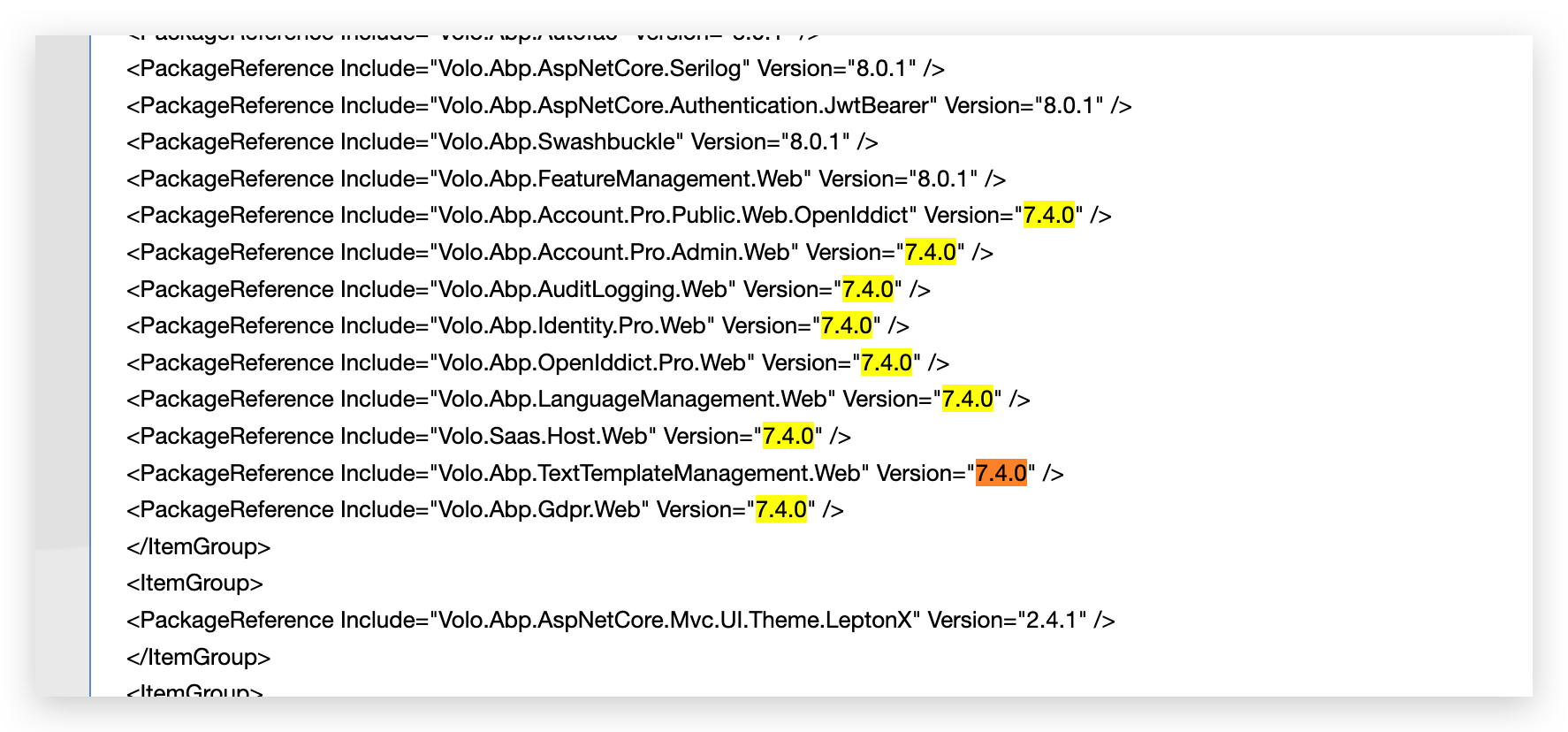 Markdown supported.Copy, paste, or drag & drop images and files (max 100 MB per file, 100 MB total per post)
 -
0
When I went to manage packages it didn't show version 8.0.1 for those packages, but I updated the .csproj files manually and it built. However now I get another runtime error:
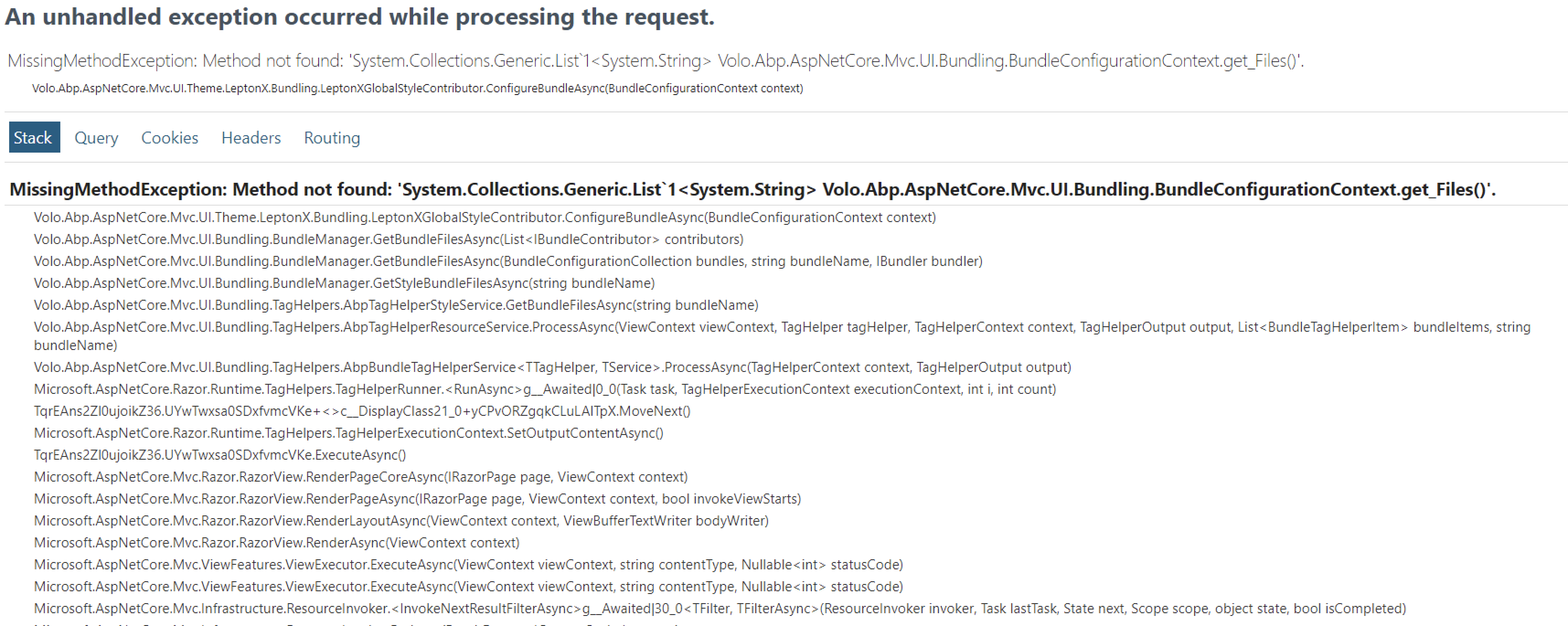 Markdown supported.Copy, paste, or drag & drop images and files (max 100 MB per file, 100 MB total per post)



