






I created a blank abp app as following:
- ABP Framework version: v8.0.1
- UI Type: Angular / MVC ( with mobile app)
- Database System: EF Core (SQL Server)
- Tiered (for MVC) or Auth Server Separated (for Angular): no ---- OpenId
- Multi tenency : true
I need to add 2 functions (generate token + generate refresh token) , these will be used by mobile app
Please suggest the best simple way of how to create 2 functions, previously I had a code that creates the token when I was using identity server 4 , now I am using the new framework : openid
(I do not perfer to add account module source code) + ( I perfere to create the function on myApp.Application layer or myApp.HttpApi layer)
I tried this code but did not work, it generated some token but did not work:
string getToken(Volo.Abp.Identity.IdentityUser user, string tokenType)
{
    var authServer = configuration["AuthServer:Authority"];
    var options = oidcOptions.CurrentValue;
    //var roles = user.Roles.Select(r=>r.RoleId)
    var descriptor = new SecurityTokenDescriptor
    {
        Claims = new Dictionary<string, object>
        {
            { "sub", user.Id.ToString() },
            { "scope", MainScope.Split(',') },
            { "tenantid", user.TenantId?.ToString() },
            //{ "role", user.Roles.Split(',') },
        },
        EncryptingCredentials = options.DisableAccessTokenEncryption
            ? null
            : options.EncryptionCredentials.First(),
        Expires = DateTime.UtcNow.AddMinutes(lifetime),
        IssuedAt = DateTime.UtcNow,
        Issuer = authServer,
        SigningCredentials = options.SigningCredentials.First(),
        TokenType = tokenType,
    };
    var accessToken = options.JsonWebTokenHandler.CreateToken(descriptor);
    return accessToken;
}
Thank you
9 Answer(s)
-
1
Hi,
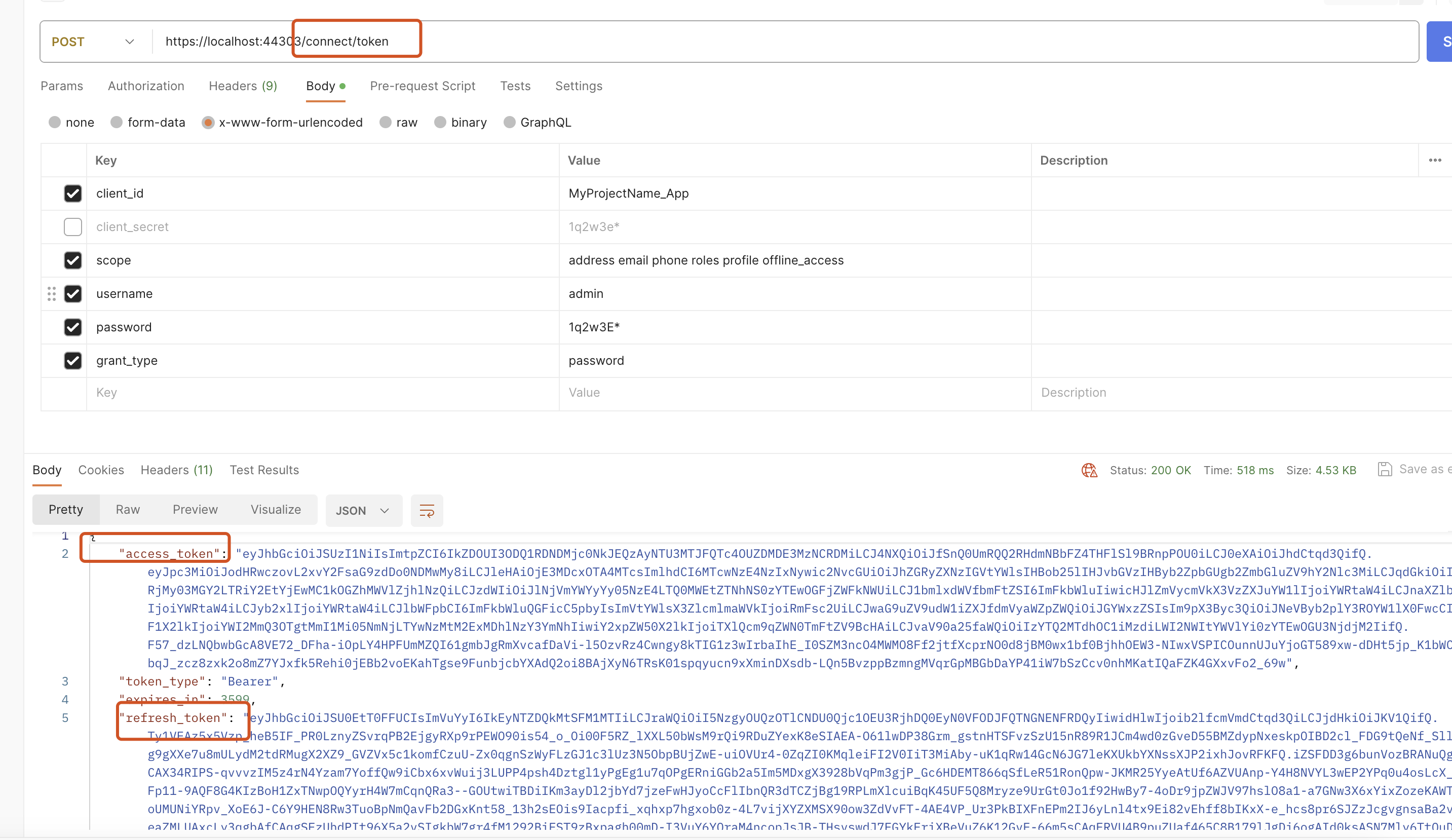
You don't need to create new functions. they already exist.
https://github.com/abpframework/abp/blob/dev/modules/openiddict/src/Volo.Abp.OpenIddict.AspNetCore/Volo/Abp/OpenIddict/Controllers/TokenController.cs
 Markdown supported.Copy, paste, or drag & drop images and files (max 100 MB per file, 100 MB total per post)
 -
0
Thank you for your response but that does not answer my question,
As I said, I am in the application layer, I would like to create a token for a user, I have the username only (of course I do not have the password, I only have the username)
I need more informatio how to implement this requirements:
- which module should I import,
- which config should I add in appSettings
- which service should I inject, what parameters should I pass
I am looking for simple way like using similar interface for example:
public interface ITokenService
 {
     Task<string> GenerateTokenAsync(IdentityUser user, string tokenType);
 }
Markdown supported.Copy, paste, or drag & drop images and files (max 100 MB per file, 100 MB total per post) -
1
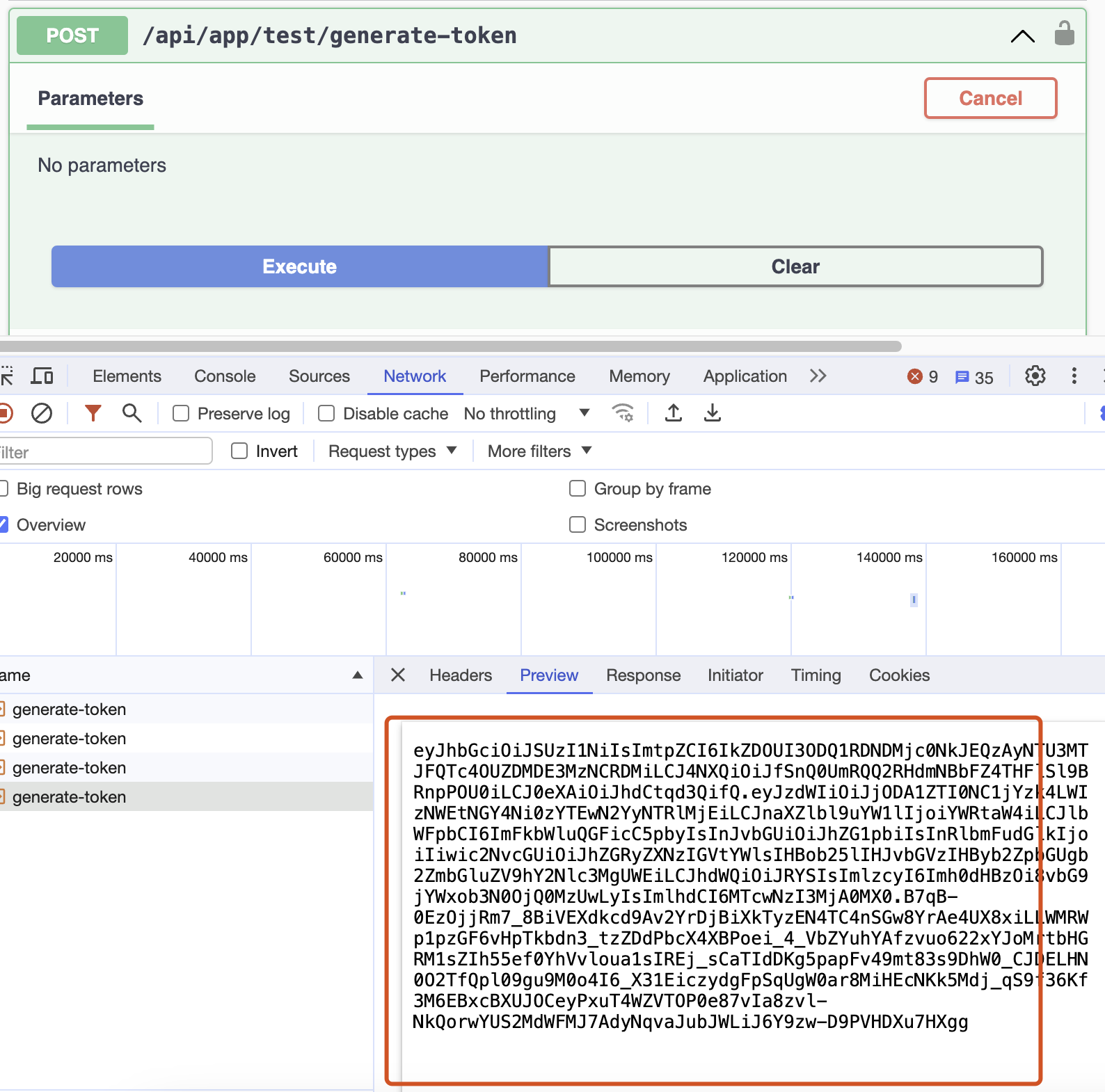
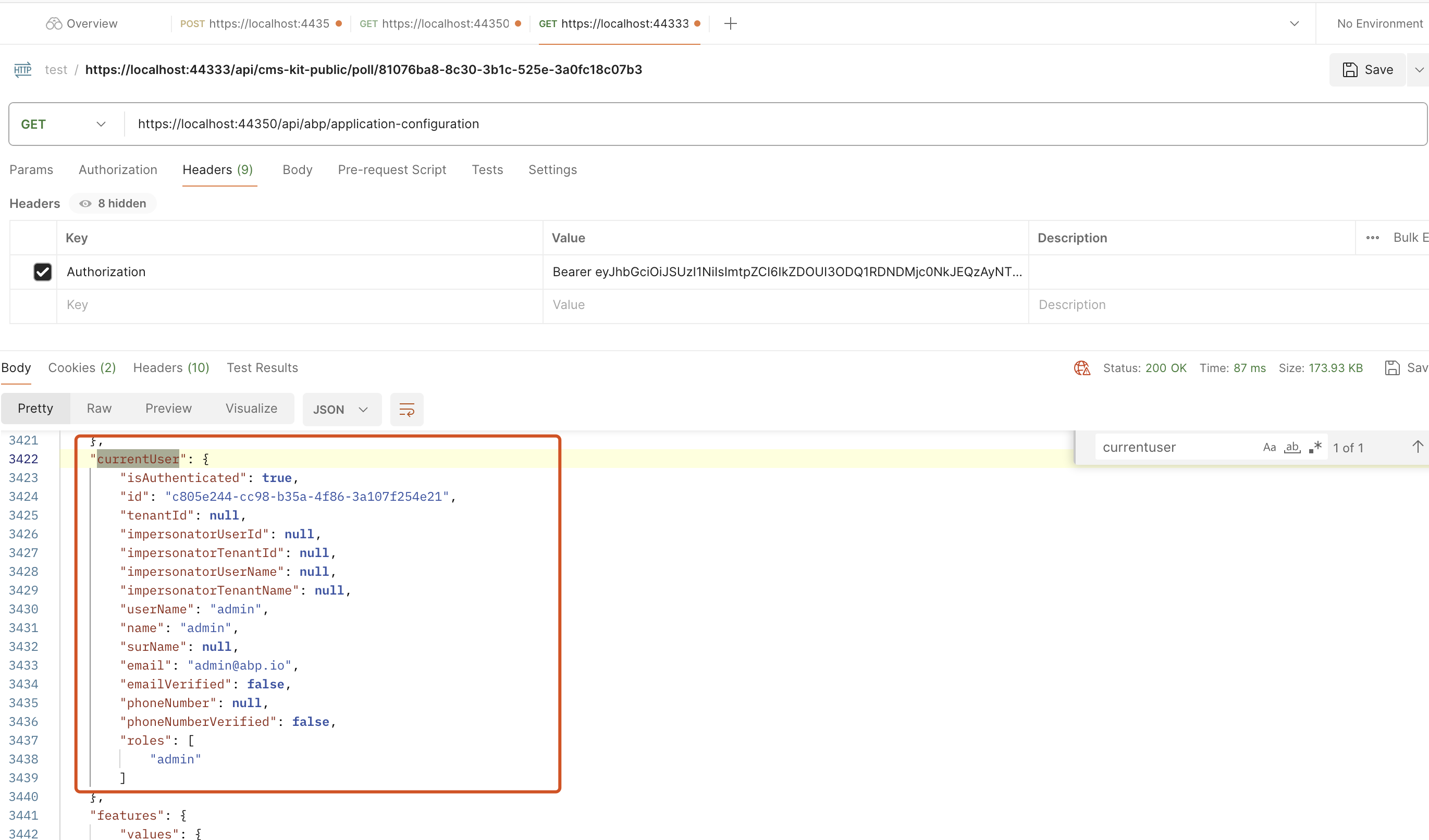
Hi works for me:
public class TestAppService : QaAppService
{
    private readonly IOptionsMonitor<OpenIddictServerOptions> _oidcOptions;
    private readonly IdentityUserManager _userManager;

    public TestAppService(IOptionsMonitor<OpenIddictServerOptions> oidcOptions, IdentityUserManager userManager)
    {
        _oidcOptions = oidcOptions;
        _userManager = userManager;
    }
    public async Task<string> GenerateTokenAsync()
    {

        var user = await _userManager.FindByNameAsync("admin");
        var roles = await _userManager.GetRolesAsync(user);

        var claims = new List<Claim>()
        {
            new Claim("sub", user.Id.ToString()),
            new Claim("given_name", user.UserName),
            new Claim("email", user.Email),
            new Claim("role", string.Join(",", roles)),
            new Claim("tenantid", user.TenantId?.ToString() ?? ""),
            new Claim("scope", "address email phone roles profile offline_access Qa") //replace Qa with yours

        };
        var options = _oidcOptions.CurrentValue;
        var descriptor = new SecurityTokenDescriptor
        {
            Audience = "Qa", // replace with yours,
            EncryptingCredentials = options.DisableAccessTokenEncryption
                ? null
                : options.EncryptionCredentials.First(),
            Expires = null,
            Subject = new ClaimsIdentity(claims,TokenValidationParameters.DefaultAuthenticationType),
            IssuedAt = DateTime.UtcNow,
            Issuer = "https://localhost:44350/", // replace with yours,
            SigningCredentials = options.SigningCredentials.First(),
            TokenType = OpenIddictConstants.JsonWebTokenTypes.AccessToken,
        };

        var accessToken = options.JsonWebTokenHandler.CreateToken(descriptor);

        return accessToken;
    }
}
 Markdown supported.Copy, paste, or drag & drop images and files (max 100 MB per file, 100 MB total per post)
 -
0
It looked worked but it did not, for example I got this access token :
eyJhbGciOiJSUzI1NiIsImtpZCI6IkRGNUUwQkU2QUEzQkUxRDFGMDNCRDc0NjQyOEUyQTY4QzBGRUMwRjgiLCJ4NXQiOiIzMTRMNXFvNzRkSHdPOWRHUW80cWFNRC13UGciLCJ0eXAiOiJhdCtqd3QifQ.eyJzdWIiOiI4NjYwYmUyYy04NzcxLTU4ZTQtMzA1ZC0zYTEwOGQ1NjA3MDIiLCJnaXZlbl9uYW1lIjoiKzk2NjUxMTIyMjIyMiIsImVtYWlsIjoiKzk2NjUxMTIyMjIyMkBtYWlsLmNvbSIsInJvbGUiOiJBZG1pbixNYW5hZ2VyLE93bmVyIiwidGVuYW50aWQiOiI1NmNkYTkzMi1kMjNjLTdjYzAtOWM2Zi0zYTEwOGQ1NWU1YWQiLCJzY29wZSI6ImFkZHJlc3MgZW1haWwgcGhvbmUgcm9sZXMgcHJvZmlsZSBvZmZsaW5lX2FjY2VzcyBOZWVsQm9vayIsImF1ZCI6Ik5lZWxCb29rIiwiaXNzIjoiaHR0cHM6Ly9ub29uY2xvdWRzYXBpLmF6dXJld2Vic2l0ZXMubmV0IiwiaWF0IjoxNzA3MzQyMjk1fQ.PsnqHSEGldB8QTHOH7maDFMjOg6Z0AHOhYg28Lv9qCh1aRAO0r3yMviauZgXArlt67vZejTZmbK_47-S7koAgI5Ov5BiCMTkpBj68qPX6ZxhYzXQ-S-HNkjZkTQXSqNemPyvJyjPmyaQOhA-_0lgus497XZ7gfMp4A1TmftW6lmXNxufaBVgSinQQIcRH_EaA6Pd1P5ruJgmE54XjWaUKgufOv-el_6SEMCK0eb8E7sd4w35rxwUWaUfoI2C91zGn-Kef1vXpzrpFOHaJVEyuJ0xHs24jseSkoBe6dMRzK4w53-bNYnLrgecs2W63JcbYLdTJeTnXkRkbLSPEzJOxgWhen I use the token , the user looks anonymous!I tried to add some more claims but no hope:
eyJhbGciOiJSUzI1NiIsImtpZCI6IkVERDgzNzQ1NDA0QjdBMUYwOEQ2MjZBMEZGQTUyMjU2ODk4Mzg0MjciLCJ4NXQiOiI3ZGczUlVCTGVoOEkxaWFnXzZVaVZvbURoQ2MiLCJ0eXAiOiJhdCtqd3QifQ.eyJzdWIiOiIyOWQzZGI4YS1mY2RhLTA0YjUtZDdjMC0zYTEwOWM4MGY1OGEiLCJnaXZlbl9uYW1lIjpbIis5NjY1MTEyMjIyMjIiLCIrOTY2NTExMjIyMjIyIl0sImVtYWlsIjoiKzk2NjUxMTIyMjIyMkBtYWlsLmNvbSIsInJvbGUiOiJBZG1pbixNYW5hZ2VyLE93bmVyIiwidGVuYW50aWQiOiJiZjZjNjgxOC0xYzQ4LTEwNTctZDA0ZC0zYTEwOWM4MGYwZjYiLCJzY29wZSI6ImFkZHJlc3MgZW1haWwgcGhvbmUgcm9sZXMgcHJvZmlsZSBvZmZsaW5lX2FjY2VzcyBOZWVsQm9vayIsInVuaXF1ZV9uYW1lIjoiKzk2NjUxMTIyMjIyMiIsInByZWZlcnJlZF91c2VybmFtZSI6Iis5NjY1MTEyMjIyMjIiLCJlbWFpbF92ZXJpZmllZCI6IkZhbHNlIiwicGhvbmVfbnVtYmVyX3ZlcmlmaWVkIjoiRmFsc2UiLCJvaV9wcnN0IjoiTmVlbEJvb2tfQXBwIiwiY2xpZW50X2lkIjoiTmVlbEJvb2tfQXBwIiwiZXhwIjoiMTcwODIwOTUwNiIsImF1ZCI6Ik5lZWxCb29rIiwiaXNzIjoiaHR0cHM6Ly9sb2NhbGhvc3Q6NDQzODYiLCJpYXQiOjE3MDc0MjQxNzF9.pVP9dLLbGjU3LFP6wlKiVqPleDaw8H1xhO24txamOiBpH-xhJ8dmK-HjUipGmg9VJLimK5Q5zzZzkRIC1OwKCtvM-vfLb2hek514EKqCwNmcpQ-HsEF2m2i8zcGfvDJILKkv0fEWej0LBiblw1oCxxCUCs6VZJ07H86p8UYBbq6Tv4M4EMncGHWu1zbt_8yJ_uQXt_5-2E9p7qPo54s3fVPDy6-NrPMjBs6Jt5EP0DKhJ86TLus3hIGyQknq57aQDZMtr5_RK0un6RegezKN1j_u6-jJxUxAK3QmPp1S1OaG_WtMf4Nm1A6L9GsHXwCXSVEI5BUe8p0yEuOCR_3JsAWhen I use the token , the user looks anonymous!
Markdown supported.Copy, paste, or drag & drop images and files (max 100 MB per file, 100 MB total per post) -
0
Hi,
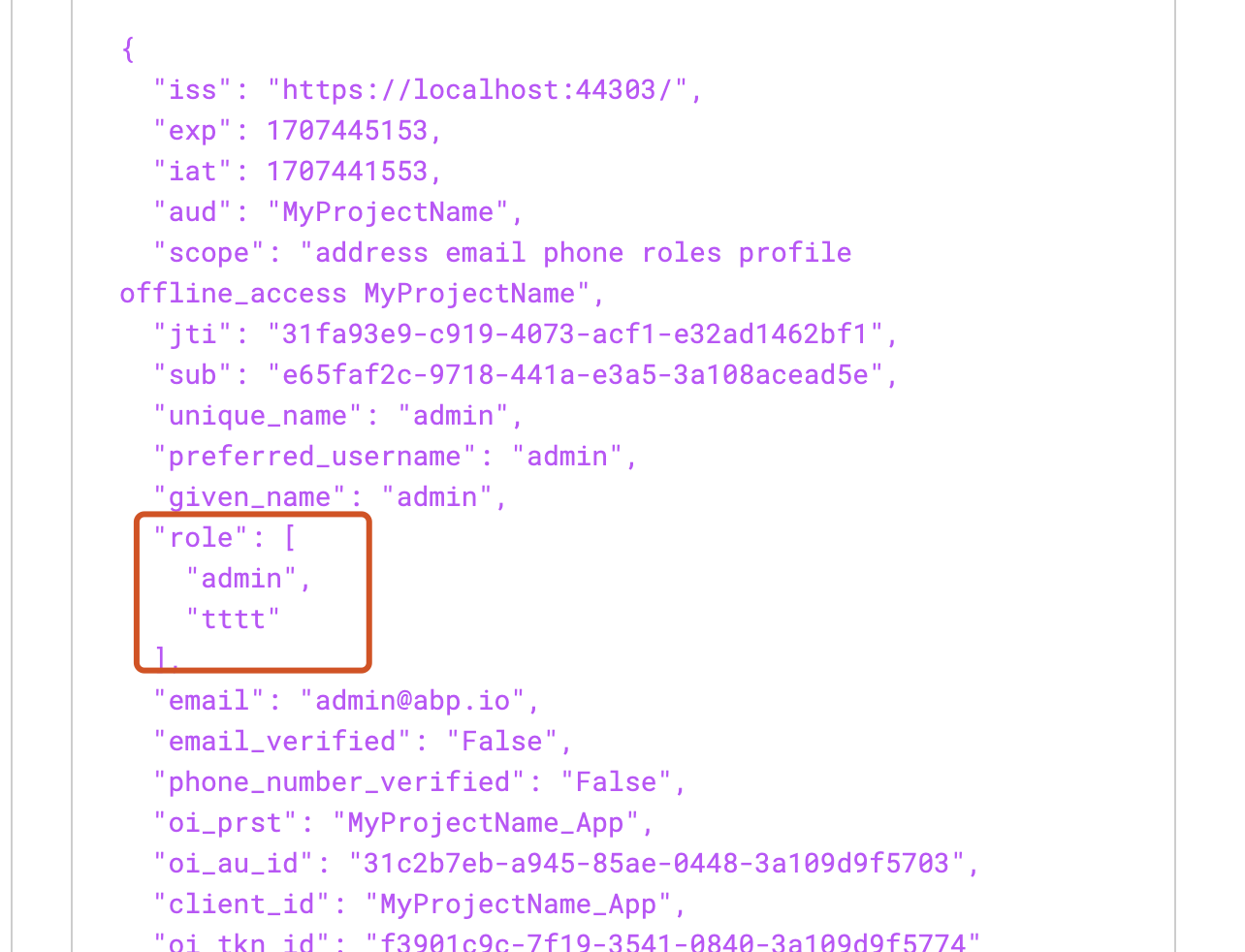
Sorry, If the user has multiple roles, the role claim should be an array
You can try change the role claim.
 Markdown supported.Copy, paste, or drag & drop images and files (max 100 MB per file, 100 MB total per post)
 -
0
I tried what you suggested, did not work :
eyJhbGciOiJSUzI1NiIsImtpZCI6IkVERDgzNzQ1NDA0QjdBMUYwOEQ2MjZBMEZGQTUyMjU2ODk4Mzg0MjciLCJ4NXQiOiI3ZGczUlVCTGVoOEkxaWFnXzZVaVZvbURoQ2MiLCJ0eXAiOiJhdCtqd3QifQ.eyJzdWIiOiIyOWQzZGI4YS1mY2RhLTA0YjUtZDdjMC0zYTEwOWM4MGY1OGEiLCJnaXZlbl9uYW1lIjoiKzk2NjUxMTIyMjIyMiIsImVtYWlsIjoiKzk2NjUxMTIyMjIyMkBtYWlsLmNvbSIsInRlbmFudGlkIjoiYmY2YzY4MTgtMWM0OC0xMDU3LWQwNGQtM2ExMDljODBmMGY2Iiwic2NvcGUiOiJhZGRyZXNzIGVtYWlsIHBob25lIHJvbGVzIHByb2ZpbGUgb2ZmbGluZV9hY2Nlc3MgTmVlbEJvb2siLCJ1bmlxdWVfbmFtZSI6Iis5NjY1MTEyMjIyMjIiLCJwcmVmZXJyZWRfdXNlcm5hbWUiOiIrOTY2NTExMjIyMjIyIiwiZW1haWxfdmVyaWZpZWQiOiJGYWxzZSIsInBob25lX251bWJlcl92ZXJpZmllZCI6IkZhbHNlIiwib2lfcHJzdCI6Ik5lZWxCb29rX0FwcCIsImNsaWVudF9pZCI6Ik5lZWxCb29rX0FwcCIsImV4cCI6IjE3MDgyMDk1MDYiLCJyb2xlIjpbIkFkbWluIiwiTWFuYWdlciIsIk93bmVyIl0sImF1ZCI6Ik5lZWxCb29rIiwiaXNzIjoiaHR0cHM6Ly9sb2NhbGhvc3Q6NDQzODYiLCJpYXQiOjE3MDc1ODYyODl9.ujXEXG0GlWljvPDQL6Mi4nO5K2CLF5B2Ps-IlS0JoIBQSYsXM9FDwh3urVcP3qCNDn5VCvdJPBhZeHk5zq3xVFTjVgQoDIctjiS50cgLiwwzxgFLvnNcSn1LIRh6Bu9SH7HrWe8XdJrBGplDY2Ya7Qs2L6j1UGNc6-au80wU-_Fl6O2K0WK0LxEZAUpj3LmqGmVzM3aphLg2dViDACmzQO5cUQFVZpNPLxX5_sCsKemRViL0GbtDwfnlW7hsaRCAjbUtf56KzIsdn9Mx4W9S3IJNmDTIMApMVhDI9Fk234MXMX-D79FMFe8dnUdz4k-xkaJrasW6m3Z1a3I_IzOGPAthis is the decoded version :
{
  "sub": "29d3db8a-fcda-04b5-d7c0-3a109c80f58a",
  "given_name": "+966511222222",
  "email": "+966511222222@mail.com",
  "tenantid": "bf6c6818-1c48-1057-d04d-3a109c80f0f6",
  "scope": "address email phone roles profile offline_access NeelBook",
  "unique_name": "+966511222222",
  "preferred_username": "+966511222222",
  "email_verified": "False",
  "phone_number_verified": "False",
  "oi_prst": "NeelBook_App",
  "client_id": "NeelBook_App",
  "exp": "1708209506",
  "role": [
    "Admin",
    "Manager",
    "Owner"
  ],
  "aud": "NeelBook",
  "iss": "https://localhost:44386",
  "iat": 1707586289
}
Markdown supported.Copy, paste, or drag & drop images and files (max 100 MB per file, 100 MB total per post) -
0
Hi,
When I use the token , the user looks anonymous!
Could you explain what exactly the problem is? I will check it.
Markdown supported.Copy, paste, or drag & drop images and files (max 100 MB per file, 100 MB total per post) -
0
When I send a requestion and pass the previous bearer token, still the user considered anonymous (even if it was admin) So when I debug the app, the ICurrentuser says this is anonymouse user!
Markdown supported.Copy, paste, or drag & drop images and files (max 100 MB per file, 100 MB total per post) -
0
Hi,
I could not reproduce it.
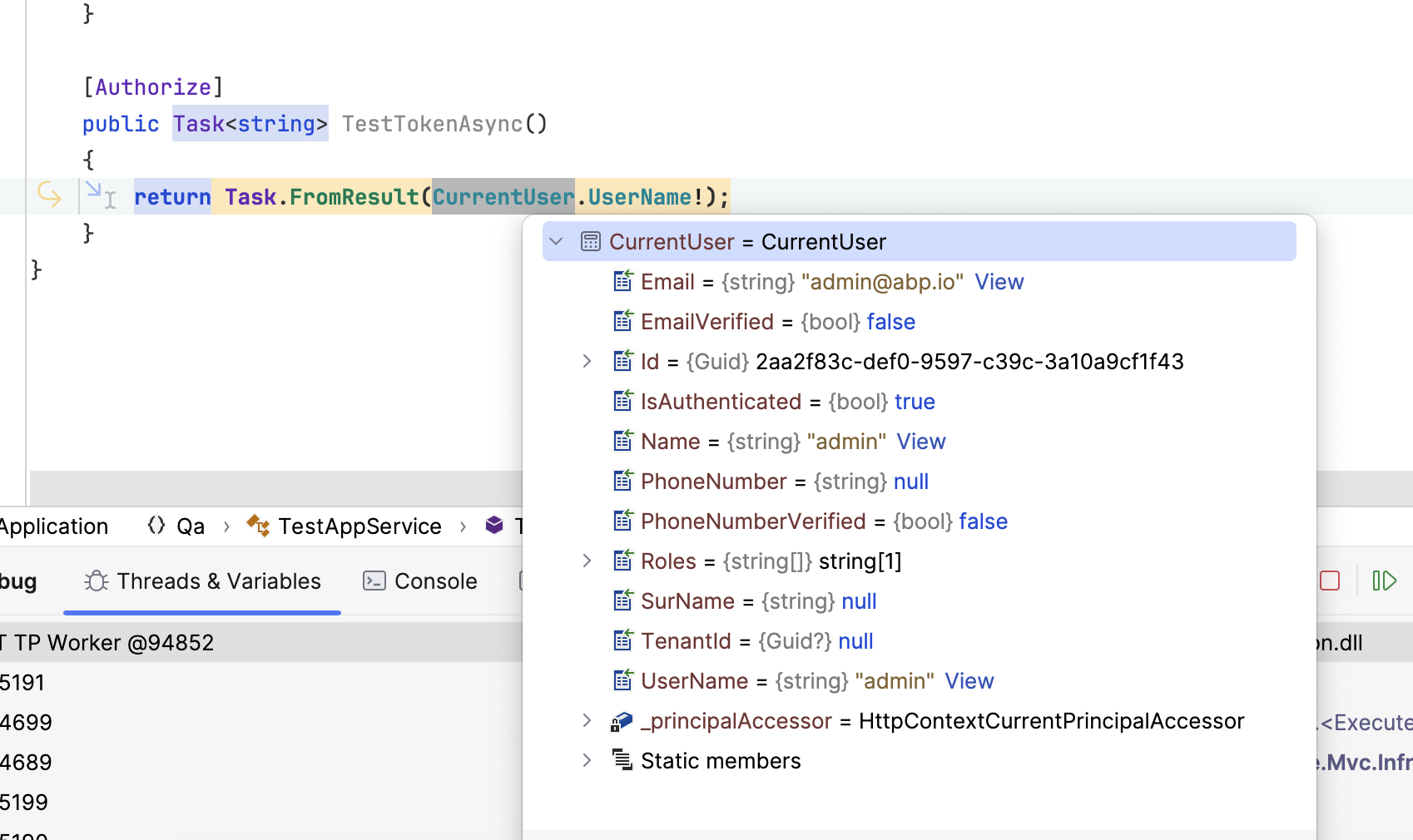
Here are my steps
- use abp cli to create a new project
abp new Qa - Add
TestAppServiceto application layer
public class TestAppService : QaAppService
{
    private readonly IOptionsMonitor<OpenIddictServerOptions> _oidcOptions;
    private readonly IdentityUserManager _userManager;

    public TestAppService(IOptionsMonitor<OpenIddictServerOptions> oidcOptions, IdentityUserManager userManager)
    {
        _oidcOptions = oidcOptions;
        _userManager = userManager;
    }
    public async Task<string> GenerateTokenAsync()
    {

        var user = await _userManager.FindByNameAsync("admin");
        var roles = await _userManager.GetRolesAsync(user);

        var claims = new List<Claim>()
        {
            new Claim("sub", user.Id.ToString()),
            new Claim("given_name", user.UserName),
            new Claim("email", user.Email),
            new Claim("tenantid", user.TenantId?.ToString() ?? ""),
            new Claim("scope", "address email phone roles profile offline_access Qa") //replace Qa with yours
        };

        claims.AddRange(roles.Select(role => new Claim("role", role)));
        var options = _oidcOptions.CurrentValue;
        var descriptor = new SecurityTokenDescriptor
        {
            Audience = "Qa", // replace with yours,
            EncryptingCredentials = options.DisableAccessTokenEncryption
                ? null
                : options.EncryptionCredentials.First(),
            Expires = null,
            Subject = new ClaimsIdentity(claims,TokenValidationParameters.DefaultAuthenticationType),
            IssuedAt = DateTime.UtcNow,
            Issuer = "https://localhost:44356/", // replace with yours,
            SigningCredentials = options.SigningCredentials.First(),
            TokenType = OpenIddictConstants.JsonWebTokenTypes.AccessToken,
        };

        var accessToken = options.JsonWebTokenHandler.CreateToken(descriptor);

        return accessToken;
    }

    [Authorize]
    public Task<string> TestTokenAsync()
    {
        return Task.FromResult(CurrentUser.UserName!);
    }
}
Markdown supported.Copy, paste, or drag & drop images and files (max 100 MB per file, 100 MB total per post) - use abp cli to create a new project


