






I have previously created a support ticket about this issue in the ticket below. I had to reply late for personal reasons. The answer to the question asked is what I wrote in the last paragraph when I opened the ticket. I think I have all the necessary details.
https://support.abp.io/QA/Questions/6917/User%27s-permissions-option-does-not-open
I repeat the brief summary of the problem; After creating a new project with the following setting, the modal where I will make user level permission settings does not open.
<br>
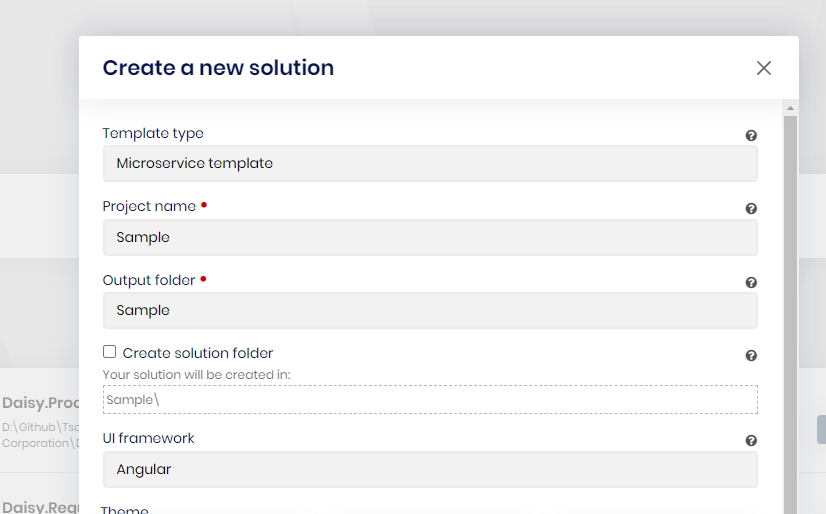
<br>
16 Answer(s)
-
0
hi
abp new BookStore -t microservice-pro -u angular --version 8.0.5It works on my machine.
see the video https://www.transfernow.net/en/bld?utm_source=20240415OjHb1QjG
Markdown supported.Copy, paste, or drag & drop images and files (max 100 MB per file, 100 MB total per post) -
0
I will test it with the command as soon as possible. I created it with the abp suite interface when I did it.
Markdown supported.Copy, paste, or drag & drop images and files (max 100 MB per file, 100 MB total per post) -
0
The first time I reported the problem, it was not working in the project I created with abp suite, now it started working again in the new project I created with abp suite. It also started working with the command you wrote. The old abp suite project I created before is still not working. Very interesting (It might be because I did the abp suite and cli update between this time frame)
My original problem is that I am using version 8.0.0 as follows. What is your advice to solve the error I get in permissions "Daisy.AuthServer.csproj"
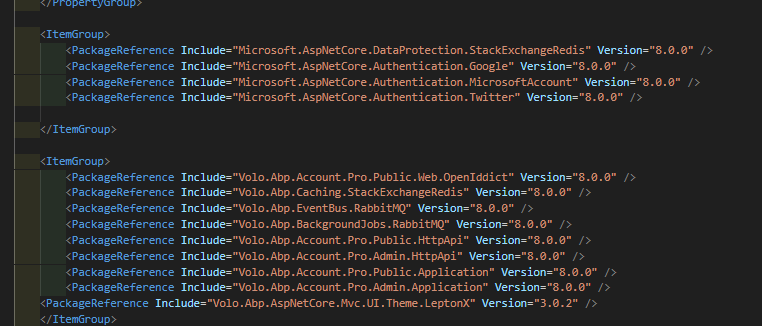 Markdown supported.Copy, paste, or drag & drop images and files (max 100 MB per file, 100 MB total per post)
 -
0
The error output on the console side is as follows It gives a 404 response when sending a GET request

[administration-service_b46ecd25-2]: [00:13:19 ERR] ---------- RemoteServiceErrorInfo ----------
[administration-service_b46ecd25-2]: {
[administration-service_b46ecd25-2]: "code": "NotFound",
[administration-service_b46ecd25-2]: "message": "Not Found",
[administration-service_b46ecd25-2]: "details": null,
[administration-service_b46ecd25-2]: "data": null,
[administration-service_b46ecd25-2]: "validationErrors": null
[administration-service_b46ecd25-2]: }
[administration-service_b46ecd25-2]:
[administration-service_b46ecd25-2]: [00:13:19 ERR] Not Found
[administration-service_b46ecd25-2]: Volo.Abp.Http.Client.AbpRemoteCallException: Not Found
[administration-service_b46ecd25-2]: at Volo.Abp.Http.Client.ClientProxying.ClientProxyBase`1.ThrowExceptionForResponseAsync(HttpResponseMessage response)
[administration-service_b46ecd25-2]: at Volo.Abp.Http.Client.ClientProxying.ClientProxyBase`1.RequestAsync(ClientProxyRequestContext requestContext)
[administration-service_b46ecd25-2]: at Volo.Abp.Http.Client.ClientProxying.ClientProxyBase`1.RequestAsync[T](ClientProxyRequestContext requestContext)
[administration-service_b46ecd25-2]: at Volo.Abp.Http.Client.ClientProxying.ClientProxyBase`1.RequestAsync[T](String methodName, ClientProxyRequestTypeValue arguments)
[administration-service_b46ecd25-2]: at Volo.Abp.Identity.Integration.IdentityUserIntegrationClientProxy.GetRoleNamesAsync(Guid id)
[administration-service_b46ecd25-2]: at Volo.Abp.Identity.HttpClientUserRoleFinder.GetRoleNamesAsync(Guid userId)
[administration-service_b46ecd25-2]: at Volo.Abp.PermissionManagement.Identity.RolePermissionManagementProvider.CheckAsync(String[] names, String providerName, String providerKey)
[administration-service_b46ecd25-2]: at Volo.Abp.PermissionManagement.PermissionManager.GetInternalAsync(PermissionDefinition[] permissions, String providerName, String providerKey)
[administration-service_b46ecd25-2]: at Volo.Abp.PermissionManagement.PermissionManager.GetAsync(String[] permissionNames, String providerName, String providerKey)
[administration-service_b46ecd25-2]: at Volo.Abp.PermissionManagement.PermissionAppService.GetAsync(String providerName, String providerKey)
[administration-service_b46ecd25-2]: at Castle.DynamicProxy.AsyncInterceptorBase.ProceedAsynchronous[TResult](IInvocation invocation, IInvocationProceedInfo proceedInfo)
[administration-service_b46ecd25-2]: at Volo.Abp.Castle.DynamicProxy.CastleAbpMethodInvocationAdapterWithReturnValue`1.ProceedAsync()
[administration-service_b46ecd25-2]: at Volo.Abp.GlobalFeatures.GlobalFeatureInterceptor.InterceptAsync(IAbpMethodInvocation invocation)
[administration-service_b46ecd25-2]: at Volo.Abp.Castle.DynamicProxy.CastleAsyncAbpInterceptorAdapter`1.InterceptAsync[TResult](IInvocation invocation, IInvocationProceedInfo proceedInfo, Func`3 proceed)
[administration-service_b46ecd25-2]: at Castle.DynamicProxy.AsyncInterceptorBase.ProceedAsynchronous[TResult](IInvocation invocation, IInvocationProceedInfo proceedInfo)
[administration-service_b46ecd25-2]: at Volo.Abp.Castle.DynamicProxy.CastleAbpMethodInvocationAdapterWithReturnValue`1.ProceedAsync()
[administration-service_b46ecd25-2]: at Volo.Abp.Authorization.AuthorizationInterceptor.InterceptAsync(IAbpMethodInvocation invocation)
[administration-service_b46ecd25-2]: at Volo.Abp.Castle.DynamicProxy.CastleAsyncAbpInterceptorAdapter`1.InterceptAsync[TResult](IInvocation invocation, IInvocationProceedInfo proceedInfo, Func`3 proceed)
[administration-service_b46ecd25-2]: at Castle.DynamicProxy.AsyncInterceptorBase.ProceedAsynchronous[TResult](IInvocation invocation, IInvocationProceedInfo proceedInfo)
[administration-service_b46ecd25-2]: at Volo.Abp.Castle.DynamicProxy.CastleAbpMethodInvocationAdapterWithReturnValue`1.ProceedAsync()
[administration-service_b46ecd25-2]: at Volo.Abp.Auditing.AuditingInterceptor.ProceedByLoggingAsync(IAbpMethodInvocation invocation, AbpAuditingOptions options, IAuditingHelper auditingHelper, IAuditLogScope auditLogScope)
[administration-service_b46ecd25-2]: at Volo.Abp.Auditing.AuditingInterceptor.InterceptAsync(IAbpMethodInvocation invocation)
[administration-service_b46ecd25-2]: at Volo.Abp.Castle.DynamicProxy.CastleAsyncAbpInterceptorAdapter`1.InterceptAsync[TResult](IInvocation invocation, IInvocationProceedInfo proceedInfo, Func`3 proceed)
[administration-service_b46ecd25-2]: at Castle.DynamicProxy.AsyncInterceptorBase.ProceedAsynchronous[TResult](IInvocation invocation, IInvocationProceedInfo proceedInfo)
[administration-service_b46ecd25-2]: at Volo.Abp.Castle.DynamicProxy.CastleAbpMethodInvocationAdapterWithReturnValue`1.ProceedAsync()
[administration-service_b46ecd25-2]: at Volo.Abp.Validation.ValidationInterceptor.InterceptAsync(IAbpMethodInvocation invocation)
[administration-service_b46ecd25-2]: at Volo.Abp.Castle.DynamicProxy.CastleAsyncAbpInterceptorAdapter`1.InterceptAsync[TResult](IInvocation invocation, IInvocationProceedInfo proceedInfo, Func`3 proceed)
[administration-service_b46ecd25-2]: at Castle.DynamicProxy.AsyncInterceptorBase.ProceedAsynchronous[TResult](IInvocation invocation, IInvocationProceedInfo proceedInfo)
[administration-service_b46ecd25-2]: at Volo.Abp.Castle.DynamicProxy.CastleAbpMethodInvocationAdapterWithReturnValue`1.ProceedAsync()
[administration-service_b46ecd25-2]: at Volo.Abp.Uow.UnitOfWorkInterceptor.InterceptAsync(IAbpMethodInvocation invocation)
[administration-service_b46ecd25-2]: at Volo.Abp.Castle.DynamicProxy.CastleAsyncAbpInterceptorAdapter`1.InterceptAsync[TResult](IInvocation invocation, IInvocationProceedInfo proceedInfo, Func`3 proceed)
[administration-service_b46ecd25-2]: at lambda_method3264(Closure, Object)
[administration-service_b46ecd25-2]: at Microsoft.AspNetCore.Mvc.Infrastructure.ActionMethodExecutor.AwaitableObjectResultExecutor.Execute(ActionContext actionContext, IActionResultTypeMapper mapper, ObjectMethodExecutor executor, Object controller, Object[] arguments)
[administration-service_b46ecd25-2]: at Microsoft.AspNetCore.Mvc.Infrastructure.ControllerActionInvoker.<InvokeActionMethodAsync>g__Logged|12_1(ControllerActionInvoker invoker)
[administration-service_b46ecd25-2]: at Microsoft.AspNetCore.Mvc.Infrastructure.ControllerActionInvoker.<InvokeNextActionFilterAsync>g__Awaited|10_0(ControllerActionInvoker invoker, Task lastTask, State next, Scope scope, Object state, Boolean isCompleted)
[administration-service_b46ecd25-2]: at Microsoft.AspNetCore.Mvc.Infrastructure.ControllerActionInvoker.Rethrow(ActionExecutedContextSealed context)
[administration-service_b46ecd25-2]: at Microsoft.AspNetCore.Mvc.Infrastructure.ControllerActionInvoker.Next(State& next, Scope& scope, Object& state, Boolean& isCompleted)
[administration-service_b46ecd25-2]: at Microsoft.AspNetCore.Mvc.Infrastructure.ControllerActionInvoker.<InvokeInnerFilterAsync>g__Awaited|13_0(ControllerActionInvoker invoker, Task lastTask, State next, Scope scope, Object state, Boolean isCompleted)
[administration-service_b46ecd25-2]: at Microsoft.AspNetCore.Mvc.Infrastructure.ResourceInvoker.<InvokeNextExceptionFilterAsync>g__Awaited|26_0(ResourceInvoker invoker, Task lastTask, State next, Scope scope, Object state, Boolean isCompleted)
[administration-service_b46ecd25-2]: [00:13:19 ERR] Code:NotFound
[administration-service_b46ecd25-2]: [00:13:19 ERR] Details:
[administration-service_b46ecd25-2]: [00:13:19 INF] Executing ObjectResult, writing value of type 'Volo.Abp.Http.RemoteServiceErrorResponse'.
[administration-service_b46ecd25-2]: [00:13:19 INF] Executed action Volo.Abp.PermissionManagement.PermissionsController.GetAsync (Volo.Abp.PermissionManagement.HttpApi) in 3197.7031ms
[administration-service_b46ecd25-2]: [00:13:19 INF] Executed endpoint 'Volo.Abp.PermissionManagement.PermissionsController.GetAsync (Volo.Abp.PermissionManagement.HttpApi)'
[administration-service_b46ecd25-2]: [00:13:19 DBG] Added 0 entity changes to the current audit log
[administration-service_b46ecd25-2]: [00:13:19 DBG] Added 0 entity changes to the current audit log
[administration-service_b46ecd25-2]: [00:13:19 INF] Request finished HTTP/1.1 GET https://localhost:44367/api/permission-management/permissions?providerName=U&providerKey=5248106e-8e76-b508-eb19-3a0403407de4 - 404 null application/json; charset=utf-8 3609.4302ms
Markdown supported.Copy, paste, or drag & drop images and files (max 100 MB per file, 100 MB total per post) -
0
hi
Can you share a project?
Or please share all logs.txt of your all projects.
Thanks
You can share files via https://wetransfer.com/
liming.ma@volosoft.comMarkdown supported.Copy, paste, or drag & drop images and files (max 100 MB per file, 100 MB total per post) -
0
Hello,
I just sent you an e-mail
Markdown supported.Copy, paste, or drag & drop images and files (max 100 MB per file, 100 MB total per post) -
0
hi
integration-api/identity/users/5248106e-8e76-b508-eb19-3a0403407de4/role-names - 404The
integration-api/identity/usersendpoint was introduced onAbpIdentityHttpApiModule and AbpIdentityApplicationModuleversion >=7.4.0Please check the package version. or can you share a project? liming.ma@volosoft.com
Thanks
Markdown supported.Copy, paste, or drag & drop images and files (max 100 MB per file, 100 MB total per post) -
0
Hi
Resent again :)
Markdown supported.Copy, paste, or drag & drop images and files (max 100 MB per file, 100 MB total per post) -
1
hi
Try to add the code below to your
IdentityServiceHttpApiHostModuleConfigure<AbpAspNetCoreMvcOptions>(options => { options.ExposeIntegrationServices = true; });Markdown supported.Copy, paste, or drag & drop images and files (max 100 MB per file, 100 MB total per post) -
0
Thank you for your support, it works now. This update must have come after 7.4.0, when upgrading the version in the project, it does not add the code here, it only upgrades the package versions. Should I check all module files when upgrading ABP version, what is the best way?
Markdown supported.Copy, paste, or drag & drop images and files (max 100 MB per file, 100 MB total per post) -
0
hi
You can check our migration guide.
https://docs.abp.io/en/abp/latest/Migration-Guides/Abp-7_4#exposing-integration-services
https://docs.abp.io/en/abp/latest/Migration-Guides/Index https://docs.abp.io/en/commercial/latest/migration-guides/index
Markdown supported.Copy, paste, or drag & drop images and files (max 100 MB per file, 100 MB total per post) -
0
thank you for suport
Markdown supported.Copy, paste, or drag & drop images and files (max 100 MB per file, 100 MB total per post)


