

Open Closed

New module solution #7093


User avatar
0
rcalv002 created
  • ABP Framework version: v8.1.1
  • UI Type: Blazor Server
  • Database System: EF Core (SQL Server)
  • Tiered (for MVC) or Auth Server Separated (for Angular): no
  • Exception message and full stack trace:
  • Steps to reproduce the issue:

Create a new MODULE type solution on abp. The resulting solution does not seem to use LeptonX. Why? Also on the main login page the tenant selection input is missing, even though the solution by default is set to use MultiTenancy. Why is this missing?

Markdown supported.
Copy, paste, or drag & drop images and files (max 100 MB per file, 100 MB total per post)

11 Answer(s)
  • User Avatar
    0
    maliming created
    Support Team Fullstack Developer

    hi

    Create a new MODULE type solution on abp

    What are the parameters of the CLI new command?

    Markdown supported.
    Copy, paste, or drag & drop images and files (max 100 MB per file, 100 MB total per post)
  • User Avatar
    0
    rcalv002 created

    Generated by ABP suite with new module solution wizard

    Markdown supported.
    Copy, paste, or drag & drop images and files (max 100 MB per file, 100 MB total per post)
  • User Avatar
    0
    maliming created
    Support Team Fullstack Developer

    hi

    I checked. The module and module pro templates don't support changing the Theme.

    Markdown supported.
    Copy, paste, or drag & drop images and files (max 100 MB per file, 100 MB total per post)
  • User Avatar
    0
    maliming created
    Support Team Fullstack Developer

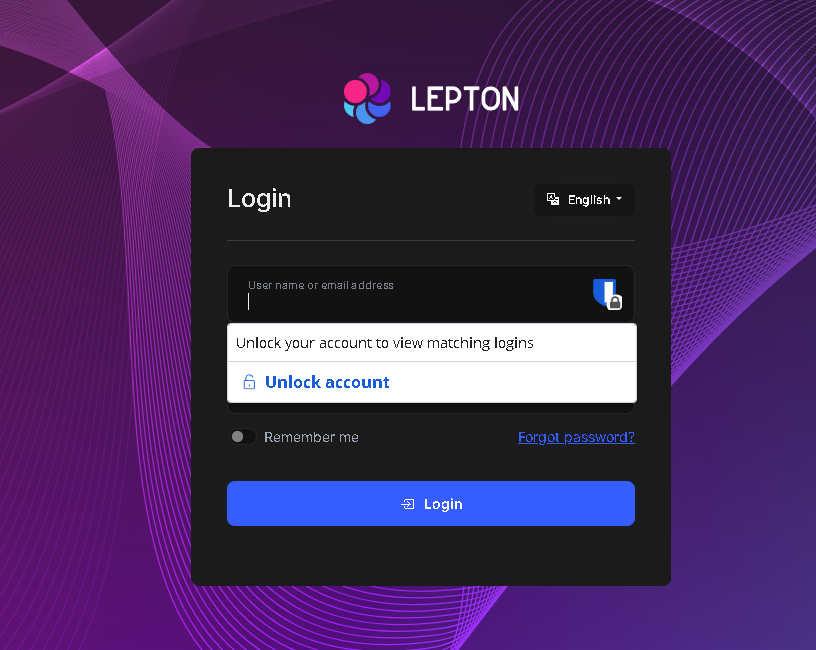
    Also on the main login page the tenant selection input is missing, even though the solution by default is set to use MultiTenancy.

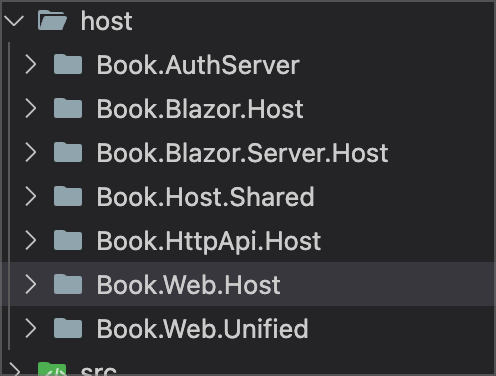
    What is the project?
    Markdown supported.
    Copy, paste, or drag & drop images and files (max 100 MB per file, 100 MB total per post)
  • User Avatar
    0
    rcalv002 created

    Blazor.Server.Host is the startup project

    I have manually changed everything to leptonx in the module successfully, but the tenant missing issue is happening straight from module creation.
    Markdown supported.
    Copy, paste, or drag & drop images and files (max 100 MB per file, 100 MB total per post)
  • User Avatar
    0
    maliming created
    Support Team Fullstack Developer

    Thanks. I will try it. You can also try opening the login page on Chrome in incognito mode.

    Markdown supported.
    Copy, paste, or drag & drop images and files (max 100 MB per file, 100 MB total per post)

  • User Avatar
    0
    rcalv002 created

    Using "brave" and "edge" in incognito, same problem.

    Markdown supported.
    Copy, paste, or drag & drop images and files (max 100 MB per file, 100 MB total per post)

  • User Avatar
    0
    maliming created
    Support Team Fullstack Developer

    Thanks

    Markdown supported.
    Copy, paste, or drag & drop images and files (max 100 MB per file, 100 MB total per post)
  • User Avatar
    0
    rcalv002 created

    The issue is that this is missing in the file ProjectBlazorHostModule on the blazor.server.host project...

    Configure<AbpMultiTenancyOptions>(options =>
    {
        options.IsEnabled = MultiTenancyConsts.IsEnabled;
    });
    
    Markdown supported.
    Copy, paste, or drag & drop images and files (max 100 MB per file, 100 MB total per post)
  • User Avatar
    0
    maliming created
    Support Team Fullstack Developer

    You're right. Thanks

    Markdown supported.
    Copy, paste, or drag & drop images and files (max 100 MB per file, 100 MB total per post)
  • User Avatar
    0
    maliming created
    Support Team Fullstack Developer

    The ticket has been refunded. 👍

    Markdown supported.
    Copy, paste, or drag & drop images and files (max 100 MB per file, 100 MB total per post)
Boost Your Development
ABP Live Training
Packages
See Trainings
Mastering ABP Framework Book
The Official Guide
Mastering
ABP Framework
Learn More
Mastering ABP Framework Book
Made with ❤️ on ABP v10.8.0-preview. Updated on September 28, 2026, 11:44
1
ABP Assistant
🔐 You need to be logged in to use the chatbot. Please log in first.