






- ABP Framework version: v4.0.1
- UI type: MVC
- DB provider: MongoDB
- Tiered (MVC) or Identity Server Seperated (Angular): yes
- Exception message and stack trace:
- Steps to reproduce the issue:
I have found that after creating around 20 organization units, it now takes a while (5 seconds) to open the create / edit user modal dialog. After some investigation, it seems to be the following lines
                        @for (var i = 0; i < Model.OrganizationUnits.Length; i++)
                        {
                            <input asp-for="@Model.OrganizationUnits[i].IsAssigned">
                            <input asp-for="@Model.OrganizationUnits[i].DisplayName" />
                            <input asp-for="@Model.OrganizationUnits[i].Id" />
                        }
I replaced this with the following and it is now is back down to less than a second to open the dialogs.
                        @for (var i = 0; i < Model.OrganizationUnits.Length; i++)
                        {
                            <input type="hidden" id="OrganizationUnits_@(i)__Id" name="OrganizationUnits[@(i)].Id" value="@Model.OrganizationUnits[i].Id">
                            <input type="hidden" id="OrganizationUnits_@(i)__IsAssigned" name="OrganizationUnits[@(i)].IsAssigned" value="@Model.OrganizationUnits[i].IsAssigned.ToString()">
                        }
I have excluded the DisplayName input as we did not need that.
Is it something to do with dialogs? Or the asp-for tag helper and the associated extra generated validation properties? I am not able to delve into the cause of the performance difference, but maybe you could investigate it?
Best regards,
Mike
9 Answer(s)
-
0
I have also seen this performance hit when editing user or role permissions. It can take 15 seconds to load. I have also made the equivalent change to the
PermissionManagementModalview and it took it down to 3 seconds.Markdown supported.Copy, paste, or drag & drop images and files (max 100 MB per file, 100 MB total per post) -
0
Hi,
Try:
@for (var i = 0; i < Model.OrganizationUnits.Length; i++)
{
    var organizationUnits = Model.OrganizationUnits[i];
    <input asp-for="@organizationUnits.IsAssigned" id="OrganizationUnits_@(i)__IsAssigned" name="OrganizationUnits[@i].IsAssigned">
    <input asp-for="@organizationUnits.DisplayName" id="OrganizationUnits_@(i)__DisplayName" name="OrganizationUnits[@i].DisplayName" />
    <input asp-for="@organizationUnits.Id" id="OrganizationUnits_@(i)__Id" name="OrganizationUnits[@i].Id" />
}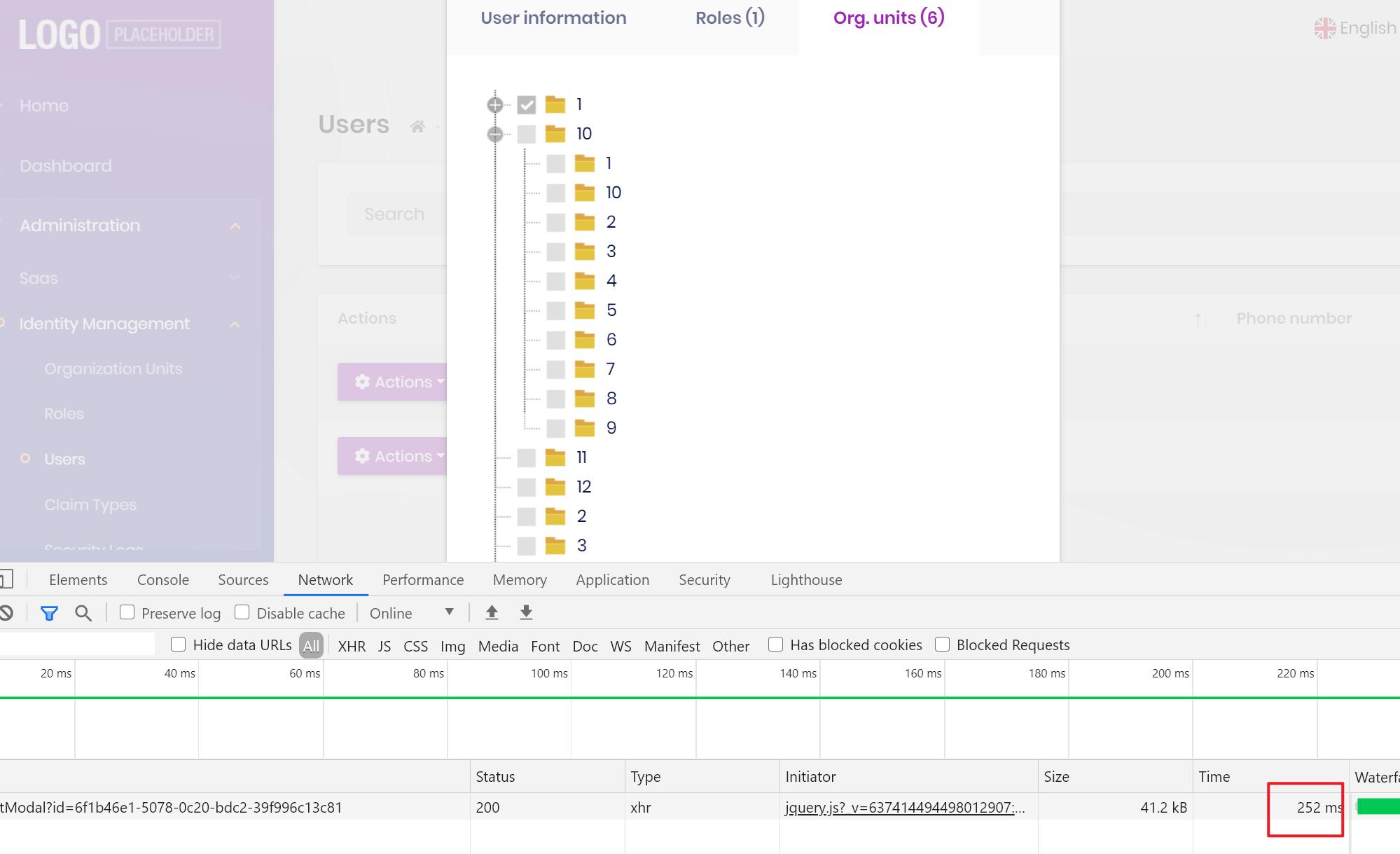
We will try to improve performance in the next version.
Markdown supported.Copy, paste, or drag & drop images and files (max 100 MB per file, 100 MB total per post) -
0
See https://github.com/abpframework/abp/pull/6747
Markdown supported.Copy, paste, or drag & drop images and files (max 100 MB per file, 100 MB total per post) -
0
Yep - that gives the same performance boost. Of course, it is much better to be able to use the
asp-fortag helpers, so this is great. Thanks for the workaround.Markdown supported.Copy, paste, or drag & drop images and files (max 100 MB per file, 100 MB total per post) -
0
Interestingly, overriding the
PermissionManagementModal.cshtmlwith your changes seems to improved the Edit Permissions dialog when editing permissions for a Role. But, when I edit the permissions of a User it still has the performance problem. I have confiirmed that it is using the overriden view, so not sure why it is different.Markdown supported.Copy, paste, or drag & drop images and files (max 100 MB per file, 100 MB total per post) -
0
When editing a users permissions, there is still a big performance issue (no longer associated with the UI - thanks for that fix), but appears to be with the application services (
PermissionAppService,PermissionManagerand Permission Providers ).For a brand new user (with no roles or OUs) it takes 15 seconds to load the Permissions dialog.

I have approximately 10 roles configured and approximately 30 OUs configured. Some of the OUs have roles associated with them, but as I said, none of these are associated with the newly created user.
Markdown supported.Copy, paste, or drag & drop images and files (max 100 MB per file, 100 MB total per post) -
0
Hi,
I can't reproduce your problem, can you provide more steps? thanks.
Markdown supported.Copy, paste, or drag & drop images and files (max 100 MB per file, 100 MB total per post) -
0
I probably wont be able to investigate until after Christmas now.
What did you try?
It might be the fact that I am using mongodb? I also have created a single module exposing 75 permissions.
Markdown supported.Copy, paste, or drag & drop images and files (max 100 MB per file, 100 MB total per post) -
0
Can I check it remotely? shiwei.liang@volosoft.com
Markdown supported.Copy, paste, or drag & drop images and files (max 100 MB per file, 100 MB total per post)


