






Hi!
We want to restrict users to only use Azure AD login for our application. When the user already exists it works perfectly, but when a user does not exist yet they are redirected to a register page. The register page looks like this:
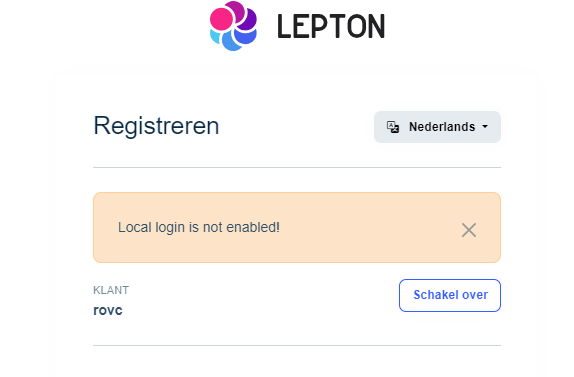
It does not allow users to register themselves and it does not auto register the user. Our settings in-app look like this:
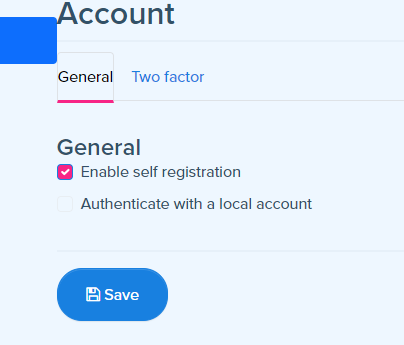
My question is: Is there a way to make this register page work or auto-register users that log in via the Azure AD? Preferably we would like a solution that doesn't involve overriding the log-in screen, but we're interested in hearing what our options are.
Kind regards, Jona
Check the docs before asking a question: https://docs.abp.io/en/commercial/latest/ Check the samples to see the basic tasks: https://docs.abp.io/en/commercial/latest/samples/index The exact solution to your question may have been answered before, and please first use the search on the homepage. Provide us with the following info:
- ABP Framework version: v7.3.3
- UI Type: Angular
- Database System: EF Core (SQL Server, Oracle, MySQL, PostgreSQL, etc..)
- Tiered (for MVC) or Auth Server Separated (for Angular): yes
- Steps to reproduce the issue:
3 Answer(s)
-
1
hi
I think this problem has been solve on 8.x.
Can you test an 8.x template project?
You can download the Account Pro module source to override in your
7.3.3Markdown supported.Copy, paste, or drag & drop images and files (max 100 MB per file, 100 MB total per post) -
0
Hi Maliming,
Thank you for your response!
I made a new project with version 8.1.3. Set up the necessary parts and tested it out. After logging in it takes new users to a register page that allows them to register. In short, it works as intended.
We'll schedule an update for our applications.
Thank you for your help, have a nice weekend!
Regards, Jona
Markdown supported.Copy, paste, or drag & drop images and files (max 100 MB per file, 100 MB total per post)


