






Hello,
I recently started receiving the following license errors in development/debug: ===> 08:29:22 [Error] ABP-LIC-0013 - License exception: ABP-LIC-0023: An error occured while calling the license server! License check communication failed! The response was not successful: 403 - Forbidden ===> 08:29:23 [Error] ABP-LIC-0013 - License exception: ABP-LIC-0023: An error occured while calling the license server! License check communication failed! The response was not successful: 403 - Forbidden
I have confirmed that I am logged in as a license commercial user using the following:
I have tried: abp logout abp login username (which confirms success) abp login-info (which returns my login info)
abp suite ABP CLI 8.1.3 **Please login with your account. **
I can run the code in release mode with ASPNETCORE_ENVIRONMENT=Production but I need to run in development/debug.
Please advise.
- ABP Framework version: v8.1.3
- UI Type: Angular
- Database System: EF Core PostgreSQL
- Tiered (for MVC) or Auth Server Separated (for Angular): no
- Exception message and full stack trace: ABP-LIC-0013
- Steps to reproduce the issue: Try to run the HttpApi.Host with dotnet run
4 Answer(s)
-
0
You can try to clear the
access-token.binfile, and try logout&login.For Windows it's => %UserProfile%.abp\cli
For Linux it must be $HOME => /home/user/.abp/cli/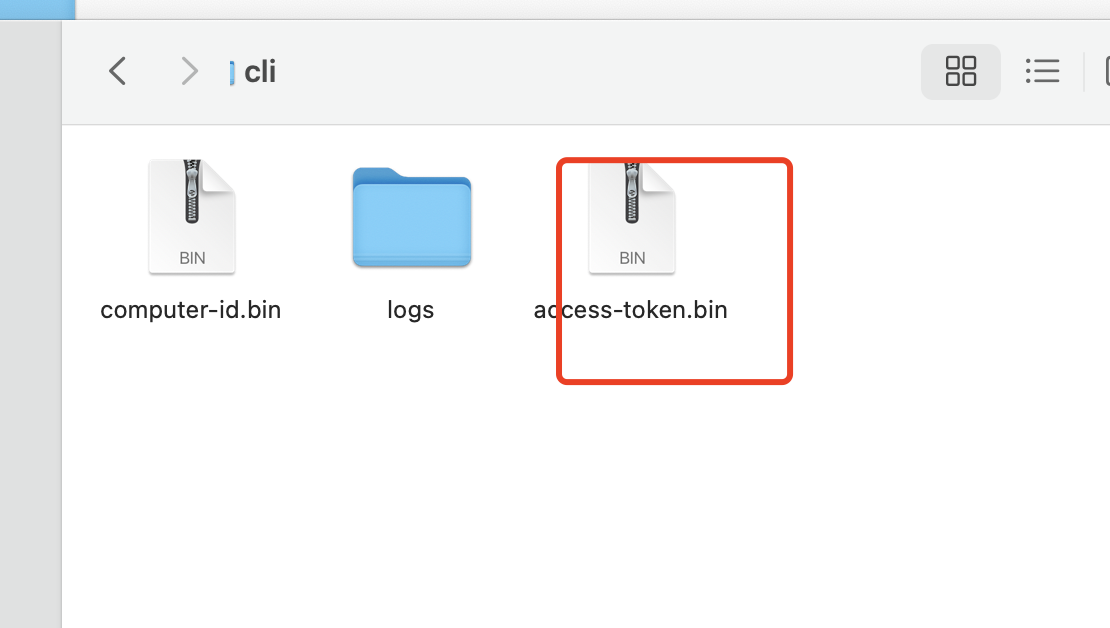 Markdown supported.Copy, paste, or drag & drop images and files (max 100 MB per file, 100 MB total per post)
 -
0
I am on a Macbook M1 and cleared the access-token.bin in /Users/me/.abp/cli. No luck...I am still receiving the license errors and abp suite is till prompting me to "Please login with your account." immediately after "abp login" was successful.
Markdown supported.Copy, paste, or drag & drop images and files (max 100 MB per file, 100 MB total per post) -
0
I just found the issue. I was logged in with my ABP primary user account credentials and not using my Organization's developer account. I assume the primary user account does not have permission.
Markdown supported.Copy, paste, or drag & drop images and files (max 100 MB per file, 100 MB total per post) -
0
Hi,
https://docs.abp.io/en/abp/latest/CLI#login
You can try add the
--organizationoptionabp login <username> --organization <organization>Markdown supported.Copy, paste, or drag & drop images and files (max 100 MB per file, 100 MB total per post)


