






How to change Angular leptonx copyright footer text
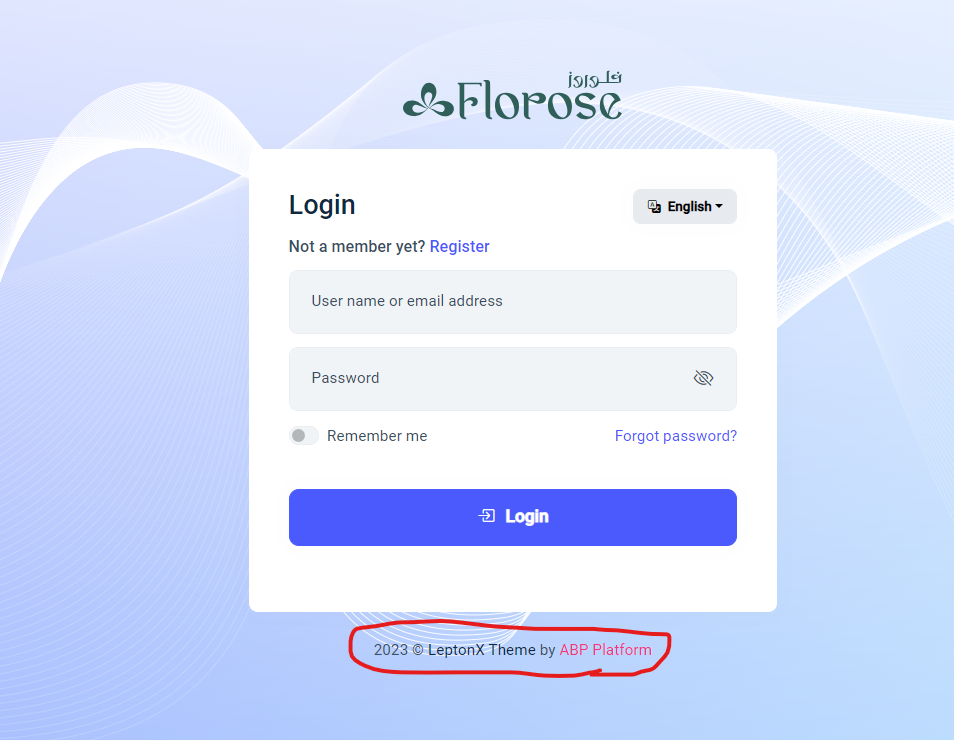
- ABP Framework version: v8.2.0
- UI Type: Angular
- Database System: EF Core (SQL Serve)
- Tiered Auth Server Separated (for Angular): yes
- Exception message and full stack trace:
- Steps to reproduce the issue:
9 Answer(s)
-
0
Angular
Markdown supported.Copy, paste, or drag & drop images and files (max 100 MB per file, 100 MB total per post) -
0
how to override AuthWrapperComponent
Markdown supported.Copy, paste, or drag & drop images and files (max 100 MB per file, 100 MB total per post) -
0
Hello, I recommend you to follow this documentation part to customize the
AuthWrapperComponent. The auth wrapper component comes from@volo/abp.ng.account/public, so you can import it like this:import { eAccountComponents } from '@volo/abp.ng.account/public';Markdown supported.Copy, paste, or drag & drop images and files (max 100 MB per file, 100 MB total per post) -
0
I know how to replace the component, but what I want to do is text replacement, why I have to change the whole component and create my own one, and if there are no way to change the text only, I want the auth wrapper component source code to be able to replace it!!!
Markdown supported.Copy, paste, or drag & drop images and files (max 100 MB per file, 100 MB total per post) -
0
May I ask for your license type?
Markdown supported.Copy, paste, or drag & drop images and files (max 100 MB per file, 100 MB total per post) -
0
license type: Team
Markdown supported.Copy, paste, or drag & drop images and files (max 100 MB per file, 100 MB total per post) -
0
Thank you for providing extra details. Currently, we do not have an option to customize this text. You can follow the next releases to be able to customize it.
Markdown supported.Copy, paste, or drag & drop images and files (max 100 MB per file, 100 MB total per post) -
0
thanks for useless support!!
Markdown supported.Copy, paste, or drag & drop images and files (max 100 MB per file, 100 MB total per post)



