






0
zhongfang created
- ABP Framework version: v8.3.0
- UI Type: Blazor Server
- Database System: EF Core MySQL)
- Tiered (for MVC) or Auth Server Separated (for Angular): no
- Exception message and full stack trace: There is a menu named 'ABP Suite' in ABP Studio toolbar. I clicked 'Change Version', and set the version to 8.3.0 Then I create a solution in ABP Studio. After I open the new solution created, I found athat all the volo.abp.* packages is 8.2.2 Why?
Markdown supported.
Copy, paste, or drag & drop images and files (max 100 MB per file, 100 MB total per post)
2 Answer(s)
-
0
Hi @zhongfang,
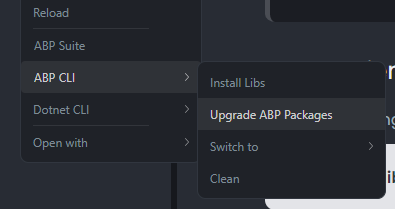
We haven't released a new ABP Studio version for v8.3.0 ABP Framework version. We will probably release it in the following week.
For now, you can update the version after creating the module:
There is a menu named 'ABP Suite' in ABP Studio toolbar. I clicked 'Change Version', and set the version to 8.3.0
This is not related with version of the templates.
Markdown supported.Copy, paste, or drag & drop images and files (max 100 MB per file, 100 MB total per post)


