






- ABP Framework version: v8.2.1
- UI Type: Angular
- Database System: EF Core (SQL Server)
- Tiered (for MVC) or Auth Server Separated (for Angular): separeted
- Exception message and full stack trace:
- Steps to reproduce the issue:
I logged in into tenant with user. Navigated to Account/manage and there I go to Personal information. There I click confirm button next to email field. I receive email. Confirmation link contains only account/EmailConfirmation?userId=1111111-7777-1111-6666-77777777&__tenant=666666-4444-7777-ec6a-99999999&confirmationToken=SOME_TOKEN&returnUrl=https://our.url//account/login So it is missing domain part. Reseting password is working as it should and link is complete and working. I checked text template and they are similar between password reset and email confirmation.
div>
    a> href="{{model.link}}">{{L "ConfirmMyEmail"}} a>
div>
We have these in configuration:
Configure<AppUrlOptions>(options =>
{
    options.Applications["Angular"].RootUrl = configuration["App:AngularUrl"];
    options.Applications["Angular"].Urls[AccountUrlNames.PasswordReset] = "account/reset-password";
    options.Applications["Angular"].Urls[AccountUrlNames.EmailConfirmation] = "account/email-confirmation";
});
41 Answer(s)
-
0
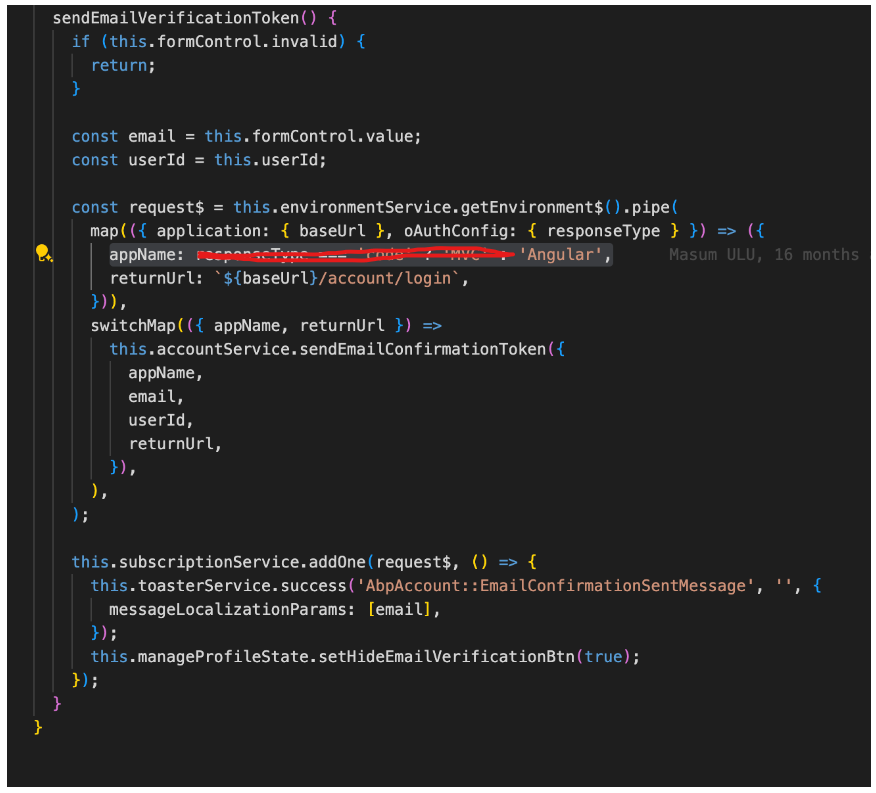
So do you mean that I need to remove these parts from code an use Angular as static value here?
 Markdown supported.Copy, paste, or drag & drop images and files (max 100 MB per file, 100 MB total per post)
 -
0
Yes, You can try that.
Using
AngularasappNamewill try to get the URL fromApplications["Angular"]options.Applications["Angular"].RootUrl = configuration["App:AngularUrl"]; options.Applications["Angular"].Urls[AccountUrlNames.PasswordReset] = "account/reset-password"; options.Applications["Angular"].Urls[AccountUrlNames.EmailConfirmation] = "account/email-confirmation";Markdown supported.Copy, paste, or drag & drop images and files (max 100 MB per file, 100 MB total per post) -
0
Where do I find this component? abp-personal-settings-verify-button I finally managed to try this solution and I don't find it anywhere.
Markdown supported.Copy, paste, or drag & drop images and files (max 100 MB per file, 100 MB total per post) -
0
Or if you can say what module contains it.
Markdown supported.Copy, paste, or drag & drop images and files (max 100 MB per file, 100 MB total per post) -
0
Yep that works. thanks. I will now test how it works in our test environment.
Markdown supported.Copy, paste, or drag & drop images and files (max 100 MB per file, 100 MB total per post) -
0
About thre replacement mechanic. I found this guide but what should be key for PersonalSettingsEmailComponent? https://abp.io/docs/latest/framework/ui/angular/component-replacement#how-to-replace-a-component
Markdown supported.Copy, paste, or drag & drop images and files (max 100 MB per file, 100 MB total per post) -
0
Hello, this component is not directly replaceable. You can either try to customize the root component that has the
eAccountComponents.PersonalSettings, or customize the form using the extension system based on your requirements.Markdown supported.Copy, paste, or drag & drop images and files (max 100 MB per file, 100 MB total per post) -
0
So after all for me it seems that my initial fix to add those settings to MVC side is easiest way. Maybe not most correct way but it works. Replacing that much of code instead seems overkill. Is our setup somehow wrong or weird or why we have this problem? Or is it actually problem in your code and you will fix it on later versions? Is the problem with using angular and having separate Auth server? Does this combo make that problem?
Markdown supported.Copy, paste, or drag & drop images and files (max 100 MB per file, 100 MB total per post) -
0
As mentioned earlier, the approach will depend on your specific business needs. Here are two options you can follow to customize the relevant sections. If your goal is simply to hide certain elements, you can achieve this easily by overriding them with CSS properties.
Markdown supported.Copy, paste, or drag & drop images and files (max 100 MB per file, 100 MB total per post) -
0
No. My goal is to get verification link to work. Currently I need to add MVC settings to get it working even verification mail send is done via Angular front. In angular front there is (In your code)logic which check if responseType is code then use MVC and otherwise use Angular settings. I was guided to override that part of code to always use Angular settings. It seems to me to be little overkill. So maybe I just add those MVC settings for email verification which are mentioned eralier in this issue.
options.Applications["MVC"].Urls[AccountUrlNames.EmailConfirmation] =
	"account/email-confirmation";
Default value is MVC style link which is not working for Angular front. Initial problem was that there was no domain part in link. that was solved by adding:
options.Applications["MVC"].RootUrl = configuration["App:SelfUrl"];Markdown supported.Copy, paste, or drag & drop images and files (max 100 MB per file, 100 MB total per post) -
0
maybe we should improve it to provide a way to easily change it, what do you think? @sumeyye.kurtulus
Markdown supported.Copy, paste, or drag & drop images and files (max 100 MB per file, 100 MB total per post) -
0
I will continue with solution I have with configurations. I will continue to listen this thread if you decide something.
Markdown supported.Copy, paste, or drag & drop images and files (max 100 MB per file, 100 MB total per post)



