






- ABP Framework version: 8.3.2
- UI Type: Blazor Server
- Database System: EF Core (PostgreSQL)
- Tiered (for MVC) or Auth Server Separated (for Angular): no
- Exception message and full stack trace:
[19:30:13 FTL] Host terminated unexpectedly!
Volo.Abp.AbpInitializationException: An error occurred during ConfigureServicesAsync phase of the module Volo.Abp.OpenIddict.AbpOpenIddictAspNetCoreModule, Volo.Abp.OpenIddict.AspNetCore, Version=8.3.2.0, Culture=neutral, PublicKeyToken=null. See the inner exception for details.
---> System.IO.FileNotFoundException: Signing Certificate couldn't found: openiddict.pfx
at Microsoft.Extensions.DependencyInjection.OpenIddictServerBuilderExtensions.AddProductionEncryptionAndSigningCertificate(OpenIddictServerBuilder builder, String fileName, String passPhrase)
at AlMudir.Blazor.AlMudirBlazorModule.<>c.<PreConfigureServices>b__0_4(OpenIddictServerBuilder serverBuilder) in /src/src/AlMudir.Blazor/AlMudirBlazorModule.cs:line 137
at Volo.Abp.Options.PreConfigureActionList
1.Configure(TOptions options) at Microsoft.Extensions.DependencyInjection.ServiceCollectionPreConfigureExtensions.ExecutePreConfiguredActions[TOptions](IServiceCollection services, TOptions options) at Volo.Abp.OpenIddict.AbpOpenIddictAspNetCoreModule.<>c__DisplayClass1_0.<AddOpenIddictServer>b__0(OpenIddictServerBuilder builder) at Microsoft.Extensions.DependencyInjection.OpenIddictServerExtensions.AddServer(OpenIddictBuilder builder, Action1 configuration) at Volo.Abp.OpenIddict.AbpOpenIddictAspNetCoreModule.AddOpenIddictServer(IServiceCollection services) at Volo.Abp.OpenIddict.AbpOpenIddictAspNetCoreModule.ConfigureServices(ServiceConfigurationContext context) at Volo.Abp.Modularity.AbpModule.ConfigureServicesAsync(ServiceConfigurationContext context) at Volo.Abp.AbpApplicationBase.ConfigureServicesAsync() --- End of inner exception stack trace --- at Volo.Abp.AbpApplicationBase.ConfigureServicesAsync() at Volo.Abp.AbpApplicationFactory.CreateAsync[TStartupModule](IServiceCollection services, Action1 optionsAction) at Microsoft.Extensions.DependencyInjection.ServiceCollectionApplicationExtensions.AddApplicationAsync[TStartupModule](IServiceCollection services, Action1 optionsAction) at Microsoft.Extensions.DependencyInjection.WebApplicationBuilderExtensions.AddApplicationAsync[TStartupModule](WebApplicationBuilder builder, Action`1 optionsAction) at AlMudir.Blazor.Program.Main(String[] args) in /src/src/AlMudir.Blazor/Program.cs:line 36 [19:30:14 INF] Starting web host. - Steps to reproduce the issue:
Hello ABP Support team,
I'm currently trying to deploy an ABP application using Docker, and I'm encountering some challenges with the certificate configuration.
Environment details:
- Using Coolify as a Docker container management platform
- Deploying via docker-compose
- Non-tiered Blazor Server application
- PostgreSQL database with EF Core
Current issues: The main problem appears to be related to the certificate configuration. Despite following the documentation and trying various approaches, I'm unable to get the application running properly in the Docker environment.
My docker-compose configuration includes: `version: '3.8'
services:
almudir-blazor:
image: ${REGISTRY:-ghcr.io}/${GITHUB_REPOSITORY:-fuutu-company/almudir}/blazor:${TAG:-latest}
container_name: almudir-blazor
environment:
- ASPNETCORE_URLS=https://+:443;http://+:80
- Kestrel__Certificates__Default__Path=/app/openiddict.pfx
- Kestrel__Certificates__Default__Password=*****
- App__SelfUrl=${APP_URL:-https://localhost:44314}
- AuthServer__RequireHttpsMetadata=false
- AuthServer__Authority=${AUTH_SERVER_URL:-https://localhost:44314}
- ConnectionStrings__Default=${DB_CONNECTION_STRING}
- OpenIddict__SigningCertificate__Path=/app/openiddict.pfx
- OpenIddict__SigningCertificate__Password=*****
- ASPNETCORE_ENVIRONMENT=${ASPNETCORE_ENVIRONMENT:-Development}
ports:
- "${PORT:-44314}:443"
restart: on-failure
depends_on:
db-migrator:
condition: service_completed_successfully
networks:
- almudir-network
db-migrator: image: ${REGISTRY:-ghcr.io}/${GITHUB_REPOSITORY:-fuutu-company/almudir}/db-migrator:${TAG:-latest} container_name: almudir-db-migrator restart: "no" deploy: replicas: 1 restart_policy: condition: none environment: - OpenIddict__Applications__AlMudir_Blazor__RootUrl=${APP_URL:-https://localhost:44314} - ConnectionStrings__Default=${DB_CONNECTION_STRING} networks: - almudir-network
networks: almudir-network: name: ${NETWORK_NAME:-almudir-network} driver: bridge
`
PreConfigureServices: ` public override void PreConfigureServices(ServiceConfigurationContext context) { var hostingEnvironment = context.Services.GetHostingEnvironment(); var configuration = context.Services.GetConfiguration();
    var tenantUrl = "https://{0}." + configuration["App:TenantUrl"];
    PreConfigure<AbpOpenIddictWildcardDomainOptions>(options =>
    {
        options.EnableWildcardDomainSupport = true;
        options.WildcardDomainsFormat.Add(tenantUrl);
    });

    context.Services.PreConfigure<AbpMvcDataAnnotationsLocalizationOptions>(options =>
    {
        options.AddAssemblyResource(
            typeof(AlMudirResource),
            typeof(AlMudirDomainModule).Assembly,
            typeof(AlMudirDomainSharedModule).Assembly,
            typeof(AlMudirApplicationModule).Assembly,
            typeof(AlMudirApplicationContractsModule).Assembly,
            typeof(AlMudirBlazorModule).Assembly
        );
    });

    PreConfigure<OpenIddictBuilder>(builder =>
    {
        builder.AddValidation(options =>
        {
            options.AddAudiences("AlMudir");
            options.UseLocalServer();
            options.UseAspNetCore();
        });
    });

    if (!hostingEnvironment.IsDevelopment())
    {
        PreConfigure<AbpOpenIddictAspNetCoreOptions>(options =>
        {
            options.AddDevelopmentEncryptionAndSigningCertificate = false;
        });

        PreConfigure<OpenIddictServerBuilder>(serverBuilder =>
        {
            serverBuilder.AddProductionEncryptionAndSigningCertificate(
                "/app/openiddict.pfx",
                "a0166a3a-5ffb-4f53-a8d7-a699d3c3ce1e"
            );
        });
    }
}`
src\AlMudir.Blazor\Dockerfile.local: FROM mcr.microsoft.com/dotnet/sdk:8.0 AS build WORKDIR /src
ARG ABP_API_KEY
RUN dotnet nuget add source "https://nuget.abp.io/${ABP_API_KEY}/v3/index.json"
--name "ABP Commercial"
--store-password-in-clear-text
COPY . .
RUN dotnet dev-certs https -v -ep openiddict.pfx -p a0166a3a-5ffb-4f53-a8d7-a699d3c3ce1e
RUN dotnet publish "src/AlMudir.Blazor/AlMudir.Blazor.csproj" -c Release -o /app/publish
RUN cp openiddict.pfx /app/publish/
FROM mcr.microsoft.com/dotnet/sdk:8.0 AS final WORKDIR /app COPY --from=build /app/publish . ENTRYPOINT ["dotnet", "AlMudir.Blazor.dll"]
src\AlMudir.DbMigrator\Dockerfile.local: FROM mcr.microsoft.com/dotnet/sdk:8.0 AS build WORKDIR /src
ARG ABP_API_KEY
RUN dotnet nuget add source "https://nuget.abp.io/${ABP_API_KEY}/v3/index.json"
--name "ABP Commercial"
--store-password-in-clear-text
COPY . .
RUN dotnet publish "src/AlMudir.DbMigrator/AlMudir.DbMigrator.csproj" -c Release -o /app/publish
FROM mcr.microsoft.com/dotnet/runtime:8.0 WORKDIR /app COPY --from=build /app/publish . ENTRYPOINT ["dotnet", "AlMudir.DbMigrator.dll"]
by git workflow to create my images: name: Docker Build and Deploy
on: push: branches: [ "main" ] tags: [ 'v*..' ] pull_request: branches: [ "main" ]
env: REGISTRY: ghcr.io BLAZOR_IMAGE_NAME: fuutu-company/almudir/blazor MIGRATOR_IMAGE_NAME: fuutu-company/almudir/db-migrator
jobs: build: runs-on: ubuntu-latest permissions: contents: read packages: write
steps:
  - name: Checkout repository
    uses: actions/checkout@v4

  - name: Setup .NET
    uses: actions/setup-dotnet@v3
    with:
      dotnet-version: '8.0.x'

  - name: Configure ABP NuGet Source
    run: |
      dotnet nuget add source https://nuget.abp.io/${{ secrets.ABP_API_KEY }}/v3/index.json -n "ABP Commercial"

  - name: Login to GitHub Container Registry
    uses: docker/login-action@v3
    with:
      registry: ${{ env.REGISTRY }}
      username: ${{ github.actor }}
      password: ${{ secrets.GITHUB_TOKEN }}

  # Build und Push Blazor
  - name: Build and Push Blazor
    env:
      ABP_API_KEY: ${{ secrets.ABP_API_KEY }}
    run: |
      # Generiere das Zertifikat
      dotnet dev-certs https -v -ep openiddict.pfx -p **********

      # Kopiere das Zertifikat in das Projektverzeichnis
      cp openiddict.pfx src/AlMudir.Blazor/

      # Build Docker Image
      docker build \
        --build-arg ABP_API_KEY=$ABP_API_KEY \
        -f src/AlMudir.Blazor/Dockerfile.local \
        -t ${{ env.REGISTRY }}/${{ env.BLAZOR_IMAGE_NAME }}:latest \
        -t ${{ env.REGISTRY }}/${{ env.BLAZOR_IMAGE_NAME }}:${{ github.sha }} .
      docker push ${{ env.REGISTRY }}/${{ env.BLAZOR_IMAGE_NAME }}:latest
      docker push ${{ env.REGISTRY }}/${{ env.BLAZOR_IMAGE_NAME }}:${{ github.sha }}

  # Build und Push DbMigrator
  - name: Build and Push DbMigrator
    env:
      ABP_API_KEY: ${{ secrets.ABP_API_KEY }}
    run: |
      docker build \
        --build-arg ABP_API_KEY=$ABP_API_KEY \
        -f src/AlMudir.DbMigrator/Dockerfile.local \
        -t ${{ env.REGISTRY }}/${{ env.MIGRATOR_IMAGE_NAME }}:latest \
        -t ${{ env.REGISTRY }}/${{ env.MIGRATOR_IMAGE_NAME }}:${{ github.sha }} .
      docker push ${{ env.REGISTRY }}/${{ env.MIGRATOR_IMAGE_NAME }}:latest
      docker push ${{ env.REGISTRY }}/${{ env.MIGRATOR_IMAGE_NAME }}:${{ github.sha }}
if you need to check my code i can give you access to it.
23 Answer(s)
-
0
Hi,
Signing Certificate couldn't found: openiddict.pfx
You should put the
openiddict.pfxin the right place.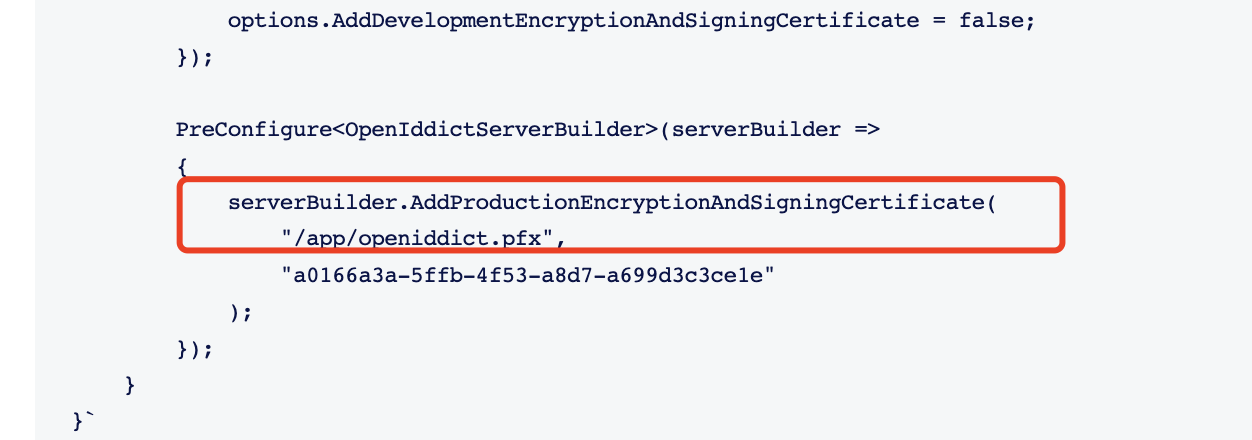
try
PreConfigure<OpenIddictServerBuilder>(serverBuilder =>
{
    serverBuilder.AddSigningCertificate(GetSigningCertificate(hostingEnvironment, configuration));
    serverBuilder.AddEncryptionCertificate(GetSigningCertificate(hostingEnvironment, configuration));
});

private X509Certificate2 GetSigningCertificate(IWebHostEnvironment hostingEnv, IConfiguration configuration)
{
    var fileName = "authserver.pfx";
    var passPhrase = "a0166a3a-5ffb-4f53-a8d7-a699d3c3ce1e";
    var file = Path.Combine(hostingEnv.ContentRootPath, fileName);

    if (!File.Exists(file))
    {
        throw new FileNotFoundException($"Signing Certificate couldn't found: {file}");
    }

    return new X509Certificate2(file, passPhrase);
}
Markdown supported.Copy, paste, or drag & drop images and files (max 100 MB per file, 100 MB total per post) -
0
Hi,
Signing Certificate couldn't found: openiddict.pfx
You should put the
openiddict.pfxin the right place.try
PreConfigure<OpenIddictServerBuilder>(serverBuilder =>
{
    serverBuilder.AddSigningCertificate(GetSigningCertificate(hostingEnvironment, configuration));
    serverBuilder.AddEncryptionCertificate(GetSigningCertificate(hostingEnvironment, configuration));
});

private X509Certificate2 GetSigningCertificate(IWebHostEnvironment hostingEnv, IConfiguration configuration)
{
    var fileName = "authserver.pfx";
    var passPhrase = "a0166a3a-5ffb-4f53-a8d7-a699d3c3ce1e";
    var file = Path.Combine(hostingEnv.ContentRootPath, fileName);

    if (!File.Exists(file))
    {
        throw new FileNotFoundException($"Signing Certificate couldn't found: {file}");
    }

    return new X509Certificate2(file, passPhrase);
}
i change it to: ` public override void PreConfigureServices(ServiceConfigurationContext context) { var hostingEnvironment = context.Services.GetHostingEnvironment(); var configuration = context.Services.GetConfiguration();
    var tenantUrl = "https://{0}." + configuration["App:TenantUrl"];
    PreConfigure<AbpOpenIddictWildcardDomainOptions>(options =>
    {
        options.EnableWildcardDomainSupport = true;
        options.WildcardDomainsFormat.Add(tenantUrl);
    });

    context.Services.PreConfigure<AbpMvcDataAnnotationsLocalizationOptions>(options =>
    {
        options.AddAssemblyResource(
            typeof(AlMudirResource),
            typeof(AlMudirDomainModule).Assembly,
            typeof(AlMudirDomainSharedModule).Assembly,
            typeof(AlMudirApplicationModule).Assembly,
            typeof(AlMudirApplicationContractsModule).Assembly,
            typeof(AlMudirBlazorModule).Assembly
        );
    });

    PreConfigure<OpenIddictBuilder>(builder =>
    {
        builder.AddValidation(options =>
        {
            options.AddAudiences("AlMudir");
            options.UseLocalServer();
            options.UseAspNetCore();
        });
    });

    if (!hostingEnvironment.IsDevelopment())
    {
        PreConfigure<AbpOpenIddictAspNetCoreOptions>(options =>
        {
            options.AddDevelopmentEncryptionAndSigningCertificate = false;
        });

        PreConfigure<OpenIddictServerBuilder>(serverBuilder =>
        {
            serverBuilder.AddSigningCertificate(GetSigningCertificate(hostingEnvironment, configuration));
            serverBuilder.AddEncryptionCertificate(GetSigningCertificate(hostingEnvironment, configuration));
            /* serverBuilder.AddProductionEncryptionAndSigningCertificate(
                "/app/openiddict.pfx",
                "a0166a3a-5ffb-4f53-a8d7-a699d3c3ce1e"
            ); */
        });
    }
}

private X509Certificate2 GetSigningCertificate(IWebHostEnvironment hostingEnv, IConfiguration configuration)
{
    var fileName = "authserver.pfx";
    var passPhrase = "a0166a3a-5ffb-4f53-a8d7-a699d3c3ce1e";
    var file = Path.Combine(hostingEnv.ContentRootPath, fileName);

    if (!File.Exists(file))
    {
        throw new FileNotFoundException($"Signing Certificate couldn't found: {file}");
    }

    return new X509Certificate2(file, passPhrase);
}`
but have still same problem
Markdown supported.Copy, paste, or drag & drop images and files (max 100 MB per file, 100 MB total per post) -
0
What is the error message now
Markdown supported.Copy, paste, or drag & drop images and files (max 100 MB per file, 100 MB total per post) -
0
What is the error message now
still same error :
[09:02:16 FTL] Host terminated unexpectedly! Volo.Abp.AbpInitializationException: An error occurred during ConfigureServicesAsync phase of the module Volo.Abp.OpenIddict.AbpOpenIddictAspNetCoreModule, Volo.Abp.OpenIddict.AspNetCore, Version=8.3.2.0, Culture=neutral, PublicKeyToken=null. See the inner exception for details. ---> System.IO.FileNotFoundException: Signing Certificate couldn't found: openiddict.pfx at Microsoft.Extensions.DependencyInjection.OpenIddictServerBuilderExtensions.AddProductionEncryptionAndSigningCertificate(OpenIddictServerBuilder builder, String fileName, String passPhrase) at AlMudir.Blazor.AlMudirBlazorModule.<>c.<PreConfigureServices>b__0_4(OpenIddictServerBuilder serverBuilder) in /src/src/AlMudir.Blazor/AlMudirBlazorModule.cs:line 137 at Volo.Abp.Options.PreConfigureActionList1.Configure(TOptions options) at Microsoft.Extensions.DependencyInjection.ServiceCollectionPreConfigureExtensions.ExecutePreConfiguredActions[TOptions](IServiceCollection services, TOptions options) at Volo.Abp.OpenIddict.AbpOpenIddictAspNetCoreModule.<>c__DisplayClass1_0.<AddOpenIddictServer>b__0(OpenIddictServerBuilder builder) at Microsoft.Extensions.DependencyInjection.OpenIddictServerExtensions.AddServer(OpenIddictBuilder builder, Action1 configuration) at Volo.Abp.OpenIddict.AbpOpenIddictAspNetCoreModule.AddOpenIddictServer(IServiceCollection services) at Volo.Abp.OpenIddict.AbpOpenIddictAspNetCoreModule.ConfigureServices(ServiceConfigurationContext context) at Volo.Abp.Modularity.AbpModule.ConfigureServicesAsync(ServiceConfigurationContext context) at Volo.Abp.AbpApplicationBase.ConfigureServicesAsync() --- End of inner exception stack trace --- at Volo.Abp.AbpApplicationBase.ConfigureServicesAsync() at Volo.Abp.AbpApplicationFactory.CreateAsync[TStartupModule](IServiceCollection services, Action1 optionsAction) at Microsoft.Extensions.DependencyInjection.ServiceCollectionApplicationExtensions.AddApplicationAsync[TStartupModule](IServiceCollection services, Action1 optionsAction) at Microsoft.Extensions.DependencyInjection.WebApplicationBuilderExtensions.AddApplicationAsync[TStartupModule](WebApplicationBuilder builder, Action1 optionsAction) at AlMudir.Blazor.Program.Main(String[] args) in /src/src/AlMudir.Blazor/Program.cs:line 36`Markdown supported.Copy, paste, or drag & drop images and files (max 100 MB per file, 100 MB total per post) -
0
Hi,
you can check the published files to make sure
openiddict.pfxfile is existsMarkdown supported.Copy, paste, or drag & drop images and files (max 100 MB per file, 100 MB total per post) -
0
Hi,
you can check the published files to make sure
openiddict.pfxfile is existsHi, i checkt the server its not there. Then i just published it locally to check it and it's also not there.
Markdown supported.Copy, paste, or drag & drop images and files (max 100 MB per file, 100 MB total per post) -
0
Hi,
First , generate
openiddict.pfxin the project folder and make sure it is copied to the published folder always.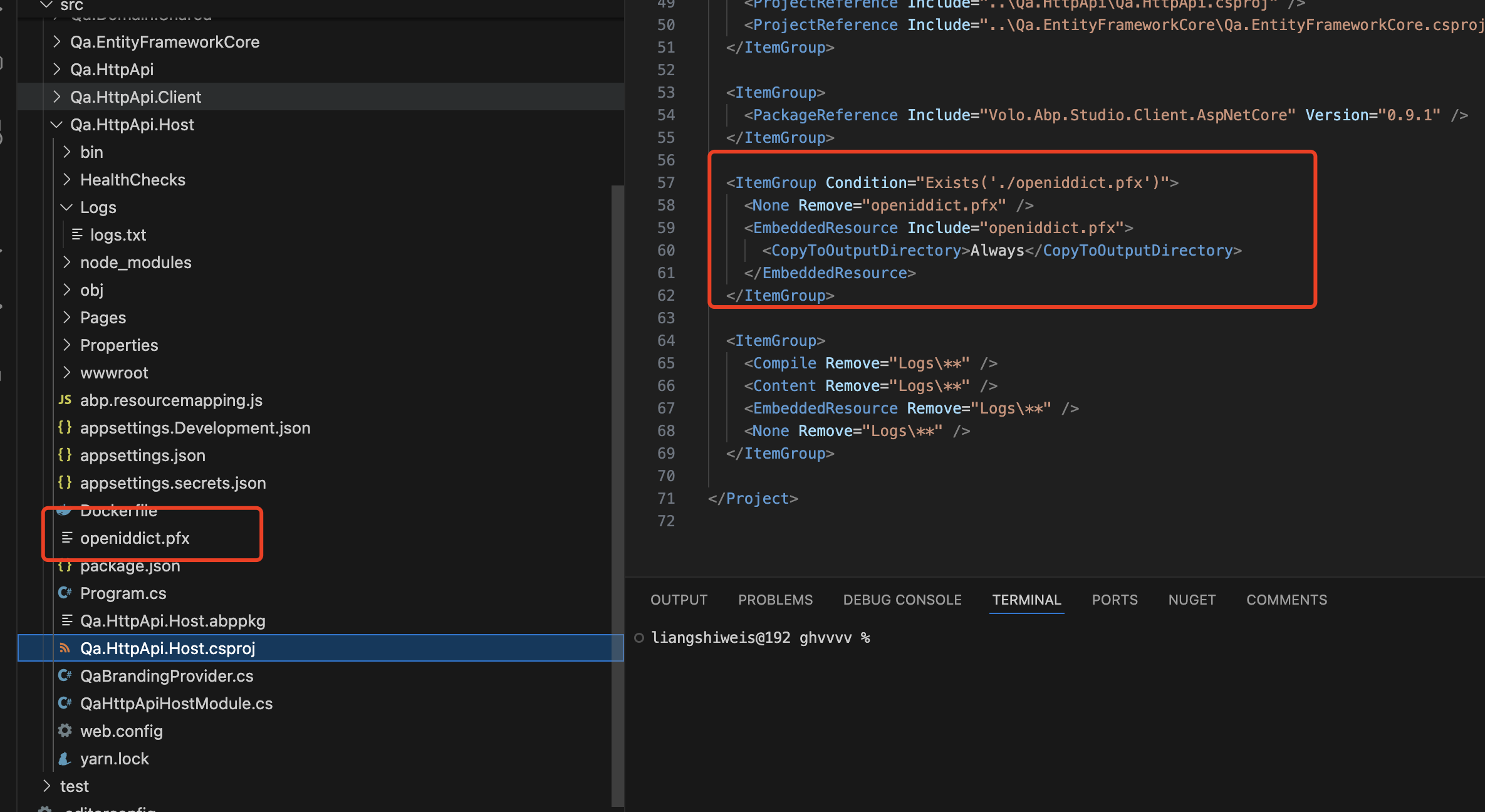 Markdown supported.Copy, paste, or drag & drop images and files (max 100 MB per file, 100 MB total per post)
 -
0
Hi,
First , generate
openiddict.pfxin the project folder and make sure it is copied to the published folder always.Hi, i dont have the API.Host projekt.
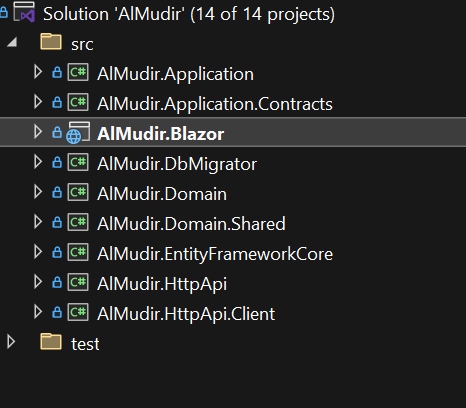
And how do i generate the openiddict.pfx ?
Markdown supported.Copy, paste, or drag & drop images and files (max 100 MB per file, 100 MB total per post) -
0
dotnet dev-certs https -v -ep openiddict.pfx -p a0166a3a-5ffb-4f53-a8d7-a699d3c3ce1eMarkdown supported.Copy, paste, or drag & drop images and files (max 100 MB per file, 100 MB total per post) -
0
dotnet dev-certs https -v -ep openiddict.pfx -p a0166a3a-5ffb-4f53-a8d7-a699d3c3ce1eok but in which project? i dont have the API.Host project.
Markdown supported.Copy, paste, or drag & drop images and files (max 100 MB per file, 100 MB total per post) -
0
Hi,
The image just an example, should be
.Blazorproject for your caseMarkdown supported.Copy, paste, or drag & drop images and files (max 100 MB per file, 100 MB total per post) -
0
Ok i did it but get still the same error.
Markdown supported.Copy, paste, or drag & drop images and files (max 100 MB per file, 100 MB total per post) -
0
if you published it locally, will it work?
Markdown supported.Copy, paste, or drag & drop images and files (max 100 MB per file, 100 MB total per post) -
0
No, it's also not there. Do you have maybe a example repo where its working with my type of Project and deploy to docker?
Markdown supported.Copy, paste, or drag & drop images and files (max 100 MB per file, 100 MB total per post) -
0
It is already pre-built into the project
abp new Testapp --old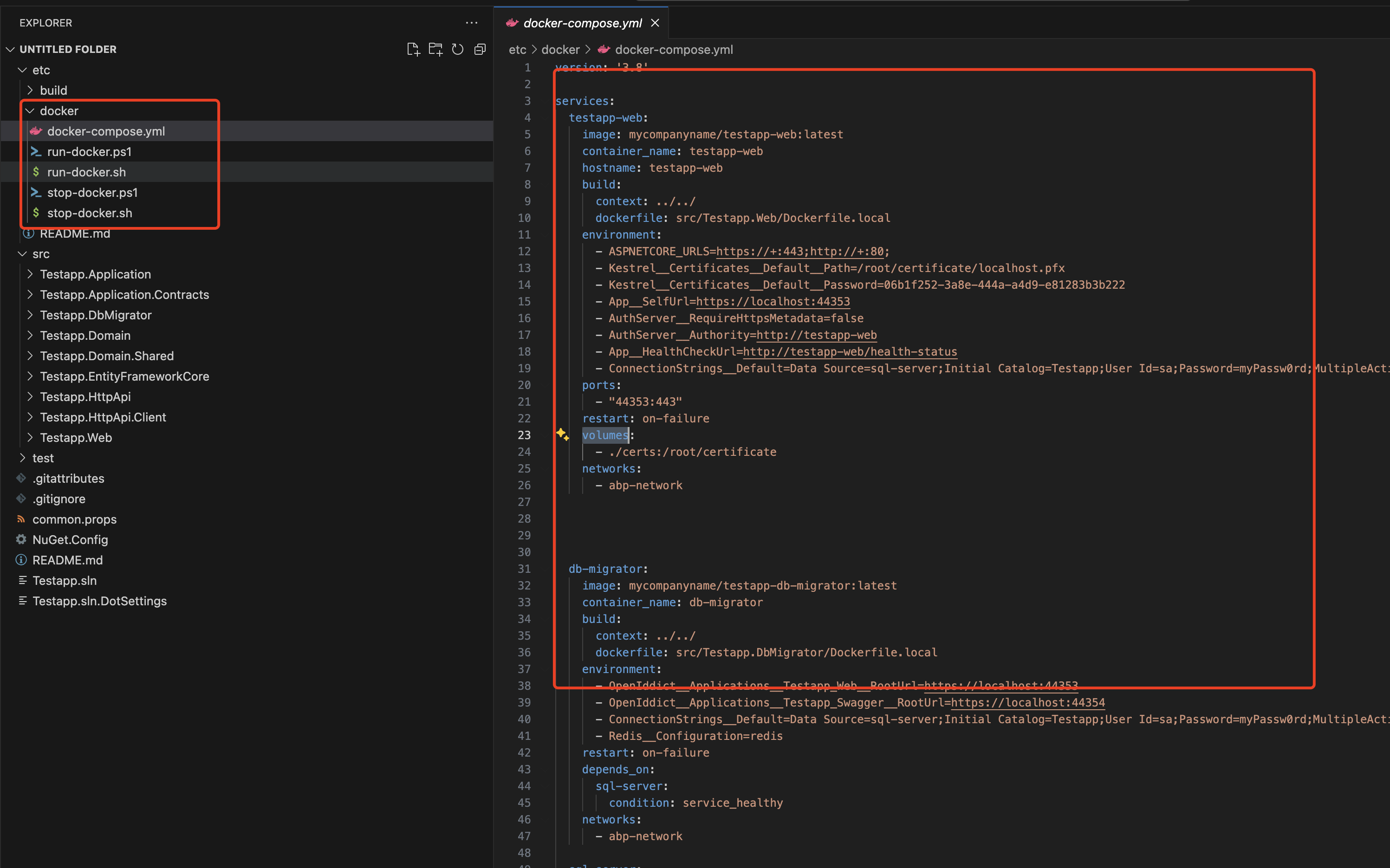 Markdown supported.Copy, paste, or drag & drop images and files (max 100 MB per file, 100 MB total per post)
 -
0
It is already pre-built into the project
abp new Testapp --oldok this also not working. i dont know what to do.
Markdown supported.Copy, paste, or drag & drop images and files (max 100 MB per file, 100 MB total per post) -
0
Hi,
It works for me
- abp new Testapp --old
- Run
build-images-locally.ps1 - Optional: Open
run-docker.ps1file to updatedocker-compose up -dtodocker compose up -d(Based on your Docker version) - Run
run-docker.ps1
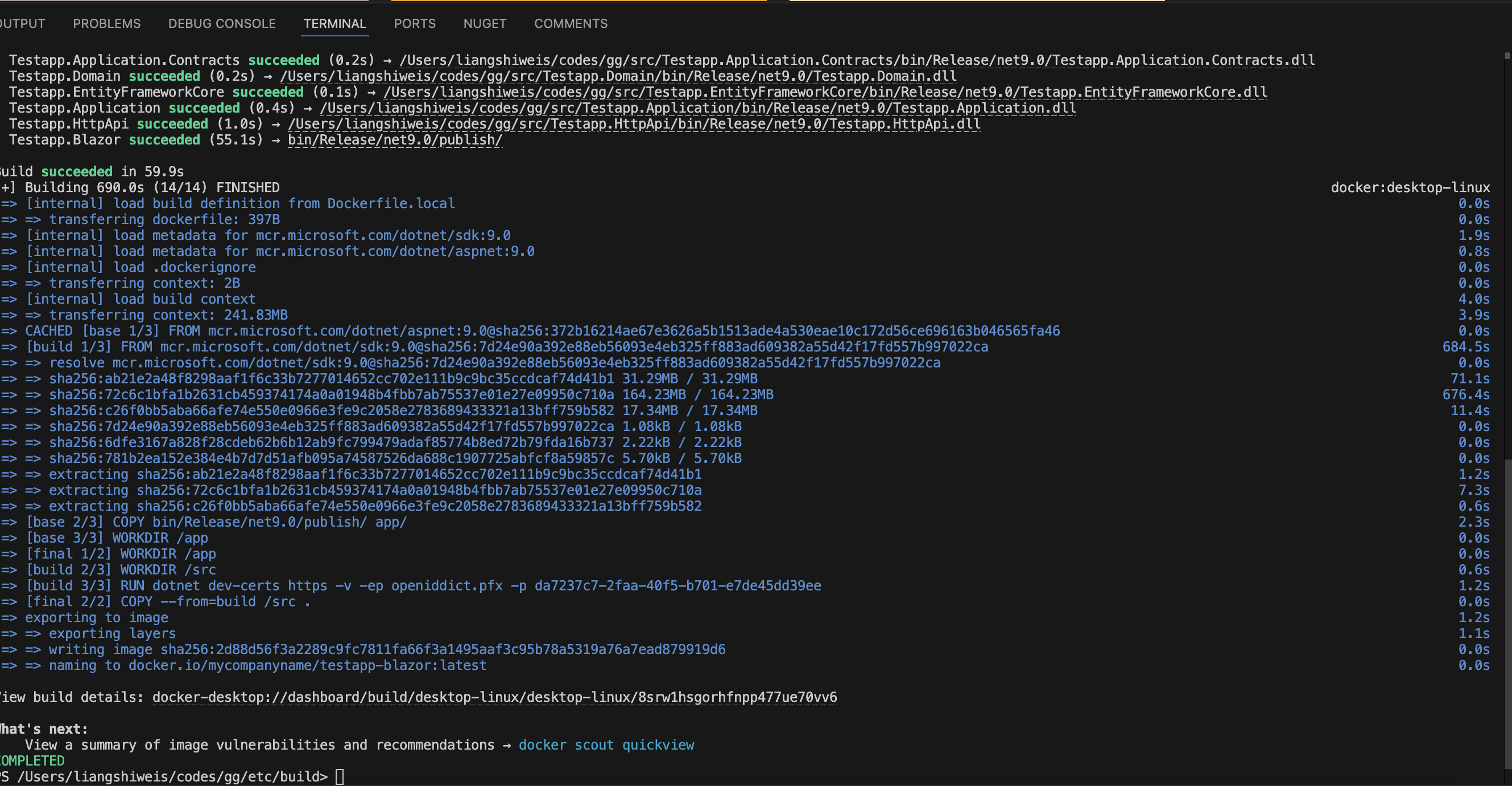
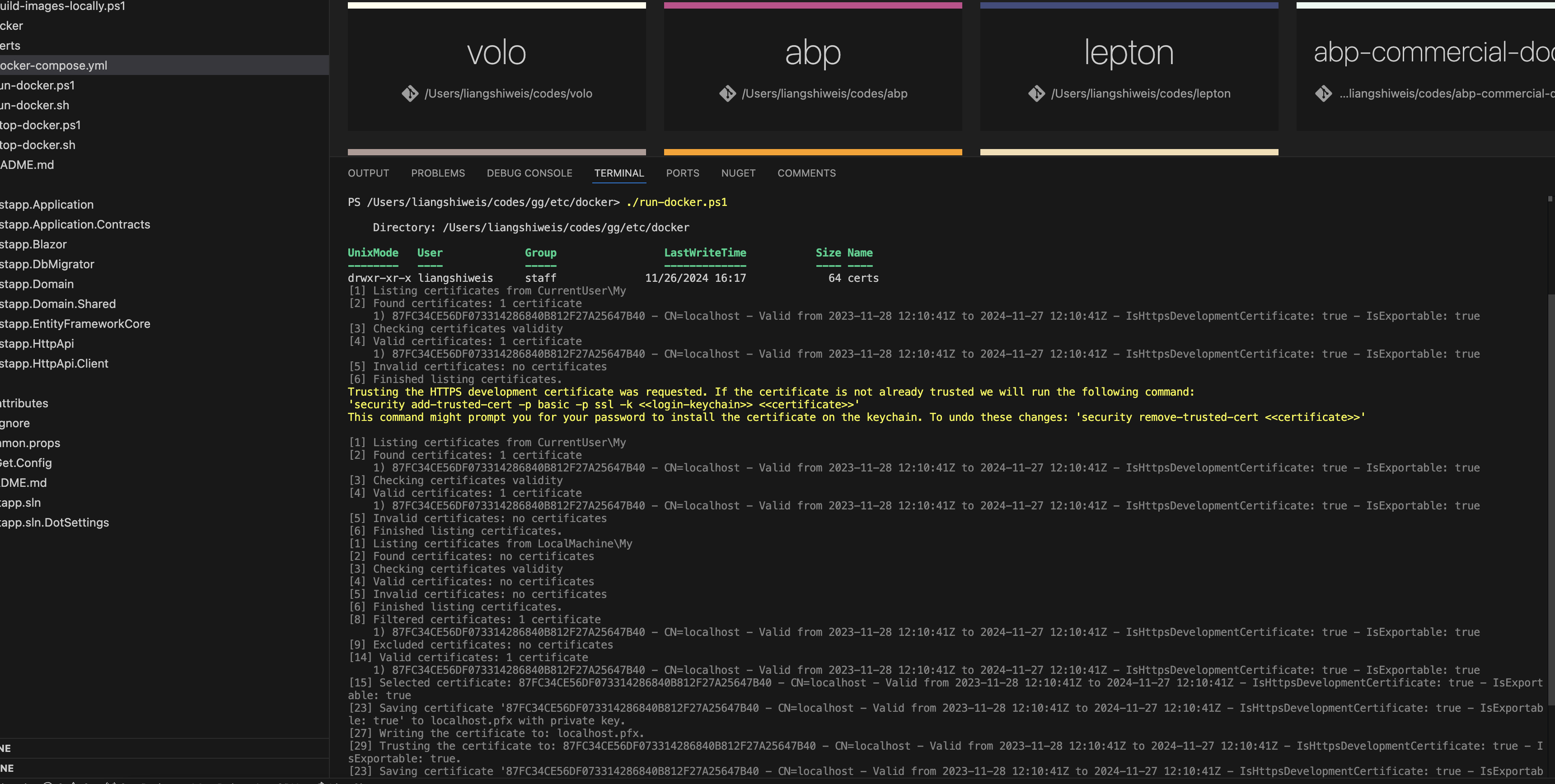 Markdown supported.Copy, paste, or drag & drop images and files (max 100 MB per file, 100 MB total per post)
 -
0
Hi, iam still trying but i have no idea what iam doing wrong.
Markdown supported.Copy, paste, or drag & drop images and files (max 100 MB per file, 100 MB total per post) -
0
what is the error now?
Markdown supported.Copy, paste, or drag & drop images and files (max 100 MB per file, 100 MB total per post) -
0
its the same error. is it possible if i give you access to the github repo ? and you take a look
Markdown supported.Copy, paste, or drag & drop images and files (max 100 MB per file, 100 MB total per post) -
0
okay, please
Markdown supported.Copy, paste, or drag & drop images and files (max 100 MB per file, 100 MB total per post) -
0
i add https://github.com/realLiangshiwei i hope this is you.
Markdown supported.Copy, paste, or drag & drop images and files (max 100 MB per file, 100 MB total per post) -
0
Hi,
you can try
private X509Certificate2 GetSigningCertificate(IWebHostEnvironment hostingEnv, IConfiguration configuration)
{
    var fileName = "openiddict.pfx";
    var passPhrase = "a0166a3a-5ffb-4f53-a8d7-a699d3c3ce1e";
    var file = Path.Combine(hostingEnv.ContentRootPath, fileName);

    if (!File.Exists(file))
    {
        throw new FileNotFoundException($"Signing Certificate couldn't found: {file}");
    }

    return new X509Certificate2(file, passPhrase);
}
Markdown supported.Copy, paste, or drag & drop images and files (max 100 MB per file, 100 MB total per post)


