- ABP Framework version: v8.3.4
- UI Type: Angular / MVC
- Database System: EF Core (SQL Server, Oracle, MySQL, PostgreSQL, etc..) / MongoDB
- Tiered (for MVC) or Auth Server Separated (for Angular): yes/no
- Exception message and full stack trace:
- Steps to reproduce the issue:
Hi team,
I have angular front end but my login pages are built on MVC.
During deployment, i notice the CSS files that i've changed in the backend are not being reflected, the default bootstrap files are still being loaded (https://idp.preprod.eduverse.vision/Account/Login) - you can view in the network tab that the below css new code is not being deployed (colours are still blue).

I've added these code to /Themes/LeptonX/Global/side-menu/css/bootstrap-light.css
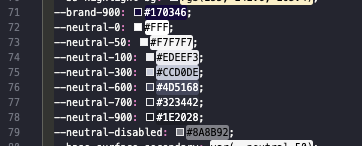
However on my local it is working correctly.

How do i solve this issue?
8 Answer(s)
-
0
hi
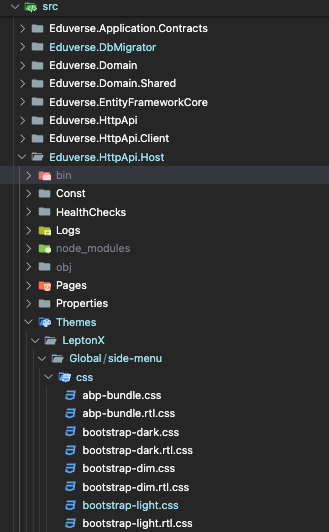
Where is the
/Themes/LeptonX/Global/side-menu/css/bootstrap-light.cssfile located?Can you check if it exists in the
wwwrootfolder?Please also share the
csprojfile context of yourhttps://idp.preprod.eduverse.visionproject.Thanks.
Markdown supported.Copy, paste, or drag & drop images and files (max 100 MB per file, 100 MB total per post) -
0
its in the folder provided in the source code, i did not change it's location:
<Project Sdk="Microsoft.NET.Sdk.Web">

  <Import Project="..\..\common.props" />

  <PropertyGroup>
    <TargetFramework>net8.0</TargetFramework>
    <Nullable>enable</Nullable>
    <AspNetCoreHostingModel>InProcess</AspNetCoreHostingModel>
    <RootNamespace>Eduverse</RootNamespace>
    <PreserveCompilationReferences>true</PreserveCompilationReferences>
  </PropertyGroup>

  <PropertyGroup Condition=" '$(RunConfiguration)' == 'Eduverse.HttpApi.Host' " />

  <ItemGroup>
    <PackageReference Include="AspNetCore.HealthChecks.UI" Version="8.0.0" />
    <PackageReference Include="AspNetCore.HealthChecks.UI.Client" Version="8.0.0" />
    <PackageReference Include="Microsoft.EntityFrameworkCore.InMemory" Version="8.0.4" />
    <PackageReference Include="AspNetCore.HealthChecks.UI.InMemory.Storage" Version="8.0.0" />
    <PackageReference Include="Owl.TokenWildcardIssuerValidator" Version="1.0.0" />
    <PackageReference Include="Serilog.AspNetCore" Version="8.0.0" />
    <PackageReference Include="Serilog.Sinks.Async" Version="1.5.0" />
    <PackageReference Include="Microsoft.AspNetCore.Authentication.Google" Version="8.0.4" />
    <PackageReference Include="Microsoft.AspNetCore.Authentication.MicrosoftAccount" Version="8.0.4" />
    <PackageReference Include="Microsoft.AspNetCore.Authentication.Twitter" Version="8.0.4" />
  </ItemGroup>

  <ItemGroup>
    <PackageReference Include="Volo.Abp.AspNetCore.MultiTenancy" Version="8.3.4" />
    <PackageReference Include="Volo.Abp.Autofac" Version="8.3.4" />
    <PackageReference Include="Volo.Abp.AspNetCore.Serilog" Version="8.3.4" />
    <PackageReference Include="Volo.Abp.BlobStoring.Aws" Version="8.3.4" />
    <PackageReference Include="Volo.Abp.Caching.StackExchangeRedis" Version="8.3.4" />
    <PackageReference Include="Volo.Abp.Swashbuckle" Version="8.3.4" />
  </ItemGroup>

  <ItemGroup>
    <PackageReference Include="Volo.Abp.Account.Pro.Public.Web.OpenIddict" Version="8.3.4" />
    <PackageReference Include="Volo.Abp.Account.Pro.Public.Web.Impersonation" Version="8.3.4" />
  </ItemGroup>

  <ItemGroup>
    <PackageReference Include="Volo.Abp.AspNetCore.Mvc.UI.Theme.LeptonX" Version="3.3.4" />
  </ItemGroup>

  <ItemGroup>
    <ProjectReference Include="..\Eduverse.Application\Eduverse.Application.csproj" />
    <ProjectReference Include="..\Eduverse.HttpApi\Eduverse.HttpApi.csproj" />
    <ProjectReference Include="..\Eduverse.EntityFrameworkCore\Eduverse.EntityFrameworkCore.csproj" />
  </ItemGroup>

  <ItemGroup>
    <PackageReference Include="Volo.Abp.Studio.Client.AspNetCore" Version="0.9.7" />
  </ItemGroup>

  <ItemGroup Condition="Exists('./openiddict.pfx')">
    <None Remove="openiddict.pfx" />
    <EmbeddedResource Include="openiddict.pfx">
      <CopyToOutputDirectory>Always</CopyToOutputDirectory>
    </EmbeddedResource>
  </ItemGroup>

  <ItemGroup>
    <Compile Remove="Logs\**" />
    <Content Remove="Logs\**" />
    <EmbeddedResource Remove="Logs\**" />
    <None Remove="Logs\**" />
  </ItemGroup>

</Project>
Markdown supported.Copy, paste, or drag & drop images and files (max 100 MB per file, 100 MB total per post) -
0
hi
Try to add action for
Themes\**\*.jsand"Themes\**\*.css"<ItemGroup> <Content Include="Pages\**\*.js"> <CopyToOutputDirectory>Always</CopyToOutputDirectory> </Content> <Content Include="Pages\**\*.css"> <CopyToOutputDirectory>Always</CopyToOutputDirectory> </Content> </ItemGroup> <ItemGroup> <Content Include="Themes\**\*.js"> <CopyToOutputDirectory>Always</CopyToOutputDirectory> </Content> <Content Include="Themes\**\*.css"> <CopyToOutputDirectory>Always</CopyToOutputDirectory> </Content> </ItemGroup>Thanks.
Markdown supported.Copy, paste, or drag & drop images and files (max 100 MB per file, 100 MB total per post) -
0
Thank you, its MVC pages have the correct css now.
However, how about the angular project? When i log in, i realized bootstrap-light.css gets downloaded again.
are the files being read / downloaded from here?
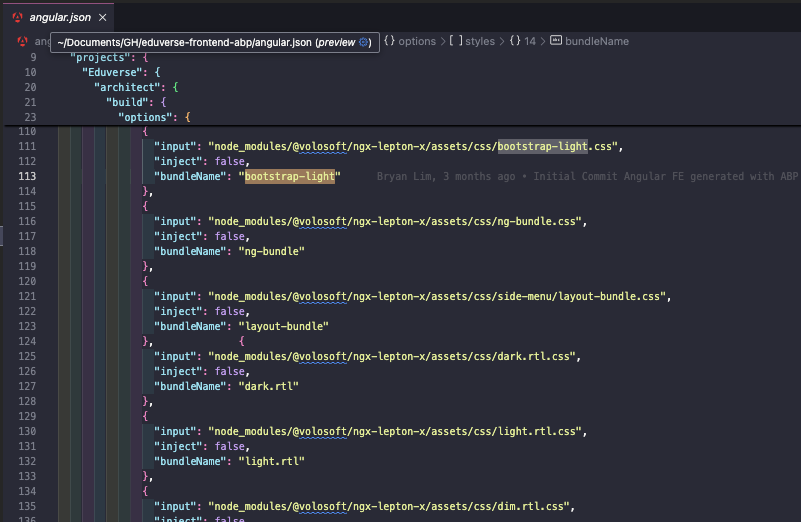 Markdown supported.Copy, paste, or drag & drop images and files (max 100 MB per file, 100 MB total per post)
 -
0
hi
I will ask our angular team. but you can replace the path with your custom CSS.
"node_modules/@volosoft/ngx-lepton-x/assets/css/bootstrap-light.cssMarkdown supported.Copy, paste, or drag & drop images and files (max 100 MB per file, 100 MB total per post)