






- ABP Framework version: v9.0.1
- UI Type: Angular / MVC / Blazor WASM / Blazor Server
- Database System: EF Core (SQL Server, Oracle, MySQL, PostgreSQL, etc..) / MongoDB
- Tiered (for MVC) or Auth Server Separated (for Angular): yes/no
- Exception message and full stack trace:
- Steps to reproduce the issue:
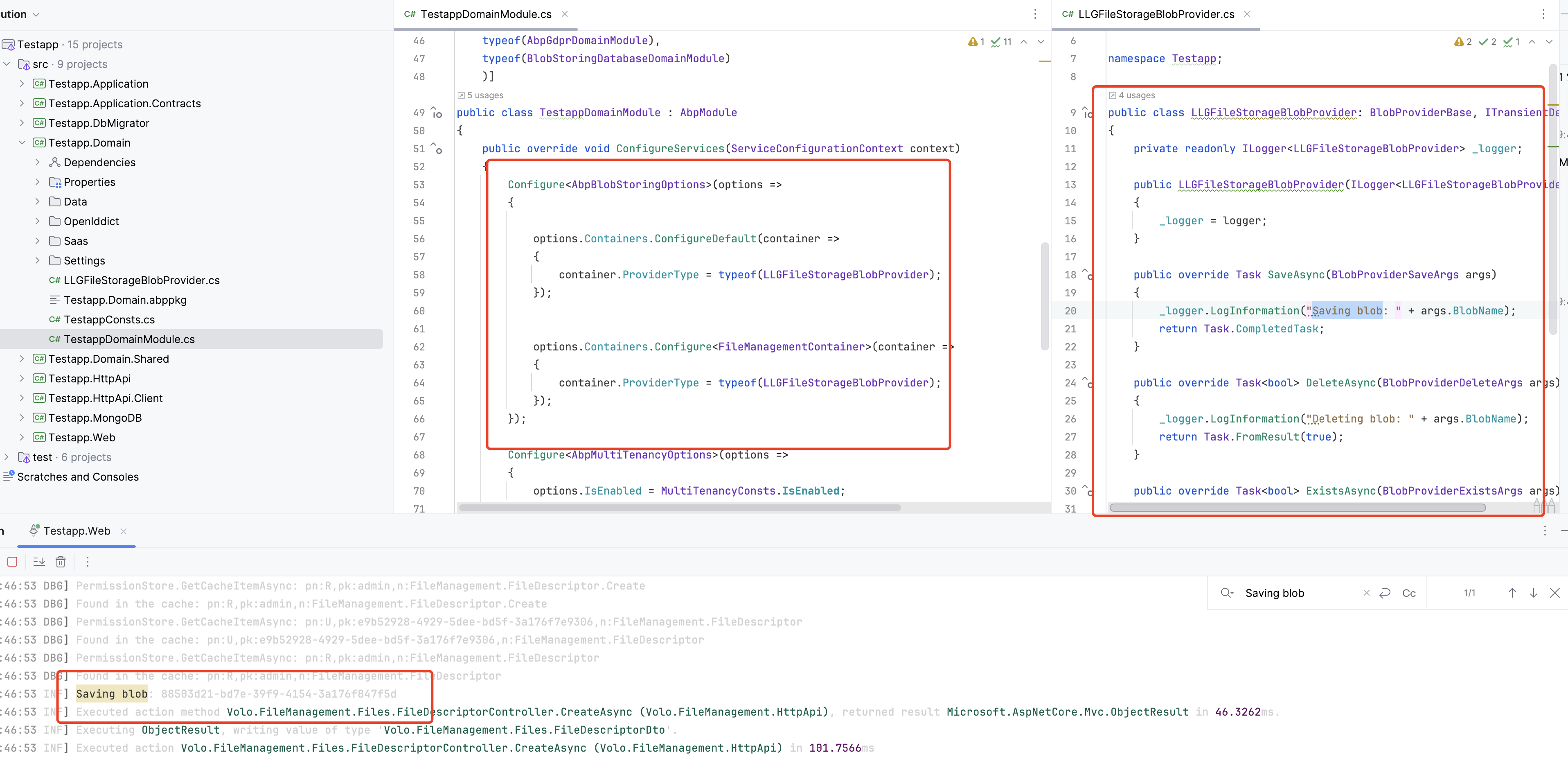
Am trying to create my own customer blob provide to used file system for File Manager.
 public class LLGFileStorageBlobProvider : BlobProviderBase, ITransientDependency
 {

     private readonly IConfiguration _configuration;
     private readonly string _basePath;
     public LLGFileStorageBlobProvider(IConfiguration configuration)
     {
         _configuration = configuration;
         _basePath = configuration["FileManagement:FileSystem:BasePath"] ?? "C:\\Users\\teron\\source\\repos\\TempUploads";
         Console.WriteLine($"LLGFileStorageBlobProvider initialized with BasePath: {_basePath}");
     }
     public override async Task SaveAsync(BlobProviderSaveArgs args)
     {

         var filePath = Path.Combine(_basePath, args.BlobName);
         Directory.CreateDirectory(Path.GetDirectoryName(filePath)!);

         using (var fileStream = File.Create(filePath))
         {
             await args.BlobStream.CopyToAsync(fileStream);
         }
     }

     public override Task<bool> DeleteAsync(BlobProviderDeleteArgs args)
     {
         var filePath = Path.Combine(_basePath, args.BlobName);

         if (File.Exists(filePath))
         {
             File.Delete(filePath);
             return Task.FromResult(true);
         }

         return Task.FromResult(false);
     }

     public override Task<bool> ExistsAsync(BlobProviderExistsArgs args)
     {
         var filePath = Path.Combine(_basePath, args.BlobName);
         return Task.FromResult(File.Exists(filePath));
     }

     public override Task<Stream> GetOrNullAsync(BlobProviderGetArgs args)
     {
         var filePath = Path.Combine(_basePath, args.BlobName);

         if (File.Exists(filePath))
         {
             var fileStream = File.OpenRead(filePath);
             return Task.FromResult<Stream>(fileStream);
         }

         return Task.FromResult<Stream>(null);
     }
 }
I added the module Configure<AbpBlobStoringOptions>(options => {
options.Containers.ConfigureDefault(container =>
{
    container.ProviderType = typeof(LLGFileStorageBlobProvider);
});


options.Containers.Configure<FileManagementContainer>(container =>
{
    container.ProviderType = typeof(LLGFileStorageBlobProvider);
});
});
when i run project and open file manager i get this error
2025-01-11 08:48:36.340 -05:00 [ERR] An exception was thrown while activating Volo.FileManagement.Directories.DirectoryDescriptorController -> Volo.FileManagement.Directories.DirectoryDescriptorAppService -> Volo.FileManagement.Directories.DirectoryManager -> Volo.FileManagement.Files.FileManager -> Volo.Abp.BlobStoring.BlobContainer1[[Volo.FileManagement.FileManagementContainer, Volo.FileManagement.Domain, Version=9.0.2.0, Culture=neutral, PublicKeyToken=null]]. Autofac.Core.DependencyResolutionException: An exception was thrown while activating Volo.FileManagement.Directories.DirectoryDescriptorController -> Volo.FileManagement.Directories.DirectoryDescriptorAppService -> Volo.FileManagement.Directories.DirectoryManager -> Volo.FileManagement.Files.FileManager -> Volo.Abp.BlobStoring.BlobContainer1[[Volo.FileManagement.FileManagementContainer, Volo.FileManagement.Domain, Version=9.0.2.0, Culture=neutral, PublicKeyToken=null]].
---> Autofac.Core.DependencyResolutionException: An exception was thrown while invoking the constructor 'Void .ctor(Volo.Abp.BlobStoring.IBlobContainerFactory)' on type 'BlobContainer1'. ---> Volo.Abp.AbpException: Could not find the BLOB Storage provider with the type (CodeFusionLabs.LogicLinkEnterprise.Interface.Utils.LLGFileStorageBlobProvider, CodeFusionLabs.LogicLinkEnterprise.Application, Version=1.0.0.0, Culture=neutral, PublicKeyToken=null) configured for the container file-management and no default provider was set. at Volo.Abp.BlobStoring.DefaultBlobProviderSelector.Get(String containerName) at Volo.Abp.BlobStoring.BlobContainerFactory.Create(String name) at lambda_method3928(Closure, Object[]) at Autofac.Core.Activators.Reflection.BoundConstructor.Instantiate() --- End of inner exception stack trace --- at Autofac.Core.Activators.Reflection.BoundConstructor.Instantiate() at Autofac.Core.Activators.Reflection.ReflectionActivator.<>c__DisplayClass14_0.<UseSingleConstructorActivation>b__0(ResolveRequestContext context, Action1 next)
at Autofac.Core.Resolving.Middleware.DisposalTrackingMiddleware.Execute(ResolveRequestContext context, Action1 next) at Autofac.Builder.RegistrationBuilder3.<>c__DisplayClass41_0.<PropertiesAutowired>b__0(ResolveRequestContext context, Action1 next) at Autofac.Core.Resolving.Middleware.ActivatorErrorHandlingMiddleware.Execute(ResolveRequestContext context, Action1 next)
--- End of inner exception stack trace ---
at Autofac.Core.Resolving.Middleware.ActivatorErrorHandlingMiddleware.Execute(ResolveRequestContext context, Action1 next) at Autofac.Core.Resolving.Middleware.SharingMiddleware.Execute(ResolveRequestContext context, Action1 next)
at Autofac.Core.Resolving.Middleware.CircularDependencyDetectorMiddleware.Execute(ResolveRequestContext context, Action`1 next)
at Autofac.Core.Resolving.ResolveOperation.GetOrCreateInstance(ISharingLifetimeScope currentOperationScope, ResolveRequest& request)
at Autofac.Core.Resolving.ResolveOperation.ExecuteOperation(ResolveRequest& request)
at Microsoft.Extensions.DependencyInjection.ServiceProviderServiceExtensions.GetRequiredService(IServiceProvider provider, Type serviceType)
at Microsoft.AspNetCore.Mvc.Controllers.ControllerFactoryProvider.<>c__DisplayClass6_0.
1 Answer(s)
-
0
Hi,
I can't reproduce the problem, could you please share a test project with me? I will check it.
 Markdown supported.Copy, paste, or drag & drop images and files (max 100 MB per file, 100 MB total per post)


