






- ABP Framework version: v9.0.7
- UI Type: Angular
- Database System: EF Core (SQL Server)
- Tiered (for MVC) or Auth Server Separated (for Angular): no
- Exception message and full stack trace: No error
- Steps to reproduce the issue:
Hello, after updating my solution to ABP 9.0.7, my solution doesn't start
this is my new package.json
{ "name": "solutionName", "version": "0.0.0", "scripts": { "ng": "ng", "start": "ng serve --open", "build": "ng build", "build:prod": "ng build --configuration production", "build:cert": "ng build --configuration certification", "watch": "ng build --watch --configuration development", "test": "ng test", "lint": "ng lint", "postinstall": "npm run compile:ivy", "compile:ivy": "yarn ngcc --properties es2015 browser module main --first-only --create-ivy-entry-points --tsconfig './tsconfig.prod.json' --source node_modules" }, "private": true, "dependencies": { "@abp/ng.components": "~9.0.7", "@abp/ng.core": "~9.0.7", "@abp/ng.oauth": "~9.0.7", "@abp/ng.setting-management": "~9.0.7", "@abp/ng.theme.lepton-x": "4.0.8", "@abp/ng.theme.shared": "~9.0.7", "@angular/animations": "~18.1.0", "@angular/common": "~18.1.0", "@angular/compiler": "~18.1.0", "@angular/core": "~18.1.0", "@angular/forms": "~18.1.0", "@angular/localize": "~18.1.0", "@angular/platform-browser": "~18.1.0", "@angular/platform-browser-dynamic": "~18.1.0", "@angular/router": "~18.1.0", "@progress/kendo-angular-buttons": "^18.1.0", "@progress/kendo-angular-common": "^18.1.0", "@progress/kendo-angular-dialog": "^18.1.0", "@progress/kendo-angular-dropdowns": "^18.1.0", "@progress/kendo-angular-editor": "^18.1.0", "@progress/kendo-angular-icons": "^18.1.0", "@progress/kendo-angular-inputs": "^18.1.0", "@progress/kendo-angular-intl": "^18.1.0", "@progress/kendo-angular-l10n": "^18.1.0", "@progress/kendo-angular-label": "^18.1.0", "@progress/kendo-angular-navigation": "^18.1.0", "@progress/kendo-angular-popup": "^18.1.0", "@progress/kendo-angular-toolbar": "^18.1.0", "@progress/kendo-angular-treeview": "^18.1.0", "@progress/kendo-angular-utils": "^18.1.0", "@progress/kendo-drawing": "^1.21.2", "@progress/kendo-licensing": "^1.5.0", "@progress/kendo-theme-default": "^10.2.0", "@volo/abp.commercial.ng.ui": "~9.0.7", "@volo/abp.ng.account": "~9.0.7", "@volo/abp.ng.audit-logging": "~9.0.7", "@volo/abp.ng.gdpr": "~9.0.7", "@volo/abp.ng.identity": "~9.0.7", "@volo/abp.ng.language-management": "~9.0.7", "@volo/abp.ng.openiddictpro": "~9.0.7", "@volo/abp.ng.saas": "~9.0.7", "@volo/abp.ng.text-template-management": "~9.0.7", "@volosoft/abp.ng.theme.lepton-x": "^4.0.8", "bootstrap": "^5.3.2", "codice-fiscale-js": "^2.3.22", "ngx-bootstrap": "^12.0.0", "rxjs": "~7.8.0", "tslib": "^2.6.2", "zone.js": "~0.14.0" }, "devDependencies": { "@abp/ng.schematics": "~9.0.7", "@angular-devkit/build-angular": "~18.1.0", "@angular-eslint/eslint-plugin": "~18.1.0", "@angular-eslint/eslint-plugin-template": "~18.1.0", "@angular-eslint/template-parser": "~18.1.0", "@angular/cli": "~18.1.0", "@angular/compiler-cli": "~18.1.0", "@angular/language-service": "~18.1.0", "@types/jasmine": "~3.6.0", "@types/node": "^12.11.1", "@typescript-eslint/eslint-plugin": "7.16.0", "@typescript-eslint/parser": "7.16.0", "eslint": "^8.0.0", "jasmine-core": "~4.0.0", "karma": "~6.3.0", "karma-chrome-launcher": "~3.1.0", "karma-coverage": "~2.1.0", "karma-jasmine": "~4.0.0", "karma-jasmine-html-reporter": "^1.7.0", "ng-packagr": "~17.0.0", "typescript": "~5.5.0" }, "peerDependencies": { "@angular-eslint/builder": "~18.1.0", "@angular-eslint/schematics": "~18.1.0" } }
Thank you in advance for your help.
Best regards
3 Answer(s)
-
0
I didn't have any log. I solved by changing some packages.
{ "name": "mySolName", "version": "0.0.0", "scripts": { "ng": "ng", "start": "ng serve --open", "build": "ng build", "build:prod": "ng build --configuration production", "build:cert": "ng build --configuration certification", "watch": "ng build --watch --configuration development", "test": "ng test", "lint": "ng lint", "postinstall": "npm run compile:ivy", "compile:ivy": "yarn ngcc --properties es2015 browser module main --first-only --create-ivy-entry-points --tsconfig './tsconfig.prod.json' --source node_modules" }, "private": true, "dependencies": { "@abp/ng.components": "~9.0.7", "@abp/ng.core": "~9.0.7", "@abp/ng.feature-management": "~9.0.7", "@abp/ng.oauth": "~9.0.7", "@abp/ng.setting-management": "~9.0.7", "@abp/ng.theme.shared": "~9.0.7", "@angular/animations": "~18.1.0", "@angular/common": "~18.1.0", "@angular/compiler": "~18.1.0", "@angular/core": "~18.1.0", "@angular/forms": "~18.1.0", "@angular/localize": "~18.1.0", "@angular/platform-browser": "~18.1.0", "@angular/platform-browser-dynamic": "~18.1.0", "@angular/router": "~18.1.0", "@progress/kendo-angular-buttons": "^18.1.0", "@progress/kendo-angular-common": "^18.1.0", "@progress/kendo-angular-dialog": "^18.1.0", "@progress/kendo-angular-dropdowns": "^18.1.0", "@progress/kendo-angular-editor": "^18.1.0", "@progress/kendo-angular-icons": "^18.1.0", "@progress/kendo-angular-inputs": "^18.1.0", "@progress/kendo-angular-intl": "^18.1.0", "@progress/kendo-angular-l10n": "^18.1.0", "@progress/kendo-angular-label": "^18.1.0", "@progress/kendo-angular-navigation": "^18.1.0", "@progress/kendo-angular-popup": "^18.1.0", "@progress/kendo-angular-toolbar": "^18.1.0", "@progress/kendo-angular-treeview": "^18.1.0", "@progress/kendo-angular-utils": "^18.1.0", "@progress/kendo-drawing": "^1.21.2", "@progress/kendo-licensing": "^1.5.0", "@progress/kendo-theme-default": "^10.2.0", "@volo/abp.commercial.ng.ui": "~9.0.7", "@volo/abp.ng.account": "~9.0.7", "@volo/abp.ng.audit-logging": "~9.0.7", "@volo/abp.ng.gdpr": "9.0.7", "@volo/abp.ng.identity": "~9.0.7", "@volo/abp.ng.language-management": "~9.0.7", "@volo/abp.ng.openiddictpro": "~9.0.7", "@volo/abp.ng.saas": "9.0.7", "@volo/abp.ng.text-template-management": "~9.0.7", "@volosoft/abp.ng.theme.lepton-x": "~4.0.5", "codice-fiscale-js": "^2.3.22", "rxjs": "~7.8.0", "tslib": "^2.0.0", "zone.js": "~0.14.0" }, "devDependencies": { "@abp/ng.schematics": "~9.0.7", "@angular-devkit/build-angular": "~18.1.0", "@angular-eslint/builder": "~18.1.0", "@angular-eslint/eslint-plugin": "~18.1.0", "@angular-eslint/eslint-plugin-template": "~18.1.0", "@angular-eslint/schematics": "~18.1.0", "@angular-eslint/template-parser": "~18.1.0", "@angular/cli": "~18.1.0", "@angular/compiler-cli": "~18.1.0", "@angular/language-service": "~18.1.0", "@types/jasmine": "~3.6.0", "@types/node": "^20.0.0", "@typescript-eslint/eslint-plugin": "^7.0.0", "@typescript-eslint/parser": "^7.0.0", "eslint": "^8.0.0", "jasmine-core": "~4.0.0", "karma": "~6.3.0", "karma-chrome-launcher": "~3.1.0", "karma-coverage": "~2.1.0", "karma-jasmine": "~4.0.0", "karma-jasmine-html-reporter": "^1.0.0", "typescript": "~5.5.0" } }my problem now is that if i leave { provide: LocationStrategy, useClass:HashLocationStrategy }, In my app module, when i change item in the side menu they stay selected.
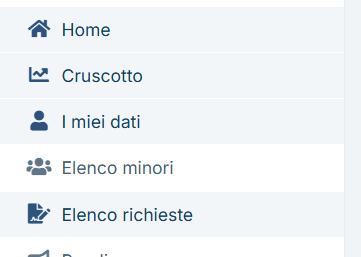
it used to work before the update. If i remove it, the side menu works.
Thank you
Markdown supported.Copy, paste, or drag & drop images and files (max 100 MB per file, 100 MB total per post)


