






Database System: EF Core / SQL Server , Running Angular UI
Exception message and full stack trace: [10:02:58 INF] Error from RemoteAuthentication: OAuth token endpoint failure: invalid_client;Description=Unauthorized. [10:02:58 ERR] An unhandled exception has occurred while executing the request. Microsoft.AspNetCore.Authentication.AuthenticationFailureException: An error was encountered while handling the remote login. ---> Microsoft.AspNetCore.Authentication.AuthenticationFailureException: OAuth token endpoint failure: invalid_client;Description=Unauthorized --- End of inner exception stack trace --- at Microsoft.AspNetCore.Authentication.RemoteAuthenticationHandler
1.HandleRequestAsync() at Volo.Abp.Account.Public.Web.ExternalProviders.AbpAccountAuthenticationRequestHandler2.HandleRequestAsync() at Microsoft.AspNetCore.Authentication.AuthenticationMiddleware.Invoke(HttpContext context) at Volo.Abp.AspNetCore.Security.AbpSecurityHeadersMiddleware.InvokeAsync(HttpContext context, RequestDelegate next) at Microsoft.AspNetCore.Builder.UseMiddlewareExtensions.InterfaceMiddlewareBinder.<>c__DisplayClass2_0.<<CreateMiddleware>b__0>d.MoveNext() --- End of stack trace from previous location --- at Microsoft.AspNetCore.Localization.RequestLocalizationMiddleware.Invoke(HttpContext context) at Microsoft.AspNetCore.RequestLocalization.AbpRequestLocalizationMiddleware.InvokeAsync(HttpContext context, RequestDelegate next) at Microsoft.AspNetCore.Builder.UseMiddlewareExtensions.InterfaceMiddlewareBinder.<>c__DisplayClass2_0.<<CreateMiddleware>b__0>d.MoveNext() --- End of stack trace from previous location ---Steps to reproduce the issue:
Hi, we upgraded an older project from 8.1 to 9.1, by doing step by step upgrades. After upgrading from 9.0.4 to 9.1, the google external login stopped working. Actually there are 2 issues:
- First of all, we had to delete the configurations in AbpSettings DB because the solution would not start, complaining that the settings are not in correct format
- After deleting the settings, and reconfigure the external google sign in, we get the above error
I tested this with a fresh 9.1 build, and the issue is also there. Basically configure google signin here:
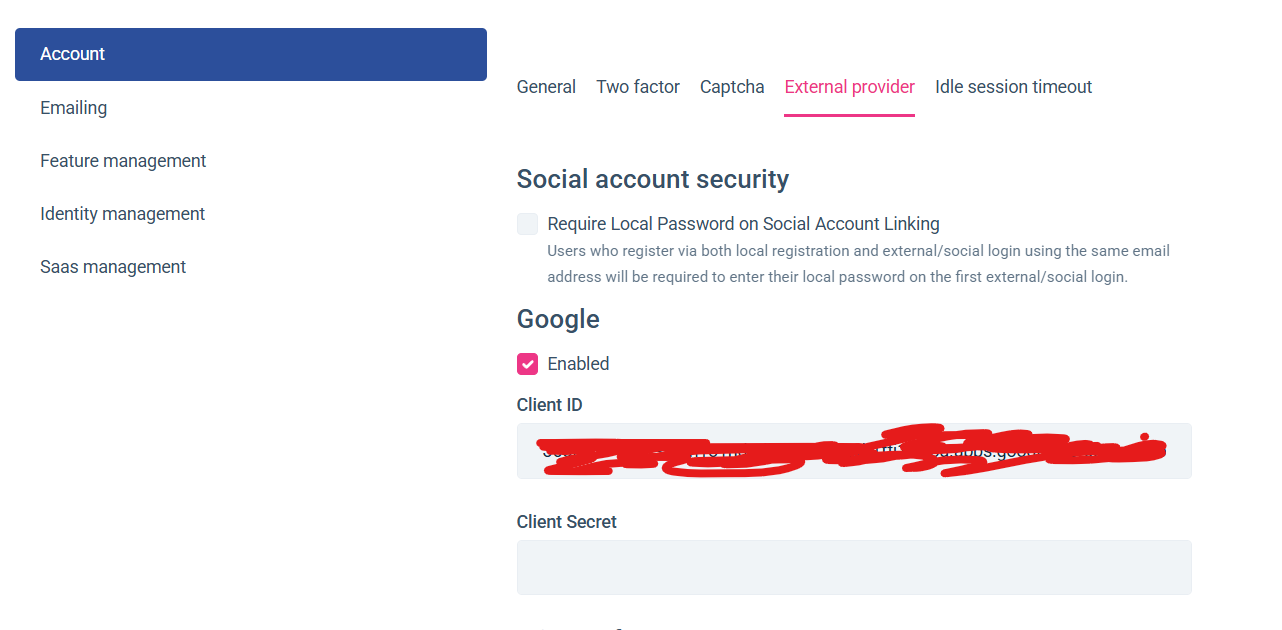
And then try to login in with google.
2 Answer(s)
-
0
Hi,
You can try this https://abp.io/support/questions/8921/External-provider-setting-exception#answer-3a18961c-cf88-a4c1-8640-488ae6d6889a
Your ticket was refunded.
Markdown supported.Copy, paste, or drag & drop images and files (max 100 MB per file, 100 MB total per post) -
0
Thanks
Markdown supported.Copy, paste, or drag & drop images and files (max 100 MB per file, 100 MB total per post)


