






the default configuration in my project is { "App": { "SelfUrl": "https://localhost:44381", "DisablePII": false, "HealthCheckUrl": "/health-status" },
I wanted to add CorsOrigins because we've created a React project and wanted to use some of the API endpoints of the abp project.
I changed the settings to
{ "App": { "SelfUrl": "https://localhost:44381", "CorsOrigins": "http://localhost:5173", -- this is the react project "DisablePII": false, "HealthCheckUrl": "/health-status", },
however, it didn't work. what else should I do?
9 Answer(s)
-
0
Hi,
Can you share the logs of your application (log.txt) located under Logs folder to make sure it's a CORS error.
Markdown supported.Copy, paste, or drag & drop images and files (max 100 MB per file, 100 MB total per post) -
0
yes, it's a CORS error, I ran this command: curl -i -X OPTIONS https://localhost:44381/api/app/ethnicities -H 'Origin: http://localhost:5173' -H 'Access-Control-Request-Method: GET'
and got C:\Users\songh>curl -i -X OPTIONS https://localhost:44381/api/app/ethnicities -H "Origin: http://localhost:5173" -H "Access-Control-Request-Method: GET" HTTP/1.1 405 Method Not Allowed Transfer-Encoding: chunked Allow: GET, HEAD, POST Server: Microsoft-IIS/10.0 X-Content-Type-Options: nosniff X-XSS-Protection: 1; mode=block X-Frame-Options: SAMEORIGIN X-Correlation-Id: 3880f62679854d47a73e1b5cff09a43c X-SourceFiles: =?UTF-8?B?RDpcZ2l0XHRhcHAtOVxzcmNcVGFwcC5XZWJcYXBpXGFwcFxldGhuaWNpdGllcw==?= Date: Tue, 08 Apr 2025 23:14:45 GMT
Markdown supported.Copy, paste, or drag & drop images and files (max 100 MB per file, 100 MB total per post) -
0
In order to reproduce your question, I created a project in the following configuration and sent a request to the HttpApi.Host project.
- Template: app
- Created ABP Studio Version: 0.9.25
- Current ABP Studio Version: 0.9.25
- Tiered: Yes
- Multi-Tenancy: Yes
- UI Framework: mvc
- Theme: leptonx
- Theme Style: system
- Run Install Libs: Yes
- Database Provider: ef
- Database Management System: postgresql
- Separate Tenant Schema: No
- Create Initial Migration: Yes
- Run Db Migrator: Yes
- Mobile Framework: none
- Public Website: No
- Include Tests: Yes
- Kubernetes Configuration: Yes
- Distributed Event Bus: none
- Use Local References: No
- Optional Modules:
- GDPR
- TextTemplateManagement
- LanguageManagement
- AuditLogging
- OpenIddictAdmin
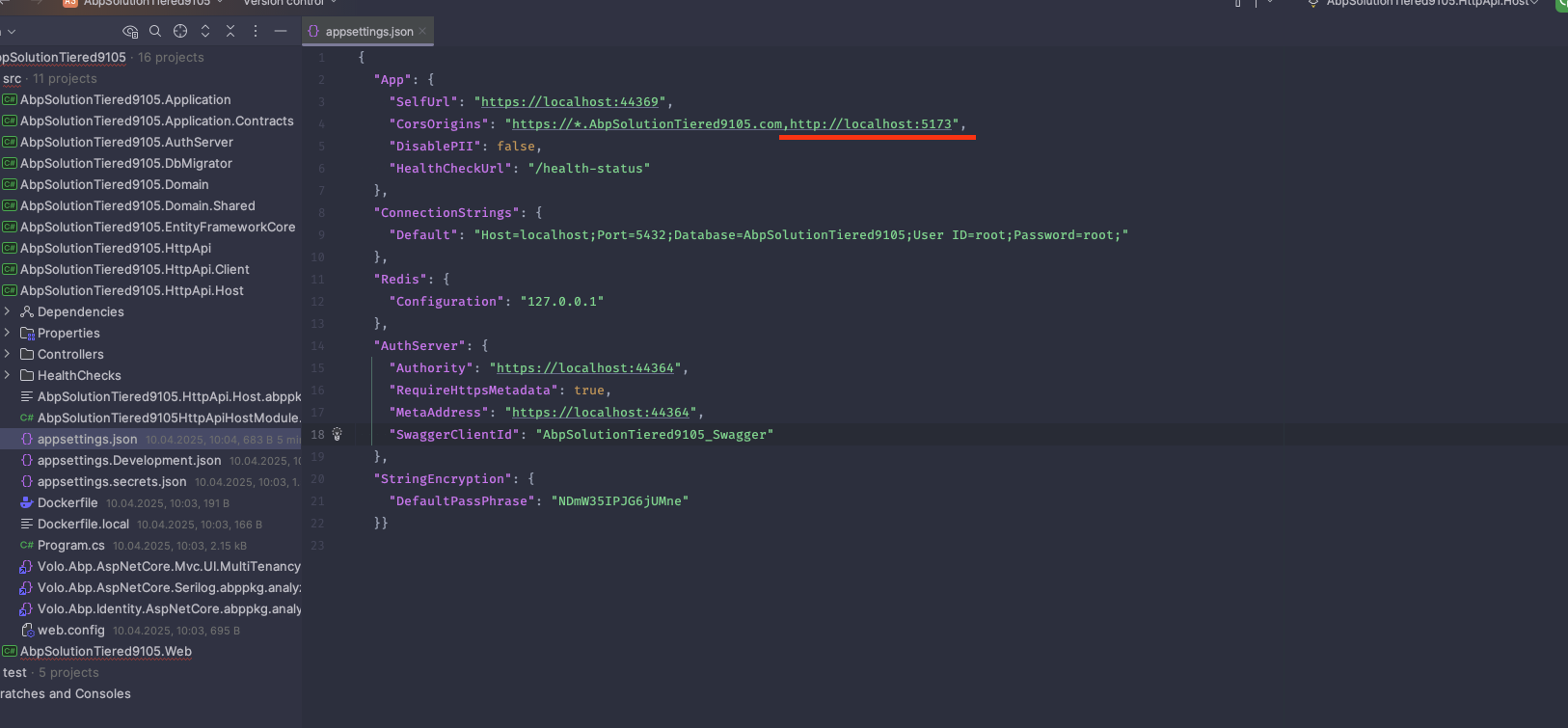
I updated appsettings.json as follows:
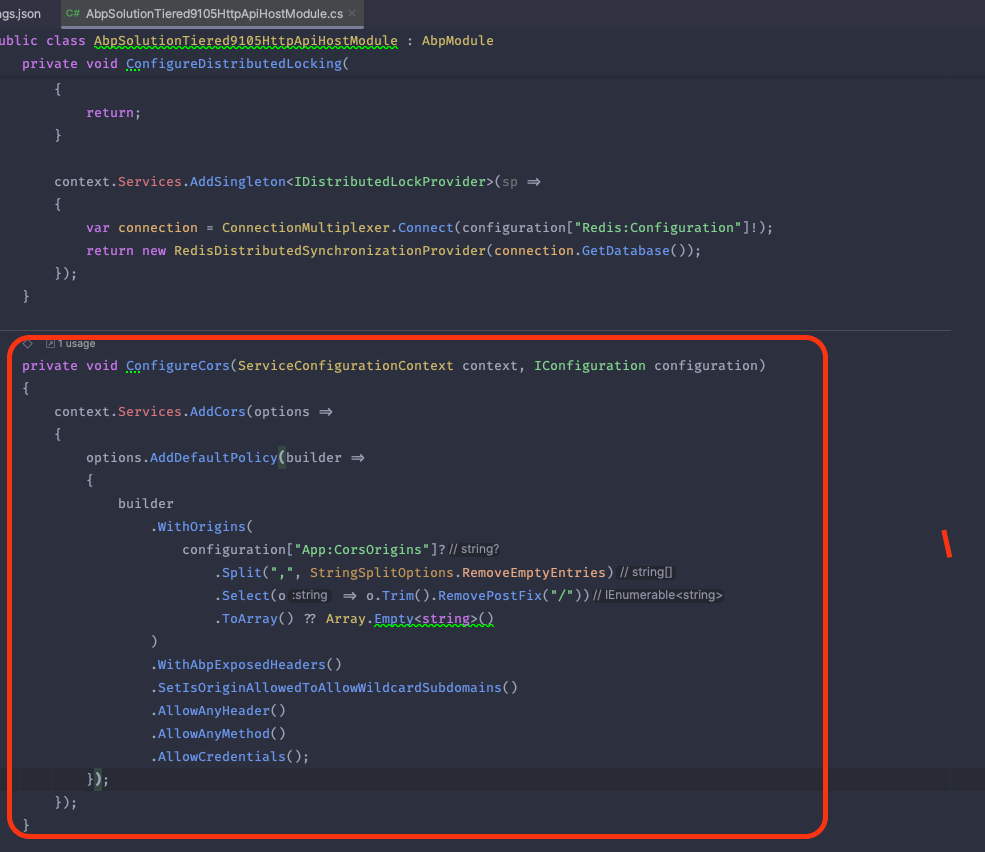
Since you created a tiered application, so did I, and therefore the following CORS setting is already available in HttpApiHost's module:
Result:
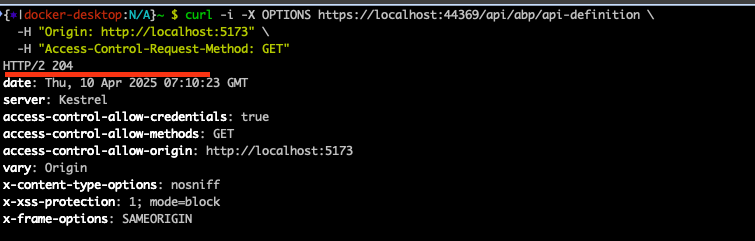
Can you control them in your case? Also, can you share the logs of your application (log.txt) located under the Logs folder?
Markdown supported.Copy, paste, or drag & drop images and files (max 100 MB per file, 100 MB total per post) -
0
sorry, I am using a layered application and non-Tiered, I was confused by layered and tiered. do you mind also checking the layered application for me. thanks
Hi, actually the configuration is the same for a layered MVC application and for a tiered application (the only difference is for a non-tiered application the configuration should be in the Web project and for the tiered application it should be in both). So, the related configuration should be in your web module:
Do you add the relevant codes in your web module class? (after creating the
ConfigureCorsmethod, ensure it's called in theConfigureServicesmethod)Markdown supported.Copy, paste, or drag & drop images and files (max 100 MB per file, 100 MB total per post) -
0
I don't see the code in the whole solution, I've actually searched for 'ConfigureCors' in the entire solution but found 0 matches, do I need to add the configurecors function myself? I want to clarify this to make sure I don't override anything underlying that might compromise security. thanks
Markdown supported.Copy, paste, or drag & drop images and files (max 100 MB per file, 100 MB total per post) -
1
Hi,
Yes, you need to add
ConfigureCorsmethod to your module class.public override void ConfigureServices(ServiceConfigurationContext context) { var configuration = context.Services.GetConfiguration(); var hostingEnvironment = context.Services.GetHostingEnvironment(); ....... ConfigureCors(context, configuration); } private void ConfigureCors(ServiceConfigurationContext context, IConfiguration configuration) { context.Services.AddCors(options => { options.AddDefaultPolicy(builder => { builder .WithOrigins( configuration["App:CorsOrigins"]? .Split(",", StringSplitOptions.RemoveEmptyEntries) .Select(o => o.Trim().RemovePostFix("/")) .ToArray() ?? Array.Empty<string>() ) .WithAbpExposedHeaders() .SetIsOriginAllowedToAllowWildcardSubdomains() .AllowAnyHeader() .AllowAnyMethod() .AllowCredentials(); }); }); }And add
app.UseCors();belowUseAbpSecurityHeaders..... app.UseAbpSecurityHeaders(); app.UseCors(); // add this line ....Markdown supported.Copy, paste, or drag & drop images and files (max 100 MB per file, 100 MB total per post) -
0
:)
Markdown supported.Copy, paste, or drag & drop images and files (max 100 MB per file, 100 MB total per post)



