Open Closed

No authorization! Make sure that you have logged in using the command `abp login <username>`. #9185


User avatar
0
mhw created

Check the docs before asking a question: https://docs.abp.io/en/commercial/latest/ Check the samples to see the basic tasks: https://docs.abp.io/en/commercial/latest/samples/index The exact solution to your question may have been answered before, and please first use the search on the homepage. Provide us with the following info:

  • ABP Framework version: v8.3.0
  • UI Type: Blazor web App
  • Database System: EF Core (MySql) ** Tiered (for MVC) or Auth Server Separated (for Angular): no
  • Exception message and full stack trace:
  • Steps to reproduce the issue: 已经使用 abp login m.... 登录过了。
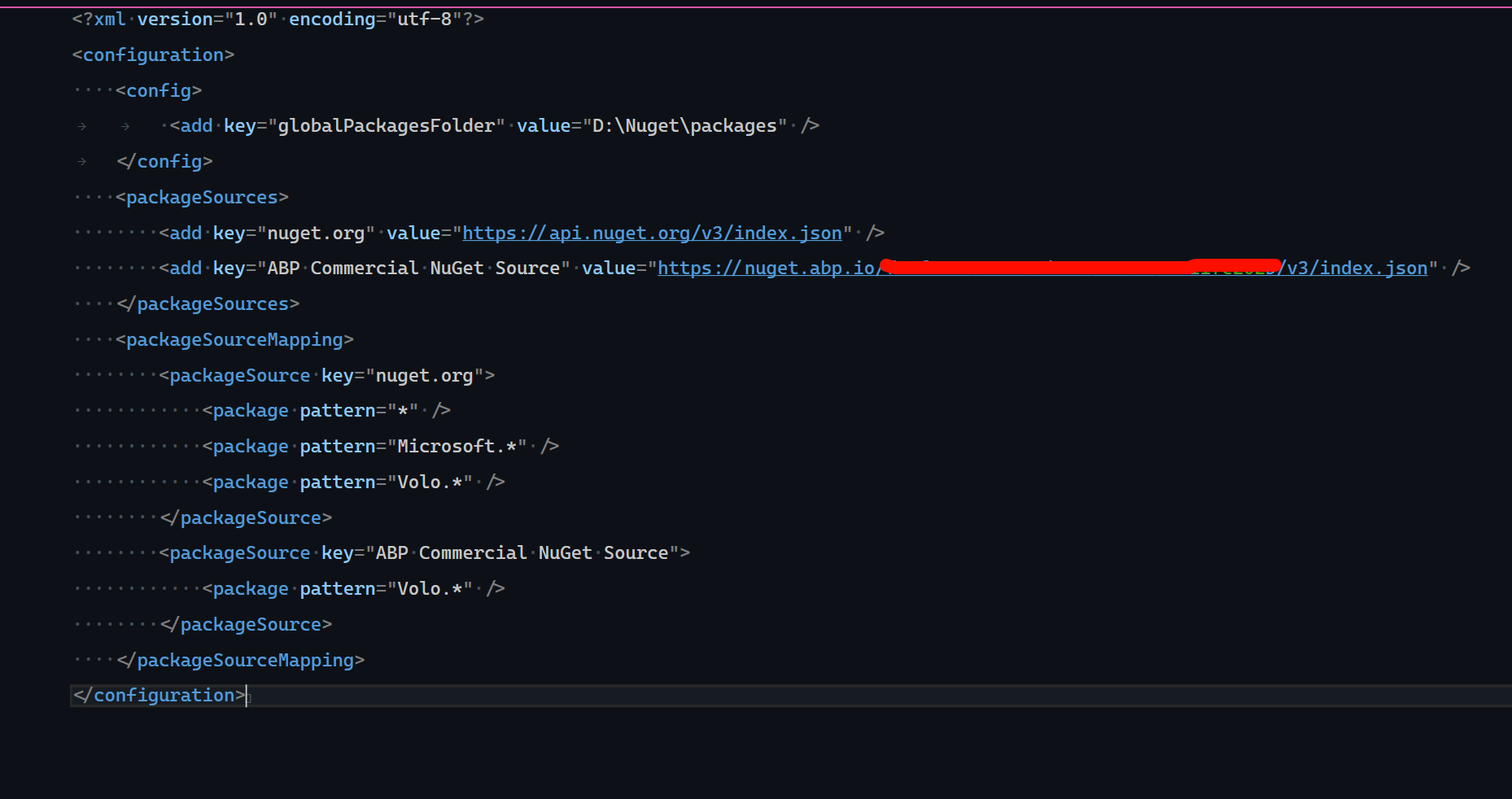
  • Nuget.config
Markdown supported.
Copy, paste, or drag & drop images and files (max 100 MB per file, 100 MB total per post)


10 Answer(s)
  • User Avatar
    0
    maliming created
    Support Team Fullstack Developer

    hi

    Is there an AbpLicenseCode in your project's appsettings.secret.json?

    What is the output of the abp login-info command?

    Thanks.

    Markdown supported.
    Copy, paste, or drag & drop images and files (max 100 MB per file, 100 MB total per post)
  • User Avatar
    0
    mhw created
    • appsettings.secret.json 有配置
    • 如何修改 appsettings.secret.jsonAbpLicenseCode 值,变更过一次Organization
    Markdown supported.
    Copy, paste, or drag & drop images and files (max 100 MB per file, 100 MB total per post)
  • User Avatar
    0
    maliming created
    Support Team Fullstack Developer

    如何修改 appsettings.secret.json 中 AbpLicenseCode 值,变更过一次Organization?

    请创建一个相同类型的项目, 然后复制新的项目的Code到当前项目在试试.

    Markdown supported.
    Copy, paste, or drag & drop images and files (max 100 MB per file, 100 MB total per post)
  • User Avatar
    0
    mhw created

    新项目没有 appsettings.secret.json文件

    Markdown supported.
    Copy, paste, or drag & drop images and files (max 100 MB per file, 100 MB total per post)

  • User Avatar
    0
    mhw created

    是不是因为我用owner登录的?

    Markdown supported.
    Copy, paste, or drag & drop images and files (max 100 MB per file, 100 MB total per post)

  • User Avatar
    0
    maliming created
    Support Team Fullstack Developer

    你可以试试使用开发者登录. 创建一个Pro模版项目

    Markdown supported.
    Copy, paste, or drag & drop images and files (max 100 MB per file, 100 MB total per post)
  • User Avatar
    0
    mhw created

    给个示例吧

    Markdown supported.
    Copy, paste, or drag & drop images and files (max 100 MB per file, 100 MB total per post)
  • User Avatar
    0
    maliming created
    Support Team Fullstack Developer

    下载Studio, 登录开发者账号, 然后创建一个项目

    https://abp.io/studio

    Markdown supported.
    Copy, paste, or drag & drop images and files (max 100 MB per file, 100 MB total per post)
  • User Avatar
    0
    mahuwei created

    可以了,就abp login ....因为使用owner账户登录造成的. 把这个问题关闭了吧,我关还得切换账户。

    Markdown supported.
    Copy, paste, or drag & drop images and files (max 100 MB per file, 100 MB total per post)
  • User Avatar
    0
    maliming created
    Support Team Fullstack Developer

    好的

    Markdown supported.
    Copy, paste, or drag & drop images and files (max 100 MB per file, 100 MB total per post)
Boost Your Development
ABP Live Training
Packages
See Trainings
Mastering ABP Framework Book
The Official Guide
Mastering
ABP Framework
Learn More
Mastering ABP Framework Book
Made with ❤️ on ABP v10.8.0-preview. Updated on September 16, 2026, 14:50
1
ABP Assistant
🔐 You need to be logged in to use the chatbot. Please log in first.