






Trying to upload a file with some other input data. I can send just the file up as a single input using this as an input: IRemoteStreamContent Content. but i need to send some other parameters.
I got an error that it could not deserialize my input dto so i added this to my module. This gets me by the Deserialization error, but my input has no data
        Configure<AbpAspNetCoreMvcOptions>(options =>
        {
            options.ConventionalControllers.FormBodyBindingIgnoredTypes.Add(typeof(PreviewFixedFileDto));
        });
interface for data i want to send to the end point
    public class PreviewFixedFileDto
    {
        public IRemoteStreamContent Content { get; set; }
        public List<AssessmentFileColumnDto> Columns { get; set; }
    }
public class FileColumnDto
{
    public string ColumnName { get; set; }
    public int From { get; set; }
    public int To { get; set; }
}
Angular Code
  previewFile(): void {
    const formData = new FormData();
    formData.append('source', this.file());

    this.parentService
      .fixedFilePreview({
        content: formData as any,
        columns: this.rows,
      })
      .subscribe(res => {
        console.log(res);
      });
  }
Also tried this:
  previewFile(): void {
    const formData = new FormData();
    formData.append('source', this.file());

    this.service
      .fixedFilePreview({
        content: {
          fileName: this.file().name,
          contentType: this.file().type,
          contentLength: this.file().size,
        },
        columns: this.rows,
      })
      .subscribe(res => {
        console.log(res);
      });
  }

11 Answer(s)
-
0
I would like to know the answer on this question. But in truth I am using a work-around, So whenever I can get an answer will be good. We do have another ticket that is more pressing, and any attention that can be given to it, even though my ticket might take longer to resolve would be good: https://abp.io/support/questions/9225/401-on-ABP-API-Using-External-OpenID-Access-Token-Works-from-Browser-and-Swagger
Markdown supported.Copy, paste, or drag & drop images and files (max 100 MB per file, 100 MB total per post) -
0
hi
Adding your DTO to
FormBodyBindingIgnoredTypesis the right way.Can you share the HTTP request info when you send the post request in the Angular app?
HTTP request
content-typeand payload. eg: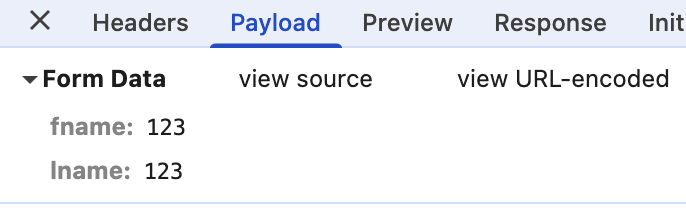 Markdown supported.Copy, paste, or drag & drop images and files (max 100 MB per file, 100 MB total per post)
 -
0
Since i already have a work around, i had to put back some of the code, but in the application, i get the source, no columns

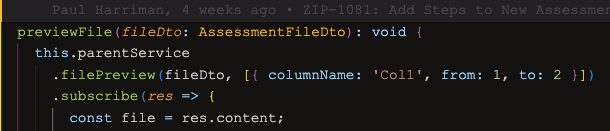
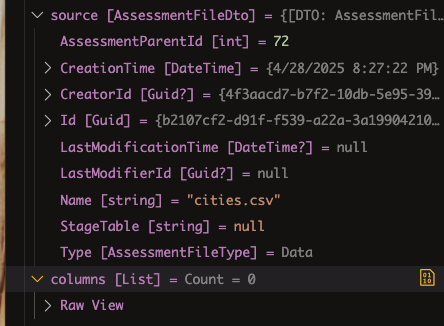 Markdown supported.Copy, paste, or drag & drop images and files (max 100 MB per file, 100 MB total per post)
 -
0
public class AssessmentFileColumnDto
{
    public string ColumnName { get; set; }
    public int From { get; set; }
    public int To { get; set; }
}
also if it helps, the example i sent above is sending of the file stream and extra data as 2 different properties to the endpoint.
This code base is using sends only one property containing the stream and the extra data i get a similar error
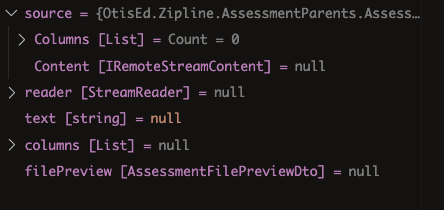
this the Service method
    public async Task<AssessmentFilePreviewDto> FilePreview2Async(AssessmentPreviewFixedFileDto source)
    {
        using var reader = new StreamReader(source.Content.GetStream());
        var text = await reader.ReadToEndAsync();

        // Get columns
        var columns = source.Columns;

        var filePreview = new AssessmentFilePreviewDto
        {
            Content = text.Trim('\0')
        };

        return filePreview;
    }
public class AssessmentPreviewFixedFileDto { public IRemoteStreamContent Content { get; set; } public List<AssessmentFileColumnDto> Columns { get; set; } }here's the special form binding
Configure<AbpAspNetCoreMvcOptions>(options =>
{              options.ConventionalControllers.FormBodyBindingIgnoredTypes.Add(typeof(AssessmentPreviewFixedFileDto));
});
previewFile(fileDto: AssessmentFileDto): void { this.parentService .filePreview2({ content: fileDto as any, columns: [{ columnName: 'Col', from: 1, to: 3 }], }) .subscribe(res => { const file = res.content; const csv = this.fileHelperService.parseCsv( file, this.parentHelperService.getDelimiter(fileDto['delimiter']), ); this.csvFile = { headers: csv.meta.fields, rows: csv.data, errors: csv.errors, }; this.isPreviewing = true; }); }proxy
  filePreview2 = (source: AssessmentPreviewFixedFileDto, config?: Partial<Rest.Config>) =>
    this.restService.request<any, AssessmentFilePreviewDto>({
      method: 'GET',
      url: '/api/app/assessment-parents/preview-2',
      params: { columns: source.columns },
      body: source.content,
    },
    { apiName: this.apiName,...config });
browser request
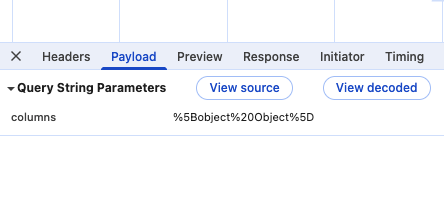
if u want i can share all the code, i still have ur email. or i can do something online w/ u. or if u have something u want me to try, i am willing to try out
Markdown supported.Copy, paste, or drag & drop images and files (max 100 MB per file, 100 MB total per post) -
0

hi
If you want to bind
List<AssessmentFileColumnDto> Columnsfrom the querystringYour querystring should be:
?Columns[0].ColumnName=Name1&Columns[0].From=1&Columns[0].To=5&Columns[1].ColumnName=Name2&Columns[1].From=6&Columns[1].To=10public class PreviewFixedFileDto { public IRemoteStreamContent Content { get; set; } public List<AssessmentFileColumnDto> Columns { get; set; } } public class AssessmentFileColumnDto { public string ColumnName { get; set; } public int From { get; set; } public int To { get; set; } }Markdown supported.Copy, paste, or drag & drop images and files (max 100 MB per file, 100 MB total per post) -
0
this what was generated by abp when i did generate proxies:
  filePreview2 = (source: AssessmentPreviewFixedFileDto, config?: Partial<Rest.Config>) =>
    this.restService.request<any, AssessmentFilePreviewDto>({
      method: 'GET',
      url: '/api/app/assessment-parents/preview-2',
      params: { columns: source.columns },
      body: source.content,
    },
    { apiName: this.apiName,...config });
this is:
AssessmentPreviewFixedFileDtoexport interface AssessmentPreviewFixedFileDto { content: IRemoteStreamContent; columns: AssessmentFileColumnDto[];}Markdown supported.Copy, paste, or drag & drop images and files (max 100 MB per file, 100 MB total per post) -
0
hi
You can check this article.
https://abp.io/community/articles/how-to-upload-and-download-files-in-the-abp-framework-using-angular-que8cdr8
Markdown supported.Copy, paste, or drag & drop images and files (max 100 MB per file, 100 MB total per post) -
0
I read the article. that is what I am doing. it works great if you just send a file to the endpoint. if you send more than just a file, it does not work. that is why u need to add the special binder
Configure(options =>
{              options.ConventionalControllers.FormBodyBindingIgnoredTypes.Add(typeof(AssessmentPreviewFixedFileDto));
});
I will try stringify'ing the other parameters, and deserialize on the server. maybe that will work.
Markdown supported.Copy, paste, or drag & drop images and files (max 100 MB per file, 100 MB total per post) -
0
hi
Generated proxy may have issues, you can try sending an HTTP request yourself.
By the way, you can test the HTTP request in Postman, then implement it in Angular.
Thanks.
Markdown supported.Copy, paste, or drag & drop images and files (max 100 MB per file, 100 MB total per post)



