






Check the docs before asking a question: https://abp.io/docs/latest Check the samples to see the basic tasks: https://abp.io/docs/latest/samples The exact solution to your question may have been answered before, and please first use the search on the homepage.
Provide us with the following info:
🧐 Hint: If you are using the ABP Studio, you can see all the information about your solution from the configuration window, which opens when you right-click on the solution and click on the Solution Configuration button.
- Template: app
- Created ABP Studio Version: 0.9.25
- Current ABP Studio Version: 0.9.26
- Tiered: Yes
- Multi-Tenancy: Yes
- UI Framework: blazor-server
- Theme: leptonx
- Theme Style: system
- Run Install Libs: Yes
- Database Provider: ef
- Database Management System: sqlserver
- Separate Tenant Schema: Yes
- Create Initial Migration: Yes
- Run Db Migrator: Yes
- Mobile Framework: maui
- Public Website: Yes
- Include Tests: Yes
- Kubernetes Configuration: No
- Distributed Event Bus: rabbitmq
- Use Local References: No
- Optional Modules:
- GDPR
- FileManagement
- TextTemplateManagement
- LanguageManagement
- AuditLogging
- Chat
- OpenIddictAdmin
- Exception message and full stack trace:
- Steps to reproduce the issue:
Issue Summary: After upgrading ABP Suite from version 9.1.0 to 9.1.2 using the "abp suite update" command as outlined in the official installation guide (ABP Suite Installation Guide - https://abp.io/docs/latest/suite/how-to-install), the application fails to launch and terminates unexpectedly. Steps Taken:
- After the failure I fully uninstalled ABP Suite, ensuring removal of all related folders and files as recommended in the installation guide.
- Cleared cache and performed a clean reinstallation.
- Reinstalled ABP Suite 9.1.2, but the issue persists.
Error Details presented in the images below.

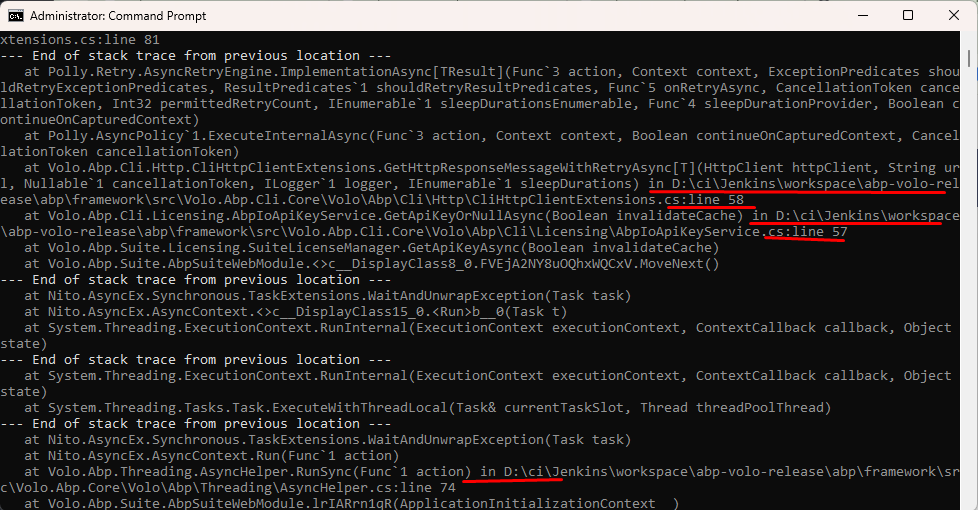
After found this root cause, I downgraded the ABP Suite to version 9.1.0 using ABP Studio and ABP Suite was lauched without error.
Additional Observations:
- The error trace includes fixed paths referencing a D:\ drive, which does not exist on my machine. This suggests the paths might have been hardcoded in the release distribution.
- The issue persists even after a clean installation of version 9.1.2.
Request for Assistance:
- Guidance on resolving the invalid request URI/BaseAddress issue existing on the version 9.1.2
- Confirmation on whether the hardcoded D:\ drive paths were mistakenly included in the distribution.
Please, after this solution refund 1 credit on my support tickets availabity.
2 Answer(s)
-
0
Hi, thanks for reporting this problem. We have already fixed that problem and will release v9.1.3 with the fix (https://github.com/abpframework/abp/pull/22861).
I'm refunding your ticket, so please wait for v9.1.3 to upgrade the ABP Suite, which we will release probably tomorrow or in the next week (as soon as possible).
Regards.
Markdown supported.Copy, paste, or drag & drop images and files (max 100 MB per file, 100 MB total per post) -
0
Thank you, Engincan!! Have a great day!
Markdown supported.Copy, paste, or drag & drop images and files (max 100 MB per file, 100 MB total per post)


