






0
rajasekhard2015 created
How to add my custom settings using razor page
Markdown supported.
Copy, paste, or drag & drop images and files (max 100 MB per file, 100 MB total per post)
7 Answer(s)
-
0
I Have added the code as you given in the document. but its not reflecting in the UI (unable to see the custom settings)
Markdown supported.Copy, paste, or drag & drop images and files (max 100 MB per file, 100 MB total per post) -
0
Hi @rajasekhard2015
Do you create your own settings management page? It doesn't appear automatically.
Markdown supported.Copy, paste, or drag & drop images and files (max 100 MB per file, 100 MB total per post) -
0
No.. just added the customsettings provider only. Please give me the steps. based on that i will create.
Markdown supported.Copy, paste, or drag & drop images and files (max 100 MB per file, 100 MB total per post) -
0
Hi, I recently did something similar and ended up referring to this example code https://github.com/EasyAbp/Abp.SettingUi
Markdown supported.Copy, paste, or drag & drop images and files (max 100 MB per file, 100 MB total per post) -
1
@rajasekhard2015
Steps to add a setting tab:
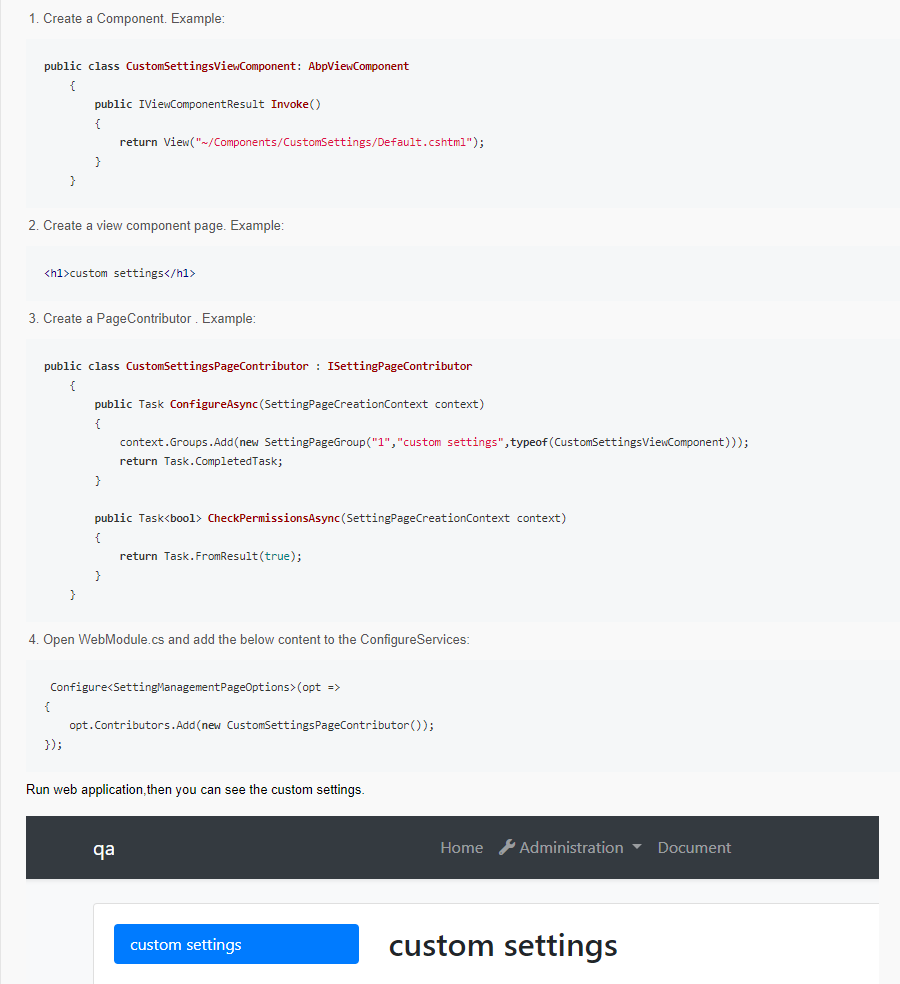 Markdown supported.Copy, paste, or drag & drop images and files (max 100 MB per file, 100 MB total per post)
 -
0
Thanks for your response.
Markdown supported.Copy, paste, or drag & drop images and files (max 100 MB per file, 100 MB total per post)



