






I have set the separate database connetionstring in page,but can't login use tenant?
- Exception message and full stack trace: *when login by tenant,the exception show can't find demo.abpusers table ?
- Steps to reproduce the issue:
22 Answer(s)
-
0
hi
I have set the separate database connetionstring in page,
can't find demo.abpusers table
Can you share your settings from this page and full exception logs?
Thanks.
Markdown supported.Copy, paste, or drag & drop images and files (max 100 MB per file, 100 MB total per post) -
0
[maliming] said: hi
I have set the separate database connetionstring in page,
can't find demo.abpusers table
Can you share your settings from this page and full exception logs?
Thanks.
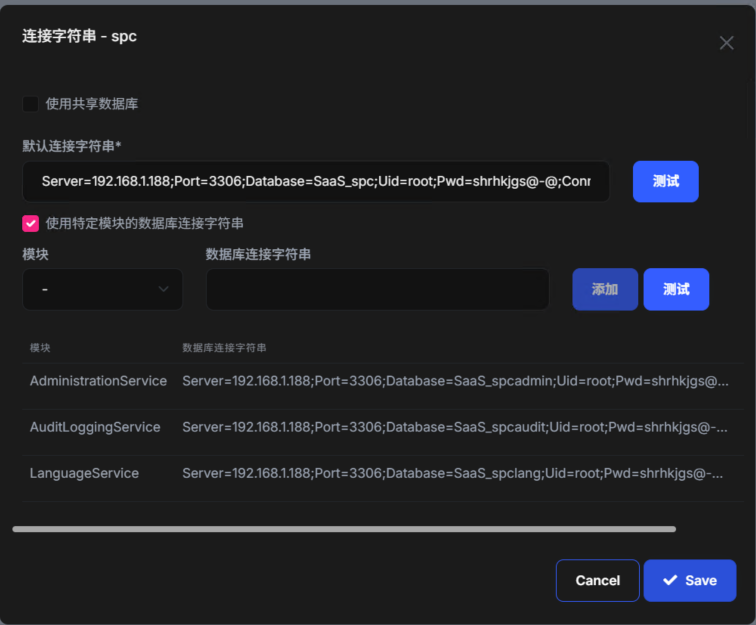 default:Server=192.168.1.188;Port=3306;Database=SaaS_spc;Uid=root;Pwd=shrhkjgs@-@;
AdministrationService Server=192.168.1.188;Port=3306;Database=SaaS_spcadmin;Uid=root;Pwd=shrhkjgs@-@
AuditLoggingService Server=192.168.1.188;Port=3306;Database=SaaS_spcaudit;Uid=root;Pwd=shrhkjgs@-@;
LanguageService Server=192.168.1.188;Port=3306;Database=SaaS_spclang;Uid=root;Pwd=shrhkjgs@-@;
default:Server=192.168.1.188;Port=3306;Database=SaaS_spc;Uid=root;Pwd=shrhkjgs@-@;
AdministrationService Server=192.168.1.188;Port=3306;Database=SaaS_spcadmin;Uid=root;Pwd=shrhkjgs@-@
AuditLoggingService Server=192.168.1.188;Port=3306;Database=SaaS_spcaudit;Uid=root;Pwd=shrhkjgs@-@;
LanguageService Server=192.168.1.188;Port=3306;Database=SaaS_spclang;Uid=root;Pwd=shrhkjgs@-@;After use tenant login,it give the exception:
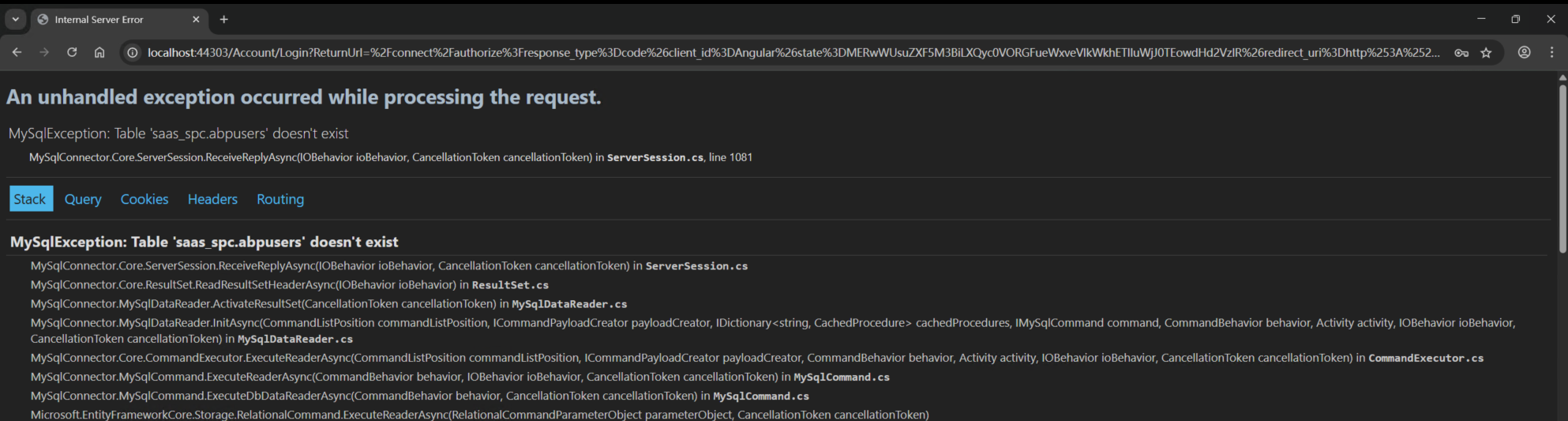 Markdown supported.Copy, paste, or drag & drop images and files (max 100 MB per file, 100 MB total per post)
 -
0
hi
Have you overridden the Login page?
Have you set custom connection string for current tenants?
Can you share the
logs.txtof yourlocalhost:44303project?Thanks.
Markdown supported.Copy, paste, or drag & drop images and files (max 100 MB per file, 100 MB total per post) -
0
[maliming] said: hi
Have you overridden the Login page?
Have you set custom connection string for current tenants?
Can you share the
logs.txtof yourlocalhost:44303project?Thanks.
Excuse me , the last problem is solved, i can use tenant to login ,but i found new problem, when i click chat and file management, it given new exception:
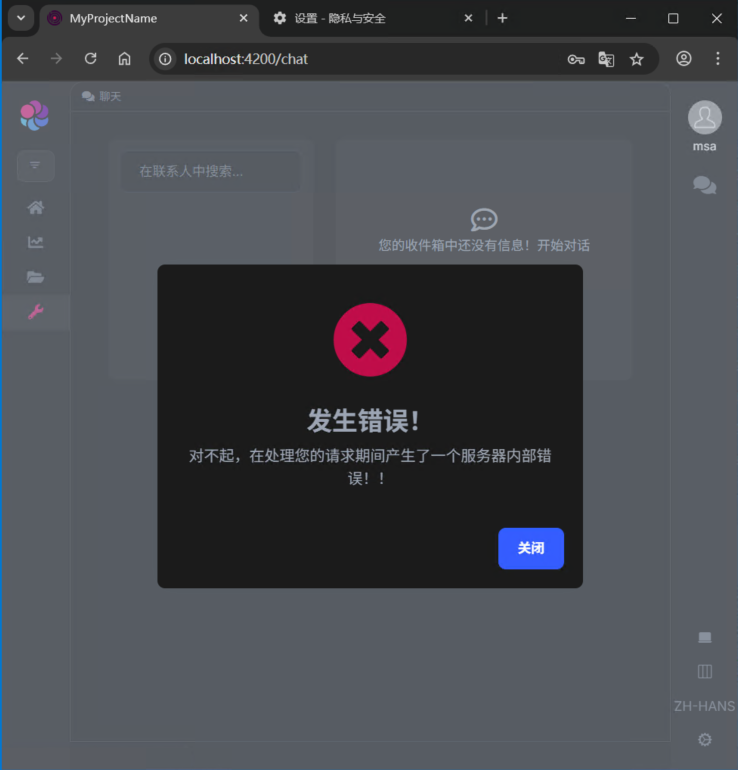
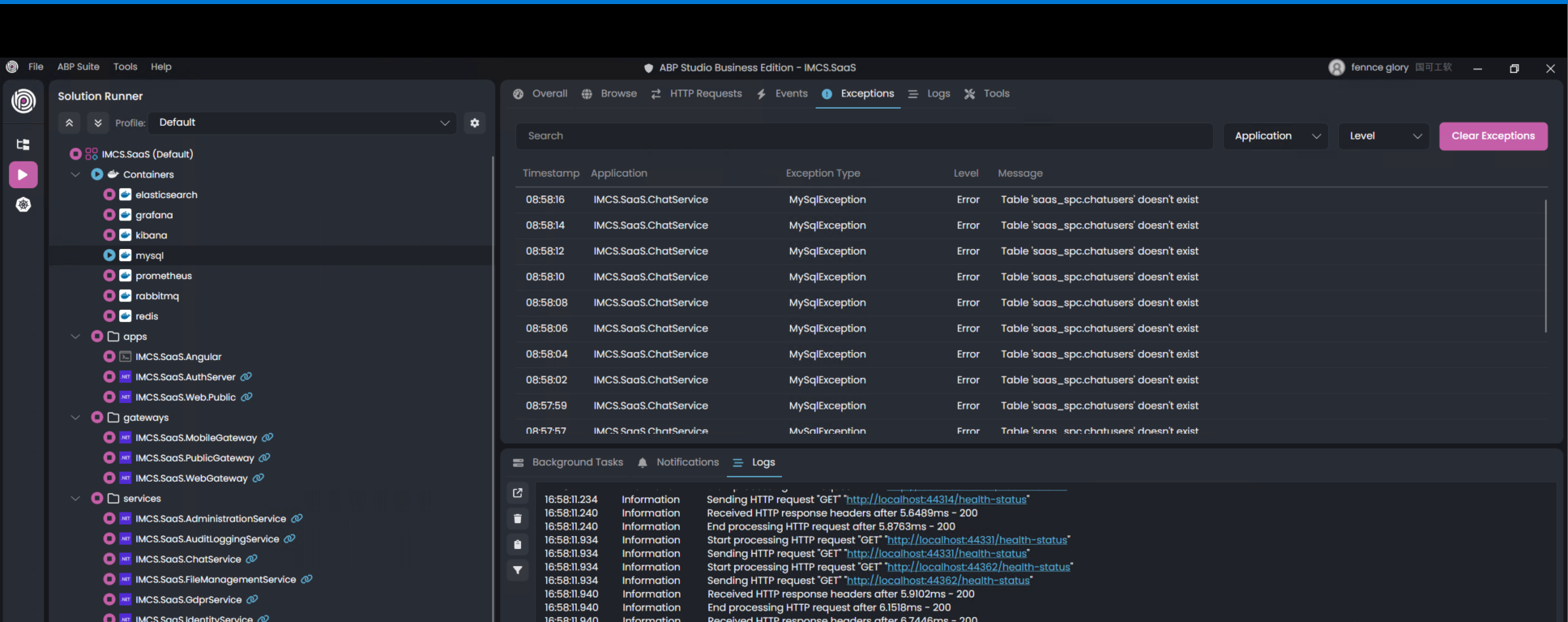 Markdown supported.Copy, paste, or drag & drop images and files (max 100 MB per file, 100 MB total per post)
 -
0
[48949912] said:
[maliming] said: hi
Have you overridden the Login page?
Have you set custom connection string for current tenants?
Can you share the
logs.txtof yourlocalhost:44303project?Thanks.
Excuse me , the last problem is solved, i can use tenant to login ,but i found new problem, when i click chat and file management, it given new exception:
The DataBase Connection string for tenant user:
default:Server=192.168.1.188;Port=3306;Database=SaaS_spc;Uid=root;Pwd=shrhkjgs@-@;
AdministrationService Server=192.168.1.188;Port=3306;Database=SaaS_spcadmin;Uid=root;Pwd=shrhkjgs@-@
AuditLoggingService Server=192.168.1.188;Port=3306;Database=SaaS_spcaudit;Uid=root;Pwd=shrhkjgs@-@;
LanguageService Server=192.168.1.188;Port=3306;Database=SaaS_spclang;Uid=root;Pwd=shrhkjgs@-@;Markdown supported.Copy, paste, or drag & drop images and files (max 100 MB per file, 100 MB total per post) -
0
In an ABP microservice solution, to use a separate database per tenant, you must ensure that:
- The tenant's connection string is set correctly in the SaaS management UI or via API.
- The database for the tenant is created and all required tables (e.g.,
AbpUsers) are present.
The error "can't find demo.abpusers table" indicates that the tenant's database does not have the necessary tables. This usually happens if database migrations have not been applied to the new tenant's database.
Solution:
Set the Tenant Connection String:
- In the SaaS management UI, set the "Default" connection string for the tenant to point to a new, empty database.
Apply Migrations to the Tenant Database:
- ABP does not automatically run migrations for new tenant databases in microservice solutions. You must run the DbMigrator application to apply all module and application migrations to the tenant's database.
- Run the DbMigrator after setting the connection string. This will create all required tables (including
AbpUsers) in the tenant's database.
Example command (from the root of your solution):
dotnet run --project YourProject.DbMigrator- Ensure your connection strings and environment variables are set so the migrator can access all tenant databases.
Verify Database:
- After running the migrator, check the tenant's database to confirm that all tables are created.
Retry Login:
- Now, login as the tenant should work, as the required tables exist.
Note: In microservice solutions, each service may have its own DbMigrator. You must run the migrator for each service that uses a database.
References:
- ABP Multi-Tenancy documentation
- Multi-Tenancy with Separate Databases in ABP
- Microservice Solution Database Configurations
This response was generated by AI. If it didn’t solve your problem, feel free to post a new answer — our support team will jump in to help you soon.
Markdown supported.Copy, paste, or drag & drop images and files (max 100 MB per file, 100 MB total per post) -
0
hi
The error is
MySqlConnector.MySqlException (0x80004005): Table 'saas_spc.chatusers' doesn't existdefault:Server=192.168.1.188;Port=3306;Database=SaaS_spc;Uid=root;Pwd=shrhkjgs@-@; AdministrationService Server=192.168.1.188;Port=3306;Database=SaaS_spcadmin;Uid=root;Pwd=shrhkjgs@-@ AuditLoggingService Server=192.168.1.188;Port=3306;Database=SaaS_spcaudit;Uid=root;Pwd=shrhkjgs@-@; LanguageService Server=192.168.1.188;Port=3306;Database=SaaS_spclang;Uid=root;Pwd=shrhkjgs@-@;Can you check the tables in the
SaaS_spcdatabase?Thanks.
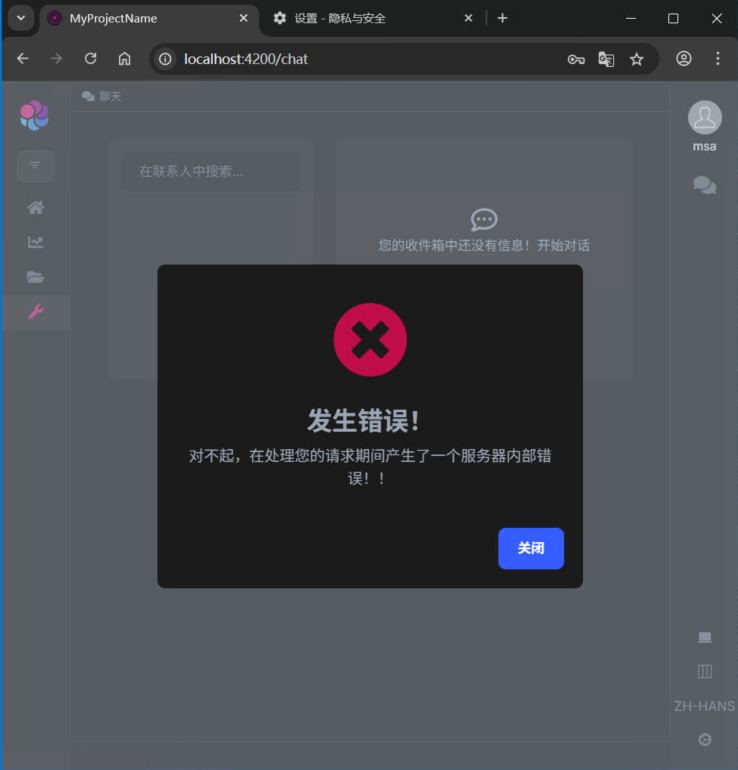 Markdown supported.Copy, paste, or drag & drop images and files (max 100 MB per file, 100 MB total per post)
 -
0
[maliming] said: hi
The error is
MySqlConnector.MySqlException (0x80004005): Table 'saas_spc.chatusers' doesn't existdefault:Server=192.168.1.188;Port=3306;Database=SaaS_spc;Uid=root;Pwd=shrhkjgs@-@; AdministrationService Server=192.168.1.188;Port=3306;Database=SaaS_spcadmin;Uid=root;Pwd=shrhkjgs@-@ AuditLoggingService Server=192.168.1.188;Port=3306;Database=SaaS_spcaudit;Uid=root;Pwd=shrhkjgs@-@; LanguageService Server=192.168.1.188;Port=3306;Database=SaaS_spclang;Uid=root;Pwd=shrhkjgs@-@;Can you check the tables in the
SaaS_spcdatabase?Thanks.
Excuse me,i can‘t find the table “chatusers” in the database “saas_spc”,not create after set tenant separate database connectionstring by the page。
Markdown supported.Copy, paste, or drag & drop images and files (max 100 MB per file, 100 MB total per post) -
0
What are the connection strings of the current tenant?
You can try creating a new tenant with a custom connection string, then check the logs.txt file to see if the tenant migration is successful.
Thanks.
Markdown supported.Copy, paste, or drag & drop images and files (max 100 MB per file, 100 MB total per post) -
0
[maliming] said: What are the connection strings of the current tenant?
You can try creating a new tenant with a custom connection string, then check the logs.txt file to see if the tenant migration is successful.
Thanks.
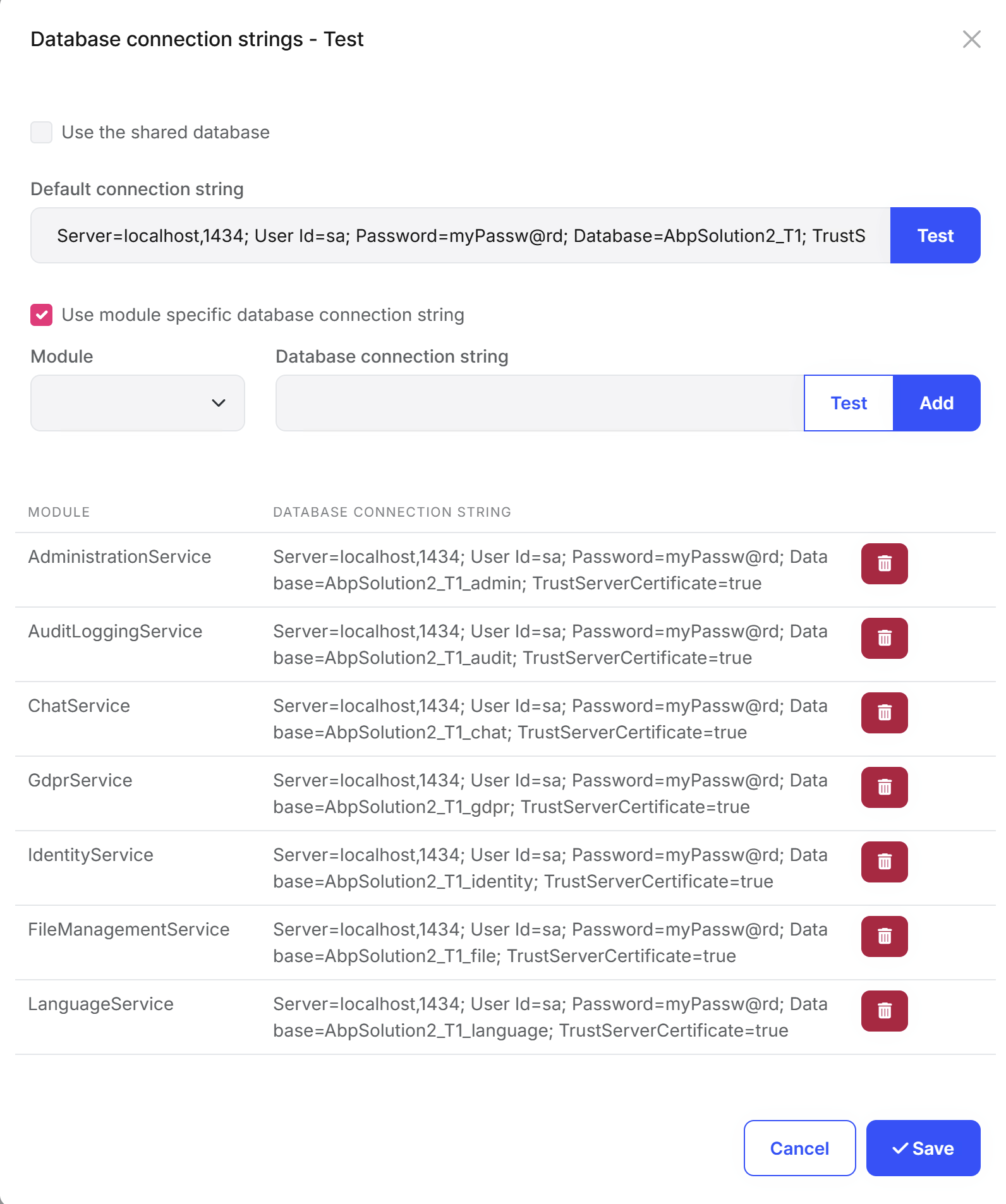
I have Create New Microservice Solution? I create a new tenant:sungrow,The tenant separate database connectionstring like this:
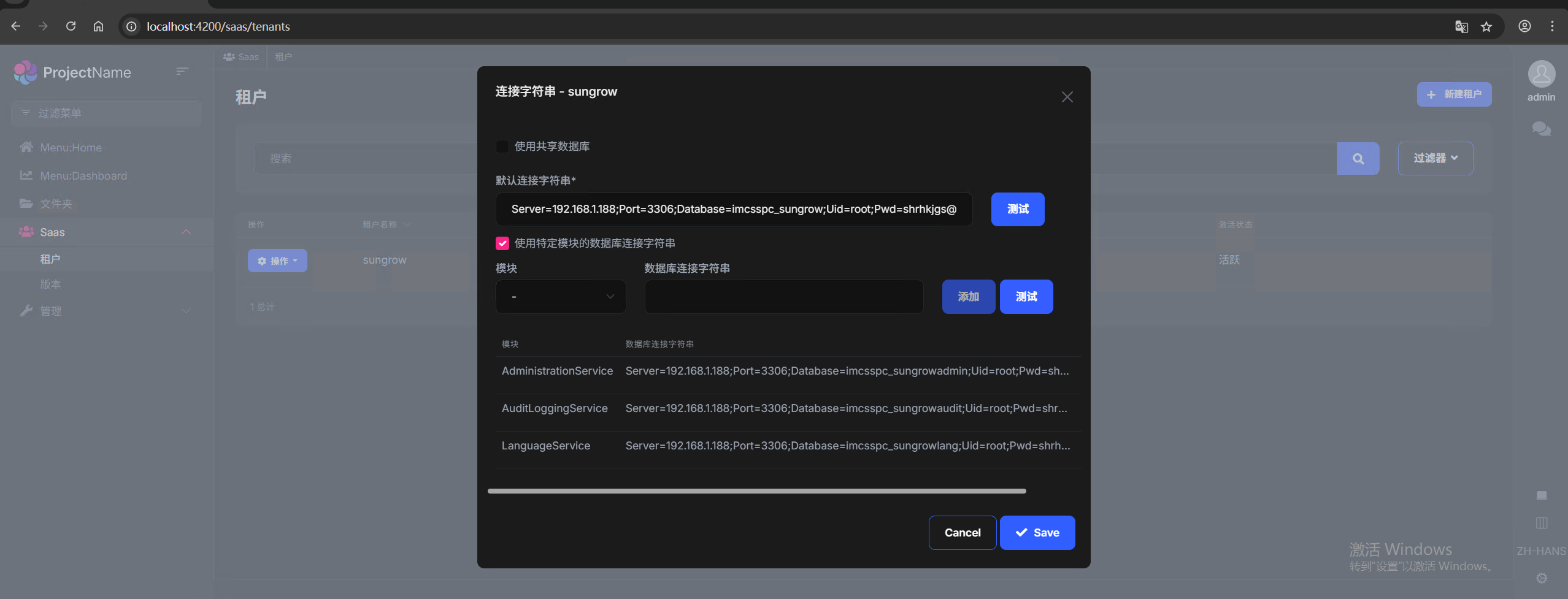
After set tenant separate database connectionstring and click 'save' button,I have send the logs to liming.ma@volosoft.com
After login use tenant,throw the exception:
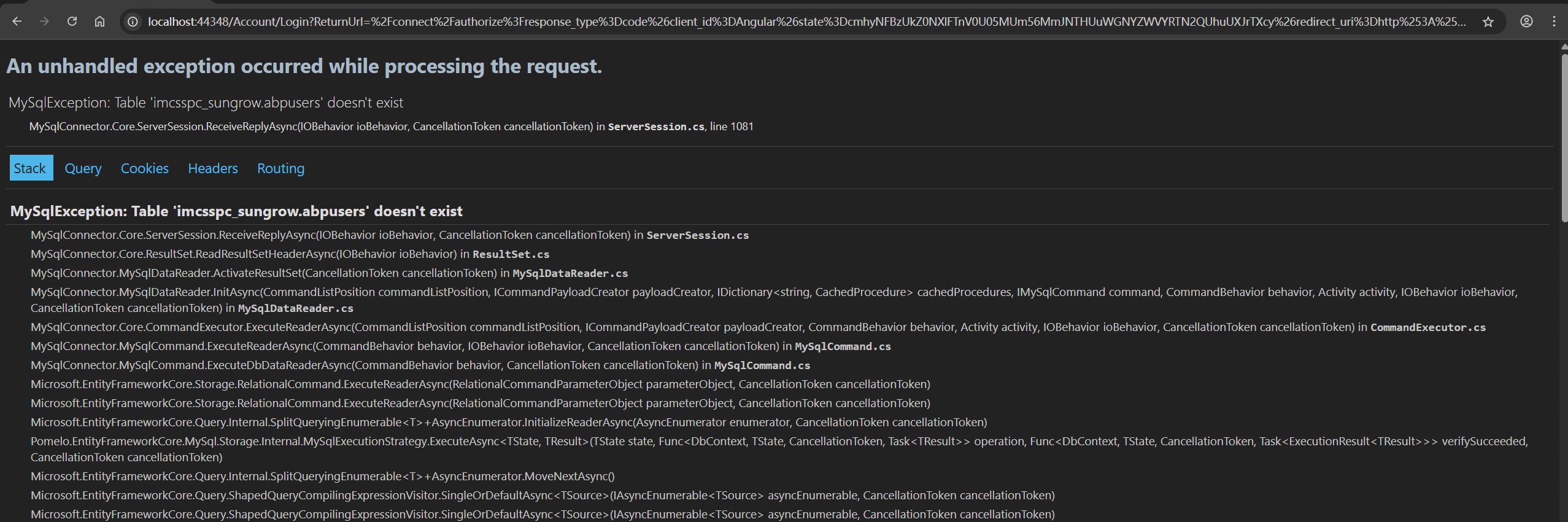
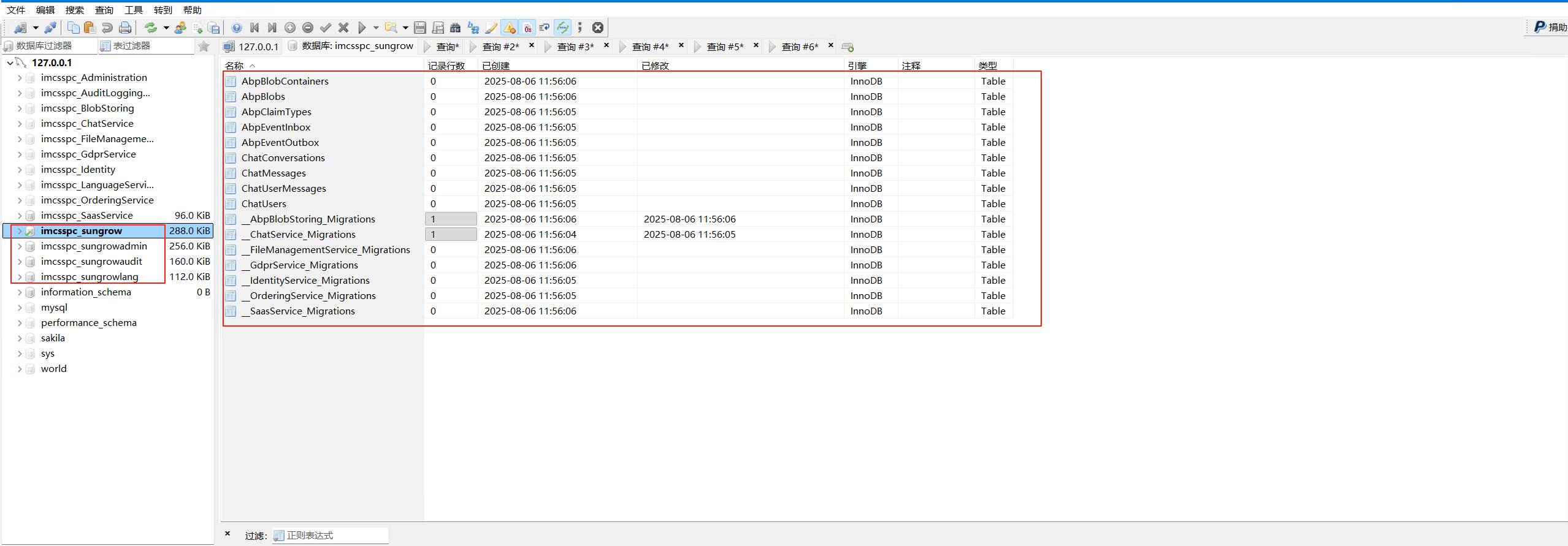
So I Check the tenant database,the Table 'imcsspc sungrow.abpusers' doesn't exist:
It's really urgent - been stuck for days without resolution!
Markdown supported.Copy, paste, or drag & drop images and files (max 100 MB per file, 100 MB total per post) -
0
hi
After login use tenant,throw the exception:
Can you share the logs after this exception?
I checked the logs. The databases have migrated successfully.
Thanks.
Markdown supported.Copy, paste, or drag & drop images and files (max 100 MB per file, 100 MB total per post) -
0
[maliming] said: hi
After login use tenant,throw the exception:
Can you share the logs after this exception?
I checked the logs. The databases have migrated successfully.
Thanks.
I have send the logs to liming.ma@volosoft.com
Markdown supported.Copy, paste, or drag & drop images and files (max 100 MB per file, 100 MB total per post) -
0
hi
Try to update
XXXSaasServiceModuleandSaasServiceDatabaseMigrationEventHandleras below:Then set connection strings for each microserver in a tenant.
Configure<AbpDbConnectionOptions>(options =>
{
    options.Databases.Configure("AdministrationService", database =>
    {
        database.MappedConnections.Add(AbpPermissionManagementDbProperties.ConnectionStringName);
        database.MappedConnections.Add(AbpFeatureManagementDbProperties.ConnectionStringName);
        database.MappedConnections.Add(AbpSettingManagementDbProperties.ConnectionStringName);
    });

    options.Databases.Configure("AuditLoggingService", database =>
    {
        database.MappedConnections.Add(AbpAuditLoggingDbProperties.ConnectionStringName);
    });

    options.Databases.Configure("ChatService", database =>
    {
        database.MappedConnections.Add("ChatService");
    });

    options.Databases.Configure("GdprService", database =>
    {
        database.MappedConnections.Add("GdprService");
    });

    options.Databases.Configure("IdentityService", database =>
    {
        database.MappedConnections.Add("IdentityService");
    });

    options.Databases.Configure("FileManagementService", database =>
    {
        database.MappedConnections.Add("FileManagementService");
    });

    options.Databases.Configure("LanguageService", database =>
    {
        database.MappedConnections.Add(LanguageManagementDbProperties.ConnectionStringName);
    });
});
using Volo.Abp.EntityFrameworkCore.Migrations; using Volo.Abp.EventBus.Distributed; using Volo.Abp.DistributedLocking; using Volo.Abp.MultiTenancy; using Volo.Abp.Uow; using Volo.Abp.Data; namespace AbpSolution2.SaasService.Data; public class SaasServiceDatabaseMigrationEventHandler : EfCoreDatabaseMigrationEventHandlerBase<SaasServiceDbContext> { private readonly SaasServiceDataSeeder _dataSeeder; public SaasServiceDatabaseMigrationEventHandler( ILoggerFactory loggerFactory, ICurrentTenant currentTenant, IUnitOfWorkManager unitOfWorkManager, ITenantStore tenantStore, IAbpDistributedLock abpDistributedLock, IDistributedEventBus distributedEventBus, SaasServiceDataSeeder dataSeeder ) : base( SaasServiceDbContext.DatabaseName, currentTenant, unitOfWorkManager, tenantStore, abpDistributedLock, distributedEventBus, loggerFactory) { _dataSeeder = dataSeeder; } public override Task HandleEventAsync(TenantCreatedEto eventData) { return Task.CompletedTask; } public override Task HandleEventAsync(ApplyDatabaseMigrationsEto eventData) { return Task.CompletedTask; } public override Task HandleEventAsync(TenantConnectionStringUpdatedEto eventData) { return Task.CompletedTask; } protected override async Task SeedAsync(Guid? tenantId) { await _dataSeeder.SeedAsync(tenantId); } }Markdown supported.Copy, paste, or drag & drop images and files (max 100 MB per file, 100 MB total per post) -
0
[maliming] said: hi
Try to update
XXXSaasServiceModuleandSaasServiceDatabaseMigrationEventHandleras below:Then set connection strings for each microserver in a tenant.
Configure<AbpDbConnectionOptions>(options =>
{
    options.Databases.Configure("AdministrationService", database =>
    {
        database.MappedConnections.Add(AbpPermissionManagementDbProperties.ConnectionStringName);
        database.MappedConnections.Add(AbpFeatureManagementDbProperties.ConnectionStringName);
        database.MappedConnections.Add(AbpSettingManagementDbProperties.ConnectionStringName);
    });

    options.Databases.Configure("AuditLoggingService", database =>
    {
        database.MappedConnections.Add(AbpAuditLoggingDbProperties.ConnectionStringName);
    });

    options.Databases.Configure("ChatService", database =>
    {
        database.MappedConnections.Add("ChatService");
    });

    options.Databases.Configure("GdprService", database =>
    {
        database.MappedConnections.Add("GdprService");
    });

    options.Databases.Configure("IdentityService", database =>
    {
        database.MappedConnections.Add("IdentityService");
    });

    options.Databases.Configure("FileManagementService", database =>
    {
        database.MappedConnections.Add("FileManagementService");
    });

    options.Databases.Configure("LanguageService", database =>
    {
        database.MappedConnections.Add(LanguageManagementDbProperties.ConnectionStringName);
    });
});
using Volo.Abp.EntityFrameworkCore.Migrations; using Volo.Abp.EventBus.Distributed; using Volo.Abp.DistributedLocking; using Volo.Abp.MultiTenancy; using Volo.Abp.Uow; using Volo.Abp.Data; namespace AbpSolution2.SaasService.Data; public class SaasServiceDatabaseMigrationEventHandler : EfCoreDatabaseMigrationEventHandlerBase<SaasServiceDbContext> { private readonly SaasServiceDataSeeder _dataSeeder; public SaasServiceDatabaseMigrationEventHandler( ILoggerFactory loggerFactory, ICurrentTenant currentTenant, IUnitOfWorkManager unitOfWorkManager, ITenantStore tenantStore, IAbpDistributedLock abpDistributedLock, IDistributedEventBus distributedEventBus, SaasServiceDataSeeder dataSeeder ) : base( SaasServiceDbContext.DatabaseName, currentTenant, unitOfWorkManager, tenantStore, abpDistributedLock, distributedEventBus, loggerFactory) { _dataSeeder = dataSeeder; } public override Task HandleEventAsync(TenantCreatedEto eventData) { return Task.CompletedTask; } public override Task HandleEventAsync(ApplyDatabaseMigrationsEto eventData) { return Task.CompletedTask; } public override Task HandleEventAsync(TenantConnectionStringUpdatedEto eventData) { return Task.CompletedTask; } protected override async Task SeedAsync(Guid? tenantId) { await _dataSeeder.SeedAsync(tenantId); } }Thanks a lot! I I'm going to test right away.
Markdown supported.Copy, paste, or drag & drop images and files (max 100 MB per file, 100 MB total per post) -
0
[maliming] said: ok, you can create a new tenant and set all service connection strings.
Thanks.
According to the method you provided above, it can currently be used normally. You are professional!
Markdown supported.Copy, paste, or drag & drop images and files (max 100 MB per file, 100 MB total per post) -
0
hi
Actually, we don't recommend setting independent connection strings for tenants in microservices. However, you can try it and feel free to provide feedback if you encounter any problems.
Thanks.
Markdown supported.Copy, paste, or drag & drop images and files (max 100 MB per file, 100 MB total per post)



