






Hello; I have opened multiple MVC+Postgresql+Tiered projects. Their tasks are:
- Auth Server (A)
- Lab Management (L)
- n+
I want all applications to use the Auth Server for authentication and authorization. I filled in the AuthServer section in appsettings.json in the projects (web and host). I added the relevant project names to the AuthServer openiddict tables. I even disabled DynamicClaims. However, the clients' web applications cannot obtain permissions from the AuthServer.
Is there an article, video, or sample client/server project that explains this topic from the beginning?
52 Answer(s)
-
0
To configure multiple ABP MVC applications to use a single AuthServer for authentication and authorization in a tiered setup, follow these steps:
- Ensure each client application's
appsettings.json(both Web and HttpApi.Host) has the correctAuthServersection pointing to your AuthServer's URL:
"AuthServer": {
     "Authority": "https://your-auth-server-url",
     "RequireHttpsMetadata": "true",
     "ClientId": "YourClientAppName",
     "ClientSecret": "YourClientSecret"
   }
In your AuthServer, register each client application in the OpenIddict Applications table. Each client should have:
- A unique
ClientId(matching theClientIdin the client appsettings). - The correct redirect URIs for MVC (e.g.,
https://your-client-app/signin-oidc). - The required permissions and scopes.
- A unique
In each client application's
Startupor module configuration, ensure authentication is set up to use OpenId Connect and points to the AuthServer.Make sure the client applications reference the AuthServer's authority and use the correct scopes (e.g.,
openid,profile,email, and any custom API scopes).If permissions are not being loaded, ensure:
- The client app references the Application.Contracts of the modules that define permissions.
- The permission providers are registered in the client app's module.
- The AuthServer is running and accessible from the client apps.
For troubleshooting:
- Check network connectivity between client apps and AuthServer.
- Review logs for authentication/authorization errors.
- Ensure clock synchronization between servers.
For a full example and step-by-step guide, see the official ABP documentation on tiered application setup:
Sources
This approach aligns with common ABP conventions for centralized authentication and authorization in a tiered architecture.
This response was generated by AI. If it didn’t solve your problem, feel free to post a new answer — our support team will jump in to help you soon.
Markdown supported.Copy, paste, or drag & drop images and files (max 100 MB per file, 100 MB total per post) - Ensure each client application's
-
0
I checked that permissions exist on both the client and the auth server. However, even if I grant permission for a role assigned to a user on the auth server, the relevant menu does not appear on the client side of the web.
Markdown supported.Copy, paste, or drag & drop images and files (max 100 MB per file, 100 MB total per post) -
0
hi
Can your web app get the access token from the auth server?
Login(web app) => redirect to authserver => login by username and password => redirect to your web app
Thanks.
Markdown supported.Copy, paste, or drag & drop images and files (max 100 MB per file, 100 MB total per post) -
0
Yes it works
Markdown supported.Copy, paste, or drag & drop images and files (max 100 MB per file, 100 MB total per post) -
0
-
0
Admin User Access Token (This token is taken from LabManagement)
eyJhbGciOiJSUzI1NiIsImtpZCI6IjdGRUQzRDEzOUM4MzQwRkYxNjM1QjlBNDQ1MzA3OUEyMTBGMTU0NjQiLCJ4NXQiOiJmLTA5RTV5RFFQOFdOYm1rUlRCNW9oRHhWR1EiLCJ0eXAiOiJhdCtqd3QifQ.eyJpc3MiOiJodHRwczovL2xvY2FsaG9zdDo0NDM4OC8iLCJleHAiOjE3NTYzNjM5OTQsImlhdCI6MTc1NjM2MDM5NCwiYXVkIjoiTGFiTWFuYWdlbWVudCIsInNjb3BlIjoib3BlbmlkIHByb2ZpbGUgcm9sZXMgZW1haWwgcGhvbmUgTGFiTWFuYWdlbWVudCIsImp0aSI6IjExYmY1NDM5LWYyMGUtNGI3OC04YzFhLTkwYWFjYjY3ZTJhYiIsInN1YiI6IjNhMWIzOGRkLThkZWEtNzU3YS00ZDYxLTUwYzQ1M2U4MjJmZCIsInNlc3Npb25faWQiOiIxZWE0ZTc5Yy1hZTY3LTRjYjMtOThhZS05ZGZkMDkzYTZhZGYiLCJ1bmlxdWVfbmFtZSI6ImFkbWluIiwib2lfcHJzdCI6IkxhYk1hbmFnZW1lbnRfV2ViIiwib2lfYXVfaWQiOiIzYTFiMzlhZC1jM2U1LTNkNmMtOWMzZS02ZDcxNWU3MDljYTEiLCJwcmVmZXJyZWRfdXNlcm5hbWUiOiJhZG1pbiIsImdpdmVuX25hbWUiOiJhZG1pbiIsInJvbGUiOiJhZG1pbiIsImVtYWlsIjoiYWRtaW5AYWJwLmlvIiwiZW1haWxfdmVyaWZpZWQiOiJGYWxzZSIsInBob25lX251bWJlcl92ZXJpZmllZCI6IkZhbHNlIiwiY2xpZW50X2lkIjoiTGFiTWFuYWdlbWVudF9XZWIiLCJvaV90a25faWQiOiIzYTFjMDE2OS05ZWEwLTkwMDgtNzIzMC00N2U5M2JjOTk5MGYifQ.sZhVQw9wTYr_jvVouR5cg9lkpkJ_ydkdPdhPqdT2x4LlE_z5zF3N-YcMlUOSCOT8S26hnmjFm9C6ffUu_s_GmG9CvFDtK513_VihJuRvAVFeLhvrm6l8dcotBXV28QLpOPXea8nCMm7VP94wHr0qQvDfJBzIijo3MrruZDipcRpuwus-LSbmqgeOs_mt_v9R40xoPSB6cmvj4SXX0BFJx2MBe5Hsv2B-iyGunoNiiEYHVrezm1zuAuFqPxrEFI3WycrMc5_1SOb6519me-JfqQgHUtgSt3XVGo2I_xkG9KcntLXAjUOVPnxOlfQqthw4OEH6aEr4VDC2N2i3BzoopQ
(Main - Auth Server) https://localhost:44388/api/account/my-profile
Response : 401 Unauthrozied
(LabManagement) https://localhost:44365/api/account/my-profile Response : 400 Not Found { "error": { "code": null, "message": "There is no entity IdentityUser with id = 3a1b38dd-8dea-757a-4d61-50c453e822fd!", "details": null, "data": null, "validationErrors": null } }
Admin User Access Token (This token is taken from Main Api)
eyJhbGciOiJSUzI1NiIsImtpZCI6IjdGRUQzRDEzOUM4MzQwRkYxNjM1QjlBNDQ1MzA3OUEyMTBGMTU0NjQiLCJ4NXQiOiJmLTA5RTV5RFFQOFdOYm1rUlRCNW9oRHhWR1EiLCJ0eXAiOiJhdCtqd3QifQ.eyJpc3MiOiJodHRwczovL2xvY2FsaG9zdDo0NDM4OC8iLCJleHAiOjE3NTYzNjgzOTksImlhdCI6MTc1NjM2NDc5OSwiYXVkIjoiTWFpbiIsInNjb3BlIjoiTWFpbiIsImp0aSI6IjRjY2MwY2M1LTQzN2YtNGMzYi05ZThhLWZhMTk4MzZhZDQyZCIsInN1YiI6IjNhMWIzOGRkLThkZWEtNzU3YS00ZDYxLTUwYzQ1M2U4MjJmZCIsInByZWZlcnJlZF91c2VybmFtZSI6ImFkbWluIiwiZW1haWwiOiJhZG1pbkBhYnAuaW8iLCJyb2xlIjoiYWRtaW4iLCJnaXZlbl9uYW1lIjoiYWRtaW4iLCJwaG9uZV9udW1iZXJfdmVyaWZpZWQiOiJGYWxzZSIsImVtYWlsX3ZlcmlmaWVkIjoiRmFsc2UiLCJzZXNzaW9uX2lkIjoiNTMyN2Q1MDQtN2ViNC00ZTUzLTg4YjEtMGYyMGI0ZWJjMGRlIiwidW5pcXVlX25hbWUiOiJhZG1pbiIsIm9pX3Byc3QiOiJNYWluX0FwcCIsImNsaWVudF9pZCI6Ik1haW5fQXBwIiwib2lfdGtuX2lkIjoiM2ExYzAxYWMtZDU3ZS1lZmJjLTkxOGQtYzNmZGE2N2EzODg2In0.TMRBw-ubouuigi5cLXUOWt91HMmHX_Zc28ksc9gM6p3vdVnj1aNMqob72v1yjhPJDEfIceVOAAMdawGjSlqdfc1DYCxeQT0j4PYNQyN5UlZHpP7d1JY3CP8a7JxK6R2-9C4zYp9lRPcp5J8fNDWwnv7y-f_s2RaCQYrxwltUhS4WdRN6nJvFmU9T-kJpKW5MZyylBzHdwWpg-KV_eBE2SK2qdTRrTfVKwITObA0_P-RNQxHBJqlaRITUyAk0lBndHvWywd_kU-S926kqYALO-C96pBtCyTs_SIxhaM98vlRiZyck2CdK5PQleCZ1lXVIF1Hm-laGj-ZD0BBc6AeMOw
(Main - Auth Server) https://localhost:44388/api/account/my-profile Response : 200 { "userName": "admin", "email": "admin@abp.io", "emailConfirmed": false, "name": "admin", "surname": null, "phoneNumber": null, "phoneNumberConfirmed": false, "isExternal": false, "hasPassword": true, "supportsMultipleTimezone": false, "timezone": "Unspecified", "concurrencyStamp": "3b39179b58a249ea923a934e917dee09", "extraProperties": {} }
(LabManagement) https://localhost:44365/api/account/my-profile
Response : 401 Unauthrozied
Markdown supported.Copy, paste, or drag & drop images and files (max 100 MB per file, 100 MB total per post) -
0
hi
All projects should get a token from the
Auth Server.And the token will be validated by
Auth Serverwebsite.
Will all your projects use the same identity users database?
Thanks.
Markdown supported.Copy, paste, or drag & drop images and files (max 100 MB per file, 100 MB total per post) -
0
Yes, that's exactly what I wanted to do. All projects will get tokens from the Main(Auth) server, all users will be in this server's database, and this server will also have roles and permissions. Other applications will work by getting identity management and permissions from a single place.
In the projects I set up, I entered the authserver information in appsettings as the Main(Auth) application's information. Login and Redirect work fine on the web. I also added the Permission information for other projects to the Main application. I even wrote the information for other projects in the application section. I also made the additions to the Scopes section.
Markdown supported.Copy, paste, or drag & drop images and files (max 100 MB per file, 100 MB total per post) -
0
I sent three projects.
Thanks
Markdown supported.Copy, paste, or drag & drop images and files (max 100 MB per file, 100 MB total per post) -
0
Hello,
The main project is the Auth server. Donor and Lab are client projects. If you log in with the Administrator (admin role), you can see the TestSample menu button on the web side of the Lab project. You can create a new role as a user. Then, you can grant permission for the TestSample menu in the Main project. After that, if you log in to the Lab project with a user belonging to this role, the TestSample button that you granted permission for in the Main project should appear, but it does not.
Thanks.
Markdown supported.Copy, paste, or drag & drop images and files (max 100 MB per file, 100 MB total per post) -
0
hi
You can create a new role as a user. Then, you can grant permission for the TestSample menu in the Main project. After that, if you log in to the Lab project with a user belonging to this role, the TestSample button that you granted permission for in the Main project should appear, but it does not.
Your web app(
SCS.LabManagement.Web) will get an access token from the authserver(SCS.Main.Web) and then use this access token to request the API(SCS.LabManagement.HttpApi.Host).The API will return the granted permissions of the current user to your web app based on the access token you provide.
BUT, the current user is from the authserver, which doesn't exist in your API app database.
The API database doesn't have your custom role, user and the permissions.
All of your apps should use the same database.
Thanks.
Markdown supported.Copy, paste, or drag & drop images and files (max 100 MB per file, 100 MB total per post) -
0
Hello Each application needs to operate with its own separate database. In this case, how can I handle both authentication and authorization through a single auth server? How do you handle this in microservice architectures? What is your recommendation?
Markdown supported.Copy, paste, or drag & drop images and files (max 100 MB per file, 100 MB total per post) -
0
hi
Your application can use its own database. But the Identity module should use the Authserver's database.
In the ABP microservices template, a single service can have a separate datatable, but it will use a common database. Eg User. Setting. Permissions.
See:
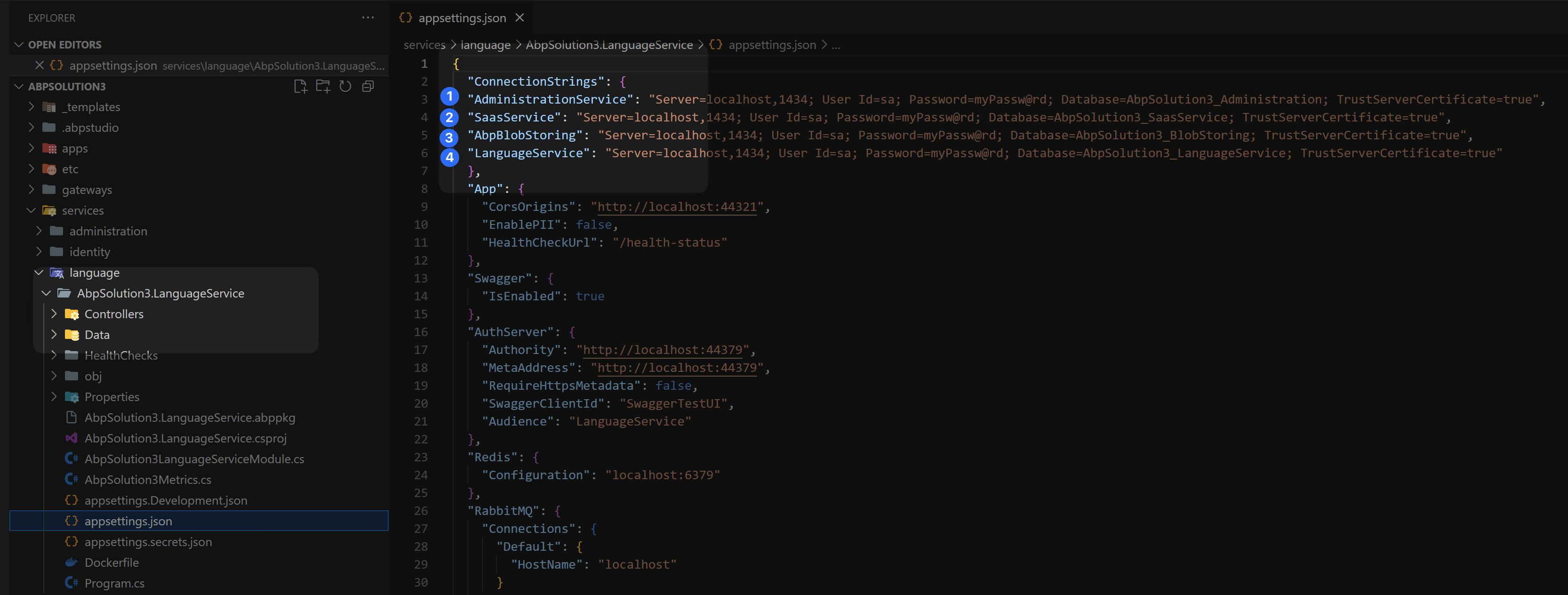
https://abp.io/docs/latest/framework/fundamentals/connection-strings https://abp.io/community/articles/multitenancy-with-separate-databases-in-dotnet-and-abp-51nvl4u9#gsc.tab=0
Markdown supported.Copy, paste, or drag & drop images and files (max 100 MB per file, 100 MB total per post) -
0
For example, if I add a second connection string in the Lab application, how do I configure this application to use this connection for users and permissions? Is there an example?
Also, if we connect with read-only permissions for the second connection string I added, will there be a problem?
Markdown supported.Copy, paste, or drag & drop images and files (max 100 MB per file, 100 MB total per post) -
0
hi
Can you check these two links? They have explained your question.
https://abp.io/docs/latest/framework/fundamentals/connection-strings https://abp.io/community/articles/multitenancy-with-separate-databases-in-dotnet-and-abp-51nvl4u9#gsc.tab=0
Thanks.
Markdown supported.Copy, paste, or drag & drop images and files (max 100 MB per file, 100 MB total per post) -
0
Hi,
After trying out what's explained in these links, I'll share the results. I'd appreciate it if this post stays up for a while.
Thanks.
Markdown supported.Copy, paste, or drag & drop images and files (max 100 MB per file, 100 MB total per post) -
0
Hello, I needed to change my authorization scenario.
The Auth server will only perform authentication. Other client applications (Lab Management and others (n)) will perform authorization checks and permissions on their own side. For this, I want the shadow user to be automatically registered in the client database when the user authenticated in the local domain first logs in, and I want permissions for this user to be opened on the client side.
It will actually work like SSO. Authentication will be performed externally (Auth Server), and user permissions will be controlled internally (Lab and others).
Do I need to write a service for the user to be automatically registered? Or is there a ready-made parameter or service for OpenIdDict in ABP?
Markdown supported.Copy, paste, or drag & drop images and files (max 100 MB per file, 100 MB total per post) -
0
hi
In this case, you add your auth server as an external login provider(like Google login)
So add the account module and
AddAbpOpenIdConnect(auth server)to your client applications.You will see a login option on your client application login page.
Thanks.
Markdown supported.Copy, paste, or drag & drop images and files (max 100 MB per file, 100 MB total per post) -
0
Hello,
I have layered applications. I create a ShadowUser in the OnTokenValidated event within the JwtBearer authentication on the host layer. When I log in from the web layer, the menus and pages that the user I assigned to the role is authorized to access are not visible.
If I had logged in with Google, Google would have sent me a verified user. This user would have a local User associated with them, and the AbpUserLogin table would contain the ProviderKey linking this user to Google. When I add a role to such a user, why are these menus not visible on the web side (MVC)?
Is there an SSO example for tiered applications that handles roles and permissions?
Markdown supported.Copy, paste, or drag & drop images and files (max 100 MB per file, 100 MB total per post) -
0
hi
I create a ShadowUser in the OnTokenValidated event within the JwtBearer
Don't do this. Just do it like Google login.
When I add a role to such a user, why are these menus not visible on the web side (MVC)?
Can you try to re-login?
If you don't want to re-login, we have a dynamic claims feature.
https://abp.io/docs/latest/framework/fundamentals/dynamic-claims
Thanks.
Markdown supported.Copy, paste, or drag & drop images and files (max 100 MB per file, 100 MB total per post) -
0
Hello,
I'm trying OIDC like Google authentication. It's not working. If I set dynamic claim to true, user authentication doesn't even work. For this reason, I reset it to false. Even if I restart the servers instead of logging in again, it still doesn't work :)
When I add a third server (Web + Host), I also want it to authenticate using the same token and function based on the authorization settings on its own server.
I don't want to write too many services for this issue and turn the project into a spaghetti mess.
Could you guide me on how to handle authentication on the Auth server and authorization from the Web and Host projects?
Markdown supported.Copy, paste, or drag & drop images and files (max 100 MB per file, 100 MB total per post) -
0
hi
I'm trying OIDC like Google authentication. It's not working. If I set dynamic claim to true, user authentication doesn't even work. For this reason, I reset it to false. Even if I restart the servers instead of logging in again, it still doesn't work :)
Fix this problem, and everything will work.
Can you share your project again? Or create a PRIVATE GitHub repository and invite me as a contributor. https://github.com/maliming
I will review your Dynamic Claims code and make the necessary fixes.
Thanks.
Markdown supported.Copy, paste, or drag & drop images and files (max 100 MB per file, 100 MB total per post)



