






we get thisr error from Hangfire dashboard
System.IO.FileNotFoundException: Could not load file or assembly 'Volo.Abp.BackgroundWorkers.Hangfire, Culture=neutral, PublicKeyToken=null'. The system cannot find the file specified.
File name: 'Volo.Abp.BackgroundWorkers.Hangfire, Culture=neutral, PublicKeyToken=null'
at System.Reflection.RuntimeAssembly.<InternalLoad>g____PInvoke|49_0(NativeAssemblyNameParts* __pAssemblyNameParts_native, ObjectHandleOnStack __requestingAssembly_native, StackCrawlMarkHandle __stackMark_native, Int32 __throwOnFileNotFound_native, ObjectHandleOnStack __assemblyLoadContext_native, ObjectHandleOnStack __retAssembly_native)
at System.Reflection.RuntimeAssembly.InternalLoad(AssemblyName assemblyName, StackCrawlMark& stackMark, AssemblyLoadContext assemblyLoadContext, RuntimeAssembly requestingAssembly, Boolean throwOnFileNotFound)
at System.Reflection.Assembly.Load(AssemblyName assemblyRef)
at Hangfire.Common.TypeHelper.AssemblyResolver(String assemblyString) in C:\projects\hangfire-525\src\Hangfire.Core\Common\TypeHelper.cs:line 227
at Hangfire.Common.TypeHelper.CachedAssemblyResolver(AssemblyName assemblyName) in C:\projects\hangfire-525\src\Hangfire.Core\Common\TypeHelper.cs:line 186
at System.Reflection.TypeNameParser.GetType(String typeName, ReadOnlySpan1 nestedTypeNames, String assemblyNameIfAny) at System.Reflection.TypeNameParser.GenericTypeName.ResolveType(TypeNameParser& parser, String containingAssemblyIfAny) at System.Type.GetType(String typeName, Func2 assemblyResolver, Func4 typeResolver, Boolean throwOnError) at Hangfire.Common.TypeHelper.<>c.<DefaultTypeResolver>b__20_0(String name) in C:\projects\hangfire-525\src\Hangfire.Core\Common\TypeHelper.cs:line 83 at Hangfire.Common.TypeHelper.DefaultTypeResolver(String typeName) in C:\projects\hangfire-525\src\Hangfire.Core\Common\TypeHelper.cs:line 75 at Hangfire.Storage.InvocationData.<>c.<CachedDeserializeMethod>b__33_0(Tuple4 tuple) in C:\projects\hangfire-525\src\Hangfire.Core\Storage\InvocationData.cs:line 335
at Hangfire.Storage.InvocationData.DeserializeJob() in C:\projects\hangfire-525\src\Hangfire.Core\Storage\InvocationData.cs:line 96
10 Answer(s)
-
0
The error
System.IO.FileNotFoundException: Could not load file or assembly 'Volo.Abp.BackgroundWorkers.Hangfire'indicates that the Hangfire dashboard is trying to load a background worker type from the assemblyVolo.Abp.BackgroundWorkers.Hangfire, but this assembly is missing from your application.This typically happens if you previously used the
Volo.Abp.BackgroundWorkers.Hangfirepackage, registered background workers with it, and then removed the package or related code, but there are still jobs in the Hangfire database referencing types from that assembly.
How to resolve:
- Ensure the Assembly is Present (Recommended for Existing Jobs):
- Add the missing package back to your project:
dotnet add package Volo.Abp.BackgroundWorkers.Hangfire- Rebuild and redeploy your application. This will allow Hangfire to resolve the types for any jobs still in the database.
Clean Up Old Jobs (If You No Longer Use That Worker):
- If you intentionally removed the background worker and do not need the old jobs, you must manually delete the related jobs from the Hangfire tables (
[HangFire].[Job],[HangFire].[State], etc.) in your database that reference the missing type. - After cleanup, you can safely remove the package.
- If you intentionally removed the background worker and do not need the old jobs, you must manually delete the related jobs from the Hangfire tables (
Prevent Future Issues:
- When removing a background worker or related assembly, always ensure that no jobs referencing those types remain in the Hangfire storage.
Summary:
Either restore the missing assembly or clean up the orphaned jobs in your Hangfire database to resolve the dashboard error.Sources:
This response was generated by AI. If it didn’t solve your problem, feel free to post a new answer — our support team will jump in to help you soon.
Markdown supported.Copy, paste, or drag & drop images and files (max 100 MB per file, 100 MB total per post) -
0
we alredy added to Volo.Abp.BackgroundWorkers.Hangfire package into Domain Project
Markdown supported.Copy, paste, or drag & drop images and files (max 100 MB per file, 100 MB total per post) -
0
We also get this error Hangfire.Common.JobLoadException: Could not load the job. See inner exception for the details. ---> System.IO.FileNotFoundException: Could not load file or assembly 'EnzimWeb.Domain, Culture=neutral, PublicKeyToken=null'. The system cannot find the file specified. File name: 'EnzimWeb.Domain, Culture=neutral, PublicKeyToken=null' at System.Reflection.RuntimeAssembly.<InternalLoad>g____PInvoke|49_0(NativeAssemblyNameParts* __pAssemblyNameParts_native, ObjectHandleOnStack __requestingAssembly_native, StackCrawlMarkHandle __stackMark_native, Int32 __throwOnFileNotFound_native, ObjectHandleOnStack __assemblyLoadContext_native, ObjectHandleOnStack __retAssembly_native) at System.Reflection.RuntimeAssembly.InternalLoad(AssemblyName assemblyName, StackCrawlMark& stackMark, AssemblyLoadContext assemblyLoadContext, RuntimeAssembly requestingAssembly, Boolean throwOnFileNotFound) at System.Reflection.Assembly.Load(AssemblyName assemblyRef) at Hangfire.Common.TypeHelper.AssemblyResolver(String assemblyString) in C:\projects\hangfire-525\src\Hangfire.Core\Common\TypeHelper.cs:line 227 at Hangfire.Common.TypeHelper.CachedAssemblyResolver(AssemblyName assemblyName) in C:\projects\hangfire-525\src\Hangfire.Core\Common\TypeHelper.cs:line 186 at System.Reflection.TypeNameParser.ResolveAssembly(String assemblyName) at System.Reflection.TypeNameParser.GetType(String typeName, ReadOnlySpan
1 nestedTypeNames, String assemblyNameIfAny) at System.Reflection.TypeNameParser.NamespaceTypeName.ResolveType(TypeNameParser& parser, String containingAssemblyIfAny) at System.Type.GetType(String typeName, Func2 assemblyResolver, Func4 typeResolver, Boolean throwOnError) at Hangfire.Common.TypeHelper.<>c.<DefaultTypeResolver>b__20_0(String name) in C:\projects\hangfire-525\src\Hangfire.Core\Common\TypeHelper.cs:line 83 at Hangfire.Common.TypeHelper.DefaultTypeResolver(String typeName) in C:\projects\hangfire-525\src\Hangfire.Core\Common\TypeHelper.cs:line 75 at Hangfire.Storage.InvocationData.<>c.<CachedDeserializeMethod>b__33_0(Tuple4 tuple) in C:\projects\hangfire-525\src\Hangfire.Core\Storage\InvocationData.cs:line 335 at Hangfire.Storage.InvocationData.DeserializeJob() in C:\projects\hangfire-525\src\Hangfire.Core\Storage\InvocationData.cs:line 96 --- End of inner exception stack trace --- at Hangfire.Storage.InvocationData.DeserializeJob() in C:\projects\hangfire-525\src\Hangfire.Core\Storage\InvocationData.cs:line 118 at Hangfire.RecurringJobExtensions.TriggerRecurringJob(IBackgroundJobFactory factory, JobStorage storage, IStorageConnection connection, IProfiler profiler, RecurringJobEntity recurringJob, DateTime now) in C:\projects\hangfire-525\src\Hangfire.Core\RecurringJobExtensions.cs:line 115 at Hangfire.Server.RecurringJobScheduler.ScheduleRecurringJob(BackgroundProcessContext context, IStorageConnection connection, String recurringJobId, RecurringJobEntity recurringJob, DateTime now) in C:\projects\hangfire-525\src\Hangfire.Core\Server\RecurringJobScheduler.cs:line 331Markdown supported.Copy, paste, or drag & drop images and files (max 100 MB per file, 100 MB total per post) -
0
hi
Please ensure all abp&volo packages use the same version(
9.3.2).Can you share a template project that shows this exception?
liming.ma@volosoft.com Thanks.
Markdown supported.Copy, paste, or drag & drop images and files (max 100 MB per file, 100 MB total per post) -
0
Hi ; All Package are Version="9.3.2". we get this error on hangfire dashboard. not in our project
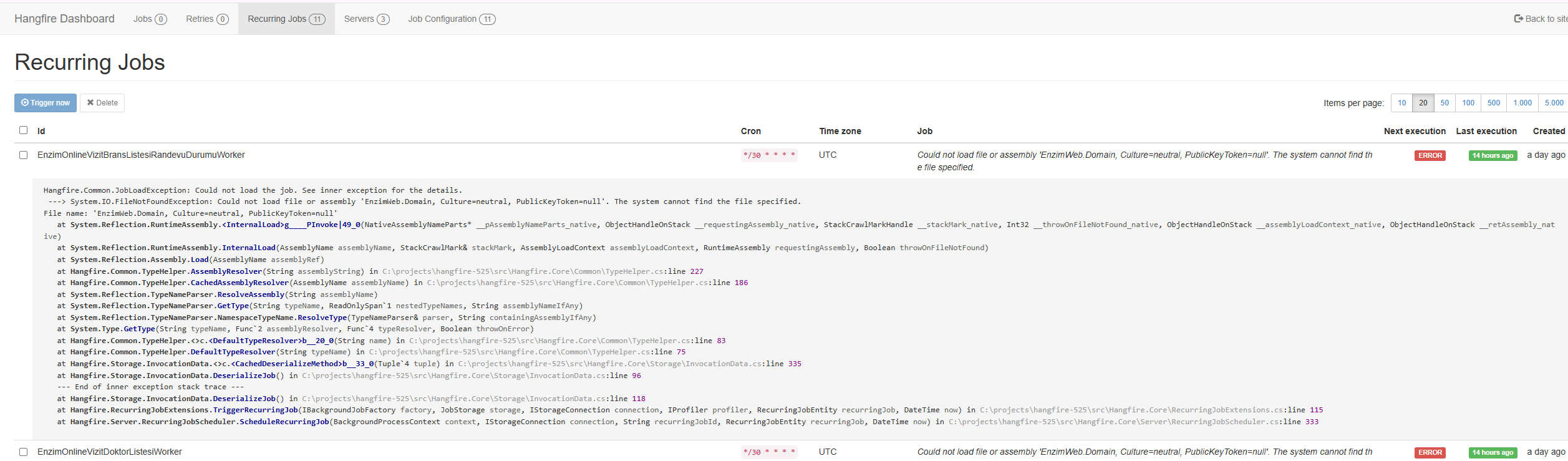 Markdown supported.Copy, paste, or drag & drop images and files (max 100 MB per file, 100 MB total per post)
 -
0
Do we need to add the domain project as a dll?
Markdown supported.Copy, paste, or drag & drop images and files (max 100 MB per file, 100 MB total per post) -
0
hi
Your Hangfire server retrieves type information from the database and utilizes it in the project. So you need to add these assemblies.
Thanks.
Markdown supported.Copy, paste, or drag & drop images and files (max 100 MB per file, 100 MB total per post) -
0
thanks. The problem resolved
Markdown supported.Copy, paste, or drag & drop images and files (max 100 MB per file, 100 MB total per post)



