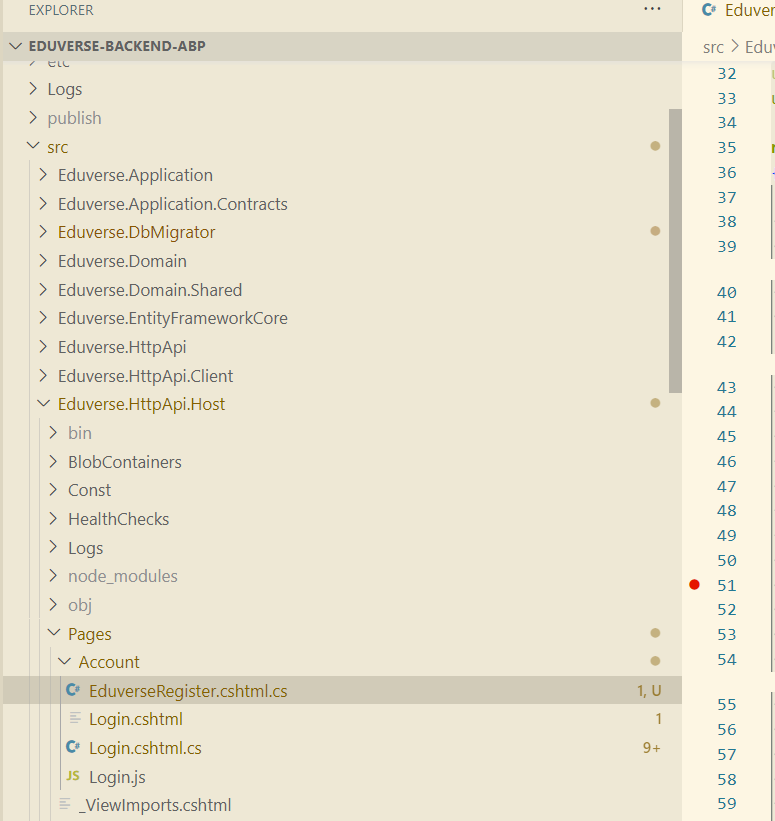
Hi team,
previously i had followed these instructions to add missing CSS files into our backend ABP https://abp.io/support/questions/8551/Angular-CSS-files
However, they are not working again , my guess its after the update to ABP 9.0.2
you can see in the screenshot that bootstrap-light.css style in my code base is:

but when deployed: (there's no import)

This is my Backend csproj code ->
<Project Sdk="Microsoft.NET.Sdk.Web">
<Import Project="....\common.props" />
<PropertyGroup> <TargetFramework>net9.0</TargetFramework> <Nullable>enable</Nullable> <AspNetCoreHostingModel>InProcess</AspNetCoreHostingModel> <RootNamespace>Eduverse</RootNamespace> <PreserveCompilationReferences>true</PreserveCompilationReferences> </PropertyGroup>
<PropertyGroup Condition=" '$(RunConfiguration)' == 'Eduverse.HttpApi.Host' " />
<ItemGroup> <PackageReference Include="AspNetCore.HealthChecks.UI" Version="9.0.0" /> <PackageReference Include="AspNetCore.HealthChecks.UI.Client" Version="9.0.0" /> <PackageReference Include="AspNetCore.SignalR.OpenTelemetry" Version="1.6.0" /> <PackageReference Include="Microsoft.EntityFrameworkCore.InMemory" Version="9.0.1" /> <PackageReference Include="AspNetCore.HealthChecks.UI.InMemory.Storage" Version="9.0.0" /> <PackageReference Include="OpenTelemetry.Exporter.Console" Version="1.11.1" /> <PackageReference Include="OpenTelemetry.Exporter.OpenTelemetryProtocol" Version="1.11.1" /> <PackageReference Include="OpenTelemetry.Extensions.Hosting" Version="1.11.1" /> <PackageReference Include="OpenTelemetry.Instrumentation.AspNetCore" Version="1.11.0" /> <PackageReference Include="OpenTelemetry.Instrumentation.Http" Version="1.11.0" /> <PackageReference Include="Owl.TokenWildcardIssuerValidator" Version="1.0.0" /> <PackageReference Include="Serilog.AspNetCore" Version="9.0.0" /> <PackageReference Include="Serilog.Sinks.Async" Version="2.1.0" /> <PackageReference Include="Microsoft.AspNetCore.Authentication.Google" Version="9.0.1" /> <PackageReference Include="Microsoft.AspNetCore.Authentication.MicrosoftAccount" Version="9.0.1" /> <PackageReference Include="Microsoft.AspNetCore.Authentication.Twitter" Version="9.0.1" /> </ItemGroup>
<ItemGroup> <PackageReference Include="Volo.Abp.AspNetCore.MultiTenancy" Version="9.0.2" /> <PackageReference Include="Volo.Abp.Autofac" Version="9.0.2" /> <PackageReference Include="Volo.Abp.AspNetCore.Serilog" Version="9.0.2" /> <PackageReference Include="Volo.Abp.BlobStoring.Aws" Version="9.0.2" /> <PackageReference Include="Volo.Abp.Caching.StackExchangeRedis" Version="9.0.2" /> <PackageReference Include="Volo.Abp.Swashbuckle" Version="9.0.2" /> </ItemGroup>
<ItemGroup> <PackageReference Include="Volo.Abp.Account.Pro.Public.Web.OpenIddict" Version="9.0.2" /> <PackageReference Include="Volo.Abp.Account.Pro.Public.Web.Impersonation" Version="9.0.2" /> </ItemGroup>
<ItemGroup> <PackageReference Include="Volo.Abp.AspNetCore.Mvc.UI.Theme.LeptonX" Version="4.0.3" /> </ItemGroup>
<ItemGroup> <ProjectReference Include="..\Eduverse.Application\Eduverse.Application.csproj" /> <ProjectReference Include="..\Eduverse.HttpApi\Eduverse.HttpApi.csproj" /> <ProjectReference Include="..\Eduverse.EntityFrameworkCore\Eduverse.EntityFrameworkCore.csproj" /> </ItemGroup>
<ItemGroup> <PackageReference Include="Volo.Abp.Studio.Client.AspNetCore" Version="0.9.19" /> </ItemGroup>
<ItemGroup Condition="Exists('./openiddict.pfx')"> <None Remove="openiddict.pfx" /> <EmbeddedResource Include="openiddict.pfx"> <CopyToOutputDirectory>Always</CopyToOutputDirectory> </EmbeddedResource> </ItemGroup>
<ItemGroup> <Compile Remove="Logs*" /> <Content Remove="Logs*" /> <EmbeddedResource Remove="Logs*" /> <None Remove="Logs*" /> </ItemGroup> <ItemGroup> <Content Include="Pages**.js"> <CopyToOutputDirectory>Always</CopyToOutputDirectory> </Content> <Content Include="Pages**.css"> <CopyToOutputDirectory>Always</CopyToOutputDirectory> </Content> </ItemGroup> <ItemGroup> <Content Include="Themes**.js"> <CopyToOutputDirectory>Always</CopyToOutputDirectory> </Content> <Content Include="Themes**.css"> <CopyToOutputDirectory>Always</CopyToOutputDirectory> </Content> </ItemGroup> </Project>
Hi team,
we have recently upgraded from 8.x.x to 9.0.5.
However the login with this tenant button from host-admin account seems to be gone.
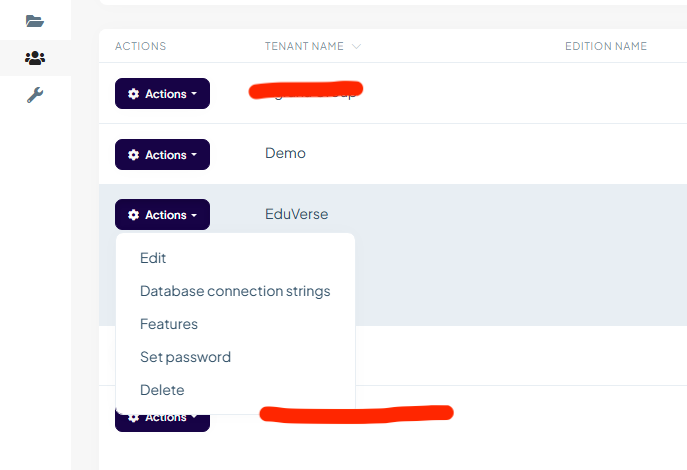
we used to be able to use "Login with this tenant"
 Please advise.
Thank you.
Hi, we noticed that language texts have to be changed in each tenant.
Is there a way to set it platform wide? ie. changing the language text in Host will be applicable for all Tenants.
Thanks.
Helpful, think we can close this off. Thanks
I've updated the login model and it stops redirecting to the change password screen for external users. Can you advise if this is okay (i've only commented out one block of code)?
using System;
using System.Security.Claims;
using System.Threading.Tasks;
using Microsoft.AspNetCore.Authentication;
using Microsoft.AspNetCore.Identity;
using Microsoft.AspNetCore.Mvc;
using Microsoft.Extensions.Logging;
using Microsoft.Extensions.Options;
using Owl.reCAPTCHA;
using Volo.Abp.Account.Security.Recaptcha;
using Volo.Abp.Account.ExternalProviders;
using Volo.Abp.Identity;
using Volo.Abp.Identity.AspNetCore;
using Volo.Abp.Security.Claims;
using Volo.Abp.Uow;
using Volo.Abp.Account.Public.Web.Pages.Account;
using Volo.Abp.Account.Public.Web;
using Volo.Abp.Account;
using Volo.Abp.DependencyInjection;

// namespace Volo.Abp.Account.Public.Web.Pages.Account;
namespace Eduverse.Pages.Account


{
    [Dependency(ReplaceServices = true)]
    [ExposeServices(typeof(LoginModel))]
    public class EduverseLoginModel: LoginModel
{
    public EduverseLoginModel(IAuthenticationSchemeProvider schemeProvider, IOptions<AbpAccountOptions> accountOptions, IAbpRecaptchaValidatorFactory recaptchaValidatorFactory, IAccountExternalProviderAppService accountExternalProviderAppService, ICurrentPrincipalAccessor currentPrincipalAccessor, IOptions<IdentityOptions> identityOptions, IOptionsSnapshot<reCAPTCHAOptions> reCaptchaOptions) : base(schemeProvider, accountOptions, recaptchaValidatorFactory, accountExternalProviderAppService, currentPrincipalAccessor, identityOptions, reCaptchaOptions)
    {
        System.Console.WriteLine("EduverseLoginModel");
    }

    [UnitOfWork]
    public override async Task<IActionResult> OnGetExternalLoginCallbackAsync(string remoteError = null)
    {
        //TODO: Did not implemented Identity Server 4 sample for this method (see ExternalLoginCallback in Quickstart of IDS4 sample)
        /* Also did not implement these:
         * - Logout(string logoutId)
         */

        if (remoteError != null)
        {
            Logger.LogWarning($"External login callback error: {remoteError}");
            return RedirectToPage("./Login");
        }

        await IdentityOptions.SetAsync();

        var loginInfo = await SignInManager.GetExternalLoginInfoAsync();
        if (loginInfo == null)
        {
            Logger.LogWarning("External login info is not available");
            return RedirectToPage("./Login");
        }

        IsLinkLogin = await VerifyLinkTokenAsync();

        // Commented out for resolve ED-520 - Prevent prompt change pw for external users
        // if (await SettingProvider.IsTrueAsync(AccountSettingNames.EnableLocalLogin))
        // {
        //     var user = await UserManager.FindByLoginAsync(loginInfo.LoginProvider, loginInfo.ProviderKey);
        //     if (user != null && user.PasswordHash == null)
        //     {
        //         await StoreChangePasswordUser(user);
        //         return RedirectToPage("./ChangePassword", new {
        //             returnUrl = ReturnUrl ?? "/",
        //             returnUrlHash = ReturnUrlHash
        //         });
        //     }
        // }

        var askUserPasswordResult = await ShouldAskUserPasswordAsync(loginInfo);
        if (askUserPasswordResult != null)
        {
            return askUserPasswordResult;
        }

        var result = await SignInManager.ExternalLoginSignInAsync(
            loginInfo.LoginProvider,
            loginInfo.ProviderKey,
            isPersistent: true,
            bypassTwoFactor: true
        );

        if (!result.Succeeded)
        {
            await IdentitySecurityLogManager.SaveAsync(new IdentitySecurityLogContext
            {
                Identity = IdentitySecurityLogIdentityConsts.IdentityExternal,
                Action = "Login" + result
            });
        }

        if (result.IsLockedOut)
        {
            var user = await UserManager.FindByLoginAsync(loginInfo.LoginProvider, loginInfo.ProviderKey);
            await StoreLockedUser(user);
            Logger.LogWarning($"Cannot proceed because user is locked out!");
            return RedirectToPage("./LockedOut", new {
                returnUrl = ReturnUrl,
                returnUrlHash = ReturnUrlHash
            });
        }

        if (result.IsNotAllowed)
        {
            Logger.LogWarning($"External login callback error: User is Not Allowed!");

            var user = await UserManager.FindByLoginAsync(loginInfo.LoginProvider, loginInfo.ProviderKey);
            if (user == null)
            {
                Logger.LogWarning($"External login callback error: User is Not Found!");
                return RedirectToPage("./Login");
            }

            if (user.ShouldChangePasswordOnNextLogin || await UserManager.ShouldPeriodicallyChangePasswordAsync(user))
            {
                await StoreChangePasswordUser(user);
                return RedirectToPage("./ChangePassword", new {
                    returnUrl = ReturnUrl,
                    returnUrlHash = ReturnUrlHash
                });
            }

            if (user.IsActive)
            {
                await StoreConfirmUser(user);
                return RedirectToPage("./ConfirmUser", new {
                    returnUrl = ReturnUrl,
                    returnUrlHash = ReturnUrlHash
                });
            }

            return RedirectToPage("./Login");
        }

        if (result.Succeeded)
        {
            var user = await UserManager.FindByLoginAsync(loginInfo.LoginProvider, loginInfo.ProviderKey);
            if (user == null)
            {
                Logger.LogWarning($"External login callback error: User is Not Found!");
                return await RedirectSafelyAsync(ReturnUrl, ReturnUrlHash);
            }

            using (CurrentPrincipalAccessor.Change(await SignInManager.CreateUserPrincipalAsync(user)))
            {
                await AccountExternalLoginAppService.SetPasswordVerifiedAsync(loginInfo.LoginProvider, loginInfo.ProviderKey);
            }

            if (IsLinkLogin)
            {
                using (CurrentPrincipalAccessor.Change(await SignInManager.CreateUserPrincipalAsync(user)))
                {
                    await IdentityLinkUserAppService.LinkAsync(new LinkUserInput
                    {
                        UserId = LinkUserId.Value,
                        TenantId = LinkTenantId,
                        Token = LinkToken
                    });

                    await IdentitySecurityLogManager.SaveAsync(new IdentitySecurityLogContext
                    {
                        Identity = IdentitySecurityLogIdentityConsts.Identity,
                        Action = IdentityProSecurityLogActionConsts.LinkUser,
                        UserName = user.UserName,
                        ExtraProperties =
                        {
                            { IdentityProSecurityLogActionConsts.LinkTargetTenantId, LinkTenantId },
                            { IdentityProSecurityLogActionConsts.LinkTargetUserId, LinkUserId }
                        }
                    });

                    using (CurrentTenant.Change(LinkTenantId))
                    {
                        var targetUser = await UserManager.GetByIdAsync(LinkUserId.Value);
                        using (CurrentPrincipalAccessor.Change(await SignInManager.CreateUserPrincipalAsync(targetUser)))
                        {
                            await IdentitySecurityLogManager.SaveAsync(new IdentitySecurityLogContext
                            {
                                Identity = IdentitySecurityLogIdentityConsts.Identity,
                                Action = IdentityProSecurityLogActionConsts.LinkUser,
                                UserName = targetUser.UserName,
                                ExtraProperties =
                                {
                                    { IdentityProSecurityLogActionConsts.LinkTargetTenantId, targetUser.TenantId },
                                    { IdentityProSecurityLogActionConsts.LinkTargetUserId, targetUser.Id }
                                }
                            });
                        }
                    }
                }
            }

            await IdentitySecurityLogManager.SaveAsync(new IdentitySecurityLogContext
            {
                Identity = IdentitySecurityLogIdentityConsts.IdentityExternal,
                Action = result.ToIdentitySecurityLogAction(),
                UserName = user.UserName
            });

            // Clear the dynamic claims cache.
            await IdentityDynamicClaimsPrincipalContributorCache.ClearAsync(user.Id, user.TenantId);

            return await RedirectSafelyAsync(ReturnUrl, ReturnUrlHash);
        }

        //TODO: Handle other cases for result!

        var email = loginInfo.Principal.FindFirstValue(AbpClaimTypes.Email) ?? loginInfo.Principal.FindFirstValue(ClaimTypes.Email);
        var externalUser = email.IsNullOrWhiteSpace() ? null : await UserManager.FindByEmailAsync(email);

        if (externalUser == null)
        {
            return RedirectToPage("./Register", new {
                isExternalLogin = true,
                returnUrl = ReturnUrl,
                returnUrlHash = ReturnUrlHash,
                linkTenantId = LinkTenantId,
                linkUserId = LinkUserId,
                linkToken = LinkToken
            });
        }

        if (await UserManager.FindByLoginAsync(loginInfo.LoginProvider, loginInfo.ProviderKey) == null)
        {
            CheckIdentityErrors(await UserManager.AddLoginAsync(externalUser, loginInfo));
        }

        if (await HasRequiredIdentitySettings())
        {
            Logger.LogWarning($"New external user is created but confirmation is required!");

            await StoreConfirmUser(externalUser);
            return RedirectToPage("./ConfirmUser", new {
                returnUrl = ReturnUrl,
                returnUrlHash = ReturnUrlHash
            });
        }

        askUserPasswordResult = await ShouldAskUserPasswordAsync(loginInfo);
        if (askUserPasswordResult != null)
        {
            return askUserPasswordResult;
        }

        await SignInManager.SignInAsync(externalUser, false , loginInfo.LoginProvider);

        // Clear the dynamic claims cache.
        await IdentityDynamicClaimsPrincipalContributorCache.ClearAsync(externalUser.Id, externalUser.TenantId);

        if (IsLinkLogin)
        {
            using (CurrentPrincipalAccessor.Change(await SignInManager.CreateUserPrincipalAsync(externalUser)))
            {
                await IdentityLinkUserAppService.LinkAsync(new LinkUserInput
                {
                    UserId = LinkUserId.Value,
                    TenantId = LinkTenantId,
                    Token = LinkToken
                });

                await IdentitySecurityLogManager.SaveAsync(new IdentitySecurityLogContext
                {
                    Identity = IdentitySecurityLogIdentityConsts.Identity,
                    Action = IdentityProSecurityLogActionConsts.LinkUser,
                    UserName = externalUser.UserName,
                    ExtraProperties =
                    {
                        { IdentityProSecurityLogActionConsts.LinkTargetTenantId, LinkTenantId },
                        { IdentityProSecurityLogActionConsts.LinkTargetUserId, LinkUserId }
                    }
                });

                using (CurrentTenant.Change(LinkTenantId))
                {
                    var targetUser = await UserManager.GetByIdAsync(LinkUserId.Value);
                    using (CurrentPrincipalAccessor.Change(await SignInManager.CreateUserPrincipalAsync(targetUser)))
                    {
                        await IdentitySecurityLogManager.SaveAsync(new IdentitySecurityLogContext
                        {
                            Identity = IdentitySecurityLogIdentityConsts.Identity,
                            Action = IdentityProSecurityLogActionConsts.LinkUser,
                            UserName = targetUser.UserName,
                            ExtraProperties =
                            {
                                { IdentityProSecurityLogActionConsts.LinkTargetTenantId, targetUser.TenantId },
                                { IdentityProSecurityLogActionConsts.LinkTargetUserId, targetUser.Id }
                            }
                        });
                    }
                }
            }
        }

        await IdentitySecurityLogManager.SaveAsync(new IdentitySecurityLogContext
        {
            Identity = IdentitySecurityLogIdentityConsts.IdentityExternal,
            Action = result.ToIdentitySecurityLogAction(),
            UserName = externalUser.Name
        });

        return await RedirectSafelyAsync(ReturnUrl, ReturnUrlHash);
    }
}
}
perhaps this is the snippet i need to edit
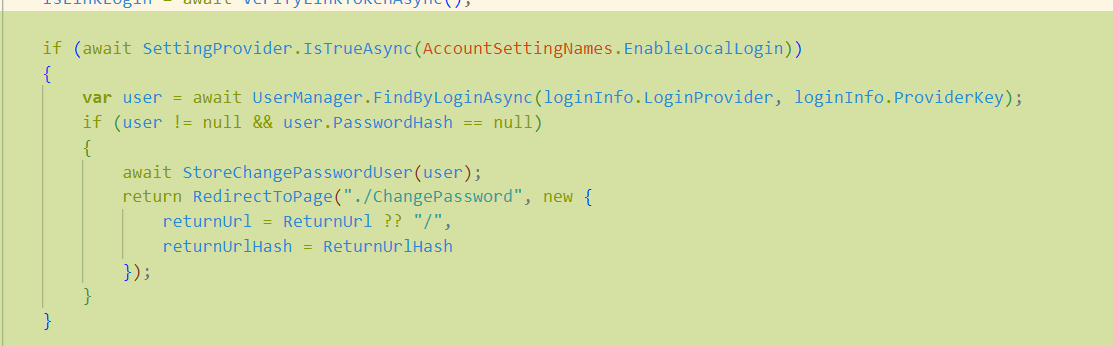
After investigating, i've realised that the user is not redirected to a /Register screen. I've tested overriding the ChangePassword model and breakpoints are being hit
Seems like Login > Microsoft SSO > change password screen
Hi, Seems like breakpoints not being hit strangely. I've also tried following this guide https://abp.io/docs/latest/framework/ui/mvc-razor-pages/customization-user-interface#overriding-a-page-model-c
Any Gotchas that i might have missed? I've created the file in src\Eduverse.HttpApi.Host\Pages\Account\EduverseRegister.cshtml.cs
using System;
using System.Collections.Generic;
using System.ComponentModel.DataAnnotations;
using System.Linq;
using System.Net.Http;
using System.Security.Claims;
using System.Threading.Tasks;
using IdentityModel.Client;
using Microsoft.AspNetCore.Authentication;
using Microsoft.AspNetCore.Identity;
using Microsoft.AspNetCore.Mvc;
using Microsoft.Extensions.Logging;
using Microsoft.Extensions.Options;
using Owl.reCAPTCHA;
using Volo.Abp;
using Volo.Abp.Account;
using Volo.Abp.Account.ExternalProviders;
using Volo.Abp.Account.Public.Web;
using Volo.Abp.Account.Public.Web.Pages.Account;

using Volo.Abp.Account.Public.Web.Security.Recaptcha;
using Volo.Abp.Account.Settings;
using Volo.Abp.Auditing;
using Volo.Abp.Content;
using Volo.Abp.DependencyInjection;
using Volo.Abp.Identity;
using Volo.Abp.Identity.Settings;
using Volo.Abp.Reflection;
using Volo.Abp.Security.Claims;
using Volo.Abp.Settings;
using Volo.Abp.Uow;
using Volo.Abp.Validation;
using IdentityUser = Volo.Abp.Identity.IdentityUser;

namespace Eduverse.Pages.Account
{

    [Dependency(ReplaceServices = true)]
    [ExposeServices(typeof(RegisterModel))]
    public class EduverseRegisterModel : RegisterModel
    {

        public EduverseRegisterModel(
            IAuthenticationSchemeProvider schemeProvider,
            IOptions<AbpAccountOptions> accountOptions,
            IAccountExternalProviderAppService accountExternalProviderAppService,
            ICurrentPrincipalAccessor currentPrincipalAccessor,
            IHttpClientFactory httpClientFactory): base(schemeProvider,
            accountOptions, accountExternalProviderAppService, currentPrincipalAccessor, httpClientFactory)
        {
            System.Console.WriteLine("EduverseRegisterModel");
        }

        [UnitOfWork]
        public override async Task<IActionResult> OnPostAsync()
        {
            try
            {
                ExternalProviders = await GetExternalProviders();

                if (!await CheckSelfRegistrationAsync())
                {
                    throw new UserFriendlyException(L["SelfRegistrationDisabledMessage"]);
                }

                await SetUseCaptchaAsync();

                IdentityUser user;
                if (IsExternalLogin)
                {
                    var externalLoginInfo = await SignInManager.GetExternalLoginInfoAsync();
                    if (externalLoginInfo == null)
                    {
                        Logger.LogWarning("External login info is not available");
                        return RedirectToPage("./Login");
                    }

                    if (Input.UserName.IsNullOrWhiteSpace())
                    {
                        Input.UserName = await UserManager.GetUserNameFromEmailAsync(Input.EmailAddress);
                    }
                    user = await RegisterExternalUserAsync(externalLoginInfo, Input.UserName, Input.EmailAddress);

                    // Clear the dynamic claims cache.
                    await IdentityDynamicClaimsPrincipalContributorCache.ClearAsync(user.Id, user.TenantId);
                }
                else
                {
                    user = await RegisterLocalUserAsync();
                }

                if (await SettingProvider.IsTrueAsync(IdentitySettingNames.SignIn.RequireConfirmedEmail) && !user.EmailConfirmed ||
                    await SettingProvider.IsTrueAsync(IdentitySettingNames.SignIn.RequireConfirmedPhoneNumber) && !user.PhoneNumberConfirmed)
                {
                    await StoreConfirmUser(user);

                    return RedirectToPage("./ConfirmUser", new {
                        returnUrl = ReturnUrl,
                        returnUrlHash = ReturnUrlHash
                    });
                }

                if (await VerifyLinkTokenAsync())
                {
                    using (CurrentPrincipalAccessor.Change(await SignInManager.CreateUserPrincipalAsync(user)))
                    {
                        await IdentityLinkUserAppService.LinkAsync(new LinkUserInput
                        {
                            UserId = LinkUserId.Value,
                            TenantId = LinkTenantId,
                            Token = LinkToken
                        });

                        await IdentitySecurityLogManager.SaveAsync(new IdentitySecurityLogContext
                        {
                            Identity = IdentitySecurityLogIdentityConsts.Identity,
                            Action = IdentityProSecurityLogActionConsts.LinkUser,
                            UserName = user.UserName,
                            ExtraProperties =
                                {
                                    { IdentityProSecurityLogActionConsts.LinkTargetTenantId, LinkTenantId },
                                    { IdentityProSecurityLogActionConsts.LinkTargetUserId, LinkUserId }
                                }
                        });

                        using (CurrentTenant.Change(LinkTenantId))
                        {
                            var targetUser = await UserManager.GetByIdAsync(LinkUserId.Value);
                            using (CurrentPrincipalAccessor.Change(await SignInManager.CreateUserPrincipalAsync(targetUser)))
                            {
                                await IdentitySecurityLogManager.SaveAsync(new IdentitySecurityLogContext
                                {
                                    Identity = IdentitySecurityLogIdentityConsts.Identity,
                                    Action = IdentityProSecurityLogActionConsts.LinkUser,
                                    UserName = targetUser.UserName,
                                    ExtraProperties =
                                        {
                                            { IdentityProSecurityLogActionConsts.LinkTargetTenantId, targetUser.TenantId },
                                            { IdentityProSecurityLogActionConsts.LinkTargetUserId, targetUser.Id }
                                        }
                                });
                            }
                        }
                    }
                }

                // skip password change if it is an external login
                if (!IsExternalLogin)
                {
                    await StoreChangePasswordUser(user);
                    return RedirectToPage("./ChangePassword", new {
                        returnUrl = ReturnUrl ?? "/",
                        returnUrlHash = ReturnUrlHash
                    });
                }

                await SignInManager.SignInAsync(user, isPersistent: true);

                // Clear the dynamic claims cache.
                await IdentityDynamicClaimsPrincipalContributorCache.ClearAsync(user.Id, user.TenantId);

                return Redirect(ReturnUrl ?? "/");
            }
            catch (BusinessException e)
            {
                Alerts.Danger(GetLocalizeExceptionMessage(e));
                return Page();
            }
        }
    }
}
Actually i believe we had overridden the entire login page, is there some changes in v9.0.2 Login model that is not reflected in our current version of the Login Model?