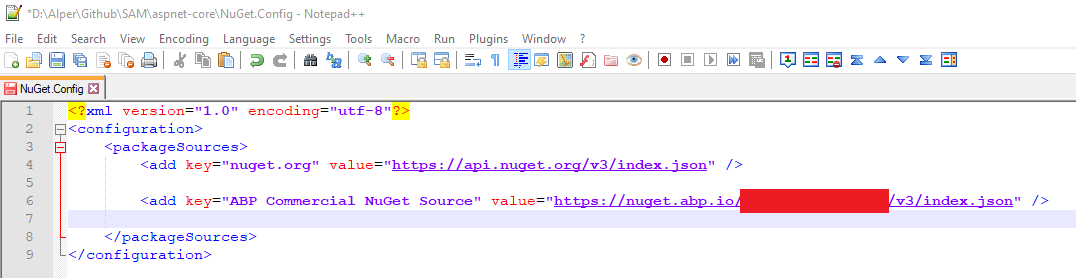
@vrajasekaran as I see from the screenshot, it's trying to download the PRO nuget packages from the official nuget.org
But the PRO nuget packages are served from nuget.abp.io.
So you need to add a new NuGet source to Azure Pipelines, or copy your NuGet.config file to the Azure Pipelines.
@murat.yuceer Blazor code generation is under devlepment. It'll be usable in v4.0
joe@tronactive.com can you create a new topic. this doesn't seem lke a bug. and many people are registed to this topic and gets unrelated email notifications.
yes but you need to add the dependencies with DependsOn attribute https://github.com/abpframework/abp/blob/dev/modules/setting-management/src/Volo.Abp.SettingManagement.Web/AbpSettingManagementWebModule.cs
@DanielAndreasen is it v3.1? (v3.3 will release tomorrow) is it Angular?
It looks like a IDS4 configuration issue.
did you run the DbMigrator project? If you are using the same database as your previous projects you may get this exception. Be sure that you create a new database with the DbMigrator project.
This is the solution structure of the SaaS package
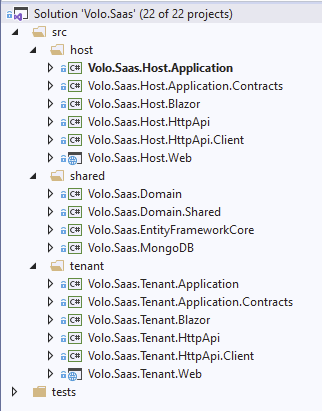
This module package is not a final application. You need to include this package in your final app. You can create a final app for each module (to be able to publish as individually) or you can put them all in a monolith app. In your case I think you want your SaaS package as a separate app.
You can create a new HttpApi.Host project using HttpApi project and you can put this app behind the Gateway (so that you can rate limit or load balance your API)
Host.Web and Blazor projects are the applications. These project has UI pages.
If you are using Angular then check out https://docs.abp.io/en/commercial/latest/ui/angular/dynamic-form-extensions
@Mohammad this document explains your question in details https://docs.abp.io/en/abp/latest/Best-Practices/Module-Architecture
@developer1 this is a know bug and it's already fixed. you can get the fixed version when the new release will be published









