Hello! sorry I'm reopening this only because I have the exact same issue with the mobile app Maui Blazor hybrid.
We use Leptonx theme side menu
using Volo.Abp.AspNetCore.Components.MauiBlazor.LeptonXTheme;
and exact same
Configure<AbpLayoutHookOptions>(options =>
        {
            options.Add(
                LayoutHooks.Head.Last,
                typeof(StyleHook)
            );
        });
I tried adding this in App.razor
<LayoutHook Name="@LayoutHooks.Head.Last" Layout="@StandardLayouts.Application" />
Thank you!
Thanks it works! we thought it would work out of the box with leptonx theme side menu
hey do you want me to send you the template again?
or the repro steps are
Add this component
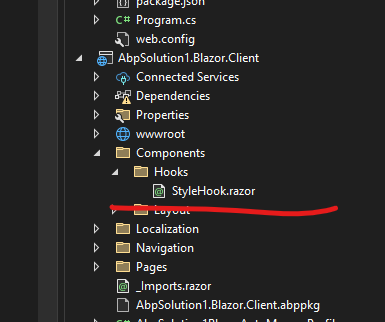
And register it like this in both Server and Wasm projects
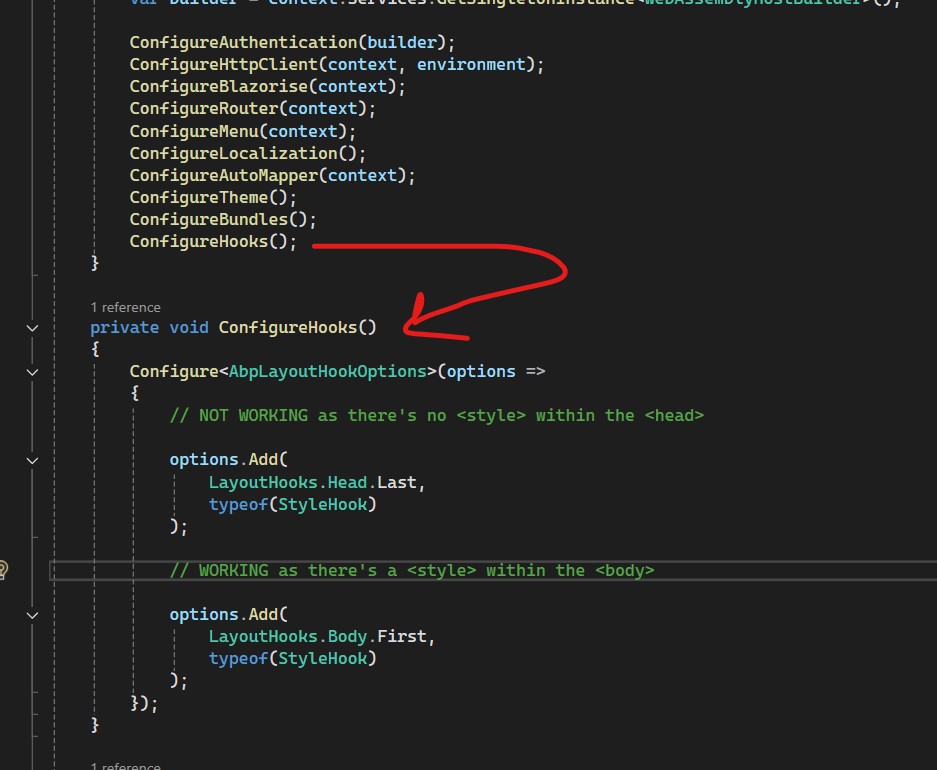
Thank you!
I emailed you the whole project source code at liming.ma@volosoft.com 3 days ago
it's also very easy to reproduce.. 2 files to change
Hello, sent thank you.
Both are Blazor ComponentBase components in a Blazor WebApp project and I showed them just to show they work on Body but not on head.
The issue is injection of these components through layout hooks Head.Last They were working with LayoutHooks.Body.First
We are trying to apply white label colors per tenant.
So it looks like this
using MyProject.AdministrationService.Constants;
using MyProject.AdministrationService.Features;
using Microsoft.AspNetCore.Components;
using Volo.Abp.Features;
using Volo.Abp.Settings;

namespace MyProject.Blazor.Shared.Components.Layout;

public partial class AppearanceStyles : ComponentBase
{
    [Inject] private ISettingProvider SettingProvider { get; set; } = null!;

    public string? PrimaryColor { get; private set; }
    public string? SecondaryColor { get; private set; }

    protected override async Task OnInitializedAsync()
    {
        try
        {
            var primaryColor = await SettingProvider.GetOrNullAsync(SettingDefinitionConstants.BrandingPrimaryColor);
            var secondaryColor = await SettingProvider.GetOrNullAsync(SettingDefinitionConstants.BrandingSecondaryColor);

            PrimaryColor = primaryColor ?? SettingDefinitionConstants.BrandingPrimaryColorDefaultValue;
            SecondaryColor = secondaryColor ?? SettingDefinitionConstants.BrandingSecondaryColorDefaultValue;
        }
        catch
        {
            PrimaryColor = null;
            SecondaryColor = null;
        }

        await base.OnInitializedAsync();
    }
}


@using MyProject.AdministrationService.Constants
@using MyProject.AdministrationService.Features
@using Volo.Abp.Features
@using Volo.Abp.Settings

@if (!string.IsNullOrEmpty(PrimaryColor) || !string.IsNullOrEmpty(SecondaryColor))
{
    <style>
        :root {
            --myproject-primary-color: @PrimaryColor;
            --myproject-secondary-color: @SecondaryColor;
        }

        .btn-primary {
            background-color: var(--myproject-primary-color);
            border-color: var(--myproject-primary-color);
        }

        .btn-primary:hover {
            background-color: var(--myproject-primary-color);
            border-color: var(--myproject-primary-color);
            opacity: 0.8;
        }

        .btn-primary:focus {
            background-color: var(--myproject-primary-color);
            border-color: var(--myproject-primary-color);
            box-shadow: 0 0 0 0.25rem rgba(from var(--myproject-primary-color) r g b / 0.25);
        }

        .bg-primary {
            background-color: var(--myproject-primary-color) !important;
        }

        .text-primary {
            color: var(--myproject-primary-color) !important;
        }

        .border-primary {
            border-color: var(--myproject-primary-color) !important;
        }

        .btn-outline-primary {
            border-color: var(--myproject-primary-color);
            color: var(--myproject-primary-color);
        }

        .btn-outline-primary:hover {
            background-color: var(--myproject-primary-color);
            border-color: var(--myproject-primary-color);
            color: #fff;
        }

        .btn-outline-primary:focus {
            background-color: var(--myproject-primary-color);
            border-color: var(--myproject-primary-color);
            color: #fff;
        }

        .nav-pills .nav-link.active,
        .nav-pills .show > .nav-link {
            background-color: var(--myproject-primary-color);
        }

        .nav-link.active:hover {
            background-color: var(--myproject-primary-color);
            opacity: 0.8;
        }

        /* Secondary Color Styles */
        .btn-secondary {
            background-color: var(--myproject-secondary-color);
            border-color: var(--myproject-secondary-color);
        }

        .btn-secondary:hover {
            background-color: var(--myproject-secondary-color);
            border-color: var(--myproject-secondary-color);
            opacity: 0.8;
        }

        .btn-secondary:focus {
            background-color: var(--myproject-secondary-color);
            border-color: var(--myproject-secondary-color);
            box-shadow: 0 0 0 0.25rem rgba(from var(--myproject-secondary-color) r g b / 0.25);
        }

        .bg-secondary {
            background-color: var(--myproject-secondary-color) !important;
        }

        .text-secondary {
            color: var(--myproject-secondary-color) !important;
        }

        .border-secondary {
            border-color: var(--myproject-secondary-color) !important;
        }

        .btn-outline-secondary {
            border-color: var(--myproject-secondary-color);
            color: var(--myproject-secondary-color);
        }

        .btn-outline-secondary:hover {
            background-color: var(--myproject-secondary-color);
            border-color: var(--myproject-secondary-color);
            color: #fff;
        }

        .btn-outline-secondary:focus {
            background-color: var(--myproject-secondary-color);
            border-color: var(--myproject-secondary-color);
            color: #fff;
        }
    </style>
}

        Configure<AbpLayoutHookOptions>(options =>
        {
            options.Add(
                LayoutHooks.Head.Last,
                typeof(AppearanceStyles)
            );
        });
Also had the same issue in MVC by using
public class BootstrapStyleViewComponent(ISettingProvider settingProvider) : AbpViewComponent
{
    public async Task<IViewComponentResult> InvokeAsync()
    {
        var primaryColor = await settingProvider.GetOrNullAsync(WhileLabelAppSettings.PrimaryColor);
        return View("~/Components/BootstrapStyle/Default.cshtml", primaryColor);
    }
}
And also
Configure<AbpLayoutHookOptions>(options =>
{
    options.Add(
    LayoutHooks.Head.Last,
    typeof(BootstrapStyleViewComponent));
});
Hello!
I am implementing tenant-specific branding in an ABP application with LeptonX Theme. The settings are saving correctly per tenant, but I cannot get the styles to apply using Layout Hooks.
Environment:
What I'm trying to achieve: Apply custom colors per tenant using CSS variables injected into the page head.
What I've tried: Following these documentation links:
The Problem:
Configure<AbpLayoutHookOptions>(options =>
{
    options.Add(
        LayoutHooks.Head.Last,  // This does NOT work - component never renders in my <Head> html
        typeof(AppearanceStylesComponent)
    );

    options.Add(
        LayoutHooks.Body.First,  // This WORKS - component renders correctly
        typeof(TestStyleComponent)
    );
});
Thanks that helped
It doesn't come with cms kit option in a microservice template and there's 0 samples online or documentation for it..
Hi, can you share a code sample for it? Thanks









