Activities of "berkansasmaz"

Hello,

Have you configured your gateway according to this change?
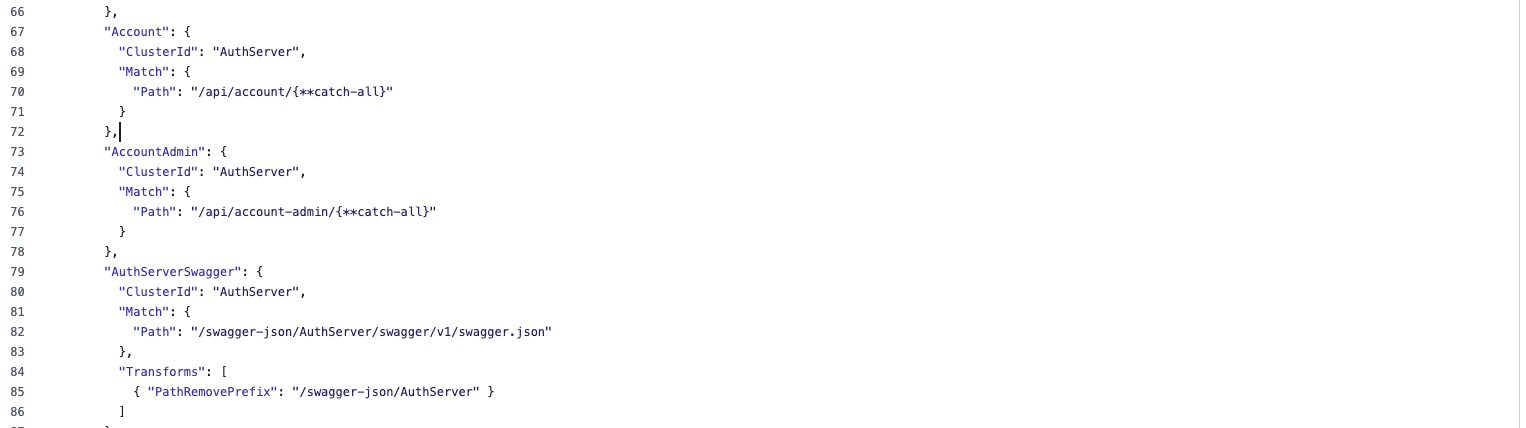
If you have configured it, the request should reach the Gateway and be passed to the AuthServer, can you verify this?

Hi,

Can you configure the forward header?

  • https://learn.microsoft.com/en-us/aspnet/core/host-and-deploy/proxy-load-balancer?view=aspnetcore-8.0#forwarded-headers-middleware-order
  • https://www.youtube.com/live/MZVL99H4xMs?si=cQC7sHADnqtmwGeH

Hello,

ABP Studio checks three conditions for this feature to be active. Please make sure the following conditions are met:

  1. Your NuGet.Config file should not contain https://nuget.abp.io. If it does, please remove that line.
  2. None of the projects in your solution should reference the Volo.Abp.Commercial.SuiteTemplates package. If it’s present, you can remove it.
  3. There should be no appsettings.secrets.json file in the solution. If found, please delete it.

Could you please check these and try again?


Sorry for the late reply, by the way. We missed this in our busy schedule.

Hi Martin,

We have reviewed the information you provided, but all the issues are mixed together, which makes it very difficult for us to follow and understand the situation clearly.

To help you more effectively, please create separate questions for each distinct issue. For example, you can create one question for an issue related to ABP Studio and another for a deployment-related problem.

In each question, please include the steps you followed and any relevant logs or error messages. You can also briefly mention what you have already tried, but please note that we need the log records in order to properly identify the root cause of the issue.

This way, we can better understand each issue and provide more accurate and helpful support.

Can you access which folders are under wwwroot/libs folder on the server? If so we can verify if /lodash/lodash.min.js exists. We can also verify if other client-side libraries have been installed.


By the way, I opened an issue to add Blazor Web App to the deployment document. See: https://github.com/abpframework/abp/issues/22654

An unhandled exception occurred while processing the request. AbpException: Could not find file '/libs/lodash/lodash.min.js' i'm using dotnet publish to go manually. so I guess you lost me on when i would run abp install-libs again in that process. intermediary, and locally in the build package? (if not using the automated ci/cd pipelines)

You can run it just before the build.

Hi,

I see the following Password field in your code;

  <div class="input-group">
                            <input  asp-for="LoginInput.Password" class="form-control form-control-sm"
                                    autocomplete="new-password" maxlength="@IdentityUserConsts.MaxPasswordLength"
                                    id="passwordInput" placeholder="Password" required-symbol="false" />


                        </div>
                        <div>
                            <span asp-validation-for="LoginInput.Password" style="cursor: pointer;" class="text-danger"></span>
                        </div>

If you update this part as follows, this feature will continue to work correctly.

  <div class="form-floating mb-2">
                            <input asp-for="LoginInput.Password" id="password-input" type="password" class="form-control" placeholder="Password">
                            @Html.LabelFor(m => m.LoginInput.Password)
                            <i id="PasswordVisibilityButton" class="bi bi-eye-slash show-pass-icon" data-bs-toggle="tooltip" data-bs-placement="top" data-bs-html="true" aria-label="@L["ShowPassword"]" data-bs-original-title="@L["ShowPassword"]"></i>
                            <i id="capslockicon" class="bi bi-capslock caps-lock-icon" style="display: none;" data-bs-toggle="tooltip" data-bs-placement="top" data-bs-html="true" aria-label="<i class='bi bi-exclamation-circle'></i> @L["CapsLockOn"]!" data-bs-original-title="<i class='bi bi-exclamation-circle'></i> @L["CapsLockOn"]!"></i>
                            <span asp-validation-for="LoginInput.Password"/>
                        </div>

Also, I am sharing the original version of the Login page below so you can refer to it when customizing:

@page
@using Microsoft.AspNetCore.Mvc.Localization
@using Microsoft.Extensions.Options
@using Owl.reCAPTCHA
@using Volo.Abp.Account.Localization
@using Volo.Abp.Account.Public.Web.Pages.Account;
@using Volo.Abp.Account.Public.Web.Security.Recaptcha
@using Volo.Abp.Account.Settings
@using Volo.Abp.Identity;
@using Volo.Abp.Settings
@model Volo.Abp.Account.Public.Web.Pages.Account.LoginModel
@inject IHtmlLocalizer<AccountResource> L
@inject Volo.Abp.AspNetCore.Mvc.UI.Layout.IPageLayout PageLayout
@inject ISettingProvider SettingProvider
@{
    PageLayout.Content.Title = L["Login"].Value;
    var reCaptchaVersion = await SettingProvider.GetAsync<int>(AccountSettingNames.Captcha.Version);
    if (Model.UseCaptcha)
    {
        await Model.ReCaptchaOptions.SetAsync(reCaptchaVersion == 3 ? reCAPTCHAConsts.V3 : reCAPTCHAConsts.V2);
    }

}

@section scripts
    {
    <abp-script-bundle name="@typeof(LoginModel).FullName">
        <abp-script src="/Pages/Account/Login.js" />
    </abp-script-bundle>

    @if (Model.UseCaptcha)
    {
        if (reCaptchaVersion == 3)
        {
            <recaptcha-script-v3 />
            <recaptcha-script-v3-js action="login" execute="false" />
        }
        else
        {
            <recaptcha-script-v2 />
        }
    }
}

@if (Model.IsLinkLogin)
{
    <abp-alert alert-type="Warning">
        @L["LinkAccountWarning", Url.PageLink()]
    </abp-alert>
}

@if (Model.BackToExternalLogins)
{
    <div class="d-grid gap-2">
        <a class="mb-3 btn btn-primary btn-block" href="@Url.Page("./ExternalLogins")">@L["Back"]</a>
    </div>
}
<div class="account-module-form">

    @if (Model.IsSelfRegistrationEnabled)
    {
        <h5 class="mb-2">@L["NotAMemberYet"] <a class="text-decoration-none" href="@Url.Page("./Register", new {returnUrl = Model.ReturnUrl, returnUrlHash = Model.ReturnUrlHash})">@L["Register"]</a></h5>
    }

    @if (Model.EnableLocalLogin)
    {
        <form method="post" id="loginForm">
            @if (Model.UseCaptcha)
            {
                <input class="mb-3" data-captcha="true" type="hidden" name="@RecaptchaValidatorBase.RecaptchaResponseKey" id="@RecaptchaValidatorBase.RecaptchaResponseKey"/>
            }
            <div>
                <div class="form-floating mb-2">
                    <input asp-for="LoginInput.UserNameOrEmailAddress" type="text" class="form-control" placeholder="name@example.com">
                    @Html.LabelFor(m => m.LoginInput.UserNameOrEmailAddress)
                    <span asp-validation-for="LoginInput.UserNameOrEmailAddress"/>
                </div>

                <div class="form-floating mb-2">
                    <input asp-for="LoginInput.Password" id="password-input" type="password" class="form-control" placeholder="Password">
                    @Html.LabelFor(m => m.LoginInput.Password)
                    <i id="PasswordVisibilityButton" class="bi bi-eye-slash show-pass-icon" data-bs-toggle="tooltip" data-bs-placement="top" data-bs-html="true" aria-label="@L["ShowPassword"]" data-bs-original-title="@L["ShowPassword"]"></i>
                    <i id="capslockicon" class="bi bi-capslock caps-lock-icon" style="display: none;" data-bs-toggle="tooltip" data-bs-placement="top" data-bs-html="true" aria-label="<i class='bi bi-exclamation-circle'></i> @L["CapsLockOn"]!" data-bs-original-title="<i class='bi bi-exclamation-circle'></i> @L["CapsLockOn"]!"></i>
                    <span asp-validation-for="LoginInput.Password"/>
                </div>
            </div>
            <abp-row>
                <abp-column>
                    <div class="form-switch ps-2">
                        <abp-input asp-for="LoginInput.RememberMe" class="mb-4"/>
                    </div>
                </abp-column>
                <abp-column class="text-end">
                    <a href="@Url.Page("./ForgotPassword", new {returnUrl = Model.ReturnUrl, returnUrlHash = Model.ReturnUrlHash})">@L["ForgotPassword"]</a>
                </abp-column>
            </abp-row>

            @if (reCaptchaVersion == 2)
            {
                <script>
                    recaptchaCallback = function (token) {
                        $('form button[type=submit]').removeAttr("disabled");
                        $('#@RecaptchaValidatorBase.RecaptchaResponseKey').val(token)
                    };
                </script>
                <div class="mb-3">
                    <recaptcha-div-v2 callback="recaptchaCallback"/>
                </div>
            }

            <div class="d-grid gap-2">
                <abp-button button-type="Primary" type="submit" class="mb-3" name="Action" value="Login" disabled="true">
                    <i class="bi bi-box-arrow-in-right me-1"></i>
                    @L["Login"]
                </abp-button>
            </div>

            @if (Model.ShowCancelButton)
            {
                <div class="d-grid gap-2">
                    <abp-button button-type="Secondary" type="submit" formnovalidate="formnovalidate" class="mb-3" name="Action" value="Cancel">@L["Cancel"]</abp-button>
                </div>
            }
        </form>
    }

    @if (Model.VisibleExternalProviders.Any())
    {
        if(Model.EnableLocalLogin)
        {
            <hr/>
            @L["OrSignInWith"]
            <br/>
        }
        else
        {
            @L["SignInWithOneOfTheFollowingProviders"]
        }

        <form asp-page="./Login" asp-page-handler="ExternalLogin"
              asp-route-returnUrl="@Model.ReturnUrl"
              asp-route-returnUrlHash="@Model.ReturnUrlHash"
              asp-route-linkTenantId="@Model.LinkTenantId"
              asp-route-linkUserId="@Model.LinkUserId"
              asp-route-linkToken="@Model.LinkToken"
              method="post">
            @foreach (var provider in Model.VisibleExternalProviders)
            {
                <button type="submit"
                        class="mt-2 me-2 btn btn-outline-primary btn-sm"
                        name="provider"
                        value="@provider.AuthenticationScheme"
                        data-busy-text="@L["ProcessingWithThreeDot"]">
                    @if (provider.Icon != null)
                    {
                        <i class="@provider.Icon"></i>
                    }
                    <span>@provider.DisplayName</span>
                </button>
            }
        </form>
    }
</div>

I'm waiting to hear from you.

Hi,

if I get 10 requests from users, so will it process 10 requests at the same time or it will process request picked by each server which means 2 requests at the same time.

This will depend entirely on your configuration. For example:

app.UseHangfireServer(new BackgroundJobServerOptions
{
    WorkerCount = 10 // or any number you need
});

You can configure the degree of parallelism manually like above. See more: https://docs.hangfire.io/en/latest/background-processing/configuring-degree-of-parallelism.html

When I'm processing the background job, I'm calling the external services, and I need to wait for the response to complete the request so with hangfire, will it also wait the existing request to complete, or it will start next request parallelly.

I am not an expert on Hangfire, but when I check their documentation, I see that you can add throttling or concurrency limiters. See: https://docs.hangfire.io/en/latest/background-processing/throttling.html

I reviewed the log you shared and saw that the request completed in 6.5 seconds. There are no connection issues with Redis or any other errors.

In general, this kind of response time may be related to the characteristics of your machine, as there are no unusual log entries.

Have you tried running the same project on a teammate’s computer? Also, do you observe similar response times when running a fresh ABP project created from scratch?

Showing 91 to 100 of 737 entries
Boost Your Development
ABP Live Training
Packages
See Trainings
Mastering ABP Framework Book
The Official Guide
Mastering
ABP Framework
Learn More
Mastering ABP Framework Book
Made with ❤️ on ABP v10.1.0-preview. Updated on December 17, 2025, 07:08
1
ABP Assistant
🔐 You need to be logged in to use the chatbot. Please log in first.