Hello,
Sorry for the late reply — it was delayed due to public holidays.
I was not able to reproduce the issue on macOS, but I have observed the terminal opening problem a few times on Windows when running a service. I will open an internal issue to track this.
Ek olarak, tek Web servisinide çalıştırmayı denedim; uygulama hemen “Application shutting down… Exited with code: 1” hatası verip kapanıyor. Bu “exited with code: 1” durumu loglarda hiçbir detaylı hata ya da stack trace göstermiyor; starting loading şkelind ekalıyor ve abp studioyu kapatmadan durduramıyorum.
If you could share the log records related to the service not starting when you run it individually, it might help us better understand the problem. Also, when you right-click and try to stop the service, I assume it does not stop either — is that correct?
When I tried to reproduce the issues using the information you provided, I was not able to reproduce them. However, if possible, please share your solution via email at support@abp.io, including your ticket number. This will help us investigate the issue more effectively and provide a quicker resolution.
Best regards, Berkan Şaşmaz
Hello,
Could you please provide more details so that we can reproduce the issue? For example:
You can access solution configuration like below:
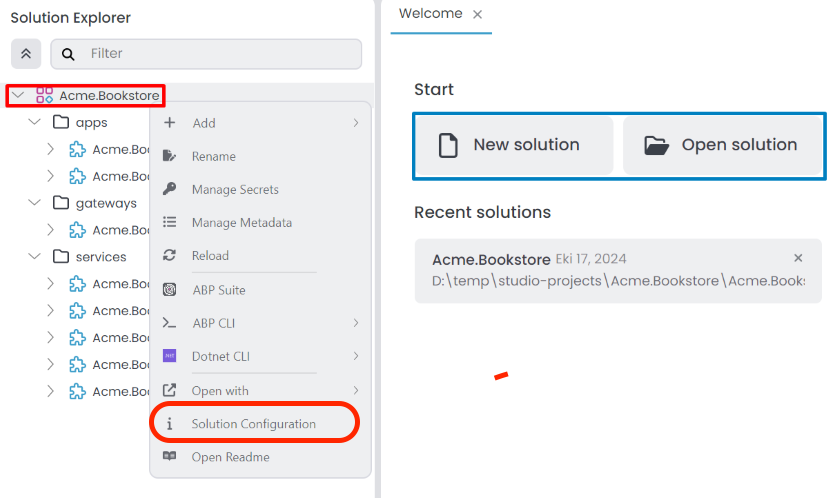
These informations will help us investigate the problem more effectively.
Best regards,
Berkan Şaşmaz
Developer Advocate
https://www.berkansasmaz.com
As a result of our meeting, I am sharing the code blocks you requested below:
OpenIdConnect Configuration:
     context.Services.AddAuthentication().AddOpenIdConnect();

        context.Services.Configure<OpenIdConnectOptions>(OpenIdConnectDefaults.AuthenticationScheme, options =>
        {
            options.Authority = configuration["AzureAd:Instance"];
            options.ClientId = configuration["AzureAd:ClientId"];
            options.ResponseType = OpenIdConnectResponseType.CodeIdToken;
            options.CallbackPath = configuration["AzureAd:CallbackPath"];
            options.ClientSecret = configuration["AzureAd:ClientSecret"];
            options.RequireHttpsMetadata = false;
            options.SaveTokens = true;
            options.GetClaimsFromUserInfoEndpoint = true;

            options.SignInScheme = IdentityConstants.ExternalScheme;
            options.Events = new OpenIdConnectEvents
            {
                OnRedirectToIdentityProvider = redirectContext =>
                {
                    redirectContext.ProtocolMessage.Prompt = "login";
                    return Task.CompletedTask;
                }
            };
            options.Scope.Add("email");
            options.Scope.Add("openid");
            options.Scope.Add("offline_access");
            options.Scope.Add("profile");

            options.ClaimActions.MapJsonKey(ClaimTypes.NameIdentifier, "sub");
        });
Custom register model to create user automatically:
[ExposeServices(typeof(RegisterModel))]
public class MyRegisterModel : RegisterModel
{
    public MyRegisterModel(IAuthenticationSchemeProvider schemeProvider, IOptions<AbpAccountOptions> accountOptions, IAccountExternalProviderAppService accountExternalProviderAppService, ICurrentPrincipalAccessor currentPrincipalAccessor, IHttpClientFactory httpClientFactory) : base(schemeProvider, accountOptions, accountExternalProviderAppService, currentPrincipalAccessor, httpClientFactory)
    {
    }

    public override async Task<IActionResult> OnGetAsync()
    {
        ExternalProviders = await GetExternalProviders();
        if (!await CheckSelfRegistrationAsync())
        {
            if (IsExternalLoginOnly)
            {
                return await OnPostExternalLogin(ExternalLoginScheme);
            }

            Alerts.Warning(L["SelfRegistrationDisabledMessage"]);
            return Page();
        }

        if (IsExternalLogin)
        {
            var externalLoginInfo = await SignInManager.GetExternalLoginInfoAsync();
            if (externalLoginInfo == null)
            {
                Logger.LogWarning("External login info is not available");
                return RedirectToPage("./Login");
            }


            var identity = externalLoginInfo.Principal.Identities.First();
            var emailClaim = identity.FindFirst(AbpClaimTypes.Email) ?? identity.FindFirst(ClaimTypes.Email);
            if (emailClaim == null)
            {
                throw new AbpException("Could not find an email address for the user from the external login info!");
            }

            var userName = await UserManager.GetUserNameFromEmailAsync(emailClaim.Value);

            var user = await RegisterExternalUserAsync(externalLoginInfo,userName, emailClaim.Value);
            await SignInManager.SignInAsync(user, isPersistent: true, authenticationMethod: ExternalLoginScheme);

            // Clear the dynamic claims cache.
            await IdentityDynamicClaimsPrincipalContributorCache.ClearAsync(user.Id, user.TenantId);
            return Redirect(ReturnUrl ?? "/");

        }

        Alerts.Warning(L["SelfRegistrationDisabledMessage"]);
        return Page();
    }
}
Disable local login in appsettings.json:
  "Settings": {
      "Abp.Account.EnableLocalLogin":false
  }
Note: After adding this setting, if it does not appear as false when you start the application, it is because the value stored in the database overrides the one in the appsettings. If you create a new database from scratch, the value in the appsettings will be used since there will be no conflicting setting in the database.
If you have no further questions on the subject, can I close the ticket?
See you soon 👋
Hi,
No, it doesn’t mean that you have to maintain a separate Auth Server. In a modular monolith setup, your final application, which hosts all the modules, does not need to be tiered.
If you haven’t already completed it, I recommend going through this tutorial to better understand how to build a modular monolith application and the benefits of this architecture.
To sum up, using a modular monolith architecture does not require you to host a separate Auth Server or maintain an Auth Server. If you'd like, I can show you a quick demo during our meeting on Thursday to clarify this further.
Hi 👋,
From your Gif it seems that in addition to the Account module you also installed the OpenIddict UI module. Creating a non-tiered solution means using OpenIddict included in ABP, right?
Yes, that's correct. When you create a non-tiered solution, OpenIddict is included via ABP modules. However, since it’s encapsulated within a module, you don’t need to manage or deploy it separately. The inclusion of the OpenIddict UI module should not be seen as a drawback—it simply gives you flexibility if you ever decide to customize authentication flows in the future.
As for Jesse’s point:
"Just to clarify. I want to use an external OIDC ID provider as the main login to my app. I do not want to use or maintain Auth server. Is this possible with ABP?"
Yes, this is absolutely possible. I believe what Jesse meant is that he does not want to maintain a separate AuthServer project. In a non-tiered solution, everything is hosted in a single application, and ABP takes care of the underlying OpenIddict setup through module references. So you're not responsible for deploying or maintaining a separate authorization server—it’s just a package dependency managed by the ABP team.
If I were to have multiple instances of my backend application this scenario would not work.
ABP is designed to support scalable, multi-instance deployments. There’s no technical limitation preventing you from running multiple instances of your backend in this scenario. If you face any specific issues with this, I recommend opening a separate issue so we can help investigate further.
Thanks for bringing up this topic—definitely valuable for many of us working with ABP.
Hi Jesse 👋,
Yes, it's possible to use an external OIDC identity provider as the main login without using the ABP AuthServer.
To do this:
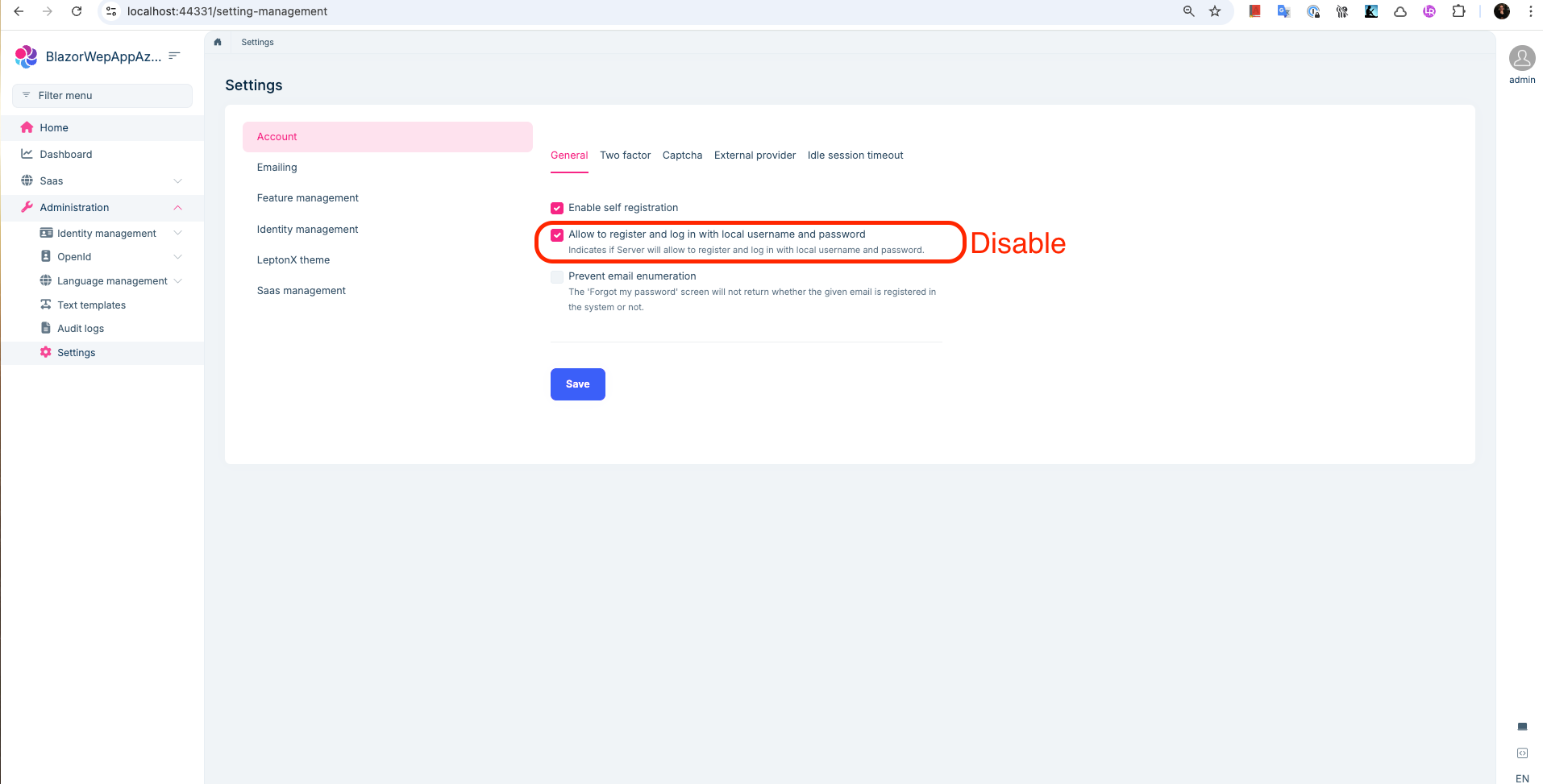
"Allow to register and log in with local username and password" setting, as mentioned in the answer, so ABP doesn’t redirect to the AuthServer anymore.In the GIF below, I demonstrated this with Azure Entra ID, but you can apply the same approach with Auth0 — there's no limitation.
⚠️ Important: Once you disable local login, you won’t be able to sign in with the default admin user anymore. So before logging out, assign the admin role to the user who logs in through Auth0. Otherwise, you’ll lose access to full permissions unless you manually update the database.
Let me know if you need help with the configuration.
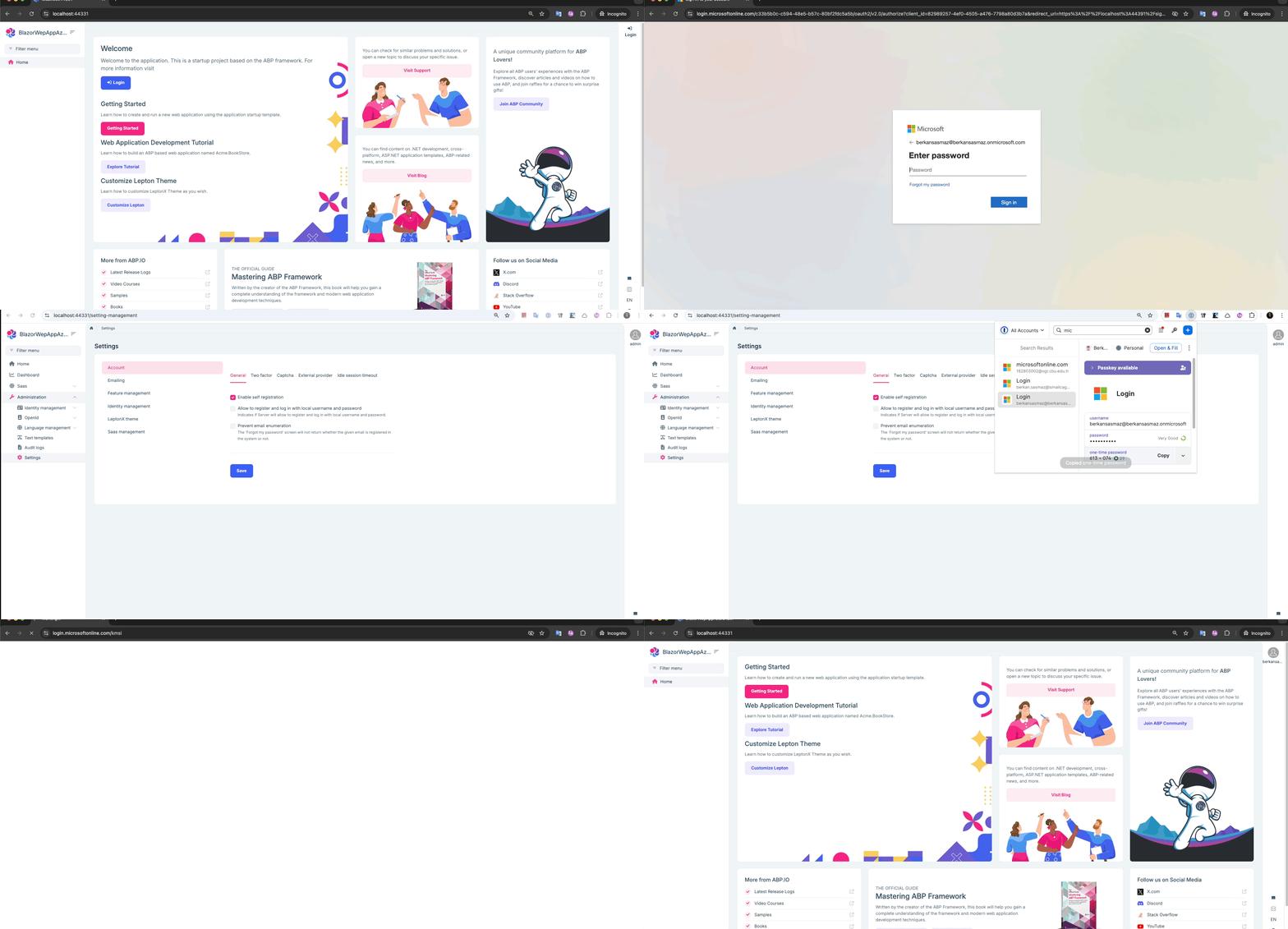
Hello Jesse 👋,
I hope your trial license is going well ☺️
To resolve this, please disable the setting highlighted in the screenshot below. Once disabled, the OpenID Connect provider you have configured will be used automatically.
Best regards,
Berkan Şaşmaz
Developer Advocate
https://www.berkansasmaz.com
Hi Ademaygun,
Thank you for your recent valuable feedback. I will open a separate issue to track this(#20294). We will proceed with using the suggested logos for Google and other popular options.
Closing this issue now. Feel free to re-open it or create a new one if you have further questions.
Hello,
I tried to reproduce the problem as you described, but unfortunately, I was not successful. Here is my configuration:
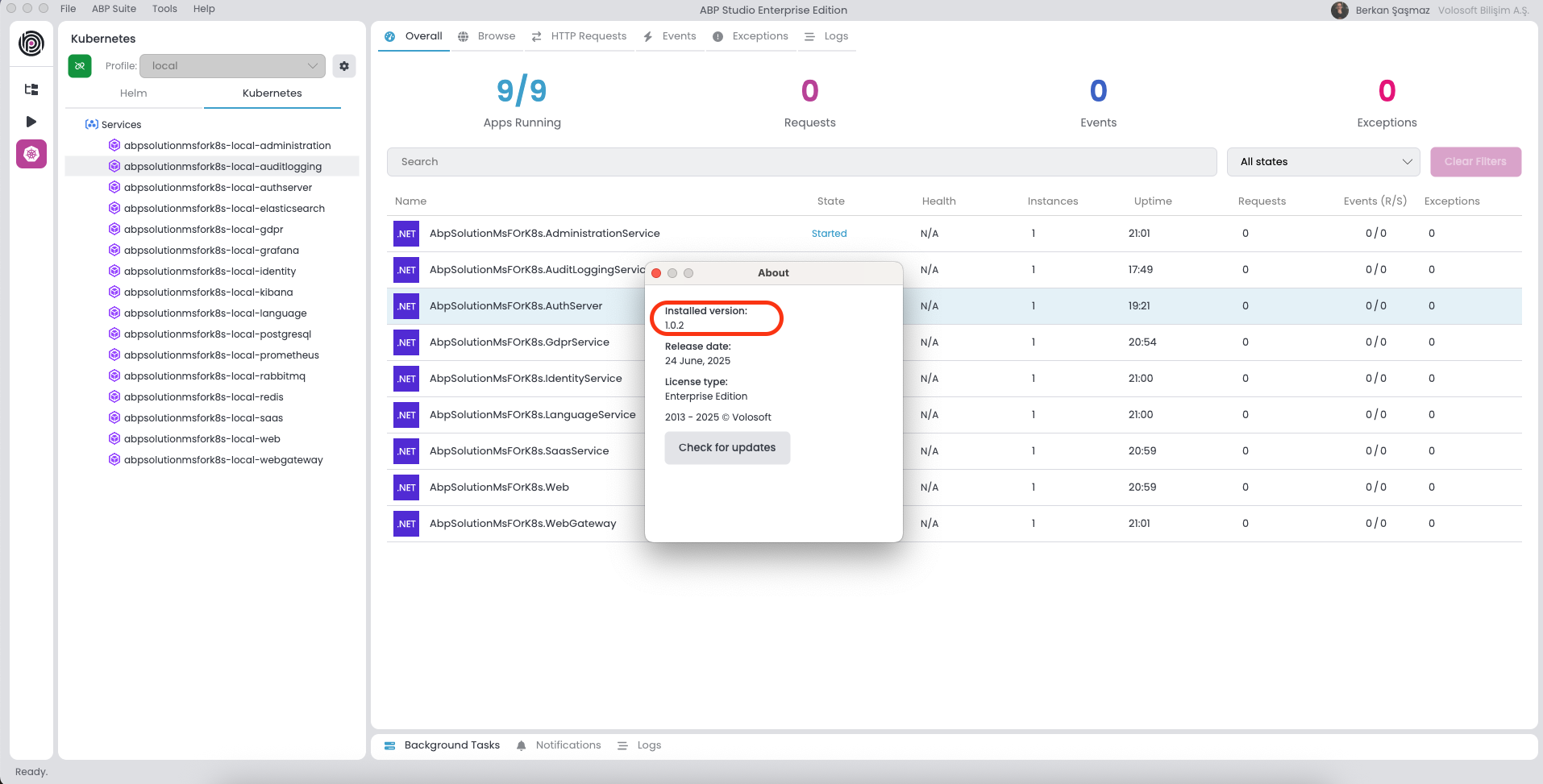
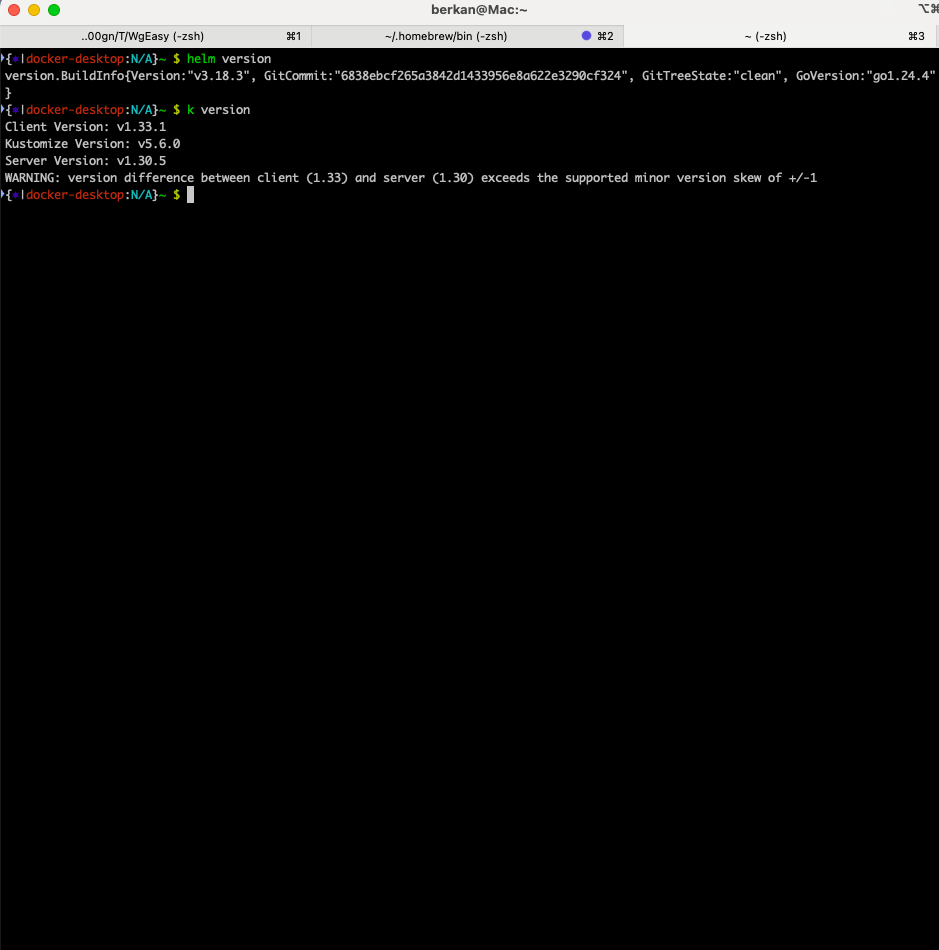
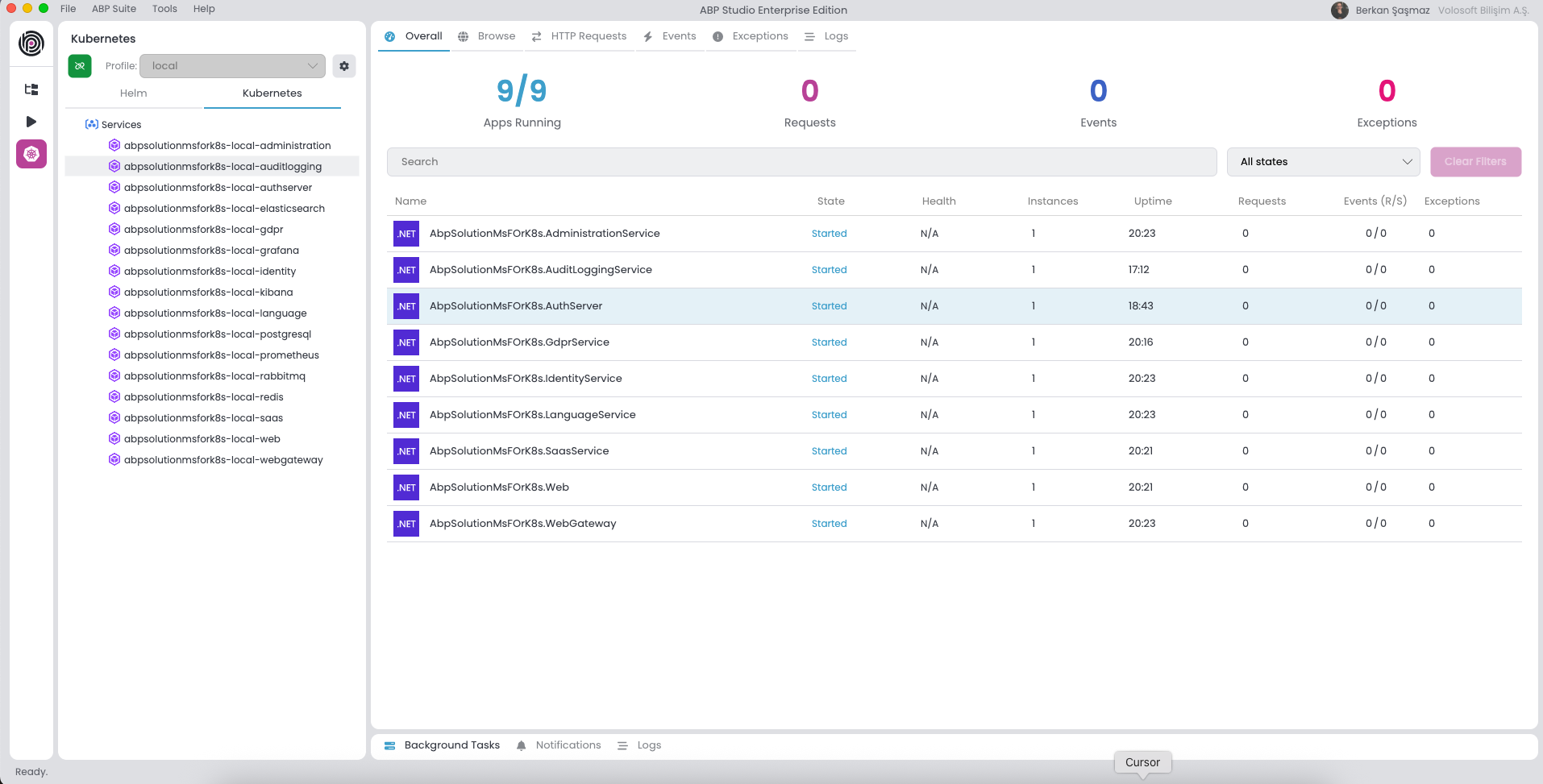
Can you provide more information so that I can reproduce the problem?









