You mentioned that there are several disadvantages compared to the previous approach, but I would appreciate some clarification on this.
For instance, in the scenario where we didn’t use a mono-repo setup, you would move the Angular folder to a new repository. Has this process changed with the new template? Or do you find it more challenging to set up CI/CD pipelines with the new folder structure? What specific aspects are causing more difficulties compared to the old approach?
Please know that we thoroughly considered these factors during the design phase, as the new structure is a significant change for us. If there are substantial disadvantages, we are open to reconsidering the folder structure. However, most of the issues raised so far were already present in the previous setup.
While customizing the folder structure might seem like it breaks the 'intended workflow,' it doesn’t pose any issues for future updates or maintaining the template, as we're only changing the folder structure without affecting core functionalities.
In summary, both approaches have their pros and cons, but we opted for the current design based on the reasons I mentioned earlier.
Lastly, the ABP framework is inherently more aligned with a mono-repo setup. For example, the microservice solution leans towards this approach by default. However, if preferred, it's straightforward to work with multiple repositories. You can find more information here: https://abp.io/docs/latest/solution-templates/microservice/mono-repo-vs-multiple-repository-approaches.
It seems like the when using the "old" CLI, it still creates solutions using the aspnet-core folder with react-native etc folders being at the same level as the aspnet-core folder. Does this mean that ABP Suite now supports both folder structures, and if so, is there a way we can choose ourselves which one we prefer?
Yes, the Suite supports both folder structures. Only when the template itself is first created, it is created in a different folder structure than before. So, we expect you to have no problems with the Suite. If you are, you can create a new question with the details of the problem you are experiencing.
Unfortunately, the feature of choosing the structure of the template as you mentioned is not part of our plans. However, we have developed ABP Studio's infrastructure to support custom templates. This means that developers will be able to create their own templates. But we need to work more on this feature, so there is no deadline for this and it is not prioritized. However, you can manually perform the related changes in the template you created for now and there should be no obstacle to this.
First of all, thank you very much for your valuable feedback. We rarely encounter such questions, but such inquisitive questions are very valuable to us, so we are grateful to you.
With ABP Studio, we made our templates from scratch, and in this process, we had the opportunity to re-evaluate and change many decisions made in the past as a result of the knowledge and feedback we gained over time. Here are the main reasons that led us to this decision:
aspnet-core in MVC UI, but there was for Angular. This meant that the location of the files on the ASP.NET Core side was different according to the UI type and we had to constantly consider this in our code generation and other systems.abpsln file and .NET's sln file to be aligned so that we don't need to go above solution root for angular or other projects.Apart from these, it has no serious advantages or disadvantages. This is how we decided and implemented it, while making all ready-made templates from scratch, we thought about this from scratch and decided like this.
However, despite all this, we apologize to you that there is a communication problem here. We have been working on this kind of change for quite a long time and from time to time we have announced it a little bit with community events and social media posts as far as I know, and we tried to support this process with blog posts close to its release. Despite all this, I agree with what you say, we needed to produce more content on this subject. I will try to constantly mention this matter in the decisions we will take for the future, I am sure we will achieve a much better result. Thanks again for your feedback.
Regards.
Hello, first of all, sorry for the late reply, I missed this question.
When I create a template with ABP Studio or with the new CLI I see the following solution structure (changing on the configurations selected):
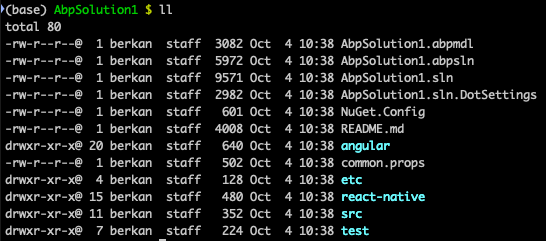
As you said, this structure was different in the old template system and we changed it thinking that this would be more advantageous in the new template system and we adapted Suite according to this change. Therefore, you should not have any problems when generating code with Suite because our expectation is that the new templates are 100% compatible with Suite. I would like to ask a few questions to make your question more specific.
Are you having trouble with a specific case? or Do you think any documents are missing or incorrect?
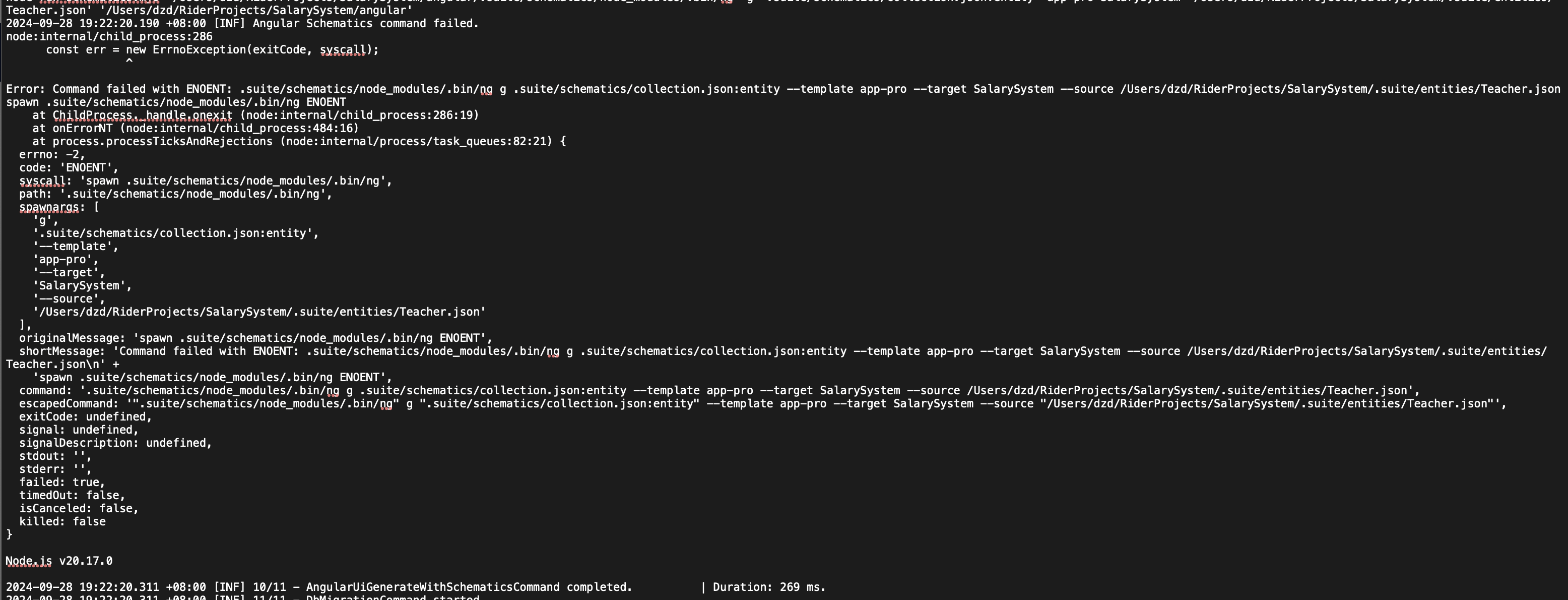
I opened an issue to the team about the code generation problem for Angular, but the team is currently working very intensively and therefore could not prioritize the issue. The other problem, the need to run Studio with admin privileges in the new version of macOS, continues. I worked on the problem for 2 days but I couldn't find a reasonable solution. I don't want to spend more time for now, I think it would be more logical for us to wait for the problem to become a little more widespread and solvable. I know this situation is very annoying but unfortunately, there are very critical problems in macOS Sequoia even for dotnet runtime. Everyone is trying to adapt to this new version, but unfortunately, it seems to take some time 😔
I think this question has gone on too long and if you don't mind, we can close this question.
If there are no problems, the new version will be released today 🥳🥳
I was able to reproduce and fix the problem of Suite not opening the first time and it should be fixed in the next version, FYI.
something wrong with generate CRUD. pages too
I used both
UIandCLIto generate CRUD page for angual. it said ok,but no file generated

I created an internal issue for this problem, thank you for the report.
after first click on open,see nothing
I can't reproduce the problem of the Suite not opening on the first click at the moment, so I am adding log records to better understand the error next time.
I updated my macOS version and now I can reproduce the external dependencies loading issue. Thanks again for reporting the problem.
Hi Benguahao,
Can you send related log records?
You can find the log file in the path below:
~/.abp/studio/ui/logs/abp-studio-ui-logs.txt
In the meantime I will be updating my OS version over the weekend, so hopefully I will then be able to reproduce the other problem you are having.
I understand the problems you are experiencing and I am really sorry for them. We are doing our best with the feedback from you, but these are things that take time. As a developer I can honestly say that right now ABP Studio has some bugs and that's why we still consider ABP Studio as beta. There is a big difference between the Studio 1 month ago and now, both in terms of features and the number of bugs. You may have noticed that we have made improvements, feature additions, etc. in a very short time. In addition, despite all these improvements, we are trying to support you in a very short time in case of any problems you experience. I don't know how the refund process works, but if you are thinking of refunding, you can send an e-mail to marketing@volosoft.com.
abp studio is work for me before I update the mac os to v15.0
do you test it in same os version?
Unfortunately, I am using version 14.6.1, but I will update to version 15.0.0 very soon and then I can reproduce your problem.
Obviously, I am not very familiar with what Apple has changed with the new version, but I believe that I can solve the problem in a short time when I can reproduce it. For now, what I can suggest you as a workaround is to run ABP Studio with admin privileges. Thank you for your patience.