public async Task<StartSubscriptionResultDto> RegisterAndSubscribeAsync(SaasTenantCreateDto input)
{
    if (input.EditionId == null || input.EditionId == Guid.Empty)
    {
        throw new UserFriendlyException("Please select a valid edition.");
    }

    if (string.IsNullOrWhiteSpace(input.Name) || string.IsNullOrWhiteSpace(input.AdminEmailAddress) || string.IsNullOrWhiteSpace(input.AdminPassword))
    {
        throw new UserFriendlyException("Please fill all required fields before submission");
    }

    bool isEmailUnique = await IsEmailUnique(input.AdminEmailAddress);
    if (!isEmailUnique)
    {
        // Check that email is unique across tenants
        using (_dataFilter.Disable<IMultiTenant>())
        {
            // Throw error is tenant is active
            List<IdentityUser> users = await _userRepository.GetListAsync();
            IdentityUser? userWithSameEmail = users.FirstOrDefault(u => u.NormalizedEmail == input.AdminEmailAddress.Trim().ToUpperInvariant());
            Tenant? associatedTenant = await _tenantRepository.FindAsync(userWithSameEmail?.TenantId ?? Guid.Empty);
            if (associatedTenant != null && !associatedTenant.IsDeleted)
            {
                throw new UserFriendlyException("Email address is already registered. Please use another email address.");
            }
        }
    }

    // 1) Create tenant via domain layer (no host permission needed)
    var tenant = await _tenantManager.CreateAsync(input.Name, editionId: input.EditionId);

    tenant.SetActivationState(input.ActivationState); // keep passive until payment succeeds
    await _tenantRepository.InsertAsync(tenant, autoSave: true);

    string email = input.AdminEmailAddress.Trim().ToLowerInvariant();

    // 2) Publish TenantCreatedEto to seed admin user (same as TenantAppService does)
    await _eventBus.PublishAsync(new TenantCreatedEto
    {
        Id = tenant.Id,
        Name = tenant.Name,
        Properties =
        {
            {"AdminEmail", email},
            {"AdminUserName", email },
            {"AdminPassword", input.AdminPassword}
        }
    });

    // 3) Start subscription (creates PaymentRequest with TenantId/EditionId extra props)
    PaymentRequestWithDetailsDto? paymentRequest = null;
    try
    {
        paymentRequest = await _subscriptionAppService.CreateSubscriptionAsync(input.EditionId ?? Guid.Empty, tenant.Id);
    }
    catch
    {
        // No payment plan configured. Go directly to activation
        await ActivateTenantAsync(tenant.Id);
    }

    return new StartSubscriptionResultDto
    {
        TenantId = tenant.Id,
        PaymentRequestId = paymentRequest?.Id ?? Guid.Empty,
    };
}
I am seeing very little documentation which would support or even elucidate anything related to this. I checked PaymentRequestCreateDto and PaymentRequestWithDetailsDto, and it seems like ExtraProperties has protected set, so I can't just set it outright. In addition, the AI recommends using _paymentRequestAppService.CreateAsync(), but I would like to continue using _subscriptionAppService.CreateSubscriptionAsync() unless there is a good reason not to, since it seems to handle a lot of aspects surrounding the subscription and multitenancy.
I'm not sure if I am misunderstanding something, or if the AI is incorrect, but any help here would be appreciated.
That doesn't really recommend anything aside from removing the whitelisting on some of my other pages, which I need for other purposes in my app (my own Stripe implementation).
Any help would be appreciated.
So nuking the databases (along with changing a connection string I missed, which might have been a big part of it) worked and everything is functional. I guess I was mostly just rubber duck debugging here so I will close this out.
Based on everything I was seeing, it seems to me that it was attempting to use my local migrations to figure out what needs to go to the azure database. Unfortunately my migrations were very messed up (I made some changes to my project awhile ago and had some source control issues, so a lot of code got messed up), so I decided to nuke both of them and make fresh databases and a brand new initial migration, since I am still in development and can do so with very few downsides.
If this ends up working, I will close the ticket.
I checked my Azure db ef migrations table, and it shows me this:
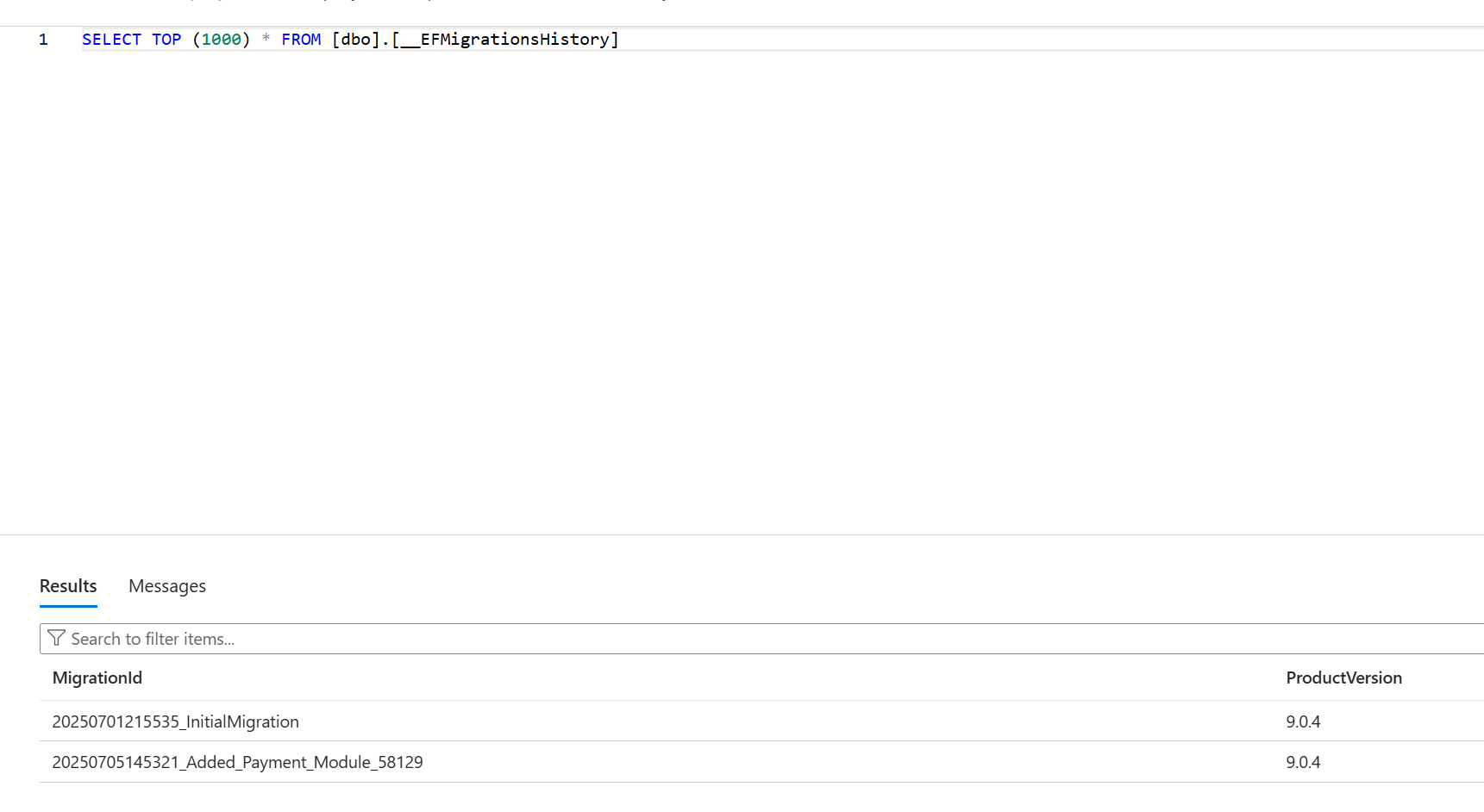
Based on the number after Added_Payment_Module, which was different than the number after the same migration locally, it makes me think that it is automatically generated or something to that effect. However, I can't determine the mechanism behind this. For instance, I added the AddedToEmail migration locally:
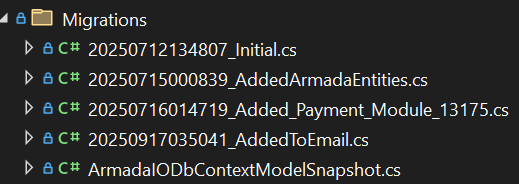
But obviously this isn't making its way into the ef migrations on the azure db.
Please help me understand how this works and why the migration isn't working in this workflow.
Decided to reopen this since I am having an issue with DbMigrator in my Github Workflow. This is also related to ticket #9542. I ran my Github workflow that runs on commit to deploy to Azure, and the DbMigrator didn't seem to work. I previously followed this guide: https://abp.io/docs/latest/solution-templates/layered-web-application/deployment/azure-deployment/step3-deployment-github-action?UI=MVC&DB=EF&Tiered=No. Here is the relevant part of the YML file:  You can find the whole YML file on my github, which I gave access to you previously.
When the workflow runs, it doesn't throw any errors, but it doesn't update the db as I would expect. I added a field that is not getting added to its table.
One thing is that I don't see any command here to add a migration, it just runs DbMigrator. I didn't see that in the documentation I linked above, so I assumed it wasn't necessary, but maybe it is and I missed it.
Any help would be really appreciated.
I did end up cleaning up my project a bit, but I realized that the issue was the the __EFMigrations table was inconsistent with the migrations I had. I have no idea how that occurred (different ids), but I renamed some of my migrations to match, and had to comment out some code in one of the migrations that was already in the db. A bit hacky but I got it working. This is just a local dev environment so worst case scenario I can always drop the db and start over, but this is working for now.
Thanks for your help.
Hmm, it seems to be running now, but isn't playing nice with the migrations. It was throwing an exception saying it can't add a table that already exists. So I deleted all the existing migrations and the DbContextModelSnapshot (perhaps I shouldn't have done this but I thought it would reset it since it seems to be out of sync with the db), and made a new migration. I assumed it would recognize what is in the table and bring up a migration with just the differences, but it is wanting to insert all of the tables again. I'm not sure how this went wrong.
Yes, I created a new migration using "dotnet ef migrations add " followed by the migration name. That looks fine, as it shows the field I was adding.









