Hi, unfortunately, we couldn't reproduce the issue with the latest CLI and latest project template version.
Did you set-up your development environment according to do Documentation?
Which dotnet SDK version are you currently using?
there is no horizontal scroll at the moment in the bottom menu currently. It's by design. You can override the component and add horizontal scroll by yourself but unfortunately there is no option for that in the theme
Sorry, I couldn't reproduce the same issue.
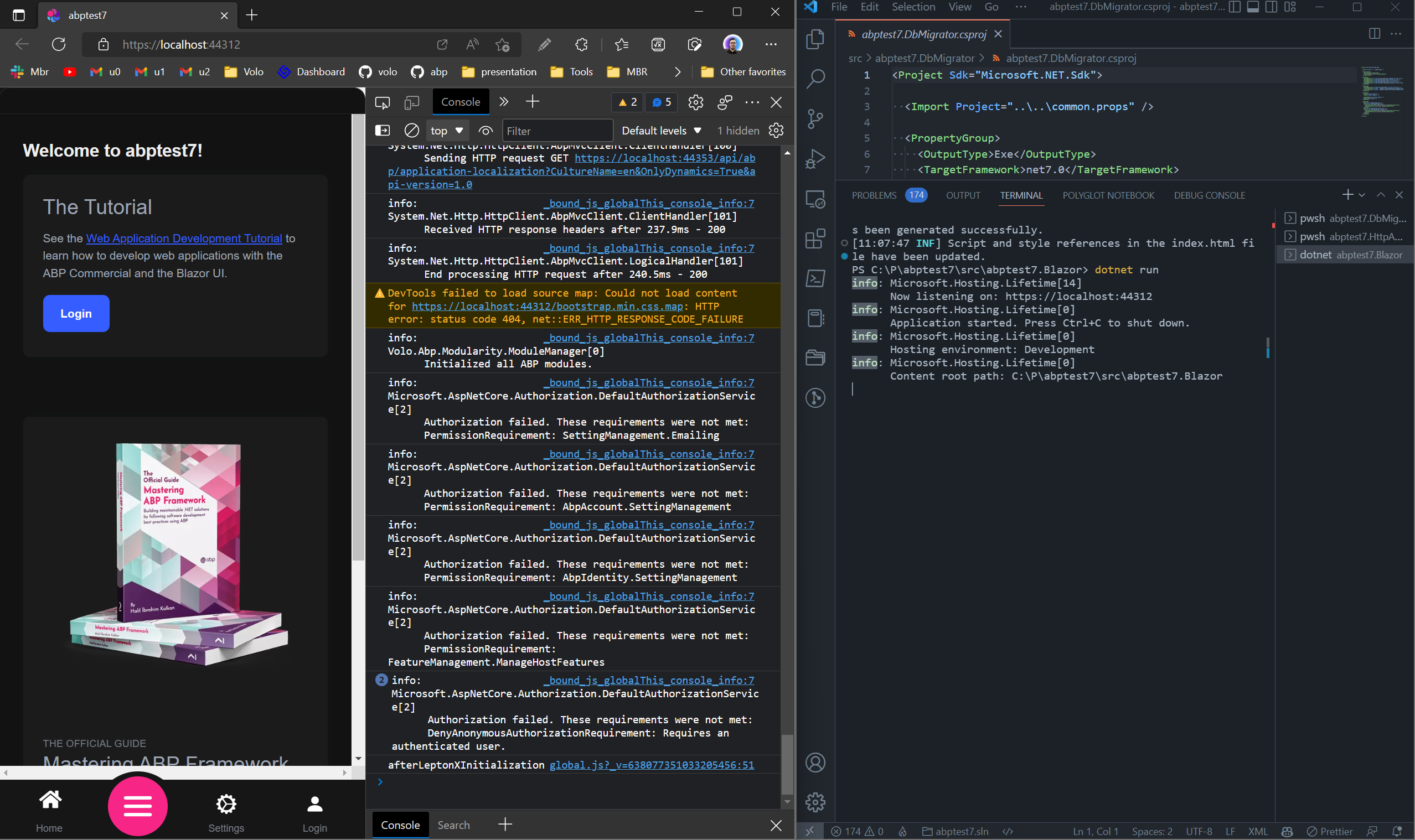
Can you share your project files to support@abp.io?
If you share how you override the component, can you share the code? ıt seems some of styles are missing in the screenshot
Can you provide abp related sample? How it supposed to work with abp commercial payments?
Hello again,
A complete example might have some conjecture but you can try the following configuration in your Domain layer:
context.Services.AddOptions<StripeOptions>()
.Configure<ICurrentTenant>(
    (options, currentTenant) =>
    {
        if (currentTenant.Name == "Tenant A")
        {
            options.SecretKey = "SECRET_KEY_FOR_TENANT_A";
            options.PublishableKey = "PUBLISHABLE_KEY_FOR_TENANT_A";
        }
        else if (currentTenant.Name == "Tenant B")
        {
            options.SecretKey = "SECRET_KEY_FOR_TENANT_B";
            options.PublishableKey = "PUBLISHABLE_KEY_FOR_TENANT_B";

        }
        else
        {
            options.SecretKey = "SECRET_KEY_FOR_REST_OF";
            options.PublishableKey = "PUBLISHABLE_KEY_FOR_REST_OF";
        }
    });
Ok it's a verified bug on Blazor UI. So your credit is refunded. We fixed it and it'll be released in the very next patch release of LeptonX 1.0.x.
I'm sharing a workaround until release:
Create a MyGeneralSettings.razor file in somewhere in you Blazor application.
Name of file isn't important, you can choose whatever you want
Fill the file content with following code:
@using Microsoft.Extensions.Localization;
@using System.Globalization;
@using Volo.Abp.AspNetCore.Components.Web.LeptonXTheme.Components.ApplicationLayout.Common;
@using Volo.Abp.AspNetCore.Components.Web.LeptonXTheme.Navigation;
@using Volo.Abp.DependencyInjection
@using Volo.Abp.LeptonX.Shared.Localization;

@inherits GeneralSettings
@attribute [ExposeServices(typeof(GeneralSettings))]
@attribute [Dependency(ReplaceServices = true)]

@inject IStringLocalizerFactory LocalizerFactory
@inject IStringLocalizer<LeptonXResource> L
@inject ILanguagePlatformManager LanguagePlatformManager

<div class="lpx-settings" id="lpx-settings">

	@if (HasMultipleStyles)
	{
		<div id="appearance" class="setting-icon" data-lpx-setting-icon="appearance"
			 data-lpx-setting-id="settings-context-menu">
			<div class="setting">
				<i class="bi bi-laptop-fill"></i>
			</div>
		</div>
	}

	@if (HasContainerWidth)
	{
		<div id="containerWidth" class="setting-icon" data-lpx-setting-icon="containerWidth"
			 data-lpx-setting-id="settings-context-menu">
			<div class="setting">
				<i class="bi bi-layout-three-columns"></i>
			</div>
		</div>
	}

	<div id="language" class="setting-icon" data-lpx-setting-icon="language"
		 data-lpx-setting-id="settings-context-menu">
		<div class="setting">
			@CurrentLanguageTwoLetters
		</div>
	</div>

	<div class="setting-icon">
		<i class="bi bi-gear-wide-connected" aria-hidden="true" data-lpx-ctx-toggle="settings-context-menu"></i>
	</div>
	<div class="lpx-context-menu" data-lpx-context-menu="settings-context-menu">
		<ul class="lpx-nav-menu" id="settings-routes">
			<li class="outer-menu-item">
				<a class="lpx-menu-item-link lpx-menu-item">
					<span class="lpx-menu-item-icon">
						<i class="lpx-icon outer-icon bi bi-gear-wide-connected" aria-hidden="true"></i>
					</span>
					<span class="lpx-menu-item-text">@L["GeneralSettings"]</span>
					<span data-lpx-close="settings-context-menu">
						<i class="lpx-icon bi bi-x outer-icon dd-icon" aria-hidden="true"></i>
					</span>
				</a>
			</li>

			@if (HasMultipleStyles)
			{
				<li class="outer-menu-item">
					<a class="lpx-menu-item-link lpx-menu-item" data-lpx-setting-group="appearance">
						<span class="lpx-menu-item-icon">
							<i class="lpx-icon bi bi-palette-fill" aria-hidden="true"></i>
						</span>

						<span class="lpx-menu-item-text hidden-in-hover-trigger">@L["Appearance"]</span>

						<i class="dd-icon hidden-in-hover-trigger lpx-caret bi-chevron-down" aria-hidden="true"></i>
					</a>

					<ul class="lpx-inner-menu hidden-in-hover-trigger collapsed" data-id="appearance">
						@foreach (var style in ThemeOptions.Value.Styles)
						{
							<li class="lpx-inner-menu-item">
								<a class="lpx-menu-item-link lpx-menu-item" data-lpx-setting="@style.Key">
									<span class="lpx-menu-item-icon">
										<i class="lpx-icon @style.Value.Icon" aria-hidden="true"></i>
									</span>

									<span class="lpx-menu-item-text hidden-in-hover-trigger">@style.Value.DisplayName.Localize(LocalizerFactory).Value</span>
								</a>
							</li>
						}
					</ul>
				</li>
			}
			@if (HasContainerWidth)
			{
				<li class="outer-menu-item">
					<a class="lpx-menu-item-link lpx-menu-item" data-lpx-setting-group="containerWidth">
						<span class="lpx-menu-item-icon">
							<i class="lpx-icon bi bi-aspect-ratio" aria-hidden="true"></i>
						</span>

						<span class="lpx-menu-item-text hidden-in-hover-trigger">@L["ContainerWidth"]</span>

						<i class="dd-icon hidden-in-hover-trigger lpx-caret bi-chevron-down" aria-hidden="true"></i>
					</a>

					<ul class="lpx-inner-menu hidden-in-hover-trigger collapsed" data-id="containerWidth">
						<li class="lpx-inner-menu-item">
							<a class="lpx-menu-item-link lpx-menu-item" data-lpx-setting="boxed">
								<span class="lpx-menu-item-icon">
									<i class="lpx-icon bi bi-square"
									   aria-hidden="true"></i>
								</span>

								<span class="lpx-menu-item-text hidden-in-hover-trigger">@L["ContainerWidth:Boxed"]</span>
							</a>
						</li>

						<li class="lpx-inner-menu-item">
							<a class="lpx-menu-item-link lpx-menu-item selected" data-lpx-setting="full">
								<span class="lpx-menu-item-icon">
									<i class="lpx-icon bi bi-layout-three-columns" aria-hidden="true"></i>
								</span>

								<span class="lpx-menu-item-text hidden-in-hover-trigger">@L["ContainerWidth:FullWidth"]</span>
							</a>
						</li>
					</ul>
				</li>
			}

			<li class="outer-menu-item">
				<a class="lpx-menu-item-link lpx-menu-item" data-lpx-setting-group="language">
					<span class="lpx-menu-item-icon"><i class="lpx-icon bi bi-globe" aria-hidden="true"></i></span>

					<span class="lpx-menu-item-text hidden-in-hover-trigger">@L["Language"]</span>

					<i class="dd-icon hidden-in-hover-trigger lpx-caret bi-chevron-down" aria-hidden="true"></i>
				</a>

				<ul class="lpx-inner-menu hidden-in-hover-trigger collapsed" data-id="language">
					@if (HasLanguages)
					{
						@foreach (var language in Languages)
						{
							<li class="lpx-inner-menu-item">
								<a class="lpx-menu-item-link@(language.CultureName == CurrentLanguage.CultureName ? " selected" : string.Empty)"
								@onclick="() => LanguagePlatformManager.ChangeAsync(language)">
									<span class="lpx-menu-item-text hidden-in-hover-trigger">
										@language.DisplayName / @(new
								CultureInfo(language.CultureName).TwoLetterISOLanguageName.ToUpper())
									</span>
								</a>
							</li>
						}
					}
				</ul>
			</li>
		</ul>
	</div>
</div>
You can place the css code into both wwwroot/global-styles.css and blazor-global-styles.css files at the same time. On the blazor-server you need to override both blazor & razor pages
Hi @cala
Sorry to hear that. We'll release a new 1.0 version for LeptonX as soon as possible. Thanks for your patience.
Also your credit is refunded.
Thanks, we reproduce the problem. We're working on it and solve it asap
You can provide different values per tenant while resolving service according to your requirement.
You can use the following way to use your services for making the configuration depending on tenants
https://learn.microsoft.com/en-us/aspnet/core/fundamentals/configuration/options?view=aspnetcore-7.0#use-di-services-to-configure-options









