Could not find IdentityClientConfiguration for AbpMvcClient. Either define a configuration for AbpMvcClient or set a default configuration.
这个应用,有很多人使用,且页面长期打开使用不关闭
2.GetAsync(TCacheKey key, Nullable1 hideErrors, Boolean considerUow, CancellationToken token)
[2025-12-18 14:00:02.801 +08:00] [WRN] [Volo.Abp.Caching.DistributedCache] ---------- Exception Data ----------
Redis-Message = HMGET c:Volo.Abp.AspNetCore.Mvc.ApplicationConfigurations.ApplicationConfigurationDto,k:vSkysoft:ApplicationConfiguration_Anonymous_zh-Hans
Redis-Message-Next = HMGET c:Volo.Abp.AspNetCore.Mvc.ApplicationConfigurations.ApplicationConfigurationDto,k:vSkysoft:ApplicationConfiguration_77ea1cc56a3e9b7aecee3a15e9cea1f5_zh-Hans
Redis-OpsSinceLastHeartbeat = 0
Redis-Queue-Awaiting-Write = 0
Redis-Queue-Awaiting-Response = 8
Redis-Active-Writer = False
Redis-Backlog-Writer = SpinningDown
Redis-Read-State = ReadAsync
Redis-Write-State = Idle
Redis-Inbound-Bytes = 87304
Redis-Inbound-Pipe-Bytes = 0
Redis-Outbound-Pipe-Bytes = 0
Redis-Last-Result-Bytes = 0
Redis-Inbound-Buffer-Bytes = 0
Redis-Sync-Ops = 18
Redis-Async-Ops = 4395440
Redis-Server-Endpoint = 10.166.0.97:6379
Redis-Server-Connected-Seconds = 770.75
Redis-Abort-On-Connect = 0
Redis-Multiplexer-Connects = 1/1/0
Redis-Manager = 10 of 10 available
Redis-Client-Name = 2623c49bb095(SE.Redis-v2.7.27.49176)
Redis-ThreadPool-IO-Completion = (Busy=0,Free=1000,Min=1,Max=1000)
Redis-ThreadPool-Workers = (Busy=99,Free=32668,Min=16,Max=32767)
Redis-ThreadPool-Items = (Threads=99,QueuedItems=30,CompletedItems=89914679,Timers=26)
Redis-Busy-Workers = 99
Redis-Version = 2.7.27.49176
redis-command = HMGET c:Volo.Abp.AspNetCore.Mvc.ApplicationConfigurations.ApplicationConfigurationDto,k:vSkysoft:ApplicationConfiguration_Anonymous_zh-Hans
request-sent-status = Sent
redis-server = 10.166.0.97:6379引用Contracts模块,包含大量权限,导致自身程序启动时也加载引用Contracts模块的权限,对自身程序没有作用,还影响性能
    Configure<PermissionManagementOptions>(options =>
    {
options.ISaveStaticPermissionsToDatabase= true; options.IsDynamicPermissionStoreEnabled = false; });
是否考虑添加OneTime.Run(),初始化全部用户角色权限,在权限多的情况下,Cache.SetManyAsync比较耗时 也可以添加Options开关
[maliming] said:
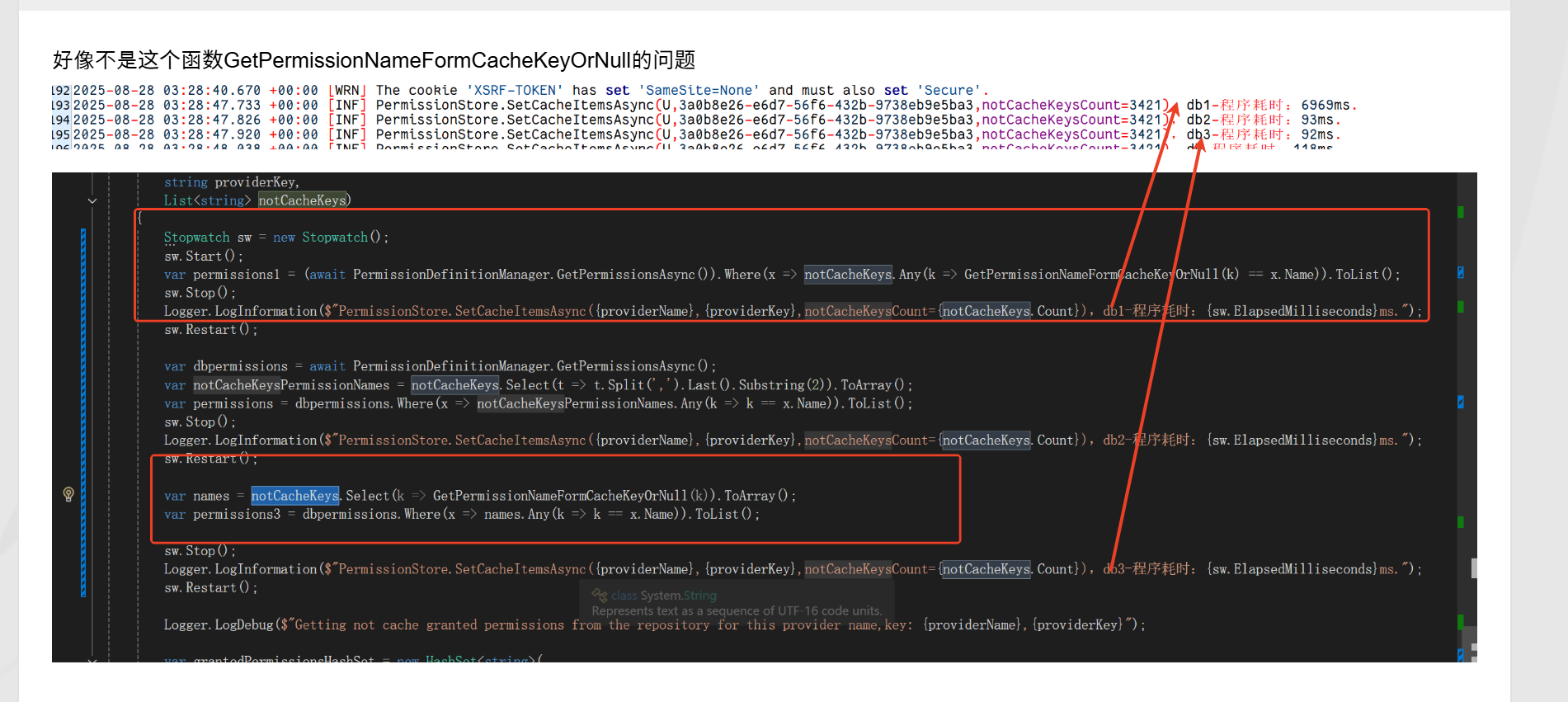
var permissions = (await PermissionDefinitionManager.GetPermissionsAsync())
                .Where(x => notCacheKeys.Any(k => GetPermissionNameFormCacheKeyOrNull(k) == x.Name)).ToList();
改为
var names = notCacheKeys.Select(k => GetPermissionNameFormCacheKeyOrNull(k)).ToArray();

var permissions = (await PermissionDefinitionManager.GetPermissionsAsync())
    .Where(x => names .Any(k => k == x.Name)).ToList();
速度从6秒到几秒? 6969ms到92ms
上面的问题,只解决了部分问题,我的程序是7.2.2 的微服务框架,没有升级到最新版本,但是会把一些高版本的优化,copy到本地重新发布dll替换原有的dll
await Cache.SetManyAsync(cacheItems);
大量权限的时候设置缓存还是有2s,每次用户登录,获取Role ,User 权限都会有2s ,一起就是4s左右,
可能还要加OneTime方法,程序启动的时候把全部信息加载到缓存,后期用户登录才可能比较快。现在是第一次登录慢,第二次才快
系统启动热数据还是要加载到缓存
https://github.com/abpframework/abp/blob/dev/modules/permission-management/src/Volo.Abp.PermissionManagement.Domain/Volo/Abp/PermissionManagement/PermissionStore.cs#L178-L179
var permissions = (await PermissionDefinitionManager.GetPermissionsAsync())
                .Where(x => notCacheKeys.Any(k => GetPermissionNameFormCacheKeyOrNull(k) == x.Name)).ToList();
改为
var names = notCacheKeys.Select(k => GetPermissionNameFormCacheKeyOrNull(k)).ToArray();

var permissions = (await PermissionDefinitionManager.GetPermissionsAsync())
    .Where(x => names .Any(k => k == x.Name)).ToList();