The problem now is when I try to see File Management from the Blazor Wasm Menu this throw this error in log:
[
  {
    "code": null,
    "message": "Syntax error '\u0000'",
    "details": "ParseException: Syntax error '\u0000'
STACK TRACE:    at System.Linq.Dynamic.Core.Tokenizer.TextParser.NextToken()
   at System.Linq.Dynamic.Core.Parser.ExpressionParser.ParseOrdering(Boolean forceThenBy)
   at System.Linq.Dynamic.Core.DynamicQueryableExtensions.InternalOrderBy(IQueryable source, ParsingConfig config, String ordering, IComparer comparer, Object[] args)
   at System.Linq.Dynamic.Core.DynamicQueryableExtensions.OrderBy(IQueryable source, ParsingConfig config, String ordering, Object[] args)
   at System.Linq.Dynamic.Core.DynamicQueryableExtensions.OrderBy[TSource](IQueryable`1 source, ParsingConfig config, String ordering, Object[] args)
   at System.Linq.Dynamic.Core.DynamicQueryableExtensions.OrderBy[TSource](IQueryable`1 source, String ordering, Object[] args)
   at Volo.FileManagement.Files.EfCoreFileDescriptorRepository.GetListAsync(Nullable`1 directoryId, String filter, String sorting, CancellationToken cancellationToken)
   at Castle.DynamicProxy.AsyncInterceptorBase.ProceedAsynchronous[TResult](IInvocation invocation, IInvocationProceedInfo proceedInfo)
   at Volo.Abp.Castle.DynamicProxy.CastleAbpMethodInvocationAdapterWithReturnValue`1.ProceedAsync()
   at Volo.Abp.Uow.UnitOfWorkInterceptor.InterceptAsync(IAbpMethodInvocation invocation)
   at Volo.Abp.Castle.DynamicProxy.CastleAsyncAbpInterceptorAdapter`1.InterceptAsync[TResult](IInvocation invocation, IInvocationProceedInfo proceedInfo, Func`3 proceed)
   at Volo.FileManagement.Directories.DirectoryDescriptorAppService.GetContentAsync(DirectoryContentRequestInput input)
   at Castle.DynamicProxy.AsyncInterceptorBase.ProceedAsynchronous[TResult](IInvocation invocation, IInvocationProceedInfo proceedInfo)
   at Volo.Abp.Castle.DynamicProxy.CastleAbpMethodInvocationAdapterWithReturnValue`1.ProceedAsync()
   at Volo.Abp.Authorization.AuthorizationInterceptor.InterceptAsync(IAbpMethodInvocation invocation)
   at Volo.Abp.Castle.DynamicProxy.CastleAsyncAbpInterceptorAdapter`1.InterceptAsync[TResult](IInvocation invocation, IInvocationProceedInfo proceedInfo, Func`3 proceed)
   at Castle.DynamicProxy.AsyncInterceptorBase.ProceedAsynchronous[TResult](IInvocation invocation, IInvocationProceedInfo proceedInfo)
   at Volo.Abp.Castle.DynamicProxy.CastleAbpMethodInvocationAdapterWithReturnValue`1.ProceedAsync()
   at Volo.Abp.GlobalFeatures.GlobalFeatureInterceptor.InterceptAsync(IAbpMethodInvocation invocation)
   at Volo.Abp.Castle.DynamicProxy.CastleAsyncAbpInterceptorAdapter`1.InterceptAsync[TResult](IInvocation invocation, IInvocationProceedInfo proceedInfo, Func`3 proceed)
   at Castle.DynamicProxy.AsyncInterceptorBase.ProceedAsynchronous[TResult](IInvocation invocation, IInvocationProceedInfo proceedInfo)
   at Volo.Abp.Castle.DynamicProxy.CastleAbpMethodInvocationAdapterWithReturnValue`1.ProceedAsync()
   at Volo.Abp.Auditing.AuditingInterceptor.ProceedByLoggingAsync(IAbpMethodInvocation invocation, IAuditingHelper auditingHelper, IAuditLogScope auditLogScope)
   at Volo.Abp.Auditing.AuditingInterceptor.InterceptAsync(IAbpMethodInvocation invocation)
   at Volo.Abp.Castle.DynamicProxy.CastleAsyncAbpInterceptorAdapter`1.InterceptAsync[TResult](IInvocation invocation, IInvocationProceedInfo proceedInfo, Func`3 proceed)
   at Castle.DynamicProxy.AsyncInterceptorBase.ProceedAsynchronous[TResult](IInvocation invocation, IInvocationProceedInfo proceedInfo)
   at Volo.Abp.Castle.DynamicProxy.CastleAbpMethodInvocationAdapterWithReturnValue`1.ProceedAsync()
   at Volo.Abp.Features.FeatureInterceptor.InterceptAsync(IAbpMethodInvocation invocation)
   at Volo.Abp.Castle.DynamicProxy.CastleAsyncAbpInterceptorAdapter`1.InterceptAsync[TResult](IInvocation invocation, IInvocationProceedInfo proceedInfo, Func`3 proceed)
   at Castle.DynamicProxy.AsyncInterceptorBase.ProceedAsynchronous[TResult](IInvocation invocation, IInvocationProceedInfo proceedInfo)
   at Volo.Abp.Castle.DynamicProxy.CastleAbpMethodInvocationAdapterWithReturnValue`1.ProceedAsync()
   at Volo.Abp.Validation.ValidationInterceptor.InterceptAsync(IAbpMethodInvocation invocation)
   at Volo.Abp.Castle.DynamicProxy.CastleAsyncAbpInterceptorAdapter`1.InterceptAsync[TResult](IInvocation invocation, IInvocationProceedInfo proceedInfo, Func`3 proceed)
   at Castle.DynamicProxy.AsyncInterceptorBase.ProceedAsynchronous[TResult](IInvocation invocation, IInvocationProceedInfo proceedInfo)
   at Volo.Abp.Castle.DynamicProxy.CastleAbpMethodInvocationAdapterWithReturnValue`1.ProceedAsync()
   at Volo.Abp.Uow.UnitOfWorkInterceptor.InterceptAsync(IAbpMethodInvocation invocation)
   at Volo.Abp.Castle.DynamicProxy.CastleAsyncAbpInterceptorAdapter`1.InterceptAsync[TResult](IInvocation invocation, IInvocationProceedInfo proceedInfo, Func`3 proceed)
   at Volo.FileManagement.Directories.DirectoryDescriptorController.GetContentAsync(DirectoryContentRequestInput input)
   at lambda_method6357(Closure , Object )
   at Microsoft.AspNetCore.Mvc.Infrastructure.ActionMethodExecutor.AwaitableObjectResultExecutor.Execute(IActionResultTypeMapper mapper, ObjectMethodExecutor executor, Object controller, Object[] arguments)
   at Microsoft.AspNetCore.Mvc.Infrastructure.ControllerActionInvoker.<InvokeActionMethodAsync>g__Logged|12_1(ControllerActionInvoker invoker)
   at Microsoft.AspNetCore.Mvc.Infrastructure.ControllerActionInvoker.<InvokeNextActionFilterAsync>g__Awaited|10_0(ControllerActionInvoker invoker, Task lastTask, State next, Scope scope, Object state, Boolean isCompleted)
   at Microsoft.AspNetCore.Mvc.Infrastructure.ControllerActionInvoker.Rethrow(ActionExecutedContextSealed context)
   at Microsoft.AspNetCore.Mvc.Infrastructure.ControllerActionInvoker.Next(State& next, Scope& scope, Object& state, Boolean& isCompleted)
   at Microsoft.AspNetCore.Mvc.Infrastructure.ControllerActionInvoker.<InvokeInnerFilterAsync>g__Awaited|13_0(ControllerActionInvoker invoker, Task lastTask, State next, Scope scope, Object state, Boolean isCompleted)
   at Microsoft.AspNetCore.Mvc.Infrastructure.ResourceInvoker.<InvokeNextExceptionFilterAsync>g__Awaited|26_0(ResourceInvoker invoker, Task lastTask, State next, Scope scope, Object state, Boolean isCompleted)
",
    "data": null,
    "validationErrors": null
  },
  {
    "code": null,
    "message": "Syntax error '\u0000'",
    "details": "ParseException: Syntax error '\u0000'
STACK TRACE:    at System.Linq.Dynamic.Core.Tokenizer.TextParser.NextToken()
   at System.Linq.Dynamic.Core.Parser.ExpressionParser.ParseOrdering(Boolean forceThenBy)
   at System.Linq.Dynamic.Core.DynamicQueryableExtensions.InternalOrderBy(IQueryable source, ParsingConfig config, String ordering, IComparer comparer, Object[] args)
   at System.Linq.Dynamic.Core.DynamicQueryableExtensions.OrderBy(IQueryable source, ParsingConfig config, String ordering, Object[] args)
   at System.Linq.Dynamic.Core.DynamicQueryableExtensions.OrderBy[TSource](IQueryable`1 source, ParsingConfig config, String ordering, Object[] args)
   at System.Linq.Dynamic.Core.DynamicQueryableExtensions.OrderBy[TSource](IQueryable`1 source, String ordering, Object[] args)
   at Volo.FileManagement.Files.EfCoreFileDescriptorRepository.GetListAsync(Nullable`1 directoryId, String filter, String sorting, CancellationToken cancellationToken)
   at Castle.DynamicProxy.AsyncInterceptorBase.ProceedAsynchronous[TResult](IInvocation invocation, IInvocationProceedInfo proceedInfo)
   at Volo.Abp.Castle.DynamicProxy.CastleAbpMethodInvocationAdapterWithReturnValue`1.ProceedAsync()
   at Volo.Abp.Uow.UnitOfWorkInterceptor.InterceptAsync(IAbpMethodInvocation invocation)
   at Volo.Abp.Castle.DynamicProxy.CastleAsyncAbpInterceptorAdapter`1.InterceptAsync[TResult](IInvocation invocation, IInvocationProceedInfo proceedInfo, Func`3 proceed)
   at Volo.FileManagement.Directories.DirectoryDescriptorAppService.GetContentAsync(DirectoryContentRequestInput input)
   at Castle.DynamicProxy.AsyncInterceptorBase.ProceedAsynchronous[TResult](IInvocation invocation, IInvocationProceedInfo proceedInfo)
   at Volo.Abp.Castle.DynamicProxy.CastleAbpMethodInvocationAdapterWithReturnValue`1.ProceedAsync()
   at Volo.Abp.Authorization.AuthorizationInterceptor.InterceptAsync(IAbpMethodInvocation invocation)
   at Volo.Abp.Castle.DynamicProxy.CastleAsyncAbpInterceptorAdapter`1.InterceptAsync[TResult](IInvocation invocation, IInvocationProceedInfo proceedInfo, Func`3 proceed)
   at Castle.DynamicProxy.AsyncInterceptorBase.ProceedAsynchronous[TResult](IInvocation invocation, IInvocationProceedInfo proceedInfo)
   at Volo.Abp.Castle.DynamicProxy.CastleAbpMethodInvocationAdapterWithReturnValue`1.ProceedAsync()
   at Volo.Abp.GlobalFeatures.GlobalFeatureInterceptor.InterceptAsync(IAbpMethodInvocation invocation)
   at Volo.Abp.Castle.DynamicProxy.CastleAsyncAbpInterceptorAdapter`1.InterceptAsync[TResult](IInvocation invocation, IInvocationProceedInfo proceedInfo, Func`3 proceed)
   at Castle.DynamicProxy.AsyncInterceptorBase.ProceedAsynchronous[TResult](IInvocation invocation, IInvocationProceedInfo proceedInfo)
   at Volo.Abp.Castle.DynamicProxy.CastleAbpMethodInvocationAdapterWithReturnValue`1.ProceedAsync()
   at Volo.Abp.Auditing.AuditingInterceptor.ProceedByLoggingAsync(IAbpMethodInvocation invocation, IAuditingHelper auditingHelper, IAuditLogScope auditLogScope)
   at Volo.Abp.Auditing.AuditingInterceptor.InterceptAsync(IAbpMethodInvocation invocation)
   at Volo.Abp.Castle.DynamicProxy.CastleAsyncAbpInterceptorAdapter`1.InterceptAsync[TResult](IInvocation invocation, IInvocationProceedInfo proceedInfo, Func`3 proceed)
   at Castle.DynamicProxy.AsyncInterceptorBase.ProceedAsynchronous[TResult](IInvocation invocation, IInvocationProceedInfo proceedInfo)
   at Volo.Abp.Castle.DynamicProxy.CastleAbpMethodInvocationAdapterWithReturnValue`1.ProceedAsync()
   at Volo.Abp.Features.FeatureInterceptor.InterceptAsync(IAbpMethodInvocation invocation)
   at Volo.Abp.Castle.DynamicProxy.CastleAsyncAbpInterceptorAdapter`1.InterceptAsync[TResult](IInvocation invocation, IInvocationProceedInfo proceedInfo, Func`3 proceed)
   at Castle.DynamicProxy.AsyncInterceptorBase.ProceedAsynchronous[TResult](IInvocation invocation, IInvocationProceedInfo proceedInfo)
   at Volo.Abp.Castle.DynamicProxy.CastleAbpMethodInvocationAdapterWithReturnValue`1.ProceedAsync()
   at Volo.Abp.Validation.ValidationInterceptor.InterceptAsync(IAbpMethodInvocation invocation)
   at Volo.Abp.Castle.DynamicProxy.CastleAsyncAbpInterceptorAdapter`1.InterceptAsync[TResult](IInvocation invocation, IInvocationProceedInfo proceedInfo, Func`3 proceed)
   at Castle.DynamicProxy.AsyncInterceptorBase.ProceedAsynchronous[TResult](IInvocation invocation, IInvocationProceedInfo proceedInfo)
   at Volo.Abp.Castle.DynamicProxy.CastleAbpMethodInvocationAdapterWithReturnValue`1.ProceedAsync()
   at Volo.Abp.Uow.UnitOfWorkInterceptor.InterceptAsync(IAbpMethodInvocation invocation)
   at Volo.Abp.Castle.DynamicProxy.CastleAsyncAbpInterceptorAdapter`1.InterceptAsync[TResult](IInvocation invocation, IInvocationProceedInfo proceedInfo, Func`3 proceed)
   at Volo.FileManagement.Directories.DirectoryDescriptorController.GetContentAsync(DirectoryContentRequestInput input)
   at lambda_method6357(Closure , Object )
   at Microsoft.AspNetCore.Mvc.Infrastructure.ActionMethodExecutor.AwaitableObjectResultExecutor.Execute(IActionResultTypeMapper mapper, ObjectMethodExecutor executor, Object controller, Object[] arguments)
   at Microsoft.AspNetCore.Mvc.Infrastructure.ControllerActionInvoker.<InvokeActionMethodAsync>g__Logged|12_1(ControllerActionInvoker invoker)
   at Microsoft.AspNetCore.Mvc.Infrastructure.ControllerActionInvoker.<InvokeNextActionFilterAsync>g__Awaited|10_0(ControllerActionInvoker invoker, Task lastTask, State next, Scope scope, Object state, Boolean isCompleted)
   at Microsoft.AspNetCore.Mvc.Infrastructure.ControllerActionInvoker.Rethrow(ActionExecutedContextSealed context)
   at Microsoft.AspNetCore.Mvc.Infrastructure.ControllerActionInvoker.Next(State& next, Scope& scope, Object& state, Boolean& isCompleted)
   at Microsoft.AspNetCore.Mvc.Infrastructure.ControllerActionInvoker.<InvokeInnerFilterAsync>g__Awaited|13_0(ControllerActionInvoker invoker, Task lastTask, State next, Scope scope, Object state, Boolean isCompleted)
   at Microsoft.AspNetCore.Mvc.Infrastructure.ResourceInvoker.<InvokeNextExceptionFilterAsync>g__Awaited|26_0(ResourceInvoker invoker, Task lastTask, State next, Scope scope, Object state, Boolean isCompleted)
",
    "data": null,
    "validationErrors": null
  }
]
I'm using Swagger to test directly using API Controller, and this found, this upload file:
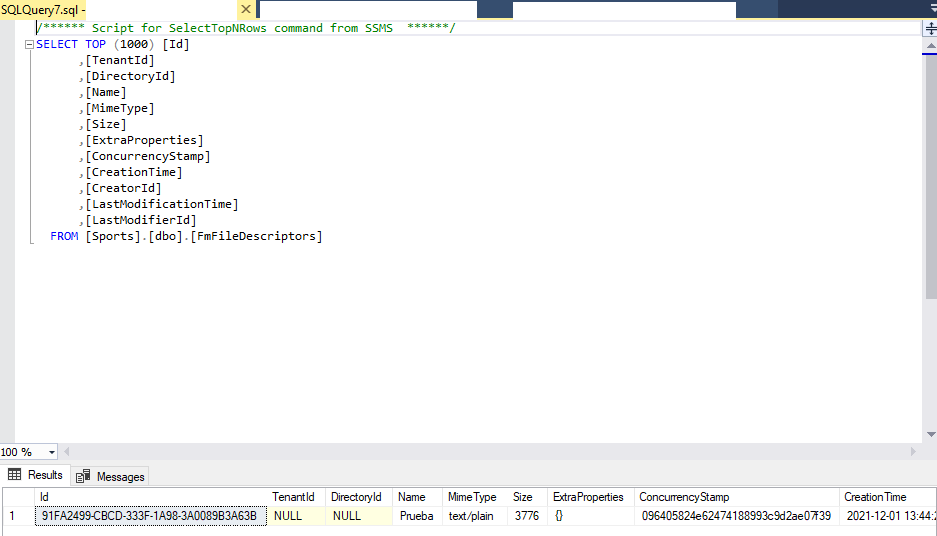
If I do this: private async Task OnFileChanged(FileChangedEventArgs e) {
            foreach (var file in e.Files)
            {
                // A stream is going to be the destination stream we're writing to.
                using (var stream = new MemoryStream())
                {

                    var fileInputWithStream = new CreateFileInputWithStream();

                    await file.WriteToStreamAsync(stream);

                    fileInputWithStream.File = new RemoteStreamContent(stream, file.Name, file.Type);

                // Here we're telling the FileEdit where to write the upload result


                    fileInputWithStream.Name = "Prueba";

                    await FileDescriptorAppService.CreateAsync(null, fileInputWithStream);

                    // Once we reach this line it means the file is fully uploaded.
                    // In this case we're going to offset to the beginning of file
                    // so we can read it.
                    stream.Seek(0, SeekOrigin.Begin);

                }
            }
Throw my request is invalid.
No, I'm not paste from clipboard.
And I selected for example files called temp.txt or some like this. I already try with physical file.
This is the detail of log API:
[ { "code": null, "message": "ModelState is not valid! See ValidationErrors for details.", "details": "AbpValidationException: ModelState is not valid! See ValidationErrors for details.\r\nLos siguientes errores fueron detectados durante la validación.\r\n - El campo Name es requerido.\r\n\r\nSTACK TRACE: at Volo.Abp.AspNetCore.Mvc.Validation.ModelStateValidator.Validate(ModelStateDictionary modelState)\r\n at Volo.Abp.AspNetCore.Mvc.Validation.AbpValidationActionFilter.OnActionExecutionAsync(ActionExecutingContext context, ActionExecutionDelegate next)\r\n at Microsoft.AspNetCore.Mvc.Infrastructure.ControllerActionInvoker.<InvokeNextActionFilterAsync>g__Awaited|10_0(ControllerActionInvoker invoker, Task lastTask, State next, Scope scope, Object state, Boolean isCompleted)\r\n at Microsoft.AspNetCore.Mvc.Infrastructure.ControllerActionInvoker.Rethrow(ActionExecutedContextSealed context)\r\n at Microsoft.AspNetCore.Mvc.Infrastructure.ControllerActionInvoker.Next(State& next, Scope& scope, Object& state, Boolean& isCompleted)\r\n at Microsoft.AspNetCore.Mvc.Infrastructure.ControllerActionInvoker.InvokeInnerFilterAsync()\r\n--- End of stack trace from previous location ---\r\n at Microsoft.AspNetCore.Mvc.Infrastructure.ResourceInvoker.<InvokeNextExceptionFilterAsync>g__Awaited|26_0(ResourceInvoker invoker, Task lastTask, State next, Scope scope, Object state, Boolean isCompleted)\r\n", "data": null, "validationErrors": [ { "message": "El campo Name es requerido.", "members": [ "name" ] } ] } ]
Thank you,
ABP Framework version: v5.0.0 rc1
UI type: Blazor Wasm
DB provider: EF Core
Tiered (MVC) or Identity Server Separated (Angular): no
Exception message and stack trace:
When I added File Manament Pro Module to my solution and I tried to upload a file display this error:
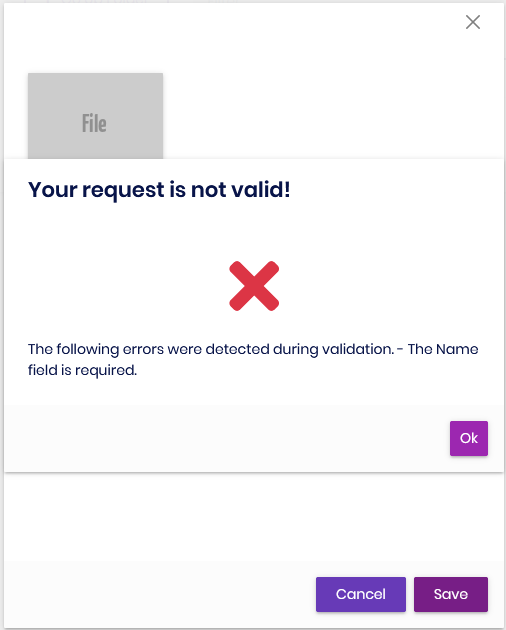 But not exists any field to filled the name.
Steps to reproduce the issue:" Create a new solution using abp suite. Add File Management module to my solution. Try to upload file.
hi
https://support.abp.io/QA/Questions/631/Support-for-many-to-one-and-many-to-many-relationships https://community.abp.io/articles/many-to-many-relationship-with-abp-and-ef-core-g7rm2qut
Thank you.
If you're creating a bug/problem report, please include followings:
Is planned create many to many table relationship using abp suite?. And is there any easy steps to create many to many table CRUD in commercial version? Or maybe an example in commercial to implement this relationship in our software project.
Thank you,