Provide us with the following info:
🧐 Hint: If you are using the ABP Studio, you can see all the information about your solution from the configuration window, which opens when you right-click on the solution and click on the Solution Configuration button.
1 notBefore, Nullable1 expires, IEnumerable`1 audiences, TokenValidationParameters validationParameters, BaseConfiguration configuration)
at Microsoft.IdentityModel.JsonWebTokens.JsonWebTokenHandler.ValidateSignature(JsonWebToken jwtToken, TokenValidationParameters validationParameters, BaseConfiguration configuration)
at Microsoft.IdentityModel.JsonWebTokens.JsonWebTokenHandler.ValidateSignatureAndIssuerSecurityKey(JsonWebToken jsonWebToken, TokenValidationParameters validationParameters, BaseConfiguration configuration)
at Microsoft.IdentityModel.JsonWebTokens.JsonWebTokenHandler.ValidateJWSAsync(JsonWebToken jsonWebToken, TokenValidationParameters validationParameters, BaseConfiguration configuration) upstream authserver_backend {
server master-authserver weight=8;
server slave-authserver weight=2;
}
...
location /auth/ {
proxy_pass http://authserver_backend;
proxy_http_version 1.1;
proxy_set_header Upgrade $http_upgrade;
proxy_set_header Connection $http_connection;
proxy_set_header Connection keep-alive;
proxy_set_header Host $host:$server_port;
proxy_set_header X-Forwarded-For $proxy_add_x_forwarded_for;
proxy_set_header X-Forwarded-Proto $scheme;
proxy_set_header X-Forwarded-Host $host;
proxy_set_header X-Forwarded-Port $server_port;
proxy_cache_bypass $http_upgrade;
proxy_read_timeout 7200;
port_in_redirect off;
proxy_buffering off;
}
The authserver configuration stays the same, and I checked the iss&aud of the token,It doesn't work well, unfortunately.
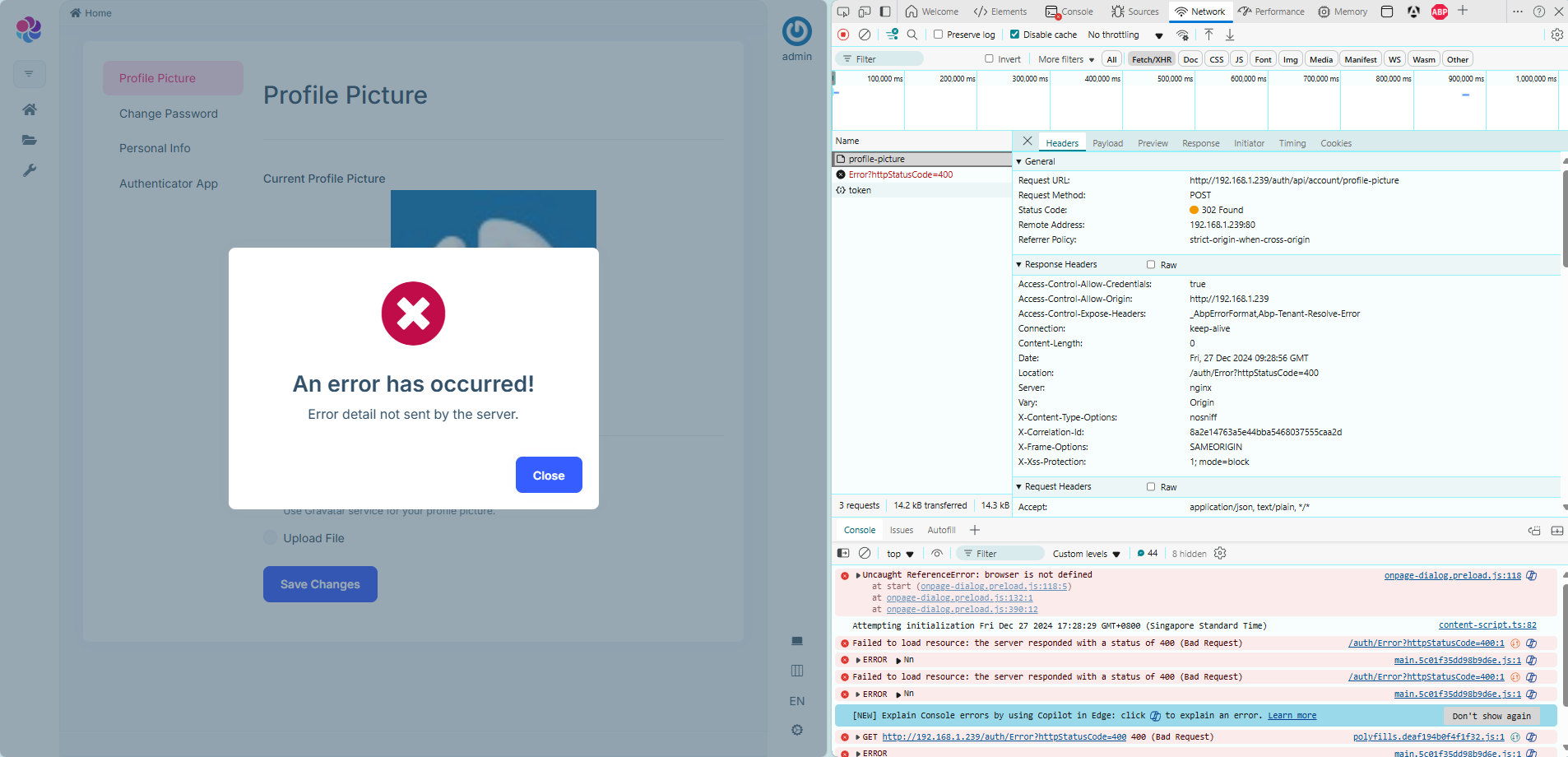
I want to deploy the application through one site , the other interfaces work fine except for it: Authorization service deployed under the path /auth/. Main application deployed under the root path /. From the application, I make a request to update the profile picture by calling:
POST /auth/api/account/profile-picture
However, the response is a 302 redirect pointing to:
/auth/Error?httpStatusCode=400
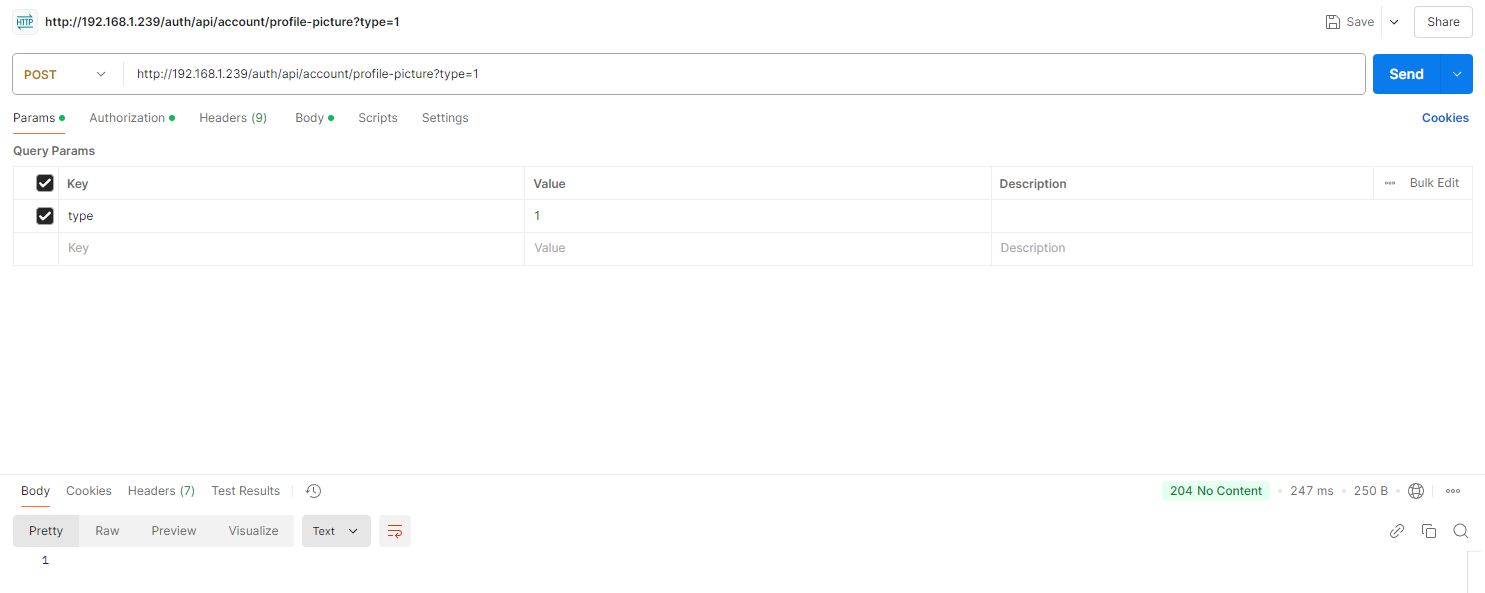
On the other hand, when I send the same request (same URL, same HTTP method, same payload) using Postman, it returns a 204 (No Content) response, which indicates success.
I can't find the problem at the moment. Help me.
"ReverseProxy": {
  "Routes": {
    "UnifiedApi": {
      "ClusterId": "HostApiServer",
      "Match": {
        "Path": "/api/{**catch-all}"
      }
    },
    "UnifiedApiSwagger": {
      "ClusterId": "HostApiServer",
      "Match": {
        "Path": "/swagger-json/HostApiServer/swagger/v1/swagger.json"
      },
      "Transforms": [
        { "PathRemovePrefix": "/swagger-json/HostApiServer" }
      ]
    },
    //// 授权服务的路由
    //"AuthServerWellKnown": {
    //  "ClusterId": "AuthServer",
    //  "Match": {
    //    "Path": "/.well-known/openid-configuration"
    //  },
    //  "Order": 1
    //},
    //"AuthServerConnectEndpoints": {
    //  "ClusterId": "AuthServer",
    //  "Match": {
    //    "Path": "/connect/{**catch-all}"
    //  },
    //  "Order": 2
    //}
  },
  "Clusters": {
    "HostApiServer": {
      "Destinations": {
        "HostApiServer": {
          "Address": "http://localhost:44362/"
        }
      }
    },
    //"AuthServer": {
    //  "Destinations": {
    //    "AuthServer": {
    //      "Address": "http://localhost:44333/"
    //    }
    //  }
    //}
  }
I’ve been exploring ABP.IO's support resources and came across these discussions:
How to SSO Integration Using OAuth2/OpenID Connect in ABP.IO Microservices How to Authenticate External SSO Token with Admin APIs Now, I have an existing Angular client and I’m planning to introduce a new Vue client. I aim to implement a Single Sign-On (SSO) where logging into one client allows access to the other without needing to log in again.
Considering two potential scenarios where:
Both clients are under the same domain (e.g., xxx.com for Angular and xxx.com/vue for Vue). Each client is hosted on a separate subdomain (e.g., angular.xxx.com and vue.xxx.com). Could you advise on how to configure the authorization service to support SSO in these setups? Does ABP natively support such configurations for SSO?
Thank you!









