I would like to go straightaway to the Login page and avoid that visual effect rendering Index page and then Login page, is that possible?
You cannot do this in the blazor front end, because in blazor applications, a refresh will reload the application(it will be slow). This solution should work: https://support.abp.io/QA/Questions/1152#answer-d2e834e0-4600-d3d0-eb47-39fbdb7edfc7
And:
Maybe related https://github.com/abpframework/abp/issues/8240
Hi,
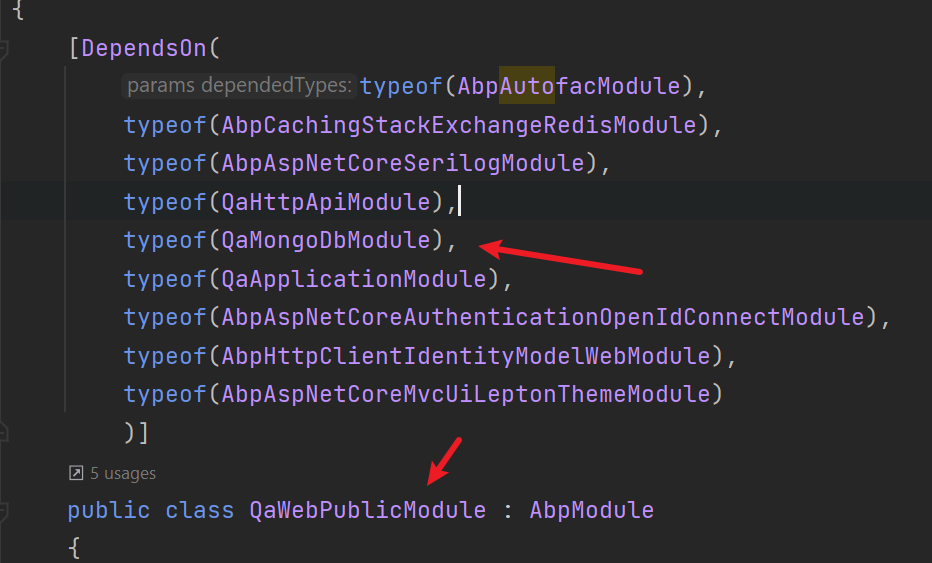
Try add YourProjectNameMongoModule depend to YourProjectNamePublicModule
Hi,
You can try put the MyLoggedOutModel.cs file to your .HttpApi.Host or .IdentityServer project
MyLoggedOutModel.cs
[Dependency(ReplaceServices = true)]
[ExposeServices(typeof(LoggedOutModel))]
public class MyLoggedOutModel : LoggedOutModel
{
    public override Task<IActionResult> OnGetAsync()
    {
        var blazorUrl = "https://<blazor>"; // front-end url
        if (PostLogoutRedirectUri.StartsWith(blazorUrl))
        {
            PostLogoutRedirectUri = $"https://<auth-server>/account/login?returnUrl={blazorUrl}";
            SignOutIframeUrl = null;
        }

        return base.OnGetAsync();
    }
}
@jward01
Open a new question, thanks.
Solved
Solved, you need use same db for all HttpApi.Host
Hi,
Sorry, Can you explain in detail?
Hi,
I think this is your network problem , and you must add --preview option, because 4.3.0 is preview version now.
at the moment, the redirect after i log out takes me to https://app.promailnet.com/authentication/logged-out , but i want it to go back to the login screen.
See https://stackoverflow.com/questions/39909419/what-are-the-main-differences-between-jwt-and-oauth-authentication.
what is the advantage of using OPENID vs regular JWT token and attaching to the header ?
OpenID Connect - OpenID Connect builds on top of OAuth2 and add authentication. OpenID Connect add some constraint to OAuth2 like UserInfo Endpoint, ID Token, discovery and dynamic registration of OpenID Connect providers and session management. JWT is the mandatory format for the token.
See https://support.abp.io/QA/Questions/1152/How-to-to-Login-page-when-accessing-the-app-and-after-logout#answer-5c9c7a51-3689-9ec8-e5b6-39fbc698d514









