






ABP Framework version: v4.3-rc1
- UI type: Angular / MVC
- DB provider: MongoDB
- Tiered (MVC) or Identity Server Separated (Angular): no
How can I configure the Settings:Abp.Mailing.Smtp.Host by overriding de defaults in the Azure app service (linux)?
I tried to add the application setting Settings__Abp.Mailing.Smtp.Host, but that doesn't seem to work. app__CorsOrigins does work, so using the double works to set a nested config setting. But this doesn't seem to work for the Abp.Mailing.Smtp.Host part. Maybe the dots need some sort of prefix for Linux?
15 Answer(s)
-
0
Hi,
https://github.com/abpframework/abp/pull/7669 We have added email setting UI in 4.3, You can change it in email setting page
Markdown supported.Copy, paste, or drag & drop images and files (max 100 MB per file, 100 MB total per post) -
0
Hi,
thanks for the quick reply. Great to see that a UI is created, that will reduce initial complexity of setting email setting a lot for me. We use Angular as UI and I see that I a UI should be available (https://github.com/abpframework/abp/pull/7869). It seems to be part of a npm package, but how can I add this to our project?
I also still wonder how the settings can be set via application settings in an Azure app service (linux), any idea on that?
Markdown supported.Copy, paste, or drag & drop images and files (max 100 MB per file, 100 MB total per post) -
0
After you update the npm package, you should see the email setting UI.
I also still wonder how the settings can be set via application settings in an Azure app service (linux), any idea on that?
I don't know about azure much, https://docs.microsoft.com/en-us/aspnet/core/fundamentals/configuration/?view=aspnetcore-5.0#naming-of-environment-variables.
after my test, azure seems does not support such
A.Bsetting, maybe you can ask azure team.Markdown supported.Copy, paste, or drag & drop images and files (max 100 MB per file, 100 MB total per post) -
0
Is this new settings form for SMTP available in Blazor template? I've updated for the latest version but I can't find them.
Markdown supported.Copy, paste, or drag & drop images and files (max 100 MB per file, 100 MB total per post) -
0
@Leonardo.Willrich
https://github.com/abpframework/abp/blob/dev/modules/setting-management/src/Volo.Abp.SettingManagement.Blazor/Pages/SettingManagement/EmailSettingGroup/EmailSettingGroupViewComponent.razor
try DependsOn
AbpSettingManagementBlazorWebAssemblyModuleorAbpSettingManagementBlazorServerModuleMarkdown supported.Copy, paste, or drag & drop images and files (max 100 MB per file, 100 MB total per post) -
0
@liangshiwei
I haven't found those classes. Instead, I do have AbpSettingManagementBlazorModule on DependsOn.
namespace TVD_Holdings_Ltd.AvalancheOCP.Blazor
{
    [DependsOn(
        typeof(AbpAutofacWebAssemblyModule),
        typeof(AvalancheOCPHttpApiClientModule),
        typeof(AbpAspNetCoreComponentsWebAssemblyLeptonThemeModule),
        typeof(AbpIdentityProBlazorModule),
        typeof(SaasHostBlazorModule),
        typeof(AbpSettingManagementBlazorModule),
        typeof(LeptonThemeManagementBlazorModule),
        typeof(AbpAccountAdminBlazorModule),
        typeof(AbpAuditLoggingBlazorModule),
        typeof(TextTemplateManagementBlazorModule),
        typeof(LanguageManagementBlazorModule),
        typeof(AbpIdentityServerBlazorModule)
    )]
    public class AvalancheOCPBlazorModule : AbpModule
What I would be missing?
Markdown supported.Copy, paste, or drag & drop images and files (max 100 MB per file, 100 MB total per post) -
0
@Leonardo.Willrich
You can download new template (4.3.1 rc) for comparison
Markdown supported.Copy, paste, or drag & drop images and files (max 100 MB per file, 100 MB total per post) -
0
I am really trying my best to download that, but getting an error when trying to create a solution. Can you tell me whenever I can download that besides creating a new project through Abp Suite? I am using Commercial version.
Markdown supported.Copy, paste, or drag & drop images and files (max 100 MB per file, 100 MB total per post) -
0
Try
abp new Qa -t app-pro -u blazor --previewMarkdown supported.Copy, paste, or drag & drop images and files (max 100 MB per file, 100 MB total per post) -
0
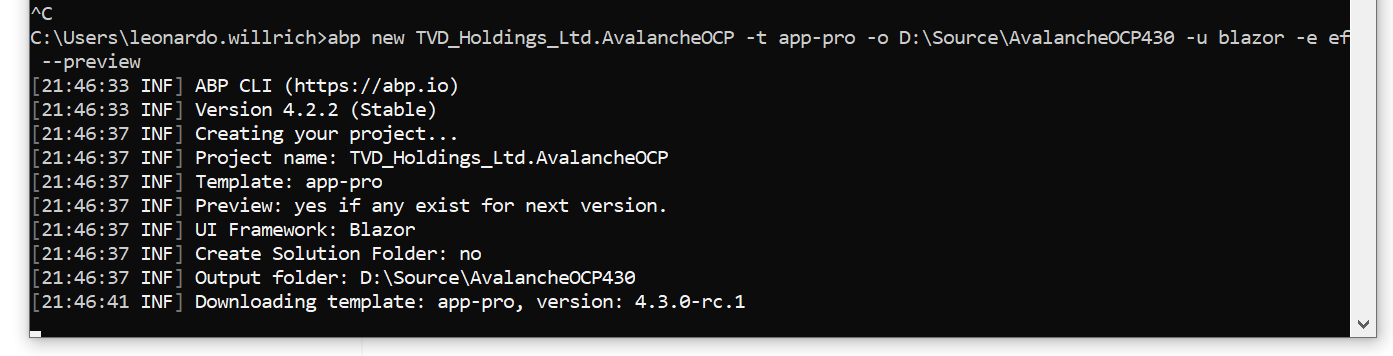
Through command, it got stuck on downloading message. I don't believe it is too big. If I remove --preview, it creates the project really fast, I believe it is already cached.
 Markdown supported.Copy, paste, or drag & drop images and files (max 100 MB per file, 100 MB total per post)
 -
0
Hi,
I think this is your network problem , and you must add --preview option, because 4.3.0 is preview version now.
Markdown supported.Copy, paste, or drag & drop images and files (max 100 MB per file, 100 MB total per post) -
0
I've updated the npm packages via the abp cli, and in the angular package.json I see that the version is updated (@abp/ng.setting-management": "~4.3.0-rc.1). However I still don't see the new UI appear, what am I missing?
Meanwhile I've created a new project to test the UI, then it is visible. But the password provided by SendGrid is longer than 64 characters, and doesn't fit in the field.Can this be changed?
The following errors were detected during validation. - The field SmtpPassword must be a string or array type with a maximum length of '64'.
Markdown supported.Copy, paste, or drag & drop images and files (max 100 MB per file, 100 MB total per post) -
0
I've updated the npm packages via the abp cli, and in the angular package.json I see that the version is updated (@abp/ng.setting-management": "~4.3.0-rc.1). However I still don't see the new UI appear, what am I missing?
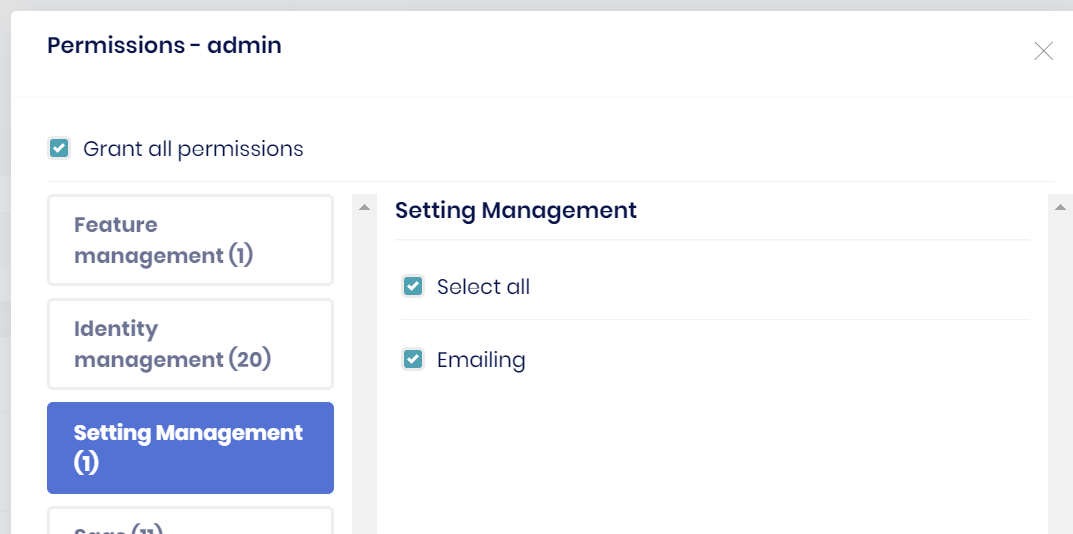
Found out that I didn't add the permissions yet.
 Markdown supported.Copy, paste, or drag & drop images and files (max 100 MB per file, 100 MB total per post)
 -
0
It seems the setting cannot customise? Could the commercial UI do this?
1, in the service, we add some settings: context.Add(new SettingDefinition(NnnMallSettings.MySetting1, "good", isVisibleToClients: true)); context.Add(new SettingDefinition(NnnMallSettings.MySetting2, "hello world", isVisibleToClients: true));
2, Could these settings be display in the UI? Angular
3, Could these settings be customise by user, input value/dropdownlist??
Thx
Markdown supported.Copy, paste, or drag & drop images and files (max 100 MB per file, 100 MB total per post) -
0
@abpVAndy
See https://docs.abp.io/en/abp/latest/UI/Angular/Custom-Setting-Page
Markdown supported.Copy, paste, or drag & drop images and files (max 100 MB per file, 100 MB total per post)



