Hi,
We have an tiered modular application, abp version 9.2.0, database postgresql. Not sure if it is related but mentioning, we migrated from mysql previously and upgrade from abp 8.3.0. We’re investigating a timezone/filtering problem with ABP audit/security logs and would like to confirm the correct approach.
Audit log and security log date filters behave differently between local and cloud hosted environments. The __timezone header is present on requests, but filtering still appears incorrect and does not return the results relevant to the timezone, even with the ClockOptions.Kind set to DateTimeKind.Utc and the app.UseAbpTimeZone() middleware. We also have EnableLegacyTimestampBehavior set to true in the DbContext, but i suspect that this part of the problem as the EF module snapshots still define the timestamp columns as timestamps with time zone.
Supporting information: Incoming request log (from our host probe): Audit timezone probe Path=/api/audit-logging/audit-logs __timezone=Africa/Johannesburg startTime=2026-07-02T14:02:00.000 endTime= DB sample audit rows are stored as UTC/timestamptz, e.g. 2026-07-02 11:40:59.564458+00. Code pointers in our repo (current state): AppContext.SetSwitch("Npgsql.EnableLegacyTimestampBehavior", true) exists in: EntityFrameworkCoreModule.cs Migrations/snapshots show columns created as timestamp with time zone across modules (e.g. src/EntityFrameworkCore/Migrations/* and module snapshots).
modelBuilder.Entity("Volo.Abp.Identity.IdentitySecurityLog", b =>
     {
         b.Property<Guid>("Id")
             .ValueGeneratedOnAdd()
             .HasColumnType("uuid");
         b.Property<DateTime>("CreationTime")
             .HasColumnType("timestamp with time zone");
     });
Is my understanding correct that with Npgsql.EnableLegacyTimestampBehavior = true the runtime may interpret ambiguous/unspecified DateTime values using host-local timezone, causing behavior differences between local and UTC-hosted environments? Is that the intended/known effect of the legacy switch?
If we set Npgsql.EnableLegacyTimestampBehavior to false (or remove the AppContext.SetSwitch), will that cause incompatibility with existing data or require database migrations or data fixes? Any known upgrade pitfalls? Why is model snapshot still defining the timestamp related columns as timestamp with time zone if I have set Npgsql.EnableLegacyTimestampBehavior = true?
For an ABP v10 project, what is the recommended setting for Npgsql.EnableLegacyTimestampBehavior when using timestamp with time zone (timestamptz) for audit/security timestamps? Why do some ABP templates/solutions still set the switch to true by default — is that for backward compatibility? Are there official migration steps documented by ABP when switching off legacy behavior?
Do you recommend (a) keeping timestamptz and disabling legacy behavior or (b) switching to timestamp without time zone and handling conversion application-side? Template: app Version 9.2.0
Tiered: Yes
UI Framework: angular
Theme: leptonx
Theme Style: system
Progressive Web App: Yes
Database Provider: ef
Database Management System: postgresql
Separate Tenant Schema: Yes
Mobile Framework: none
Public Website: No
Optional Modules:
LanguageManagement
AuditLogging
SaaS
OpenIddictAdmin
[maliming] said: hi
Volo.Abp.Domain.Entities.EntityNotFoundException: There is no such an entity. Entity type: Volo.Abp.Identity.IdentityUser, id: 3a1b19ed-1b99-0633-bfaf-f2bbd8fa0af3
at Volo.Abp.Identity.IdentityUserManager.GetByIdAsync(Guid id)
Why does this user not exist?
Is your application using the same database as the auth server(openiddit)?
Thanks.
Hi, No separate databases.
Does the tenant and the user absolutely need to exist? The example does not compile. Is there either more docs or other support tickets or examples that we can refer to?
[maliming] said: hi
however the authentication and authorization fails in the host api.
Do you have any error logs? Why do you think creating a tenant will fix it?
https://abp.io/support/questions/8622/How-to-enable-Debug-logs-for-troubleshoot-problems
Thanks.
Hi,
Here is an example of the error:
Volo.Abp.Domain.Entities.EntityNotFoundException: There is no such an entity. Entity type: Volo.Abp.Identity.IdentityUser, id: 3a1b19ed-1b99-0633-bfaf-f2bbd8fa0af3
at Volo.Abp.Identity.IdentityUserManager.GetByIdAsync(Guid id)
at Castle.DynamicProxy.AsyncInterceptorBase.ProceedAsynchronous[TResult](IInvocation invocation, IInvocationProceedInfo proceedInfo)
at Volo.Abp.Castle.DynamicProxy.CastleAbpMethodInvocationAdapterWithReturnValue1.ProceedAsync() at Volo.Abp.Uow.UnitOfWorkInterceptor.InterceptAsync(IAbpMethodInvocation invocation) at Volo.Abp.Castle.DynamicProxy.CastleAsyncAbpInterceptorAdapter1.InterceptAsync[TResult](IInvocation invocation, IInvocationProceedInfo proceedInfo, Func3 proceed) at Volo.Abp.Identity.IdentityDynamicClaimsPrincipalContributorCache.<>c__DisplayClass23_0.<<GetAsync>b__0>d.MoveNext() --- End of stack trace from previous location --- at Volo.Abp.Caching.DistributedCache2.GetOrAddAsync(TCacheKey key, Func1 factory, Func1 optionsFactory, Nullable1 hideErrors, Boolean considerUow, CancellationToken token) at Volo.Abp.Identity.IdentityDynamicClaimsPrincipalContributorCache.GetAsync(Guid userId, Nullable1 tenantId)
at Volo.Abp.Identity.IdentityDynamicClaimsPrincipalContributor.ContributeAsync(AbpClaimsPrincipalContributorContext context)
If we then manually create the user, then it works on host but then fails on tenant untill we manually create the tenant. The different ABP solutions use completely separate databases.
Hi,
We have need to define multiple different ABP based solutions and yet still use the same openiddict auth server for a single sign on experience and central management of users, roles and permissions. The auth server has been configured and the client applications including the other client api's (ie. the host api's of the various modules) have been registered. The redirect works and a valid token is issued, however the authentication and authorization fails in the host api. We are able to get this working, if we manually create the tenant, the user and the session record in the database that is used by the host api. Can we programmatically create the tenant if it doesn't exist, create the user if it doesn't exist, and the session context for that user so that ICurrentUser and ICurrentTenant works? Alternatively is there a different approach we can take to take to implement this?
ABP Version - 9.2.0
Hi,
Thank you. I did not know that migrations would be generated automatically. It works.
Hi,
The migration guides refer to PR's in order to determine what has changed. My request is that instead of me going through the PR's to make sense of the changes but then also to collate them based on the exact ABP solution (template and configuration, included in this ticket) that we are using manually, given the ABP solution that we are using, can you provide me with the exact migration changes that I need to apply to upgrade from 8.3 to 9.2? In other words, can you provide me with a up and down method for the host migration and then similarly a up and down method for the tenant migration?
Additionally there is no migration guide or release notes on the abp.io website for 9.2?
Hi,
To avoid mistakes, is it possible to get the migrations needed? This is an upgrade from the previous major version, so I would expect that many ABP developers are facing the same problem and supplying it, would make it easier.
Hi,
Can you provide us a with a single migration that needs to be applied for both the host and tenant when upgrading from 8.3.0 to 9.2.0? Here is the solution configuration:
Hi, the package
Volo.Abp.Users.Abstractionsis not in our NuGet Server, instead, it's an open-source package and stored in the nuget.org (https://www.nuget.org/packages/Volo.Abp.Users.Abstractions/9.2.0-rc.1). Therefore, it's normal to get this error message because this is how NuGet package system works, it tries to get the related packages from the defined package-sources (checks the relevant packages in all package sources with a fallback mechanism).So, in your case, probably there is a problem between these two:
1-) You might be not logged in through ABP CLI: This might be the reason, because it gives a 403 error. To check it you can run the
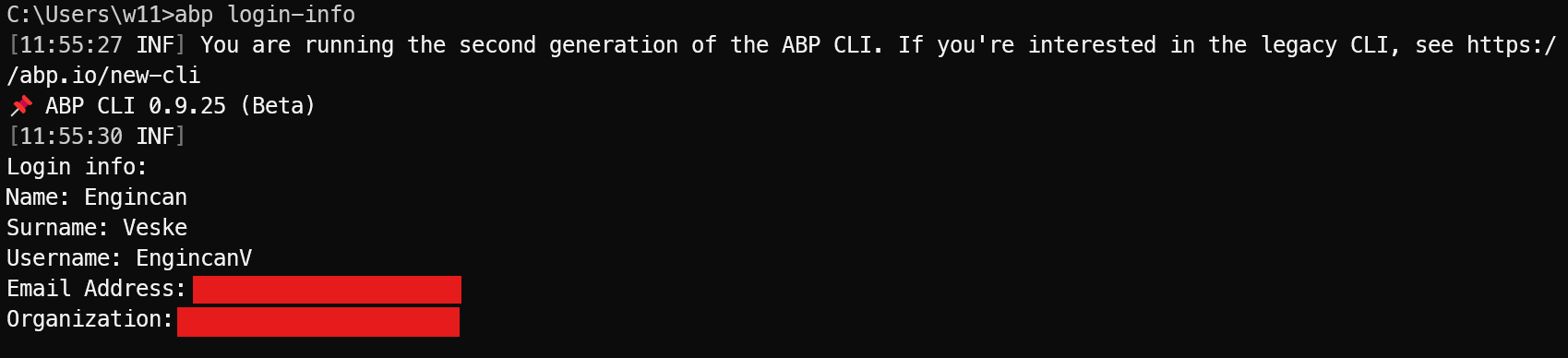
abp login-infocommand in your terminal and ensure you are logged in or not:abp login-infowith this command, you should be able to see the logged-in user details, including your OrganizationName:
If you don't see the relevant information, then it means that you are not logged in via ABP CLI and should log in with the following command:
abp login <username> -p <password> -o <organization-name>2-) Wrong
packageSourceMappingin NuGet.config file: This might also be the reason and it would be better to check the NuGet.config file in your solution, especially you can check your api-key andpackageSourceMappingsection (if it exists)
After you checked these two solutions, if you are still unable to fix the problem, then please let me know.
Regards.
Hi,
This was working until recently. The first problem is that the CLI does not install successfully in the build agent.
Then the second problem, that Volo.Abp.Users.Abstractions
Regards, Lucian Appels.