You're signed in with your abp.io account and your organization has a commercial license, but the tools still behave as if you have no license:
This is not a bug when the signed-in account isn't assigned as a Developer. All three tools read the license from the account you signed in with, and this is what you get when that account is not a Developer in your organization. (The same "no license" state can also mean an expired license, but if your organization's license is active, the developer-seat check is the reason here.)
An abp.io organization has two separate roles, and they are not the same thing:
So having a commercial license on the organization, or being only an Owner, is not enough. Studio, CLI and Suite all check the same thing: whether your signed-in account holds a Developer seat. If it doesn't, they treat you as unlicensed, they just surface it differently: Studio drops to the Community edition and shows the upgrade dialog, the CLI fails a pro template / download with the "set you as a developer" message, and Suite doesn't load its licensed features. A single person can be both an Owner and a Developer at the same time, most people who buy the license for themselves need to add themselves under both.
abp logout then abp login for the CLI / Suite). This step matters: the developer membership is cached, so just restarting won't pick it up, you have to re-login.After that the tools see the commercial license and the message goes away.
ABP Studio's upgrade dialog shows the username, email and organization it resolved, and the CLI prints the account it's logged in as. If that email isn't the one holding the developer seat, or the organization is empty, you're signed in with the wrong account, sign out and sign in with the correct one.
We have an agreement between Volosoft and Megabit, according to which the Blazorise license is bundled with the ABP Platform’s commercial licenses. Therefore, our paid users do not need to purchase an additional Blazorise license.
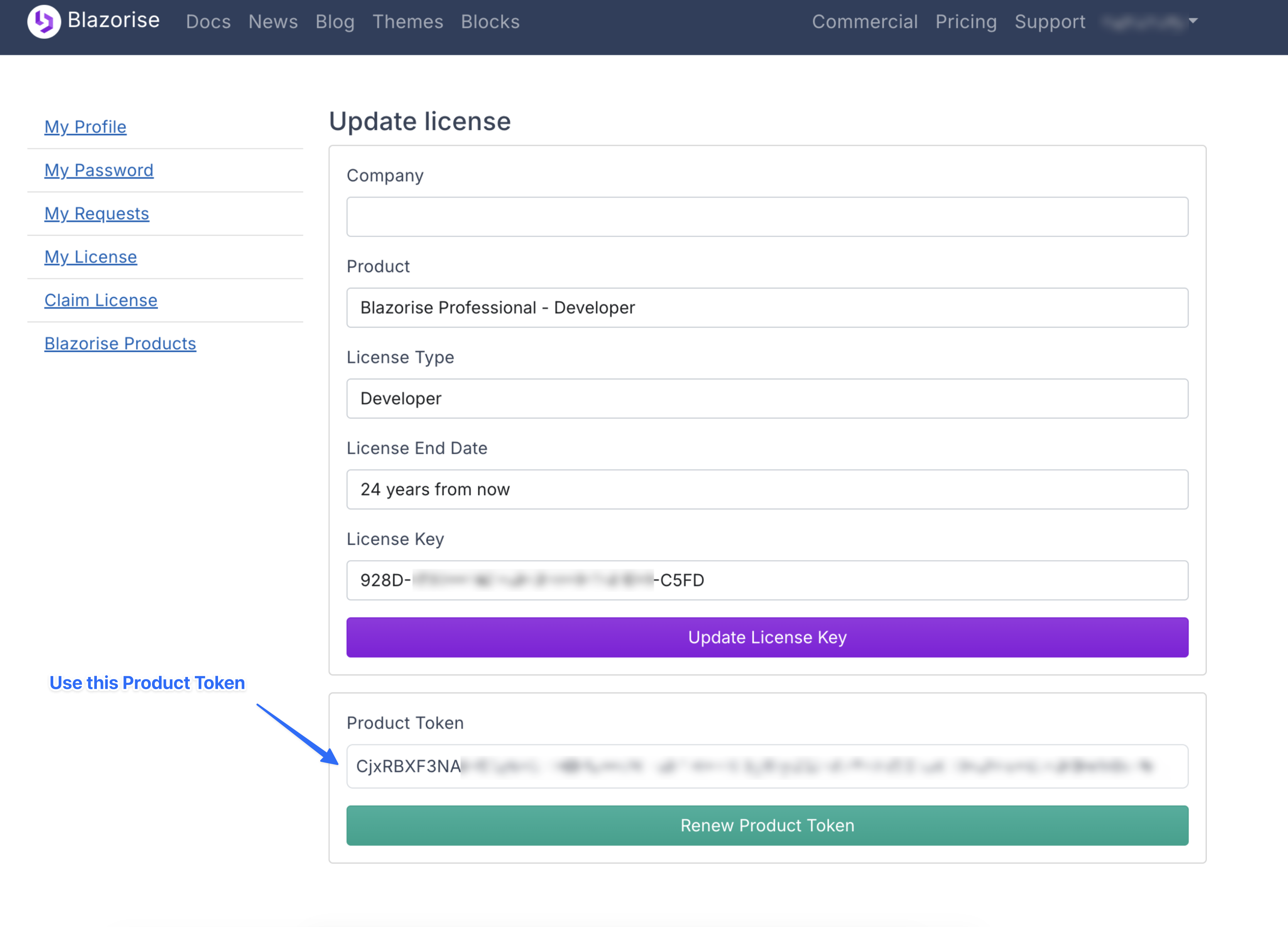
Follow the steps below to get support from the Blazorise team and get your Blazorise license key:
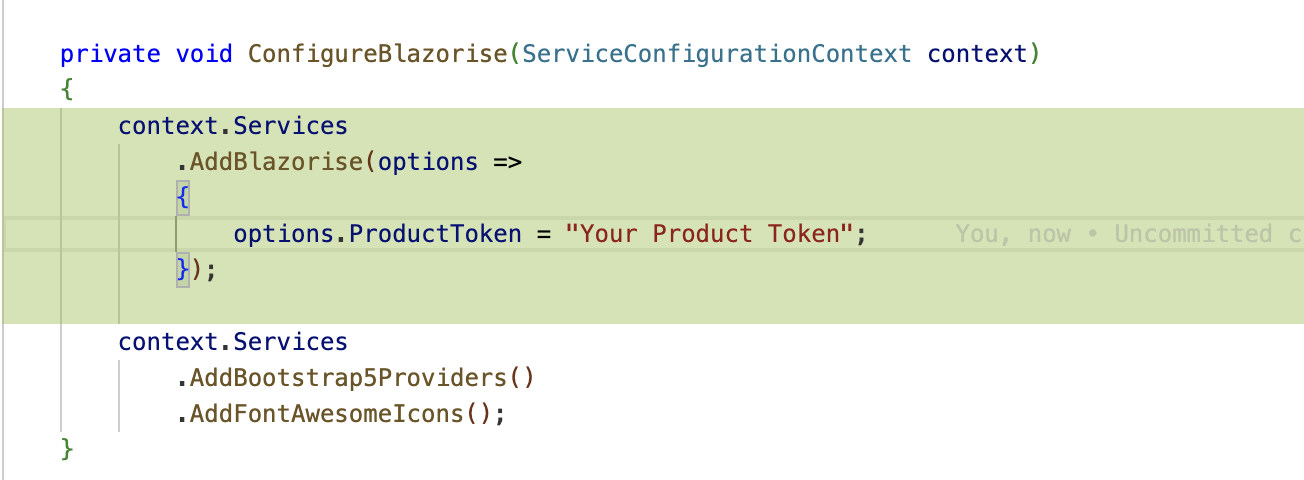
Register your Product Token in ABP Blazor projects.
See https://blazorise.com/docs/usage/licensing/register-product-token for more info.
When you encounter problems in the development or production environment, we would like to see the log to troubleshoot the problem.
.MinimumLevel.Debug() will set MinimumLevel to Debug to show more logs.
We don't want to see EF Core's
Debuglogs when your problem has nothing to do with EF Core.
var loggerConfiguration = new LoggerConfiguration()
    .MinimumLevel.Debug()
    .MinimumLevel.Override("Microsoft.EntityFrameworkCore", LogEventLevel.Warning)
    .Enrich.FromLogContext()
    .WriteTo.Async(c => c.File("Logs/logs.txt"))
If you have an EF Core-related problem, you can remove MinimumLevel.Override("Microsoft.EntityFrameworkCore", LogEventLevel.Warning) and EnableSensitiveDataLogging to see EF Core debug logs.
Configure<AbpDbContextOptions>(options =>
{
    /* The main point to change your DBMS.
     * See also BookStoreMigrationsDbContextFactory for EF Core tooling. */
    Configure<AbpDbContextOptions>(options =>
    {
        options.Configure(actions =>
        {
            actions.UseSqlServer();
            actions.DbContextOptions.EnableSensitiveDataLogging();
        });
    });
});
If your API website experiences a JWT authentication problem, please ShowPII and output identity model logs.
 public async static Task<int> Main(string[] args)
{
    IdentityModelEventSource.ShowPII = true;

    IdentityModelEventSource.Logger.LogLevel = EventLevel.Verbose;
    var wilsonTextLogger = new TextWriterEventListener("Logs/identitymodel.txt");
    wilsonTextLogger.EnableEvents(IdentityModelEventSource.Logger, EventLevel.Verbose);
See: https://github.com/AzureAD/azure-activedirectory-identitymodel-extensions-for-dotnet/wiki/PII https://github.com/AzureAD/azure-activedirectory-identitymodel-extensions-for-dotnet/wiki/How-to-log-from-IdentityModelEventSource.Logger
If you have an OpenIddict related problem, please override the OpenIddict log level to Verbose.
var loggerConfiguration = new LoggerConfiguration()
    .MinimumLevel.Debug()
    .MinimumLevel.Override("Microsoft.EntityFrameworkCore", LogEventLevel.Warning)
    .MinimumLevel.Override("OpenIddict", LogEventLevel.Verbose)
    .Enrich.FromLogContext()
    .WriteTo.Async(c => c.File("Logs/logs.txt"))
This error is related to NET 9 SDK.
You can use a specific SDK version in a folder to install the abp suite.
> dotnet --list-sdks
8.0.401 [/usr/local/share/dotnet/sdk]
9.0.100-rc.2.24474.11 [/usr/local/share/dotnet/sdk]

> cd TestFolder
TestFolder > dotnet new globaljson --sdk-version 8.0.401

TestFolder > dotnet --version
8.0.401

TestFolder > abp suite
Update:
Please use latest official NET 9 SDK to solve this issue,
Report from https://github.com/abpframework/abp/issues/7951
Version: ABP Suite 4.2.1 User Interface: MVC Database Version: EF Core Javascript Alert: DataTables warning: table id= Table - Requested unknown parameter '.uOM' for row 0, column 5. For more information about this error, please see http://datatables.net/tn/4 Steps needed to reproduce the problem
The reason this occurs is that the variable in the datatable gets generated as ".uOM" whereas the actual value in the object is ".uom". To fix you simply change the variable in the dataTable to "******.uom"
Not a neck breaking bug but ever so slightly annoying
Do not share the ABP source code and your private NuGet API key If there is a need, please share it to our support staff via email info@abp.io
Update the ABP CLI:
dotnet tool update -g Volo.Abp.Cli
Update the ABP Suite:
abp suite update or dotnet tool update -g Volo.Abp.Suite
Update the ABP CLI:
dotnet tool update -g Volo.Abp.Cli
Update the ABP Suite:
abp suite update









