hi
Can you check https://github.com/abpframework/abp/issues/23066#issuecomment-2975189649 ?
Thanks.
hi
Try to remove this line
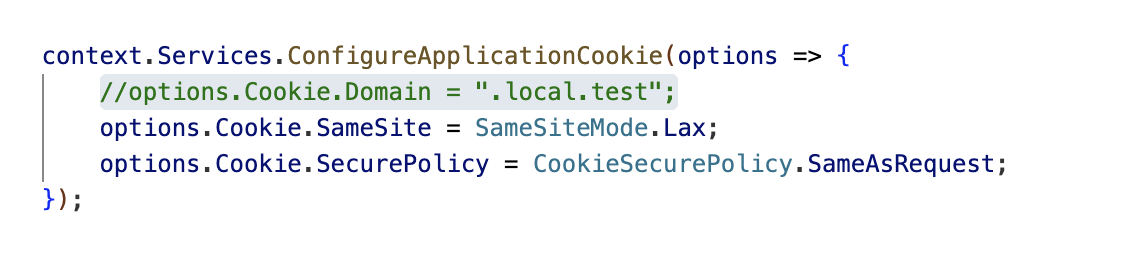
also update App.razor
@using System.Globalization
@using Microsoft.Extensions.Hosting
@using Volo.Abp.AspNetCore.Components.Server.LeptonXTheme.Bundling
@using Volo.Abp.AspNetCore.Components.Server.LeptonXTheme.Components
@using Volo.Abp.Localization
@using Volo.Abp.AspNetCore.Components.Web.Theming.Bundling
@using Volo.Abp.AspNetCore.Mvc.AntiForgery;

@inject IHostEnvironment Env
@{
    var rtl = CultureHelper.IsRtl ? "rtl" : string.Empty;
}

<!DOCTYPE html>
<html lang="@CultureInfo.CurrentCulture.Name" dir="@rtl">
<head>
    <meta charset="utf-8" />
    <meta name="viewport" content="width=device-width, initial-scale=1.0" />
    <title>DemoLogin</title>
    <base href="/" />

    <AbpStyles BundleName="@BlazorLeptonXThemeBundles.Styles.Global" WebAssemblyStyleFiles="GlobalStyles" @rendermode="InteractiveAuto" />

    <link href="DemoLogin.Blazor.styles.css" rel="stylesheet"/>
    <link href="DemoLogin.Blazor.Client.styles.css" rel="stylesheet"/>

    <HeadOutlet @rendermode="InteractiveAuto" />
    @* <HeadOutlet @rendermode="InteractiveServer" /> *@

    <AppearanceStyles/>

</head>
<body class="abp-application-layout @rtl">

    <Routes @rendermode="InteractiveAuto" />

    <div id="blazor-error-ui">
        @if (Env.IsDevelopment())
        {
            <text>An unhandled exception has occurred. See browser dev tools for details.</text>
        }
        else if (Env.IsStaging() || Env.IsProduction())
        {
            <text>An error has occurred. This application may no longer respond until reloaded.</text>
        }
        <a href="" class="reload">Reload</a>
        <a class="dismiss">🗙</a>
    </div>

    <AbpScripts BundleName="@BlazorLeptonXThemeBundles.Scripts.Global" WebAssemblyScriptFiles="GlobalScripts" @rendermode="InteractiveAuto" />

    <script src="_framework/blazor.web.js"></script>

</body>
</html>

@code{
    private List<string> GlobalStyles =>
    [
        "global.css"
    ];

    private List<string> GlobalScripts =>
    [
        "global.js"
    ];

    [Inject]
    private IAbpAntiForgeryManager AbpAntiForgeryManager { get; set; }

    protected override Task OnInitializedAsync()
    {
        AbpAntiForgeryManager.SetCookie();
        return Task.CompletedTask;
    }
}
hi
https://abp.io/support/questions/5167/Hangfire-Authorization-Problem#answer-3a0b888e-b47a-d13d-c030-80ce3f046997
Great
hi
Client Proxy does not support the synchronization method, you should always use asynchronous methods as a best practice
Can you use async method(return type is Task or Task<>) and add Async to end of your method name(GetExistingDataByFieldAsync)?
Thanks.
: )
ok
hi
Can you explain it in more detail?
What is the username? password?
Maybe the host has the same user with the same password.
You can check it in the host user page.
Thanks.




