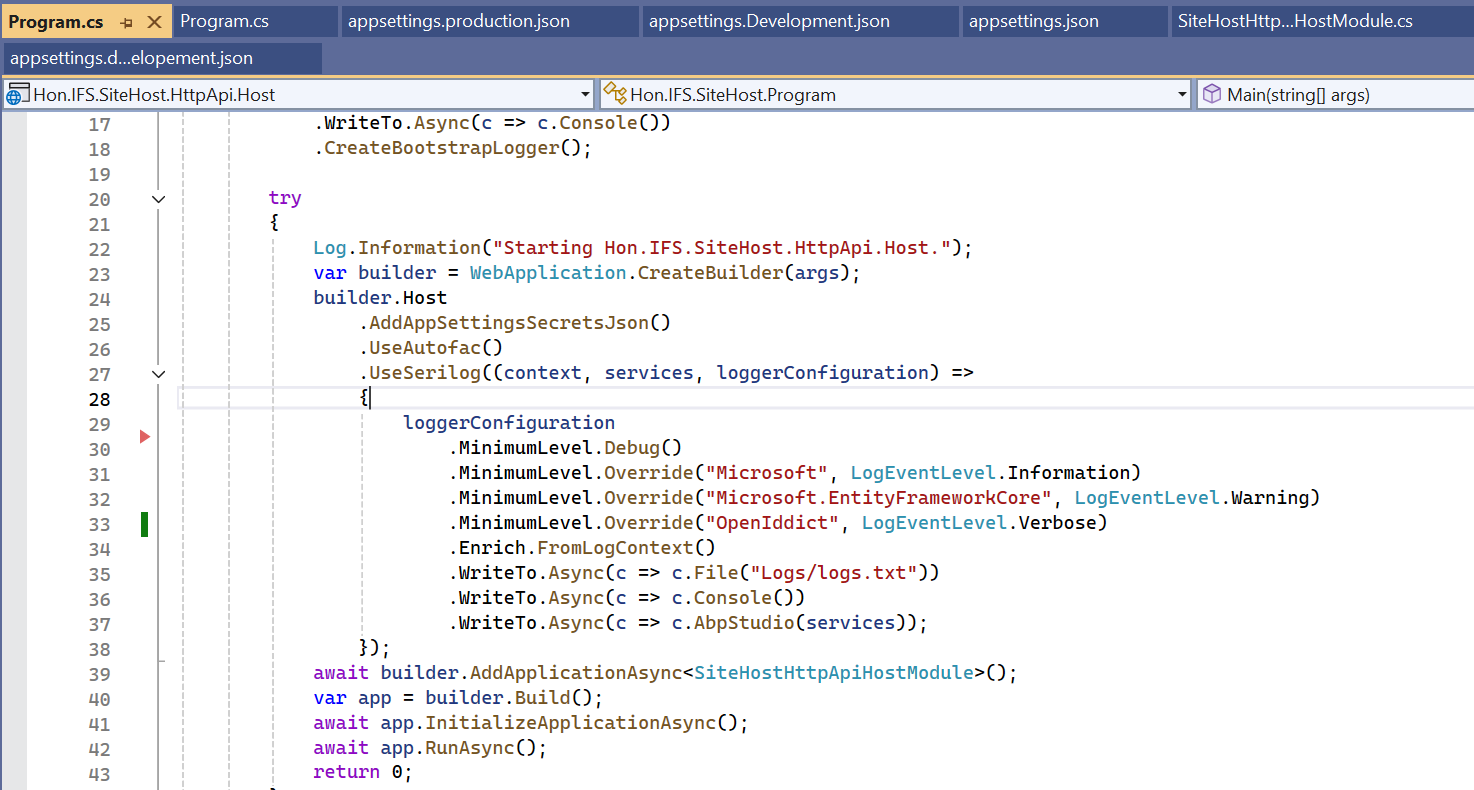
Its there and seeded . No Redis cache .
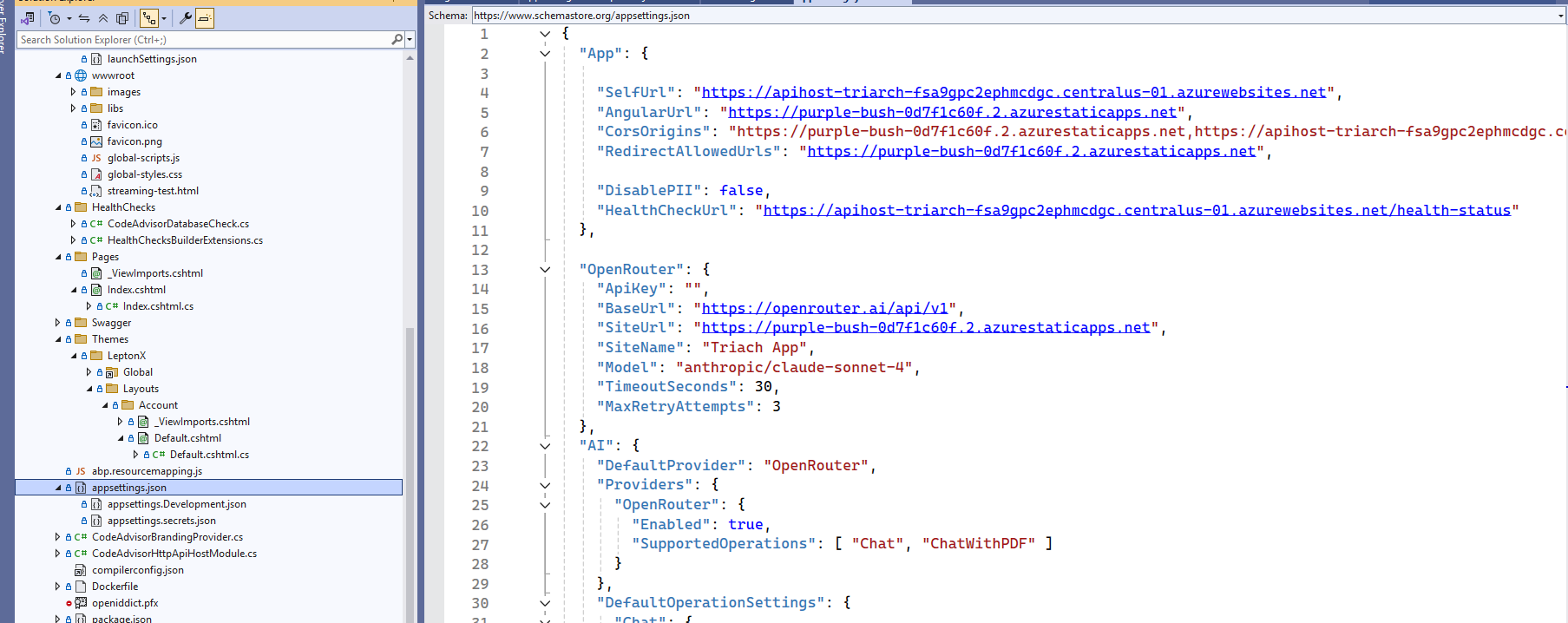
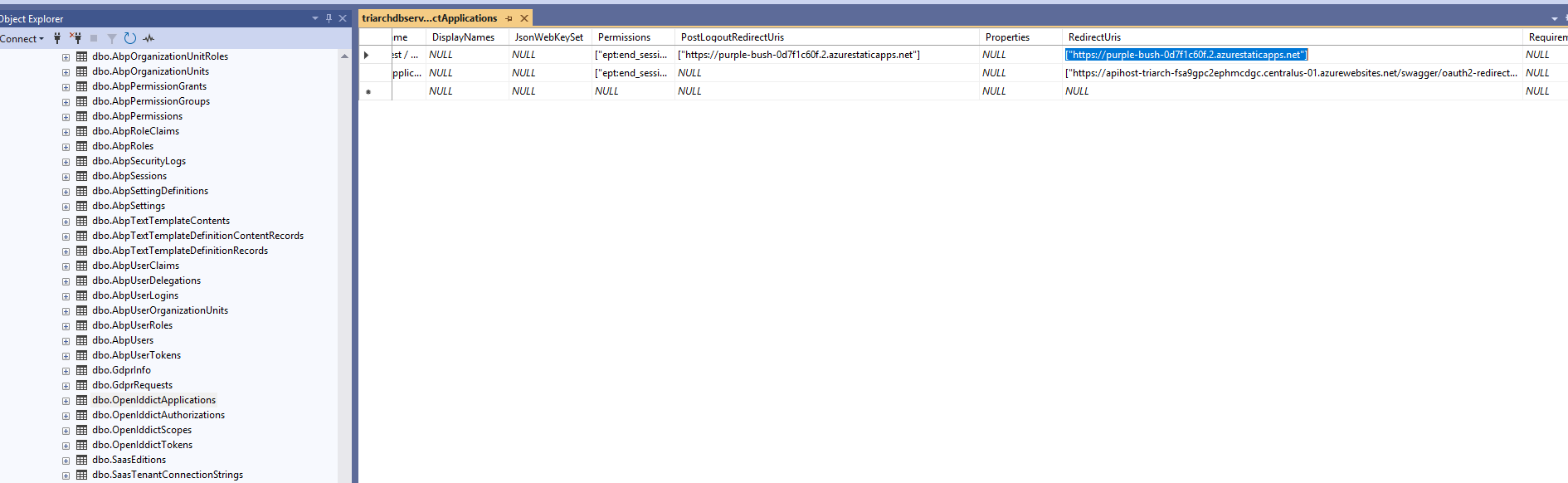
@Mailming , can you guide here ? Have shared logs with you.
2025-09-13T19:57:01.032798088Z [19:57:01 INF] Executed endpoint '/Account/Login'
2025-09-13T19:57:04.650853453Z [19:57:04 ERR] An unhandled exception has occurred while executing the request.
2025-09-13T19:57:04.650885475Z Volo.Abp.AbpException: Could not find file '~/Abp/ApplicationLocalizationScript?cultureName=en'
2025-09-13T19:57:04.650890032Z at Volo.Abp.AspNetCore.Bundling.BundlerBase.GetFileInfo(IBundlerContext context, String file)
2025-09-13T19:57:04.650893660Z at Volo.Abp.AspNetCore.Bundling.BundlerBase.GetAndMinifyFileContent(IBundlerContext context, String fileName)
2025-09-13T19:57:04.650897179Z at Volo.Abp.AspNetCore.Bundling.BundlerBase.GetFileContentConsideringMinification(IBundlerContext context, String fileName)
2025-09-13T19:57:04.650900734Z at Volo.Abp.AspNetCore.Bundling.BundlerBase.AddFileToBundle(IBundlerContext context, StringBuilder bundleContentBuilder, String fileName)
2025-09-13T19:57:04.650904196Z at Volo.Abp.AspNetCore.Bundling.BundlerBase.Bundle(IBundlerContext context)
2025-09-13T19:57:04.650907664Z at Volo.Abp.AspNetCore.Bundling.BundleManagerBase.<>c__DisplayClass15_0.<AddToBundleCache>b__0()
2025-09-13T19:57:04.650922433Z at System.Collections.Generic.AbpDictionaryExtensions.<>c__DisplayClass7_02.<GetOrAdd>b__0(TKey k) 2025-09-13T19:57:04.650926422Z at System.Collections.Concurrent.ConcurrentDictionary2.GetOrAdd(TKey key, Func2 valueFactory) 2025-09-13T19:57:04.650929933Z at Volo.Abp.AspNetCore.Bundling.BundleCache.GetOrAdd(String bundleName, Func1 factory)
2025-09-13T19:57:04.650933257Z at Volo.Abp.AspNetCore.Bundling.BundleManagerBase.AddToBundleCache(String bundleName, IBundler bundler, List1 bundleFiles) 2025-09-13T19:57:04.650936707Z at Volo.Abp.AspNetCore.Bundling.BundleManagerBase.GetBundleFilesAsync(BundleConfigurationCollection bundles, String bundleName, IBundler bundler) 2025-09-13T19:57:04.650940229Z at Volo.Abp.AspNetCore.Bundling.BundleManagerBase.GetScriptBundleFilesAsync(String bundleName) 2025-09-13T19:57:04.650943540Z at Volo.Abp.AspNetCore.Mvc.UI.Bundling.TagHelpers.AbpTagHelperScriptService.GetBundleFilesAsync(String bundleName) 2025-09-13T19:57:04.650946962Z at Volo.Abp.AspNetCore.Mvc.UI.Bundling.TagHelpers.AbpTagHelperResourceService.ProcessAsync(ViewContext viewContext, TagHelper tagHelper, TagHelperContext context, TagHelperOutput output, List1 bundleItems, String bundleName)
2025-09-13T19:57:04.650950590Z at Volo.Abp.AspNetCore.Mvc.UI.Bundling.TagHelpers.AbpBundleItemTagHelperService2.ProcessAsync(TagHelperContext context, TagHelperOutput output) 2025-09-13T19:57:04.650955098Z at Microsoft.AspNetCore.Razor.Runtime.TagHelpers.TagHelperRunner.<RunAsync>g__Awaited|0_0(Task task, TagHelperExecutionContext executionContext, Int32 i, Int32 count) 2025-09-13T19:57:04.650958920Z at AspNetCoreGeneratedDocument.Themes_LeptonX_Layouts_Account_Default.<>c__DisplayClass21_0.<<ExecuteAsync>b__1>d.MoveNext() 2025-09-13T19:57:04.652873135Z --- End of stack trace from previous location --- 2025-09-13T19:57:04.652884250Z at Microsoft.AspNetCore.Razor.Runtime.TagHelpers.TagHelperExecutionContext.SetOutputContentAsync() 2025-09-13T19:57:04.652888191Z at AspNetCoreGeneratedDocument.Themes_LeptonX_Layouts_Account_Default.ExecuteAsync() in /home/runner/work/Triarch/Triarch/src/Triarch.CodeAdvisor.HttpApi.Host/Themes/LeptonX/Layouts/Account/Default.cshtml:line 63 2025-09-13T19:57:04.652892134Z at Microsoft.AspNetCore.Mvc.Razor.RazorView.RenderPageCoreAsync(IRazorPage page, ViewContext context) 2025-09-13T19:57:04.652895506Z at Microsoft.AspNetCore.Mvc.Razor.RazorView.RenderPageAsync(IRazorPage page, ViewContext context, Boolean invokeViewStarts) 2025-09-13T19:57:04.652899116Z at Microsoft.AspNetCore.Mvc.Razor.RazorView.RenderLayoutAsync(ViewContext context, ViewBufferTextWriter bodyWriter) 2025-09-13T19:57:04.652902528Z at Microsoft.AspNetCore.Mvc.Razor.RazorView.RenderAsync(ViewContext context) 2025-09-13T19:57:04.652905951Z at Microsoft.AspNetCore.Mvc.ViewFeatures.ViewExecutor.ExecuteAsync(ViewContext viewContext, String contentType, Nullable1 statusCode)
2025-09-13T19:57:04.652909320Z at Microsoft.AspNetCore.Mvc.ViewFeatures.ViewExecutor.ExecuteAsync(ViewContext viewContext, String contentType, Nullable1 statusCode) 2025-09-13T19:57:04.652921428Z at Microsoft.AspNetCore.Mvc.Infrastructure.ResourceInvoker.<InvokeResultAsync>g__Logged|22_0(ResourceInvoker invoker, IActionResult result) 2025-09-13T19:57:04.652925507Z at Microsoft.AspNetCore.Mvc.Infrastructure.ResourceInvoker.<InvokeNextResultFilterAsync>g__Awaited|30_0[TFilter,TFilterAsync](ResourceInvoker invoker, Task lastTask, State next, Scope scope, Object state, Boolean isCompleted) 2025-09-13T19:57:04.652929240Z at Microsoft.AspNetCore.Mvc.Infrastructure.ResourceInvoker.Rethrow(ResultExecutedContextSealed context) 2025-09-13T19:57:04.652932524Z at Microsoft.AspNetCore.Mvc.Infrastructure.ResourceInvoker.ResultNext[TFilter,TFilterAsync](State& next, Scope& scope, Object& state, Boolean& isCompleted) 2025-09-13T19:57:04.652936307Z at Microsoft.AspNetCore.Mvc.Infrastructure.ResourceInvoker.InvokeResultFilters() 2025-09-13T19:57:04.652939583Z --- End of stack trace from previous location --- 2025-09-13T19:57:04.652942898Z at Microsoft.AspNetCore.Mvc.Infrastructure.ResourceInvoker.<InvokeNextResourceFilter>g__Awaited|25_0(ResourceInvoker invoker, Task lastTask, State next, Scope scope, Object state, Boolean isCompleted) 2025-09-13T19:57:04.652946982Z at Microsoft.AspNetCore.Mvc.Infrastructure.ResourceInvoker.Rethrow(ResourceExecutedContextSealed context) 2025-09-13T19:57:04.652950316Z at Microsoft.AspNetCore.Mvc.Infrastructure.ResourceInvoker.Next(State& next, Scope& scope, Object& state, Boolean& isCompleted) 2025-09-13T19:57:04.652953854Z at Microsoft.AspNetCore.Mvc.Infrastructure.ResourceInvoker.InvokeFilterPipelineAsync() 2025-09-13T19:57:04.652957146Z --- End of stack trace from previous location --- 2025-09-13T19:57:04.652960316Z at Microsoft.AspNetCore.Mvc.Infrastructure.ResourceInvoker.<InvokeAsync>g__Logged|17_1(ResourceInvoker invoker) 2025-09-13T19:57:04.652963808Z at Microsoft.AspNetCore.Mvc.Infrastructure.ResourceInvoker.<InvokeAsync>g__Logged|17_1(ResourceInvoker invoker) 2025-09-13T19:57:04.652967188Z at Microsoft.AspNetCore.Routing.EndpointMiddleware.<Invoke>g__AwaitRequestTask|7_0(Endpoint endpoint, Task requestTask, ILogger logger) 2025-09-13T19:57:04.652970981Z at Volo.Abp.AspNetCore.Serilog.AbpSerilogMiddleware.InvokeAsync(HttpContext context, RequestDelegate next) 2025-09-13T19:57:04.652974539Z at Microsoft.AspNetCore.Builder.UseMiddlewareExtensions.InterfaceMiddlewareBinder.<>c__DisplayClass2_0.<<CreateMiddleware>b__0>d.MoveNext() 2025-09-13T19:57:04.652978384Z --- End of stack trace from previous location --- 2025-09-13T19:57:04.652981567Z at Volo.Abp.AspNetCore.Auditing.AbpAuditingMiddleware.InvokeAsync(HttpContext context, RequestDelegate next) 2025-09-13T19:57:04.652984937Z at Volo.Abp.AspNetCore.Auditing.AbpAuditingMiddleware.InvokeAsync(HttpContext context, RequestDelegate next) 2025-09-13T19:57:04.652988237Z at Microsoft.AspNetCore.Builder.UseMiddlewareExtensions.InterfaceMiddlewareBinder.<>c__DisplayClass2_0.<<CreateMiddleware>b__0>d.MoveNext() 2025-09-13T19:57:04.653001276Z --- End of stack trace from previous location --- 2025-09-13T19:57:04.653009079Z at Swashbuckle.AspNetCore.SwaggerUI.SwaggerUIMiddleware.Invoke(HttpContext httpContext) 2025-09-13T19:57:04.653012639Z at Swashbuckle.AspNetCore.Swagger.SwaggerMiddleware.Invoke(HttpContext httpContext, ISwaggerProvider swaggerProvider) 2025-09-13T19:57:04.653015989Z at Microsoft.AspNetCore.Authorization.AuthorizationMiddleware.Invoke(HttpContext context) 2025-09-13T19:57:04.653019253Z at Volo.Abp.AspNetCore.Security.Claims.AbpDynamicClaimsMiddleware.InvokeAsync(HttpContext context, RequestDelegate next) 2025-09-13T19:57:04.653022656Z at Microsoft.AspNetCore.Builder.UseMiddlewareExtensions.InterfaceMiddlewareBinder.<>c__DisplayClass2_0.<<CreateMiddleware>b__0>d.MoveNext() 2025-09-13T19:57:04.653026636Z --- End of stack trace from previous location --- 2025-09-13T19:57:04.653029869Z at Volo.Abp.AspNetCore.Uow.AbpUnitOfWorkMiddleware.InvokeAsync(HttpContext context, RequestDelegate next) 2025-09-13T19:57:04.653033234Z at Microsoft.AspNetCore.Builder.UseMiddlewareExtensions.InterfaceMiddlewareBinder.<>c__DisplayClass2_0.<<CreateMiddleware>b__0>d.MoveNext() 2025-09-13T19:57:04.653036774Z --- End of stack trace from previous location --- 2025-09-13T19:57:04.653039957Z at Volo.Abp.AspNetCore.ExceptionHandling.AbpExceptionHandlingMiddleware.InvokeAsync(HttpContext context, RequestDelegate next) 2025-09-13T19:57:04.653043325Z at Volo.Abp.AspNetCore.ExceptionHandling.AbpExceptionHandlingMiddleware.InvokeAsync(HttpContext context, RequestDelegate next) 2025-09-13T19:57:04.653046691Z at Microsoft.AspNetCore.Builder.UseMiddlewareExtensions.InterfaceMiddlewareBinder.<>c__DisplayClass2_0.<<CreateMiddleware>b__0>d.MoveNext() 2025-09-13T19:57:04.653050216Z --- End of stack trace from previous location --- 2025-09-13T19:57:04.653053809Z at Volo.Abp.AspNetCore.MultiTenancy.MultiTenancyMiddleware.InvokeAsync(HttpContext context, RequestDelegate next) 2025-09-13T19:57:04.653057130Z at Microsoft.AspNetCore.Builder.UseMiddlewareExtensions.InterfaceMiddlewareBinder.<>c__DisplayClass2_0.<<CreateMiddleware>b__0>d.MoveNext() 2025-09-13T19:57:04.653060788Z --- End of stack trace from previous location --- 2025-09-13T19:57:04.653063976Z at Microsoft.AspNetCore.Builder.ApplicationBuilderAbpOpenIddictMiddlewareExtension.<>c__DisplayClass0_0.<<UseAbpOpenIddictValidation>b__0>d.MoveNext() 2025-09-13T19:57:04.653067733Z --- End of stack trace from previous location --- 2025-09-13T19:57:04.653070931Z at Microsoft.AspNetCore.Authentication.AuthenticationMiddleware.Invoke(HttpContext context) 2025-09-13T19:57:04.653074219Z at Volo.Abp.AspNetCore.Security.AbpSecurityHeadersMiddleware.InvokeAsync(HttpContext context, RequestDelegate next) 2025-09-13T19:57:04.653077619Z at Microsoft.AspNetCore.Builder.UseMiddlewareExtensions.InterfaceMiddlewareBinder.<>c__DisplayClass2_0.<<CreateMiddleware>b__0>d.MoveNext() 2025-09-13T19:57:04.653081179Z --- End of stack trace from previous location --- 2025-09-13T19:57:04.653084458Z at Volo.Abp.Studio.Client.AspNetCore.AbpStudioMiddleware.InvokeAsync(HttpContext context, RequestDelegate next) 2025-09-13T19:57:04.653091619Z at Volo.Abp.Studio.Client.AspNetCore.AbpStudioMiddleware.InvokeAsync(HttpContext context, RequestDelegate next) 2025-09-13T19:57:04.653095426Z at Microsoft.AspNetCore.Builder.UseMiddlewareExtensions.InterfaceMiddlewareBinder.<>c__DisplayClass2_0.<<CreateMiddleware>b__0>d.MoveNext() 2025-09-13T19:57:04.653099006Z --- End of stack trace from previous location --- 2025-09-13T19:57:04.653102200Z at Microsoft.AspNetCore.Diagnostics.ExceptionHandlerMiddlewareImpl.<Invoke>g__Awaited|10_0(ExceptionHandlerMiddlewareImpl middleware, HttpContext context, Task task) 2025-09-13T19:57:05.216968509Z [19:57:05 INF] Start processing HTTP request GET https://apihost-triarch-fsa9gpc2ephmcdgc.centralus-01.azurewebsites.net/health-status 2025-09-13T19:57:05.217020687Z [19:57:05 INF] Sending HTTP request GET https://apihost-triarch-fsa9gpc2ephmcdgc.centralus-01.azurewebsites.net/health-status 2025-09-13T19:57:05.365124941Z [19:57:05 INF] Request starting HTTP/1.1 GET http://apihost-triarch-fsa9gpc2ephmcdgc.centralus-01.azurewebsites.net/health-status - null null 2025-09-13T19:57:05.395227034Z [19:57:05 INF] Executing endpoint 'Health checks' 2025-09-13T19:57:05.483708673Z [19:57:05 INF] Executed endpoint 'Health checks' 2025-09-13T19:57:05.484794668Z [19:57:05 INF] Received HTTP response headers after 267.9041ms - 200 2025-09-13T19:57:05.485016701Z [19:57:05 INF] End processing HTTP request after 286.8569ms - 200 2025-09-13T19:57:05.486383151Z [19:57:05 INF] Request finished HTTP/1.1 GET https://apihost-triarch-fsa9gpc2ephmcdgc.centralus-01.azurewebsites.net/health-status - 200 null application/json 122.9341ms 2025-09-13T19:57:13.856060016Z [19:57:13 INF] Request starting HTTP/1.1 GET http://apihost-triarch-fsa9gpc2ephmcdgc.centralus-01.azurewebsites.net/health-status - null null 2025-09-13T19:57:13.926826607Z [19:57:13 INF] Executing endpoint 'Health checks' 2025-09-13T19:57:14.067826900Z [19:57:14 INF] Executed endpoint 'Health checks' 2025-09-13T19:57:14.067863518Z [19:57:14 INF] Request finished HTTP/1.1 GET https://apihost-triarch-fsa9gpc2ephmcdgc.centralus-01.azurewebsites.net/health-status - 200 null application/json 198.1658ms 2025-09-13T19:57:15.515551504Z [19:57:15 INF] Executing endpoint 'Volo.Abp.AspNetCore.Mvc.UI.Theme.Shared.Controllers.ErrorController.Index (Volo.Abp.AspNetCore.Mvc.UI.Theme.Shared)' 2025-09-13T19:57:15.526084993Z [19:57:15 INF] Route matched with {action = "Index", controller = "Error", area = "", page = ""}. Executing controller action with signature System.Threading.Tasks.Task1[Microsoft.AspNetCore.Mvc.IActionResult] Index(Int32) on controller Volo.Abp.AspNetCore.Mvc.UI.Theme.Shared.Controllers.ErrorController (Volo.Abp.AspNetCore.Mvc.UI.Theme.Shared).
2025-09-13T19:57:15.574189162Z [19:57:15 INF] Start processing HTTP request GET https://apihost-triarch-fsa9gpc2ephmcdgc.centralus-01.azurewebsites.net/health-status
2025-09-13T19:57:15.574239402Z [19:57:15 INF] Sending HTTP request GET https://apihost-triarch-fsa9gpc2ephmcdgc.centralus-01.azurewebsites.net/health-status
2025-09-13T19:57:15.604785498Z [19:57:15 INF] Request starting HTTP/1.1 GET http://apihost-triarch-fsa9gpc2ephmcdgc.centralus-01.azurewebsites.net/health-status - null null
2025-09-13T19:57:15.615722791Z [19:57:15 INF] Executing endpoint 'Health checks'
2025-09-13T19:57:15.642864901Z [19:57:15 INF] Executing action method Volo.Abp.AspNetCore.Mvc.UI.Theme.Shared.Controllers.ErrorController.Index (Volo.Abp.AspNetCore.Mvc.UI.Theme.Shared) - Validation state: Valid
2025-09-13T19:57:15.695283815Z [19:57:15 INF] Executed action method Volo.Abp.AspNetCore.Mvc.UI.Theme.Shared.Controllers.ErrorController.Index (Volo.Abp.AspNetCore.Mvc.UI.Theme.Shared), returned result Microsoft.AspNetCore.Mvc.ViewResult in 57.1194ms.:
Hi,
Did I miss to add any code? I have attached the screenshot for your reference.
We need your support to close this issue. Can we have a screen sharing session to look into it?
Hi,
My colleague Nirmal shared the debug logs over the email
Hi,
THE CORS policy is already added in both appsettings.json and also in the app service.
I have shared the logs over the email
[ { "code": "Volo.Authorization:010001", "message": "Authorization failed! Given policy has not granted.", "details": null, "data": null, "validationErrors": null } ]