Hi,
while upgrading from 9.1.1 and 9.2.3 to 9.3.1 we're experiencing a regression in the angular frontend regarding the order of style injections. It seems that previously the injection order was preserved / similar to the one declared in angular.json which is good because we want to override some variables and styles from the lepton-x theme. This is no longer possible because the style injector is always injecting the lepton styles after the ones provided by angular.
Production (9.1.1):
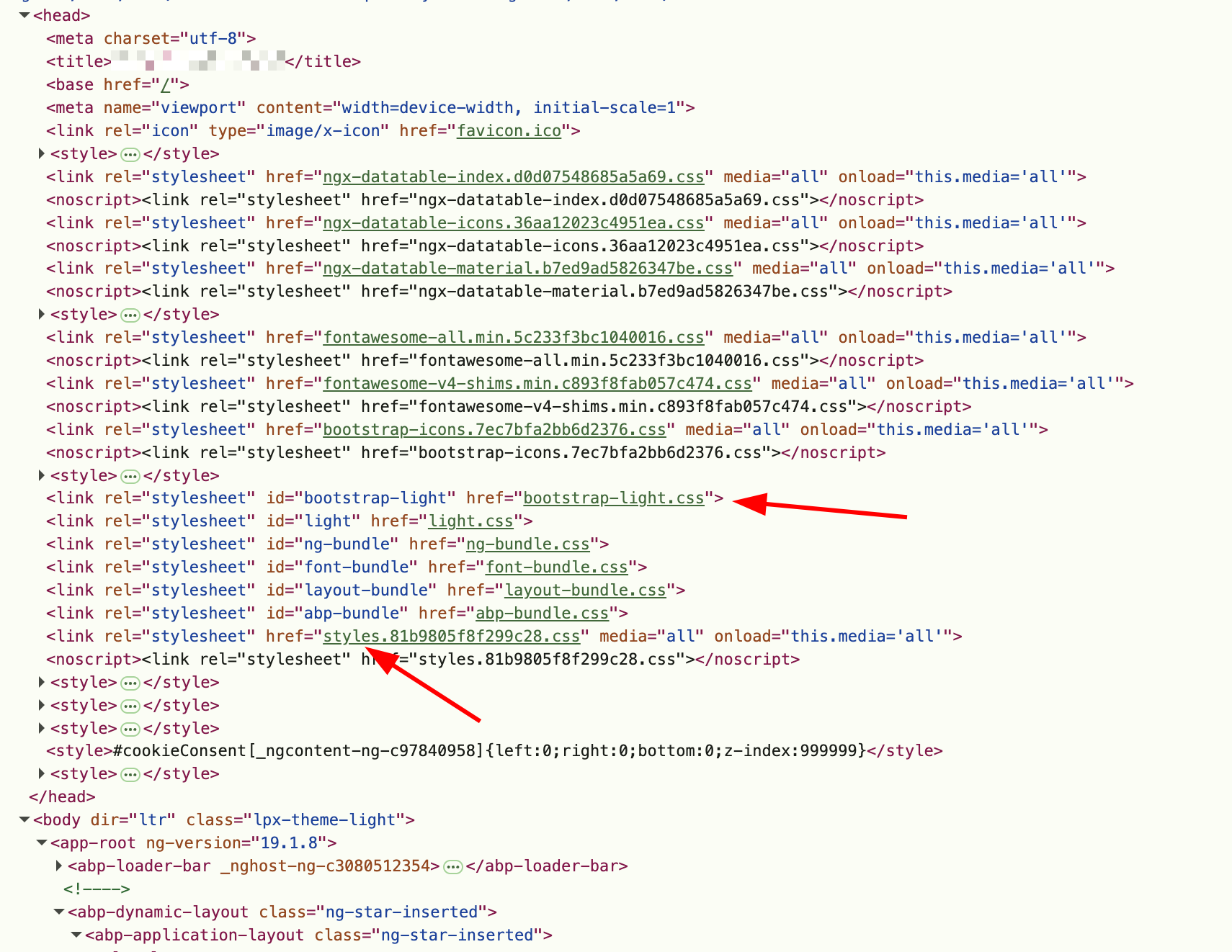
Local (9.3.1):
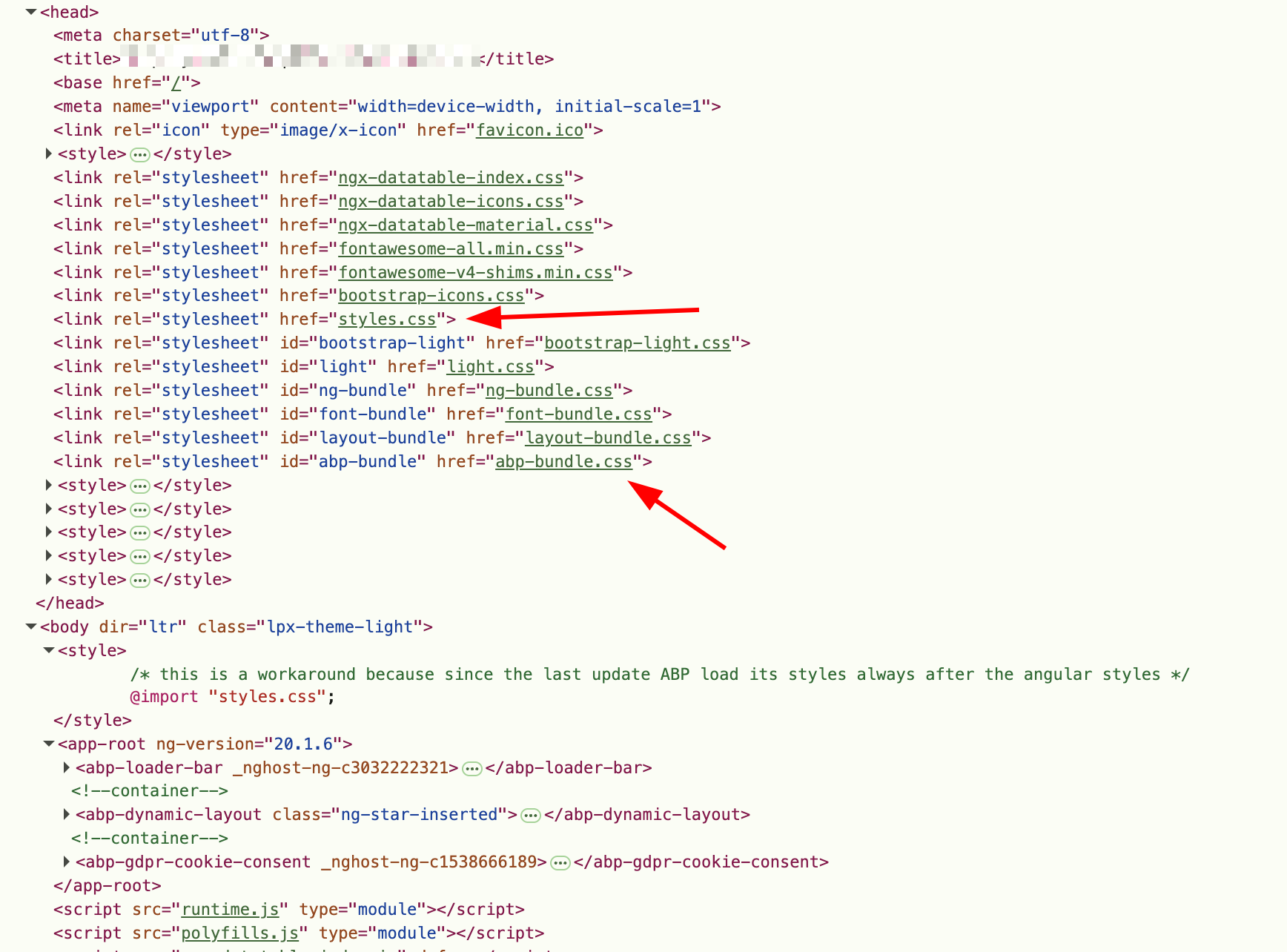
Question 1)
Do you know how I can load my style at the very bottom? Do I need to provide my own Style Load Factory / LPX_PRO_STYLE_TOKEN or LPX_LAYOUT_STYLE_FINAL or LPX_STYLE_FINAL?
Question 2) Is this something you're planning to fix? Because in the code I've seen this comment
      const linkElem = this.createLinkElem(style, direction, resolve);
      //TODO: find a better way for understand style laaded by angular json
      const appStyles = document.querySelector(
        'link[rel="stylesheet"][href*="styles"]'
      );
Which leads me to think that this could be improved.
Kind Regards, Marc
Hi,
when I add an angular route for the path /examples/:exampleId how would I add the corresponding ABP.Route for this route entry? If I specify the same path (or undefined) and then navigate to that route, the Breadcrumbs + Icons are not correct (they return the fallback value for our main route at /)
Our route configuration currently looks like this:
export const EXAMPLE_ROUTE_NAMES = {
  a: 'subroute-a',
  b: 'subroute-b',
}

export const createExampleRoutes = (path: string, order?: number, group?: string): AbpRoute[] => {
  return [
    {
      path,
      canActivate: [ authGuard ],
      data: {
        routes: [
          {
            path: undefined,
            name: '::Menu:Examples',
            iconClass: 'fas fa-dolly-flatbed',
            layout: eLayoutType.application,
            order,
            group,
          },
          {
            path: `/${path}`,
            name: '::Menu:Examples:Overview',
            parentName: '::Menu:Examples',
            order: 1,
          },
          {
            path: `/${path}/:exampleId/${EXAMPLE_ROUTE_NAMES.a}`, // <<<<<< the issue is here ! >>>>>>>>
            name: '::Menu:Examples:A',
            parentName: '::Menu:Examples',
            order: 2,
          },
          {
            path: `/${path}/:exampleId/${EXAMPLE_ROUTE_NAMES.b}`, // <<<<<< the issue is here ! >>>>>>>>
            name: '::Menu:Examples:B',
            parentName: '::Menu:Examples',
            order: 3,
          },
        ],
      },
      children: [
        {
          path: '',
          component: ExampleComponent,
          title: '::Menu:Examples:Overview',
        },
        {
          path: ':exampleId', // <<<<< all components are injected with this `exampleId` >>>>>>>
          children: [
            {
              path: `${EXAMPLE_ROUTE_NAMES.a}`,
              component: ExampleComponent,
              title: '::Menu:Examples:A',
            },

            {
              path: `${EXAMPLE_ROUTE_NAMES.b}`,
              component: ExampleComponent,
              title: '::Menu:Examples:B',
            },
            // ... more routes ...
          ],
        },
      ],
    },
  ]
}
Do you have any idea how to provide the "Menu Configuration" / ABP.Route Data for those routes with path placeholders?
Kind Regards, Marc
Hi,
the application we're currently developing has a couple of tenants, that already have established access management solutions they want to keep using. We have already agreed on using specific role names, that they can manage through Entra App. Registrations with specific App Roles, so they can keep their internal Security Group naming, but the specific role names can be recognized on our end. This works fine on a technical level, and is also an established way of handling such requests, e.g. Grafana describes the same setup for access to Entra / AzureAD with app roles like Viewer, Editor or Admin.
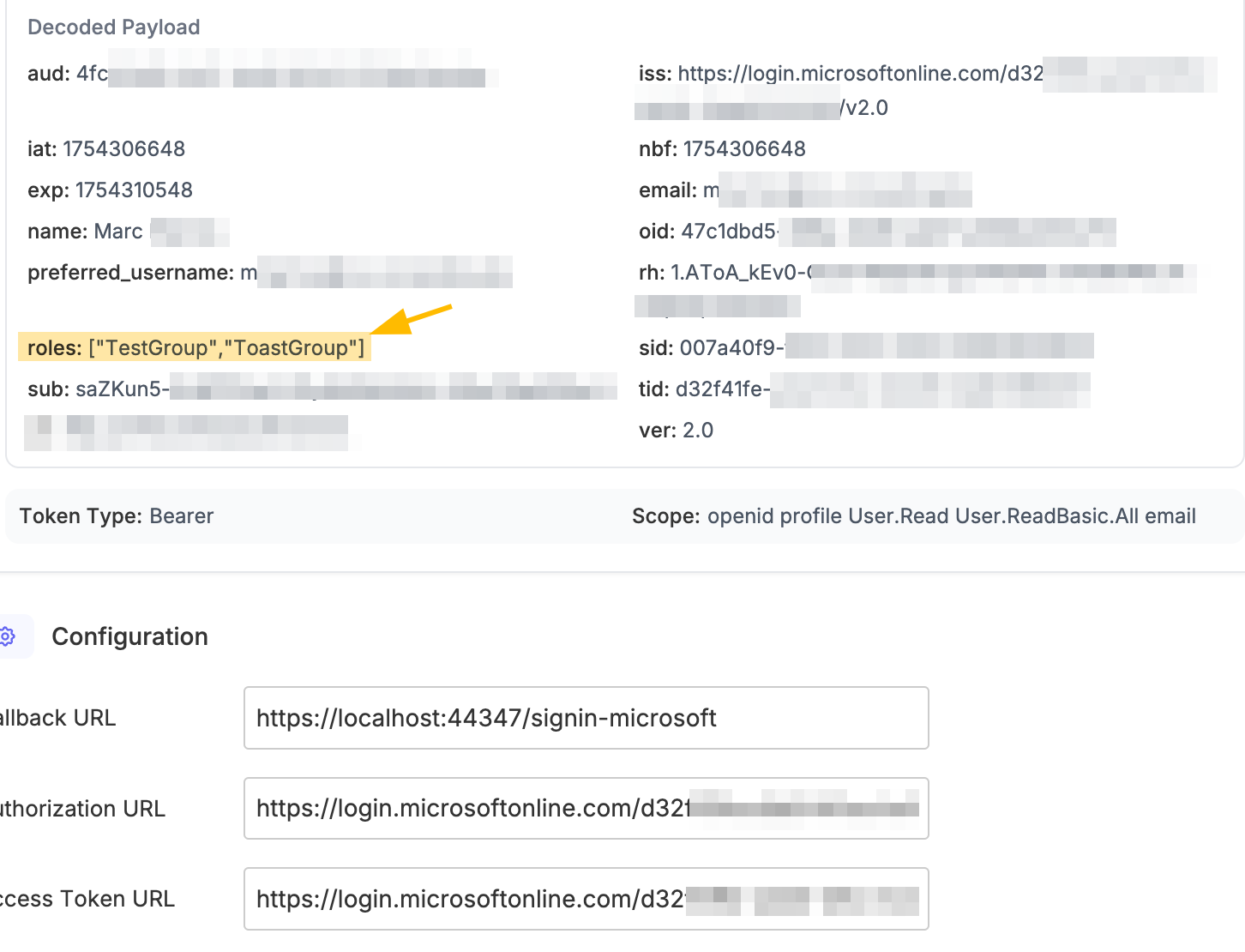
I have verified that I can access the roles when performing an external login, through either AddMicrosoftAccount or AddOpenIdConnect, in both cases I have an authentication event I can use to access the roles claims from the returned id_token:
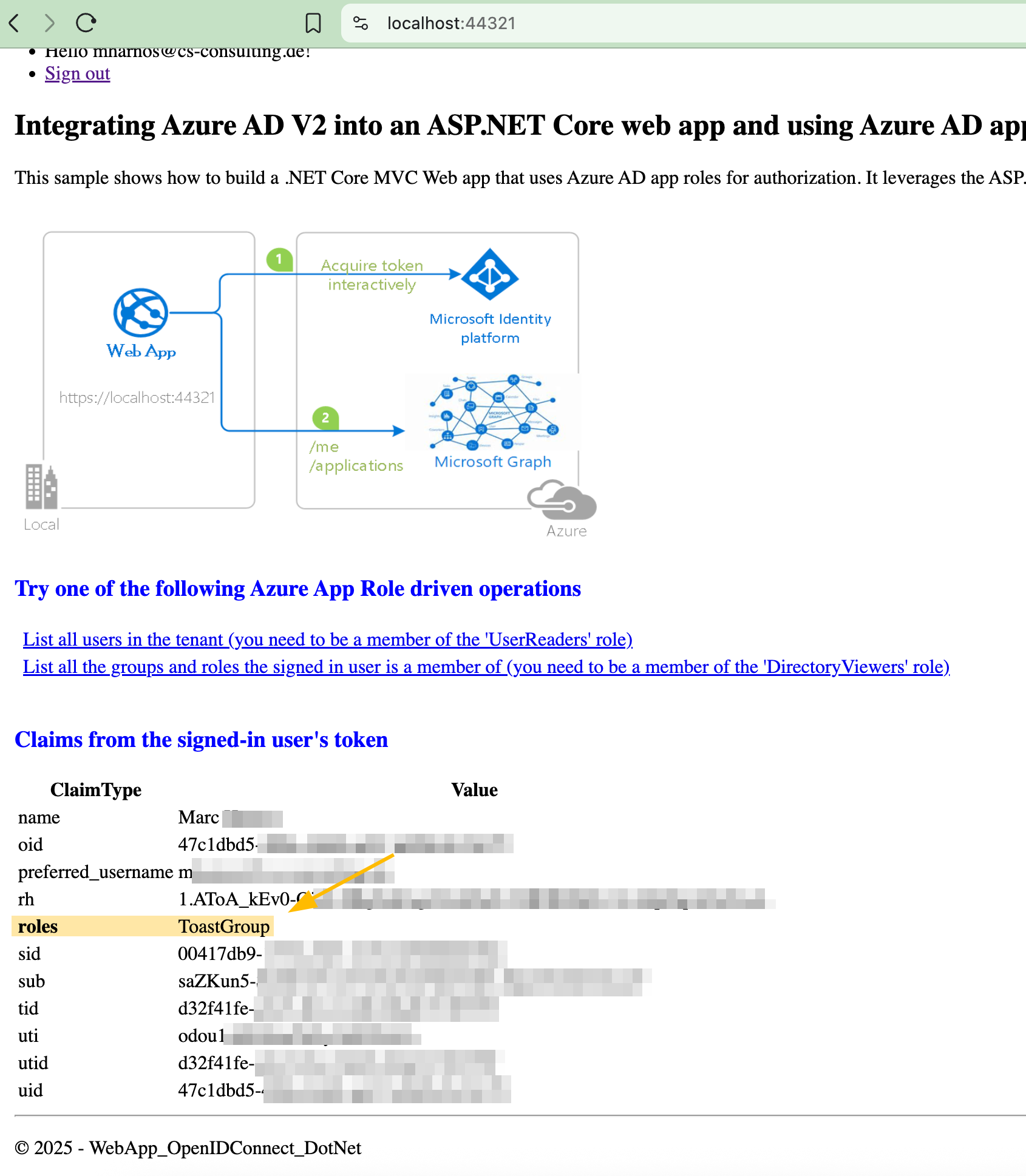
This microsoft azure example application also works as expected and I can see the assigned roles for my external identity: https://github.com/azure-samples/active-directory-aspnetcore-webapp-openidconnect-v2/blob/master/5-WebApp-AuthZ/5-1-Roles/README.md
I have seen the articles and other questions regarding the general question of how to use the external identity / login with SSO:
But at the moment I have not found a definitive answer on how to make those claims available in ABP itself. My current best guess is, to use the dynamic claims concept and re-read the id token with SignInManager when the user first registers, logs in, and maybe even periodically, and remove + add all roles "managed" by the external identity?
I don't think that I have to use the Claims Principal Factory itself, because the role claim is already exposed to the OpenIddict access_token and id_token by default: https://abp.io/docs/latest/modules/openiddict#updating-claims-in-access_token-and-id_token or is that the correct mechanisms to "create" this claim through SignInManager when OpenIddic accesses the claims? https://abp.io/docs/latest/framework/fundamentals/authorization#claims-principal-factory
How would you suggest that I implement this kind of "forwarding" of claims? What the most idiomatic way of doing this with ABP? Because hooking into the LoginModel seems kinda hacky.
Kind Regards, Marc
Hello,
we're currently trying to update from 9.1.3 to 9.2.3 and are having problems with new Single Sign On Setups / External Logins for first-time users, i.e. when registering a new local user through external login.
It looks like the "Register"-Button type in Volo.Abp.Account.Pro.Public.Web inside Pages/Account/Register.cshtml was changed from submit to button and so the form itself has no submit-Functionality anymore. I have seen, that such a functionality was added to Register.js, but that script is not included, when performing an ExternalLogin, I suppose @if (Model.EnableLocalRegister) should rather be @if (Model.EnableLocalRegister || Model.IsExternalLogin) or no guard at all for that part of the template.
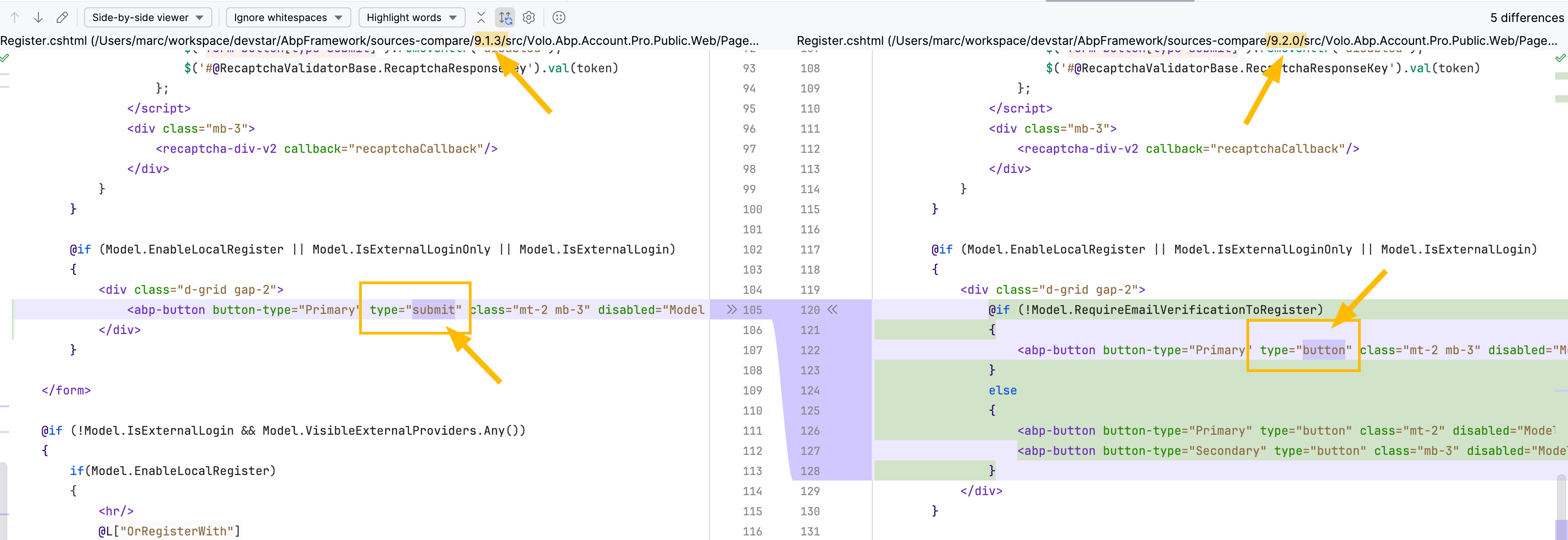
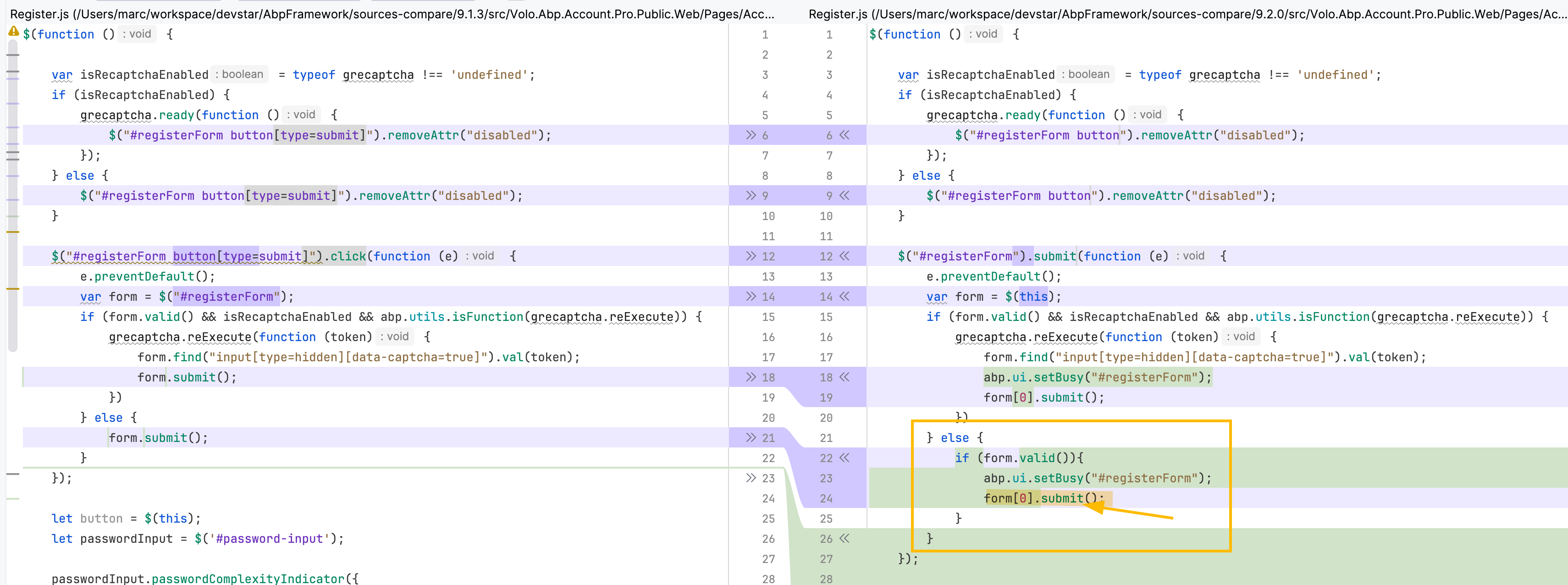

I have verified that this regression is not only present in 9.2.0 but in the current version of 9.2.3 as well.
Kind Regards, Marc









