hi
You can add an
OpenIdConnectandCookiesauthentication schemes to yourseparate siteThen everything will work as Public website
context.Services.AddAuthentication(options =>
{
    options.DefaultScheme = "Cookies";
    options.DefaultChallengeScheme = "oidc";
})
.AddCookie("Cookies", options =>
{
    options.ExpireTimeSpan = TimeSpan.FromDays(365);
    options.CheckTokenExpiration();
})
.AddAbpOpenIdConnect("oidc", options =>
{
    options.Authority = configuration["AuthServer:Authority"];
    options.RequireHttpsMetadata = Convert.ToBoolean(configuration["AuthServer:RequireHttpsMetadata"]); ;
    options.ResponseType = OpenIdConnectResponseType.CodeIdToken;

    options.ClientId = configuration["AuthServer:ClientId"];
    options.ClientSecret = configuration["AuthServer:ClientSecret"];

    options.UsePkce = true;
    options.SaveTokens = true;
    options.GetClaimsFromUserInfoEndpoint = true;

    options.Scope.Add("roles");
    options.Scope.Add("email");
    options.Scope.Add("phone");
    options.Scope.Add("MyProjectName");
});
OK then, to keep things clear, let's go back to this scenario with a separate .NET application. What code to I need to call / use in order to generate the correct URL as mentioned in the initial question?
HTML + Javascript for now, but I want to be able to have any 3rd party site / app that we have authenticate using ABP auth.
So if you could explain how best to generate that URL and if there are any particular considerations I need to be aware of given the ABP implementation that would be great.
Hi,
The question is based around handling this outside of a .NET environment.
How can I best handle this outside of a .NET environment?
So for example, I have a simple single page site, www.mysite.com with a LOGIN button on the homepage. I need to be able to generate the fully formed URL to the Auth server (ABP OpenIddict) that contains the redirectUri to then call back to www.mysite.com/callback so that I can access a JWT.
So I need a way to generate this URL ( as noted in the original question ):
https://localhost:44396/Account/Login?ReturnUrl=%2Fconnect%2Fauthorize%3Fclient_id%3DABP73Public_Web_Public%26redirect_uri%3Dhttps%253A%252F%252Flocalhost%3A7136%26response_type%3Dcode%2520id_token%26scope%3Dopenid%2520profile%2520roles%2520email%2520phone%2520ABP73Public%26response_mode%3Dform_post%26nonce%3D638261167785072016.ZDg1NjgyZWUtZTAwNi00OGI4LTk0OTktNTZiNzVhOWIxOGFhMzk3YWM5N2UtODAwZC00YTc5LWI1MDMtNTA3OGNlNDk0MTEw%26state%3DCfDJ8MMdCuDzYEhJvMFQjtHhQGyHQ7Qq5BRX2jGkRv3Pti2RLsO3Zc0hq9QnyTqRr02P1_4NXt931DyfZ7gzkMJRP7UBUQNETvBJcwNqV3g2YbD2aOWRwEnF-gzhcrwrubi6mhAbGxqd6ZcTgmD9ndYyqCU2tW_ekfuuYY1cxmxMeeDF9CauhfMREVk0tCHTPcovRb8foC_mvAqRIvB-FSNjf-MLqwbtHeOltgqXecSXXH9K9gHrkWIe-dP2lQaq3pbrBqvU6BPCC8hd4Czj034Css0dT7AedrLKTmcde7Y47OdO%26x-client-SKU%3DID_NET6_0%26x-client-ver%3D6.21.0.0
Thanks,
Karim
OK I found out what was going on here, everything actually works with replacing the Default.cshtml file. However the sample file provided had a hack around the custom styles section that made it so that the custom styles were not written:
@* TODO: We can continue with this until find a better way *@
@if (logoUrl != null || logoReverseUrl != null)
{
<style> :root { @logoUrl @logoReverseUrl }
.card {
    background: #55535f;
    color: #ffffff;
    border-radius: 250px;
    padding: 50px;
    min-width: 500px;
    text-align: center;
}

body {
    background-color: #9B9B9B;
    text-align: center;
    background-image: url('https://placeimg.com/640/480/tech/grayscale');
}
</style> }
So, remove the @* TODO :
and it works.
Thanks for getting back to me on this. Yeah I am guessing this is a config issue of some sort, and I was hoping that you / someone would be familiar with this and would know what is going on.
I may have tried to install a pre-release of LeptonX in this solution a while back, I wonder if that caused any config problems? Any thoughts on that possibility?
I will try and recreate on my end also and get back to you with more details.
An update on this:
I was able to work around this by using a less complex password. I had initially used long random passwords that contained many special characters. These would work when connecting remotely to an Azure SQL DB using SSMS, but would not work using DBMigrator against an Azure SQL DB.
I reduced the length and complexity of the passwords that I use, kept them to UpperCase/LowerCase/Numbers/[*!"] and DBMigrator now runs.
Hope that helps someone else get past this.
ABP Framework version: v4.4.2 UI type: Blazor DB provider: EF Core Tiered (MVC) or Identity Server Separated (Angular): no
Exception message and stack trace: The project name is invalid! Please specify a different name. Volo.Abp.Cli.CliUsageException: The project name is invalid! Please specify a different name.
Steps to reproduce the issue:
It seems like it is impossible to create a new project/SLN in ABP Suite that contains/ends with "Blazor", like "TestProjectBlazor". Generating the project online with the same name and then open it in ABP Suite seem to work though. No problem creating something like "TestProjectAngular".
- at Volo.Abp.Cli.Commands.NewCommand.ExecuteAsync(CommandLineArgs commandLineArgs) in D:\ci\Jenkins\workspace\abp-commercial-release\abp\framework\src\Volo.Abp.Cli.Core\Volo\Abp\Cli\Commands\NewCommand.cs:line 66 at Volo.Abp.Suite.Areas.AbpSuite.CrudPageGenerator.Services.SolutionService.CreateSolutionAsync(CreateSolutionModel input) at lambda_method2438(Closure , Object ) at Microsoft.AspNetCore.Mvc.Infrastructure.ActionMethodExecutor.AwaitableObjectResultExecutor.Execute(IActionResultTypeMapper mapper, ObjectMethodExecutor executor, Object controller, Object[] arguments) at Microsoft.AspNetCore.Mvc.Infrastructure.ControllerActionInvoker.<InvokeActionMethodAsync>g__Awaited|12_0(ControllerActionInvoker invoker, ValueTask`1 actionResultValueTask) at Microsoft.AspNetCore.Mvc.Infrastructure.ControllerActionInvoker.
I ran into this also and created a ticket : https://support.abp.io/QA/Questions/1706/Error-Project-Name-is-Invalid-when-creating-a-Blazor-Server-project-using-Suite
there is an open issue for this, but for now you can not use 'Blazor' in the project name.
https://github.com/abpframework/abp/issues/9853
Any idea when this fix will be available?
ABP Suite, Blazor Server Project, error on SaveAndGenerate entity AFTER having published once. Seems to be looking for a {ProjectName}WEBAutoMapperProfile.cs file that does not exist , see file attached. This file isn't even called {ProjectName}WebAutoMapperProfile.cs in a Blazor project, it is {ProjectName}AutoMapperProfile.cs . In either case, the file does not exist in the location and this fails every time.
Steps To Reproduce:
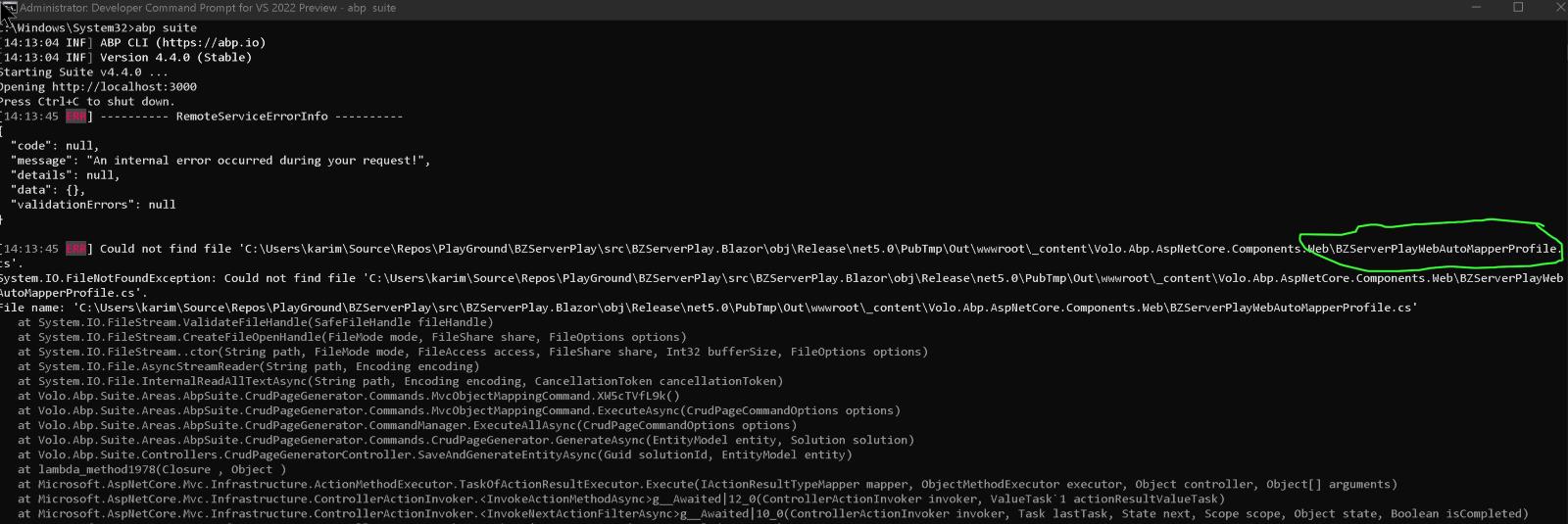
Also I am still waiting on a patch for the other ABP Suite Blazor Server Code Gen bug I reported 1 week ago:
Blazor Server & ABP Suite Code Gen Issue #1721
#1721 is still unfixed, though there is a workaround. For this issue there is no workaround that I can see, I tried renaming the AutoMapperProfile.cs file and adding it to the location but that didn't work.
These are 2 SERIOUS BLOCKERS for me and any other Commercial customer using Blazor Server. I can not continue working on my current project as I have ~50 entities to generate. Can we please get a patch ASAP?
Thanks,
Karim
Hi,
Yes, I figured that out after experimenting a few times and just settled on using BZ instead. However 'Blazor' is and should be allowed in project names. If you look at a lot of the online tutorials / documentation they use Blazor in the project name extensively. Is there a reason why you decided to make it invalid in this case?









