I understand the issue, and thank you for trying again. Could you please also try unchecking the “Run the initial tasks" option while creating the project and see if that helps?
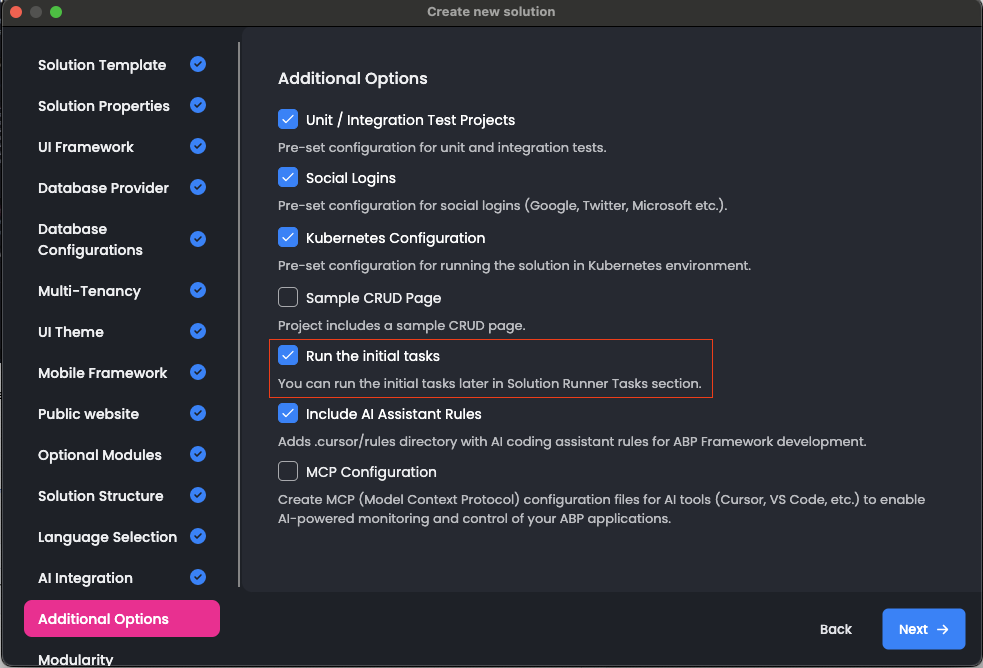
Thank you again. I understand the problem and the inconvenience this situation is causing. Could you try creating an application with a different UI option to test whether a similar problem occurs? I also suggest following the creation process in an IDE or file explorer to see whether the files are created and then deleted.
Yes, I have just checked your solution and identified that there are more files missing as it seems.
The missing files are likely being silently deleted by Windows Defender's Controlled Folder Access. It blocks unauthorized apps from writing certain file types — which explains why hundreds of files are created fine but specific ones like angular.json, package.json, app.config.ts, and app.routes.ts are missing.
To confirm: Open Windows Security → Virus & threat protection → Protection history and check for blocked write actions around the time you ran the abp new command.
To fix:
The KubernetesProfileInfoLoader crash is a secondary issue — ABP Studio is failing to load because those JSON files are missing, corrupting the solution state.
I have not received an e-mail. The same problem occurs for the other parts of the application. I suspect that it deletes the json files automatically. Can you confirm that?
Thank you again for your time and effort.
If you prefer, you can share your project via email at sumeyye.kurtulus@volosoft.com.
Alternatively, you may upload it to a GitHub repository and grant access to my account (GitHub username: sumeyyeKurtulus).
As another option, you could create a non-layered version of the application and copy over the missing files, since they are largely the same.
You can let us know if you need further assistance.
Thank you for the update. I will forward this error to my colleague. I also suspect the Angular file generation may be failing due to folder permissions. Although we do not typically encounter this issue, here is what I suggest:
C:\\dev\\MyApp (not the current directory).Thank you again. The logs don't show a clear problem with this creation. Could you try uninstalling the ABP Studio application and reinstalling it?
Hello,
Thank you for sharing details about your problem. However, I could not produce the same problem on my end. That would be the best if you could share error logs that are located in your system under such directory .abp/studio/cli/logs .
Thank you for your cooperation.
Hello,
The CMS Kit Admin feature has been postponed and will be available with the 10.2 preview release. You can follow the release notes here: https://github.com/abpframework/abp/releases
Below are the steps to configure the frontend for an existing project.
yarn add @volo/abp.ng.cms-kit-pro
yarn add @abp/ng.cms-kit
yarn add codemirror
yarn add @toast-ui/editor
app.config.ts
Add the CMS Kit providers to your providers array:import { provideCmsKitProAdminConfig } from '@volo/abp.ng.cms-kit-pro/admin/config';
import { provideCmsKitAdminConfig } from '@abp/ng.cms-kit/admin/config';
export const appConfig: ApplicationConfig = {
providers: [
// ...
provideCmsKitProAdminConfig(),
provideCmsKitAdminConfig(),
]
};
app.routes.ts
Register the CMS routes:export const APP_ROUTES: Routes = [
{
path: 'cms',
loadChildren: () =>
Promise.all([
import('@volo/abp.ng.cms-kit-pro/admin').then(c => c.createRoutes()),
import('@abp/ng.cms-kit/admin').then(c => c.createRoutes()),
]).then(([proRoutes, cmsKitRoutes]) => [
...proRoutes,
...cmsKitRoutes,
]),
},
];
angular.json"styles": [
"node_modules/@toast-ui/editor/dist/toastui-editor.css",
"node_modules/@toast-ui/editor/dist/toastui-editor-only.css",
"node_modules/@toast-ui/editor/dist/toastui-editor-viewer.css",
"node_modules/@toast-ui/editor/dist/theme/toastui-editor-dark.css",
]
Dynamic Forms are now available in the latest stable release. The documentation will be updated shortly. In the meantime, you can access the related document here:
https://github.com/abpframework/abp/blob/37bec2f8abc03a8747024497f4839ad0449018d4/docs/en/framework/ui/angular/dynamic-form-module.md
Please let us know if you need any further assistance. Thank you for your cooperation.
Thank you for the detailed explanation of the issue. I was not able to reproduce the problem on my end.
Could you please confirm which Suite version you used for the generation? You can find the version details in the documentation: https://abp.io/docs/latest/studio/working-with-suite
Additionally, it would be very helpful if you could share the dependency information from your package.json file.
Thank you in advance for your cooperation.









