






Foreign Access
Foreign Access controls how related dynamic entities can be accessed through foreign key relationships. It determines whether users can view or manage related data directly from the target entity's UI.
Important: Foreign Access only works between dynamic entities. It does not apply to reference entities because they are read-only and don't have UI pages.
Access Levels
The ForeignAccess enum defines three levels:
| Level | Value | Description |
|---|---|---|
None |
0 | No access from the target entity side. The relationship exists only for lookups. |
View |
1 | Read-only access. Users can view related records from the target entity's action menu. |
Edit |
2 | Full CRUD access. Users can create, update, and delete related records from the target entity's action menu. |
Configuring with Attributes
Use the third parameter of [DynamicForeignKey]:
[DynamicEntity]
public class Order
{
    [DynamicForeignKey("MyApp.Customers.Customer", "Name", ForeignAccess.Edit)]
    public Guid CustomerId { get; set; }
}
Configuring with Fluent API
AbpDynamicEntityConfig.EntityConfigurations.Configure(
    "MyApp.Orders.Order",
    entity =>
    {
        var customerIdProperty = entity.AddOrGetProperty("CustomerId");
        customerIdProperty.ForeignKey = new ForeignKeyDescriptor
        {
            EntityName = "MyApp.Customers.Customer",
            DisplayPropertyName = "Name",
            Access = ForeignAccess.Edit
        };
    }
);
Configuring in model.json
Set the access field on a foreign key property:
{
  "name": "CustomerId",
  "foreignKey": {
    "entityName": "LowCodeDemo.Customers.Customer",
    "displayPropertyName": "Name",
    "access": "edit"
  }
}
Examples from the Demo Application
Edit access — Orders can be managed from the Customer page:
{
  "name": "LowCodeDemo.Orders.Order",
  "properties": [
    {
      "name": "CustomerId",
      "foreignKey": {
        "entityName": "LowCodeDemo.Customers.Customer",
        "access": "edit"
      }
    }
  ]
}
View access — Visited countries are viewable from the Country page:
{
  "name": "LowCodeDemo.Customers.VisitedCountry",
  "parent": "LowCodeDemo.Customers.Customer",
  "properties": [
    {
      "name": "CountryId",
      "foreignKey": {
        "entityName": "LowCodeDemo.Countries.Country",
        "access": "view"
      }
    }
  ]
}
UI Behavior
When foreign access is configured between two dynamic entities:
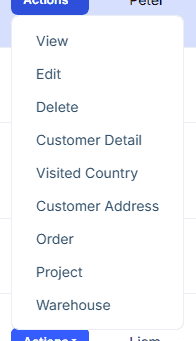
ForeignAccess.View
An action menu item appears on the target entity's data grid row (e.g., a "Visited Countries" item on the Country row). Clicking it opens a read-only modal showing related records.
ForeignAccess.Edit
An action menu item appears on the target entity's data grid row (e.g., an "Orders" item on the Customer row). Clicking it opens a fully functional CRUD modal where users can create, edit, and delete related records.
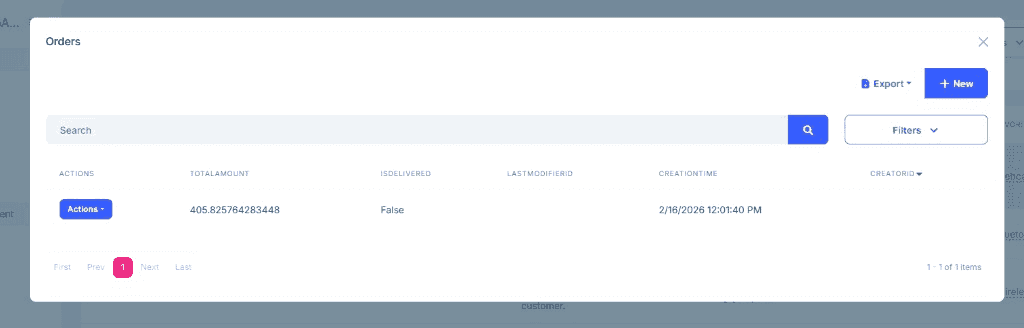
ForeignAccess.None
No action menu item is added. The foreign key exists only for data integrity and lookup display.
Permission Control
Foreign access actions respect the entity permissions of the source entity (the entity with the foreign key). For example, if a user does not have the Delete permission for Order, the delete button will not appear in the foreign access modal, even if the access level is Edit.
How It Works
The ForeignAccessRelation class stores the relationship metadata:
- Source entity — the dynamic entity with the foreign key (e.g.,
Order) - Target entity — the dynamic entity being referenced (e.g.,
Customer) - Foreign key property — the property name (e.g.,
CustomerId) - Access level —
None,View, orEdit
The DynamicEntityAppService checks these relations when building entity actions and filtering data.
Terminology: In foreign access context, "target entity" refers to the entity whose UI shows the action menu (the entity being pointed to by the foreign key). This is different from "reference entity" which specifically means an existing C# entity registered for read-only access.



