






Attributes & Fluent API
C# Attributes and the Fluent API are the recommended way to define dynamic entities. They provide compile-time checking, IntelliSense, refactoring support, and keep your entity definitions close to your domain code.
Quick Start
Step 1: Define an Entity
[DynamicEntity]
[DynamicEntityUI(PageTitle = "Products")]
public class Product : DynamicEntityBase
{
    [DynamicPropertyUnique]
    public string Name { get; set; }

    [DynamicPropertyUI(DisplayName = "Unit Price")]
    public decimal Price { get; set; }

    public int StockCount { get; set; }

    public DateTime? ReleaseDate { get; set; }
}
Step 2: Add Migration and Run
dotnet ef migrations add Added_Product
dotnet ef database update
You now have a complete Product management page with data grid, create/edit modals, search, sorting, and pagination.
Step 3: Add Relationships
[DynamicEntity]
[DynamicEntityUI(PageTitle = "Orders")]
public class Order : DynamicEntityBase
{
    [DynamicForeignKey("MyApp.Customers.Customer", "Name", ForeignAccess.Edit)]
    public Guid CustomerId { get; set; }

    public decimal TotalAmount { get; set; }
    public bool IsDelivered { get; set; }
}

[DynamicEntity(Parent = "MyApp.Orders.Order")]
public class OrderLine : DynamicEntityBase
{
    [DynamicForeignKey("MyApp.Products.Product", "Name")]
    public Guid ProductId { get; set; }

    public int Quantity { get; set; }
    public decimal Amount { get; set; }
}
The Order page now has a foreign key dropdown for Customer, and OrderLine is managed as a nested child inside the Order detail modal.
Three-Layer Configuration System
The Low-Code System uses a layered configuration model. From lowest to highest priority:
- Code Layer — C# classes with
[DynamicEntity]and other attributes - JSON Layer —
model.jsonfile (see model.json Structure) - Fluent Layer —
AbpDynamicEntityConfig.EntityConfigurations
A DefaultLayer runs last to fill in any missing values with conventions.
When the same entity or property is configured in multiple layers, the higher-priority layer wins.
C# Attributes Reference
[DynamicEntity]
Marks a class as a dynamic entity. The entity name is derived from the class namespace and name.
[DynamicEntity]
public class Product : DynamicEntityBase
{
    public string Name { get; set; }
    public decimal Price { get; set; }
}
Use the Parent property for parent-child (master-detail) relationships:
[DynamicEntity(Parent = "MyApp.Orders.Order")]
public class OrderLine : DynamicEntityBase
{
    public Guid ProductId { get; set; }
    public int Quantity { get; set; }
}
[DynamicEntityUI]
Configures entity-level UI. Entities with PageTitle get a menu item and a dedicated page:
[DynamicEntity]
[DynamicEntityUI(PageTitle = "Product Management")]
public class Product : DynamicEntityBase
{
    // ...
}
[DynamicForeignKey]
Defines a foreign key relationship on a Guid property:
[DynamicForeignKey("MyApp.Customers.Customer", "Name", ForeignAccess.Edit)]
public Guid CustomerId { get; set; }
| Parameter | Description |
|---|---|
entityName |
Full name of the target entity — can be a dynamic entity (e.g., "MyApp.Customers.Customer") or a reference entity (e.g., "Volo.Abp.Identity.IdentityUser") |
displayPropertyName |
Property to show in lookups |
access |
ForeignAccess.None, ForeignAccess.View, or ForeignAccess.Edit (see Foreign Access) |
[DynamicPropertyUI]
Controls property visibility and behavior in the UI:
[DynamicPropertyUI(
    DisplayName = "Registration Number",
    IsAvailableOnListing = true,
    IsAvailableOnDataTableFiltering = true,
    CreationFormAvailability = EntityPropertyUIFormAvailability.Hidden,
    EditingFormAvailability = EntityPropertyUIFormAvailability.NotAvailable,
    QuickLookOrder = 100
)]
public string RegistrationNumber { get; set; }
| Property | Type | Default | Description |
|---|---|---|---|
DisplayName |
string | null | Custom label for the property |
IsAvailableOnListing |
bool | true |
Show in data grid |
IsAvailableOnDataTableFiltering |
bool | true |
Show in filter panel |
CreationFormAvailability |
enum | Available |
Visibility on create form |
EditingFormAvailability |
enum | Available |
Visibility on edit form |
QuickLookOrder |
int | -2 |
Order in quick-look panel |
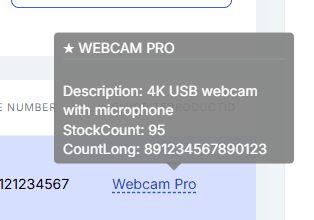
The quick-look panel shows a summary of the selected record:
[DynamicPropertyServerOnly]
Hides a property from API clients entirely. It is stored in the database but never returned to the client:
[DynamicPropertyServerOnly]
public string InternalNotes { get; set; }
[DynamicPropertySetByClients]
Controls whether clients can set this property value. Useful for computed or server-assigned fields:
[DynamicPropertySetByClients(false)]
public string RegistrationNumber { get; set; }
[DynamicPropertyUnique]
Marks a property as requiring unique values across all records:
[DynamicPropertyUnique]
public string ProductCode { get; set; }
[DynamicEntityCommandInterceptor]
Defines JavaScript interceptors on a class for CRUD lifecycle hooks:
[DynamicEntity]
[DynamicEntityCommandInterceptor(
    "Create",
    InterceptorType.Pre,
    "if(!context.commandArgs.data['Name']) { globalError = 'Name is required!'; }"
)]
[DynamicEntityCommandInterceptor(
    "Delete",
    InterceptorType.Post,
    "context.log('Deleted: ' + context.commandArgs.entityId);"
)]
public class Organization : DynamicEntityBase
{
    public string Name { get; set; }
}
The
Nameparameter must be one of:"Create","Update", or"Delete". TheInterceptorTypecan bePre,Post, orReplace. WhenReplaceis used, the default DB operation is skipped entirely and only the JavaScript handler runs.Replace-Createmust return the new entity's Id (e.g.return result.Id;afterdb.insert). Multiple interceptors can be added to the same class (AllowMultiple = true).
See Interceptors for the full JavaScript context API.
[DynamicEnum]
Marks an enum for use in dynamic entity properties:
[DynamicEnum]
public enum OrganizationType
{
    Corporate = 0,
    Enterprise = 1,
    Startup = 2,
    Consulting = 3
}
Reference in an entity:
[DynamicEntity]
[DynamicEntityUI(PageTitle = "Organizations")]
public class Organization : DynamicEntityBase
{
    public string Name { get; set; }
    public OrganizationType OrganizationType { get; set; }
}
Enum Localization
Enum values can be localized using ABP's localization system. Add localization keys in the format Enum:{EnumTypeName}.{ValueName} to your localization JSON files:
{
  "culture": "en",
  "texts": {
    "Enum:OrganizationType.Corporate": "Corporate",
    "Enum:OrganizationType.Enterprise": "Enterprise",
    "Enum:OrganizationType.Startup": "Startup",
    "Enum:OrganizationType.Consulting": "Consulting"
  }
}
The Blazor UI automatically uses these localization keys for enum dropdowns and display values. If no localization key is found, the enum member name is used as-is.
Fluent API
The Fluent API has the highest priority in the configuration system. Use AbpDynamicEntityConfig.EntityConfigurations to override any attribute or JSON setting programmatically.
Basic Usage
Configure in your Low-Code Initializer (e.g. MyAppLowCodeInitializer):
public static class MyAppLowCodeInitializer
{
    private static readonly AsyncOneTimeRunner Runner = new();

    public static async Task InitializeAsync()
    {
        await Runner.RunAsync(async () =>
        {
            AbpDynamicEntityConfig.EntityConfigurations.Configure(
                "MyApp.Products.Product",
                entity =>
                {
                    entity.DefaultDisplayPropertyName = "Name";

                    var priceProperty = entity.AddOrGetProperty("Price");
                    priceProperty.AsRequired();
                    priceProperty.UI = new EntityPropertyUIDescriptor
                    {
                        DisplayName = "Unit Price",
                        CreationFormAvailability = EntityPropertyUIFormAvailability.Available
                    };

                    entity.AddOrGetProperty("InternalNotes").AsServerOnly();
                }
            );

            await DynamicModelManager.Instance.InitializeAsync();
        });
    }
}
You can also use the generic overload with a type parameter:
AbpDynamicEntityConfig.EntityConfigurations.Configure<Product>(entity =>
{
    entity.DefaultDisplayPropertyName = "Name";
});
Entity Configuration
The Configure method provides an EntityDescriptor instance. You can set its properties directly:
| Property / Method | Description |
|---|---|
DefaultDisplayPropertyName |
Set the display property for lookups |
Parent |
Set parent entity name for nesting |
UI |
Set entity-level UI (EntityUIDescriptor with PageTitle) |
AddOrGetProperty(name) |
Get or create a property descriptor for configuration |
FindProperty(name) |
Find a property descriptor by name (returns null if not found) |
GetProperty(name) |
Get a property descriptor by name (throws if not found) |
Interceptors |
List of CommandInterceptorDescriptor — add interceptors directly |
Property Configuration
AddOrGetProperty returns an EntityPropertyDescriptor. Configure it using direct property assignment and extension methods:
| Property / Extension Method | Description |
|---|---|
.AsRequired(bool) |
Mark as required (extension method, returns the descriptor for chaining) |
.AsServerOnly(bool) |
Hide from clients (extension method, returns the descriptor for chaining) |
.MapToDbField(bool) |
Control if property is stored in DB (extension method, returns the descriptor for chaining) |
.IsUnique |
Set to true to mark as unique |
.AllowSetByClients |
Set to false to prevent client writes |
.ForeignKey |
Set a ForeignKeyDescriptor to configure foreign key relationship |
.UI |
Set an EntityPropertyUIDescriptor to configure property UI |
Chaining Extension Methods
The extension methods AsRequired(), AsServerOnly(), and MapToDbField() return the property descriptor, enabling fluent chaining:
entity.AddOrGetProperty("InternalNotes")
    .AsServerOnly()
    .AsRequired()
    .MapToDbField();
Configuring Foreign Keys
AbpDynamicEntityConfig.EntityConfigurations.Configure(
    "MyApp.Orders.Order",
    entity =>
    {
        var customerIdProperty = entity.AddOrGetProperty("CustomerId");
        customerIdProperty.ForeignKey = new ForeignKeyDescriptor
        {
            EntityName = "MyApp.Customers.Customer",
            DisplayPropertyName = "Name",
            Access = ForeignAccess.Edit
        };
    }
);
Adding Interceptors
entity.Interceptors.Add(new CommandInterceptorDescriptor("Create")
{
    Type = InterceptorType.Pre,
    Javascript = "if(!context.commandArgs.data['Name']) { globalError = 'Name is required!'; }"
});
Assembly Registration
Register assemblies containing [DynamicEntity] classes in your Low-Code Initializer:
AbpDynamicEntityConfig.SourceAssemblies.Add(
    new DynamicEntityAssemblyInfo(
        typeof(MyDomainModule).Assembly,
        rootNamespace: "MyApp",
        projectRootPath: sourcePath  // For model.json hot-reload
    )
);
| Parameter | Description |
|---|---|
assembly |
The assembly containing [DynamicEntity] classes and/or model.json |
rootNamespace |
Root namespace for the assembly (used for embedded resource lookup) |
projectRootPath |
Path to the Domain project source folder (enables model.json hot-reload in development) |
You can also register entity types directly:
AbpDynamicEntityConfig.DynamicEntityTypes.Add(typeof(Product));
AbpDynamicEntityConfig.DynamicEnumTypes.Add(typeof(OrganizationType));
Combining with model.json
Attributes and model.json work together seamlessly. A common pattern:
- Define core entities with C# attributes (compile-time safety)
- Add additional entities via model.json (no recompilation needed)
- Fine-tune configuration with Fluent API (overrides everything)
The three-layer system merges all definitions:
Fluent API (highest) > JSON (model.json) > Code (Attributes) > Defaults (lowest)
For example, if an attribute sets [DynamicPropertyUnique] and model.json sets "isUnique": false, the JSON value wins because JSON layer has higher priority than Code layer.
End-to-End Example
A complete e-commerce-style entity setup:
// Enum
[DynamicEnum]
public enum OrderStatus
{
    Pending = 0,
    Processing = 1,
    Shipped = 2,
    Delivered = 3
}

// Customer entity
[DynamicEntity]
[DynamicEntityUI(PageTitle = "Customers")]
public class Customer : DynamicEntityBase
{
    [DynamicPropertyUnique]
    public string Name { get; set; }

    [DynamicPropertyUI(DisplayName = "Phone Number", QuickLookOrder = 100)]
    public string Telephone { get; set; }

    [DynamicForeignKey("Volo.Abp.Identity.IdentityUser", "UserName")]
    public Guid? UserId { get; set; }

    [DynamicPropertyServerOnly]
    public string InternalNotes { get; set; }
}

// Product entity
[DynamicEntity]
[DynamicEntityUI(PageTitle = "Products")]
public class Product : DynamicEntityBase
{
    [DynamicPropertyUnique]
    public string Name { get; set; }

    public decimal Price { get; set; }
    public int StockCount { get; set; }
}

// Order entity with child OrderLine
[DynamicEntity]
[DynamicEntityUI(PageTitle = "Orders")]
[DynamicEntityCommandInterceptor(
    "Update",
    InterceptorType.Pre,
    @"if(context.commandArgs.data['IsDelivered']) {
        if(!context.currentUser.roles.includes('admin')) {
            globalError = 'Only admins can mark as delivered!';
        }
    }"
)]
public class Order : DynamicEntityBase
{
    [DynamicForeignKey("MyApp.Customers.Customer", "Name", ForeignAccess.Edit)]
    public Guid CustomerId { get; set; }

    public decimal TotalAmount { get; set; }
    public bool IsDelivered { get; set; }
    public OrderStatus Status { get; set; }
}

[DynamicEntity(Parent = "MyApp.Orders.Order")]
public class OrderLine : DynamicEntityBase
{
    [DynamicForeignKey("MyApp.Products.Product", "Name")]
    public Guid ProductId { get; set; }

    public int Quantity { get; set; }
    public decimal Amount { get; set; }
}
Register everything in your Low-Code Initializer:
public static class MyAppLowCodeInitializer
{
    private static readonly AsyncOneTimeRunner Runner = new();

    public static async Task InitializeAsync()
    {
        await Runner.RunAsync(async () =>
        {
            // Reference existing ABP entities
            AbpDynamicEntityConfig.ReferencedEntityList.Add<IdentityUser>("UserName");

            // Register assembly
            AbpDynamicEntityConfig.SourceAssemblies.Add(
                new DynamicEntityAssemblyInfo(typeof(MyDomainModule).Assembly)
            );

            // Initialize
            await DynamicModelManager.Instance.InitializeAsync();
        });
    }
}
Configure your DbContext to implement IDbContextWithDynamicEntities:
public class MyAppDbContext : AbpDbContext<MyAppDbContext>, IDbContextWithDynamicEntities
{
    // ... constructors and DbSets ...

    protected override void OnModelCreating(ModelBuilder builder)
    {
        builder.ConfigureDynamicEntities();
        base.OnModelCreating(builder);
    }
}
Configure your DbContextFactory for EF Core CLI commands:
public class MyAppDbContextFactory : IDesignTimeDbContextFactory<MyAppDbContext>
{
    public MyAppDbContext CreateDbContext(string[] args)
    {
        var configuration = BuildConfiguration();

        MyAppEfCoreEntityExtensionMappings.Configure();

        // ----- Ensure Low-Code system is initialized before running migrations ---
        LowCodeEfCoreTypeBuilderExtensions.Configure();
        AsyncHelper.RunSync(MyAppLowCodeInitializer.InitializeAsync);
        // -------------------------------

        var builder = new DbContextOptionsBuilder<MyAppDbContext>()
            .UseSqlServer(configuration.GetConnectionString("Default"));

        return new MyAppDbContext(builder.Options);
    }

    // ... BuildConfiguration method ...
}

This gives you four auto-generated pages (Customers, Products, Orders with nested OrderLines), complete with permissions, menu items, foreign key lookups, and interceptor-based business rules.

## See Also

* [model.json Structure](/docs/10.2/low-code/model-json)
* [Reference Entities](/docs/10.2/low-code/reference-entities)
* [Interceptors](/docs/10.2/low-code/interceptors)



