






Low-Code System
You must have an ABP Team or a higher license to use this module.
The ABP Low-Code System allows you to define entities using C# attributes or Fluent API and automatically generates:
- Database tables (via EF Core migrations)
- CRUD REST APIs (Get, GetList, Create, Update, Delete)
- Permissions (View, Create, Update, Delete per entity)
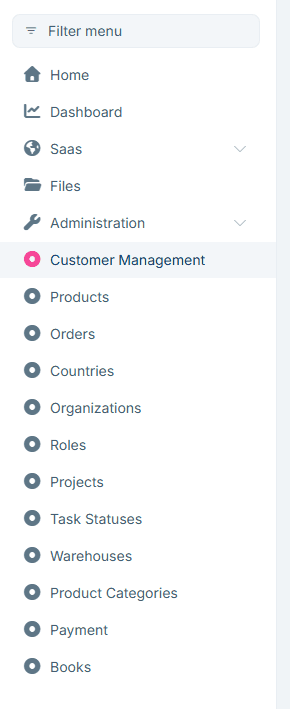
- Menu items (auto-added to the admin sidebar)
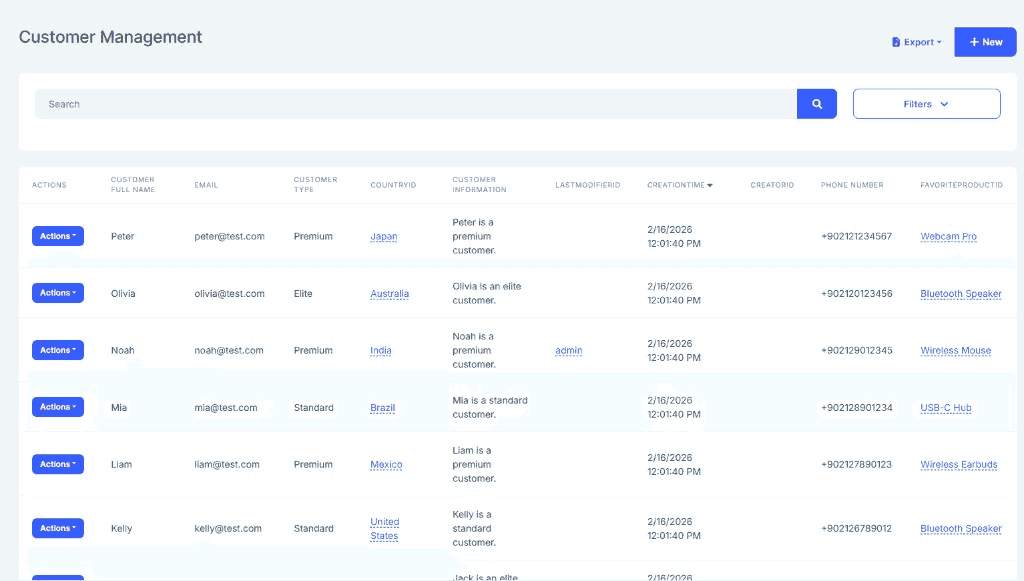
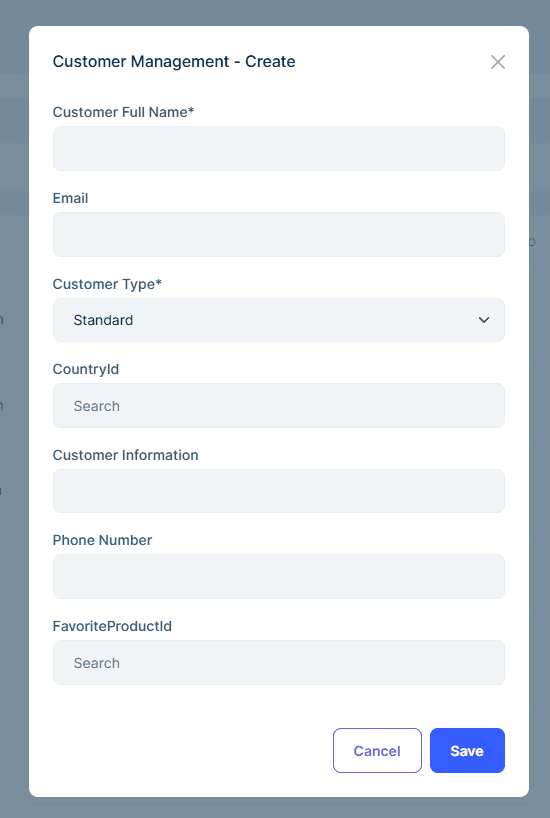
- Full Blazor UI (data grid, create/edit modals, filters, foreign key lookups)
No need to write DTOs, application services, repositories, or UI pages manually.
Why Low-Code?
Traditionally, adding a new entity with full CRUD functionality to an ABP application requires:
- Entity class in Domain
- DbContext configuration in EF Core
- DTOs in Application.Contracts
- AppService in Application
- Controller in HttpApi
- Razor/Blazor pages in UI
- Permissions, menu items, localization
With Low-Code, a single C# class replaces all of the above:
[DynamicEntity(DefaultDisplayPropertyName = "Name")]
[DynamicEntityUI(PageTitle = "Products")]
public class Product : DynamicEntityBase
{
    [DynamicPropertyUnique]
    public string Name { get; set; }

    [DynamicPropertyUI(DisplayName = "Unit Price")]
    public decimal Price { get; set; }

    public int StockCount { get; set; }

    [DynamicForeignKey("MyApp.Categories.Category", "Name")]
    public Guid? CategoryId { get; set; }
}
Run dotnet ef migrations add Added_Product and start your application. You get a complete Product management page with search, filtering, sorting, pagination, create/edit forms, and foreign key dropdown — all auto-generated.
Getting Started
1. Create a Low-Code Initializer
Create a static initializer class in your Domain project's _Dynamic folder that registers your assembly and calls DynamicModelManager.Instance.InitializeAsync():
using Volo.Abp.Identity;
using Volo.Abp.LowCode.Configuration;
using Volo.Abp.LowCode.Modeling;
using Volo.Abp.Threading;

namespace MyApp._Dynamic;

public static class MyAppLowCodeInitializer
{
    private static readonly AsyncOneTimeRunner Runner = new();

    public static async Task InitializeAsync()
    {
        await Runner.RunAsync(async () =>
        {
            // Register reference entities (optional — for linking to existing C# entities)
            AbpDynamicEntityConfig.ReferencedEntityList.Add<IdentityUser>(
                nameof(IdentityUser.UserName),
                nameof(IdentityUser.Email)
            );

            // Register assemblies containing [DynamicEntity] classes and model.json
            var sourcePath = ResolveDomainSourcePath();
            AbpDynamicEntityConfig.SourceAssemblies.Add(
                new DynamicEntityAssemblyInfo(
                    typeof(MyAppDomainModule).Assembly,
                    rootNamespace: "MyApp",
                    projectRootPath: sourcePath  // Required for model.json hot-reload in development
                )
            );

            // Fluent API configurations (optional — highest priority)
            AbpDynamicEntityConfig.EntityConfigurations.Configure("MyApp.Products.Product", entity =>
            {
                entity.AddOrGetProperty("InternalNotes").AsServerOnly();
            });

            // Initialize the dynamic model manager
            await DynamicModelManager.Instance.InitializeAsync();
        });
    }

    private static string ResolveDomainSourcePath()
    {
        // Traverse up from bin folder to find the Domain project source
        var baseDir = AppContext.BaseDirectory;
        var current = new DirectoryInfo(baseDir);

        for (int i = 0; i < 10 && current != null; i++)
        {
            var candidate = Path.Combine(current.FullName, "src", "MyApp.Domain");
            if (Directory.Exists(Path.Combine(candidate, "_Dynamic")))
            {
                return candidate;
            }
            current = current.Parent;
        }

        // Fallback for production (embedded resource will be used instead)
        return string.Empty;
    }
}
The
projectRootPathparameter enables hot-reload ofmodel.jsonduring development. When the path is empty or the file doesn't exist, the module falls back to readingmodel.jsonas an embedded resource.
2. Call the Initializer in Program.cs
The initializer must be called before the application starts. Add it to Program.cs:
public static async Task<int> Main(string[] args)
{
    // Initialize Low-Code before building the application
    await MyAppLowCodeInitializer.InitializeAsync();

    var builder = WebApplication.CreateBuilder(args);
    // ... rest of your startup code
}
Important: The initializer must also be called in your
DbMigratorproject and any other entry points (AuthServer, HttpApi.Host, etc.) that use dynamic entities. This ensures EF Core migrations can discover the entity schema.
3. Configure DbContext
Call ConfigureDynamicEntities() in your DbContext:
protected override void OnModelCreating(ModelBuilder builder)
{
    builder.ConfigureDynamicEntities();
    base.OnModelCreating(builder);
}
3. Define Your First Entity
[DynamicEntity]
[DynamicEntityUI(PageTitle = "Customers")]
public class Customer : DynamicEntityBase
{
    public string Name { get; set; }

    [DynamicPropertyUI(DisplayName = "Phone Number")]
    public string Telephone { get; set; }

    [DynamicForeignKey("Volo.Abp.Identity.IdentityUser", "UserName")]
    public Guid? UserId { get; set; }
}
4. Add Migration and Run
dotnet ef migrations add Added_Customer
dotnet ef database update
Start your application — the Customer page is ready.
Two Ways to Define Entities
C# Attributes (Recommended)
Define entities as C# classes with attributes. You get compile-time checking, IntelliSense, and refactoring support:
[DynamicEntity]
[DynamicEntityUI(PageTitle = "Orders")]
public class Order : DynamicEntityBase
{
    [DynamicForeignKey("MyApp.Customers.Customer", "Name", ForeignAccess.Edit)]
    public Guid CustomerId { get; set; }

    public decimal TotalAmount { get; set; }
    public bool IsDelivered { get; set; }
}

[DynamicEntity(Parent = "MyApp.Orders.Order")]
public class OrderLine : DynamicEntityBase
{
    [DynamicForeignKey("MyApp.Products.Product", "Name")]
    public Guid ProductId { get; set; }

    public int Quantity { get; set; }
    public decimal Amount { get; set; }
}
See Attributes & Fluent API for the full attribute reference.
model.json (Declarative)
Alternatively, define entities in a JSON file without writing C# classes:
{
  "entities": [
    {
      "name": "MyApp.Customers.Customer",
      "displayProperty": "Name",
      "properties": [
        { "name": "Name", "isRequired": true },
        { "name": "Telephone", "ui": { "displayName": "Phone Number" } }
      ],
      "ui": { "pageTitle": "Customers" }
    }
  ]
}
See model.json Structure for the full specification.
Both approaches can be combined. The three-layer configuration system merges Attributes, JSON, and Fluent API with clear priority rules.
Key Features
| Feature | Description | Documentation |
|---|---|---|
| Attributes & Fluent API | Define dynamic entities with C# attributes and configure programmatically | Attributes & Fluent API |
| model.json | Declarative dynamic entity definitions in JSON | model.json Structure |
| Reference Entities | Read-only access to existing C# entities (e.g., IdentityUser) for foreign key lookups |
Reference Entities |
| Interceptors | Pre/Post hooks for Create, Update, Delete with JavaScript | Interceptors |
| Scripting API | Server-side JavaScript for database queries and CRUD | Scripting API |
| Custom Endpoints | REST APIs with JavaScript handlers | Custom Endpoints |
| Foreign Access | View/Edit related dynamic entities from the target entity's UI | Foreign Access |
| Export | Export dynamic entity data to Excel (XLSX) or CSV | See below |
Export (Excel / CSV)
The Low-Code System provides built-in export functionality for all dynamic entities. Users can export filtered data to Excel (XLSX) or CSV directly from the Blazor UI.
How It Works
- The client calls
GET /api/low-code/entities/{entityName}/download-tokento obtain a single-use download token (valid for 30 seconds). - The client calls
GET /api/low-code/entities/{entityName}/export-as-excelorGET /api/low-code/entities/{entityName}/export-as-csvwith the token and optional filters.
API Endpoints
| Endpoint | Description |
|---|---|
GET /api/low-code/entities/{entityName}/download-token |
Get a single-use download token |
GET /api/low-code/entities/{entityName}/export-as-excel |
Export as Excel (.xlsx) |
GET /api/low-code/entities/{entityName}/export-as-csv |
Export as CSV (.csv) |
Export requests accept the same filtering, sorting, and search parameters as the list endpoint. Server-only properties are automatically excluded, and foreign key columns display the referenced entity's display value instead of the raw ID.
Custom Commands and Queries
The Low-Code System allows you to replace or extend the default CRUD operations by implementing custom command and query handlers in C#.
Custom Commands
Create a class that implements ILcCommand<TResult> and decorate it with [CustomCommand]:
[CustomCommand("Create", "MyApp.Products.Product")]
public class CustomProductCreateCommand : CreateCommand<Product>
{
    public override async Task<Guid> ExecuteWithResultAsync(DynamicCommandArgs commandArgs)
    {
        // Your custom create logic here
        // ...
    }
}
| Parameter | Description |
|---|---|
commandName |
The command to replace: "Create", "Update", or "Delete" |
entityName |
Full entity name (e.g., "MyApp.Products.Product") |
Custom Queries
Create a class that implements ILcQuery<TResult> and decorate it with [CustomQuery]:
[CustomQuery("List", "MyApp.Products.Product")]
public class CustomProductListQuery : ILcQuery<DynamicQueryResult>
{
    public async Task<DynamicQueryResult> ExecuteAsync(DynamicQueryArgs queryArgs)
    {
        // Your custom list query logic here
        // ...
    }
}
[CustomQuery("Single", "MyApp.Products.Product")]
public class CustomProductListQuery : ILcQuery<DynamicEntityDto>
{
    public async Task<DynamicEntityDto> ExecuteAsync(DynamicQueryArgs queryArgs)
    {
        // Your custom single query logic here
        // ...
    }
}
| Parameter | Description |
|---|---|
queryName |
The query to replace: "List" or "Single" |
entityName |
Full entity name (e.g., "MyApp.Products.Product") |
Custom commands and queries are automatically discovered and registered at startup. They completely replace the default handler for the specified entity and operation.
Internals
Domain Layer
DynamicModelManager: Singleton managing all entity metadata with a layered configuration architecture (Code > JSON > Fluent > Defaults).EntityDescriptor: Entity definition with properties, foreign keys, interceptors, and UI configuration.EntityPropertyDescriptor: Property definition with type, validation, UI settings, and foreign key info.IDynamicEntityRepository: Repository for dynamic entity CRUD operations.
Application Layer
DynamicEntityAppService: CRUD operations for all dynamic entities (Get, GetList, Create, Update, Delete, Export).DynamicEntityUIAppService: UI definitions, menu items, and page configurations. Provides:GetUiDefinitionAsync(entityName)— Full UI definition (filters, columns, forms, children, foreign access actions, permissions)GetUiCreationFormDefinitionAsync(entityName)— Creation form fields with validation rulesGetUiEditFormDefinitionAsync(entityName)— Edit form fields with validation rulesGetMenuItemsAsync()— Menu items for all entities that have apageTitleconfigured (filtered by permissions)
DynamicPermissionDefinitionProvider: Auto-generates permissions per entity.CustomEndpointExecutor: Executes JavaScript-based custom endpoints.
Database Providers
Entity Framework Core: Dynamic entities are configured as EF Core shared-type entities via the ConfigureDynamicEntities() extension method.



