






Interceptors
Interceptors allow you to run custom JavaScript code before, after, or instead of Create, Update, and Delete operations on dynamic entities.
Interceptor Types
| Command | Type | When Executed |
|---|---|---|
Create |
Pre |
Before entity creation — validation, default values |
Create |
Post |
After entity creation — notifications, related data |
Create |
Replace |
Instead of entity creation — must return the new entity's Id (see below) |
Update |
Pre |
Before entity update — validation, authorization |
Update |
Post |
After entity update — sync, notifications |
Update |
Replace |
Instead of entity update — no return value needed |
Delete |
Pre |
Before entity deletion — dependency checks |
Delete |
Post |
After entity deletion — cleanup |
Delete |
Replace |
Instead of entity deletion — no return value needed |
Defining Interceptors with Attributes
Use the [DynamicEntityCommandInterceptor] attribute on a C# class:
[DynamicEntity]
[DynamicEntityCommandInterceptor(
    "Create",
    InterceptorType.Pre,
    "if(!context.commandArgs.data['Name']) { globalError = 'Name is required!'; }"
)]
[DynamicEntityCommandInterceptor(
    "Create",
    InterceptorType.Post,
    "context.log('Entity created: ' + context.commandArgs.entityId);"
)]
public class Organization
{
    public string Name { get; set; }
}
The Name parameter must be one of: "Create", "Update", or "Delete". The InterceptorType can be Pre, Post, or Replace. When Replace is used, the default database operation is completely skipped and only your JavaScript handler executes. Multiple interceptors can be added to the same class (AllowMultiple = true).
Defining Interceptors with Fluent API
Use the Interceptors list on an EntityDescriptor to add interceptors programmatically in your Low-Code Initializer:
AbpDynamicEntityConfig.EntityConfigurations.Configure(
    "MyApp.Organizations.Organization",
    entity =>
    {
        entity.Interceptors.Add(new CommandInterceptorDescriptor("Create")
        {
            Type = InterceptorType.Pre,
            Javascript = "if(!context.commandArgs.data['Name']) { globalError = 'Name is required!'; }"
        });

        entity.Interceptors.Add(new CommandInterceptorDescriptor("Delete")
        {
            Type = InterceptorType.Post,
            Javascript = "context.log('Deleted: ' + context.commandArgs.entityId);"
        });
    }
);
See Attributes & Fluent API for more details on Fluent API configuration.
Defining Interceptors in model.json
Add interceptors to the interceptors array of an entity:
{
  "name": "LowCodeDemo.Customers.Customer",
  "interceptors": [
    {
      "commandName": "Create",
      "type": "Pre",
      "javascript": "if(context.commandArgs.data['Name'] == 'Invalid') {\n  globalError = 'Invalid Customer Name!';\n}"
    }
  ]
}
Interceptor Descriptor
| Field | Type | Description |
|---|---|---|
commandName |
string | "Create", "Update", or "Delete" |
type |
string | "Pre", "Post", or "Replace" |
javascript |
string | JavaScript code to execute |
JavaScript Context
Inside interceptor scripts, you have access to:
context.commandArgs
| Property / Method | Type | Description |
|---|---|---|
data |
object | Entity data dictionary (for Create/Update) |
entityId |
string | Entity ID (for Update/Delete) |
commandName |
string | Command name ("Create", "Update", or "Delete") |
entityName |
string | Full entity name |
getValue(name) |
function | Get a property value |
setValue(name, value) |
function | Set a property value (Pre-interceptors only) |
hasValue(name) |
function | Check if a property exists in the data |
removeValue(name) |
function | Remove a property from the data |
context.currentUser
| Property / Method | Type | Description |
|---|---|---|
isAuthenticated |
bool | Whether user is logged in |
id |
string | User ID |
userName |
string | Username |
email |
string | Email address |
name |
string | First name |
surName |
string | Last name |
phoneNumber |
string | Phone number |
phoneNumberVerified |
bool | Whether phone is verified |
emailVerified |
bool | Whether email is verified |
tenantId |
string | Tenant ID (for multi-tenant apps) |
roles |
string[] | User's role names |
isInRole(roleName) |
function | Check if user has a specific role |
context.emailSender
| Property / Method | Description |
|---|---|
isAvailable |
Whether the email sender is configured and available |
sendAsync(to, subject, body) |
Send a plain-text email |
sendHtmlAsync(to, subject, htmlBody) |
Send an HTML email |
Logging
| Method | Description |
|---|---|
context.log(message) |
Log an informational message |
context.logWarning(message) |
Log a warning message |
context.logError(message) |
Log an error message |
Use these methods instead of
console.log(which is blocked in the sandbox).
db (Database API)
Full access to the Scripting API for querying and mutating data.
globalError
Set this variable to a string to abort the operation and return an error:
globalError = 'Cannot delete this entity!';
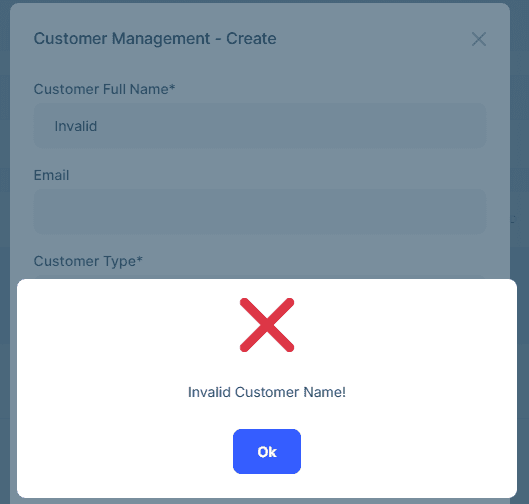
Examples
Pre-Create: Validation
{
  "commandName": "Create",
  "type": "Pre",
  "javascript": "if(!context.commandArgs.data['Name']) {\n  globalError = 'Organization name is required!';\n}"
}
Post-Create: Email Notification
{
  "commandName": "Create",
  "type": "Post",
  "javascript": "if(context.currentUser.isAuthenticated && context.emailSender) {\n  await context.emailSender.sendAsync(\n    context.currentUser.email,\n    'New Order Created',\n    'Order total: $' + context.commandArgs.data['TotalAmount']\n  );\n}"
}
Pre-Update: Role-Based Authorization
{
  "commandName": "Update",
  "type": "Pre",
  "javascript": "if(context.commandArgs.data['IsDelivered']) {\n  if(!context.currentUser.roles.includes('admin')) {\n    globalError = 'Only administrators can mark orders as delivered!';\n  }\n}"
}
Pre-Delete: Business Rule Check
{
  "commandName": "Delete",
  "type": "Pre",
  "javascript": "var project = await db.get('LowCodeDemo.Projects.Project', context.commandArgs.entityId);\nif(project.Budget > 100000) {\n  globalError = 'Cannot delete high-budget projects!';\n}"
}
Pre-Update: Negative Value Check
{
  "commandName": "Update",
  "type": "Pre",
  "javascript": "if(context.commandArgs.data['Quantity'] < 0) {\n  globalError = 'Quantity cannot be negative!';\n}"
}
Replace-Create: Custom Insert Logic
When you need to completely replace the default create operation with custom logic:
{
  "commandName": "Create",
  "type": "Replace",
  "javascript": "var data = context.commandArgs.data;\ndata['Code'] = 'PRD-' + Date.now();\nvar result = await db.insert('LowCodeDemo.Products.Product', data);\ncontext.log('Product created with custom code: ' + data['Code']);\nreturn result.Id;"
}
Important:
Replace-Createinterceptors must return the new entity'sId(Guid). The system uses this value to fetch and return the created entity. Usereturn result.Id;afterdb.insert(...).
Replace-UpdateandReplace-Deleteinterceptors do not need to return a value.
Pre-Update: Self-Reference Check
{
  "commandName": "Update",
  "type": "Pre",
  "javascript": "if(context.commandArgs.data.ParentCategoryId === context.commandArgs.entityId) {\n  globalError = 'A category cannot be its own parent!';\n}"
}



