Microservice Solution: The Structure
You must have an ABP Business or a higher license to be able to create a microservice solution.
This document explains the solution and folder structure of ABP Studio's microservice solution template.
This document assumes that you've created a new microservice solution by following the Quick Start: Creating a Microservice Solution with ABP Studio guide.
The current modern template uses React-based web applications. Older MVC, Angular, Blazor, and MAUI web app layouts are not part of this structure.
Understanding the ABP Solution Structure
When you create a new microservice solution, you will see a tree structure similar to the one below in the Solution Explorer panel:
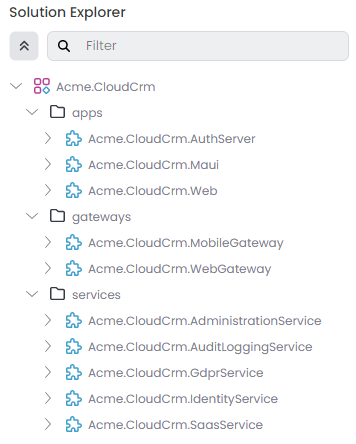
Each leaf item in the tree above is an ABP Studio module. They are grouped into folders (apps, gateways and services) in that solution.
The .NET-based modules, such as auth-server, gateways, and backend services, keep their own .NET solution structure. Frontend applications such as react, react-admin-console, and react-public-web live in their own frontend folders.
Refer to the Concepts document for a full definition of ABP Studio solution, module and package terms.
Exploring the Folder Structure
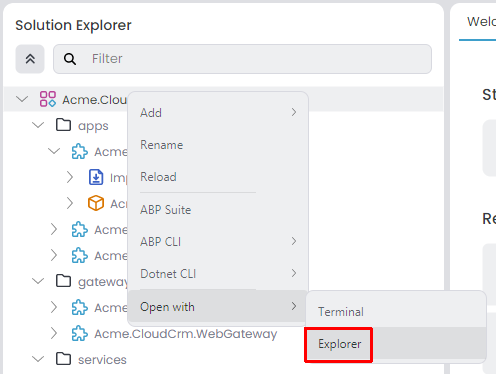
You can right-click the root item in the solution explorer (Acme.CloudCrm for this example) and select the Open with -> Explorer command to open the folder containing the solution in your file system:
The root folder of the solution will be similar to the following:
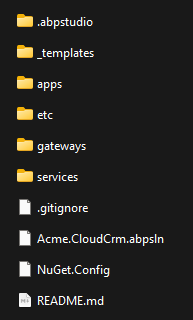
The folder structure basically matches to the solution in ABP Studio's Solution Explorer:
.abpstudiofolder contains your personal preferences for this solution and it is not added to your source control system (Git ignored). It is created and used by ABP Studio.appsfolder contains the applications of the solution:auth-serveris the authentication server based on OpenIddict.reactis the main React SPA when the web UI is enabled.react-admin-consoleis the dedicated administration SPA when the web UI is enabled.react-public-webis the optional public-facing site.mobile/react-nativeis the optional mobile application.
etcfolder contains some additional files for the solution. It has the following sub-folders:abp-studiofolder contains settings that are managed by ABP Studio. This folder is added to your source control system and shared between developers.dockerfolder contains docker-compose configuration to easily run infrastructure dependencies (e.g. RabbitMQ, Redis) of the solution on your local computer.helmfolder contains all the Helm charts and related scripts to deploy the solution to Kubernetes.scriptsfolder contains helper scripts for initializing and running the solution.
gatewaysfolder contains one or more API Gateways. This solution implements the BFF pattern, so it has a dedicated API Gateway for each different client type:webis the gateway forreact.publicis the gateway forreact-public-web, when the public website is enabled.mobileis the gateway for the React Native application, when mobile is enabled.
servicesfolder contains the microservices. The microservice count varies based on the options you've selected during the solution creation. However, the following microservices are always included:administrationmicroservice manages permissions, settings, features, and other operational capabilities used by the solution.identitymicroservice manages users, roles, and related identity/OpenIddict endpoints used by the web applications.