Today we faced a really critical problem, all logged in user's in the system (belongs to different tenants) started to be behave like logged in via same tenant and user like XTenant\XUser to the system. Angular side was showing this same tenant and user in top of the right (profile) area. In thi situation we opened Linked Accounts and screen was like below. The problem has been solved after restarting service (app). This problem occured second time. Because of the user's belongs to different tenants see the unrelated (unauthorized) data, this problem is really critical for us. We need urgent support for this.
We are not sure if related with problem, but want to share as an extra information, we realised below error on logs approximately same time:
Invalid extension grant{"error":"TheTargetUserIsNotLinkedToYou"}, details: {"ClientId":"MyApp_App","ClientName":"MyApp_App","GrantType":"LinkLogin","Scopes":"XProject offline_access","AuthorizationCode":"********","RefreshToken":"********","UserName":null,"AuthenticationContextReferenceClasses":null,"Tenant":null,"IdP":null,"Raw":{"grant_type":"LinkLogin","LinkUserId":"39fb9b1b-1ccc-51d0-f52a-964600e6ed13","access_token":"**","client_id":"MyApp_App","client_secret":"***REDACTED***","scope":"offline_access XProject","LinkTenantId":"3a031155-0c87-72e8-5057-48a94e23fce3"},"$type":"TokenRequestValidationLog"}
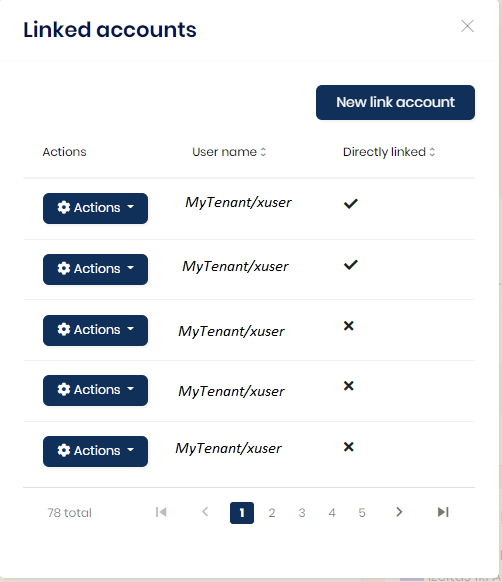
Note:There are 162 rows in AbpLinkUsers table
I am getting error when submit a record on UI page ("An error occured"):
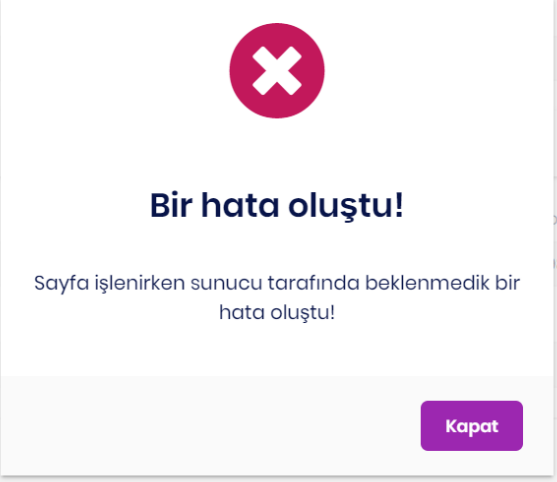
and AbpAuditLogs.exceptions :
[
  {
    "code": "Xproject:00132",
    "message": "Exception of type 'MyCompany.Xproject.Domain.Addresses.Exceptions.TaxOfficeNotMatchException' was thrown.",
    "details": "TaxOfficeNotMatchException: Exception of type 'MyCompany.Xproject.Domain.Addresses.Exceptions.TaxOfficeNotMatchException' was thrown.\nSTACK TRACE:    at MyCompany.Xproject.Addresses.AddressManager.CheckTaxOfficeAsync(String taxOffice) in C:\\MyCompany\\Repos\\MyCompany.ECOM.Misc\\MyCompany.Xproject\\aspnet-core\\src\\MyCompany.Xproject.Domain\\Addresses\\AddressManager.cs:line 120\n   at MyCompany.Xproject.Addresses.AddressManager.CreateAsync(Int32 countryId, Nullable`1 municipalityId, Nullable`1 neighbourhoodId, Nullable`1 parentId, Nullable`1 cityId, String salutation, String contactName, String contactSurName, String countryPhonePrefix, String phone, String eMail, String companyTitle, String companyDepartment, String iossNr, String postalCode, String addressText, String taxOffice, String taxNr, String idNr, IndividualCorporateType individualCorporateTypeId, DeliveryType deliveryTypeId, Decimal code, Nullable`1 adressTypeId, Boolean deliveryAndInvoiceAddressSame) in C:\\MyCompany\\Repos\\MyCompany.ECOM.Misc\\MyCompany.Xproject\\aspnet-core\\src\\MyCompany.Xproject.Domain\\Addresses\\AddressManager.cs:line 55\n   at MyCompany.Xproject.Addresses.AddressesAppService.CreateAsync(AddressCreateDto input) in C:\\MyCompany\\Repos\\MyCompany.ECOM.Misc\\MyCompany.Xproject\\aspnet-core\\src\\MyCompany.Xproject.Application\\Addresses\\AddressAppService.cs:line 263\n   at Castle.DynamicProxy.AsyncInterceptorBase.ProceedAsynchronous[TResult](IInvocation invocation, IInvocationProceedInfo proceedInfo)\n   at
but message in logs.txt looks like it should
2022-06-07 14:36:18.774 +03:00 [WRN] ---------- RemoteServiceErrorInfo ----------
{
  "code": "Xproject:00132",
  "message": "Vergi Dairesi Alanı Eşleşmedi",
  "details": null,
  "data": {},
  "validationErrors": null
}

2022-06-07 14:36:18.774 +03:00 [WRN] Exception of type 'MyCompany.Xproject.Domain.Addresses.Exceptions.TaxOfficeNotMatchException' was thrown.
MyCompany.Xproject.Domain.Addresses.Exceptions.TaxOfficeNotMatchException: Exception of type 'MyCompany.Xproject.Domain.Addresses.Exceptions.TaxOfficeNotMatchException' was thrown.
   at MyCompany.Xproject.Addresses.AddressManager.CheckTaxOfficeAsync(String taxOffice) in C:\MyCompany\Repos\MyCompany.ECOM.Misc\MyCompany.Xproject\aspnet-core\src\MyCompany.Xproject.Domain\Addresses\AddressManager.cs:line 120
   at MyCompany.Xproject.Addresses.AddressManager.CreateAsync(Int32 countryId, Nullable`1 municipalityId, Nullable`1
I don't manage exception manually. (there is no any try-catch block)
private async Task CheckTaxOfficeAsync(string taxOffice)
        {
            if (!string.IsNullOrEmpty(taxOffice))
            {
                var address = (await _taxOfficeRepository.GetQueryableAsync()).Any(x => x.Name == taxOffice);
                if (!address)
                {
                    throw new TaxOfficeNotMatchException();
                }
            }
        }
public class TaxOfficeNotMatchException : BusinessException
    {
        public TaxOfficeNotMatchException()
            : base(XprojectErrorCodes.XprojectTaxOfficeNotMatchError)
        {
        }
    }
ABP Framework version: v4.4.4
UI type: Angular
DB provider: EF Core
Tiered (MVC) or Identity Server Separated (Angular): yes
Exception message and stack trace:
Steps to reproduce the issue:"
I created a new solution with seperate IdentityServer via following cli command:
abp new Acme.BookStore --separate-identity-server -csf -dbms PostgreSql -u angular -m none -t app-pro -v 4.4.4
I changed connection strings
Host=localhost;Port=5432;Database=BookStoreDb;User ID=postgres;Password=1234;Host=localhost;Port=5432;Database=IdentityServerDb;User ID=postgres;Password=1234;I executed dotnet run in .DbMigrator folder.
All tables created in BookStoreDb but nothing happened in IdentityServerDb. How can I create seperate IdentityServer Database ?
SELECT a."Id", a."ConcurrencyStamp", a."CreationTime", a."ExtraProperties", a."IsAbandoned", a."JobArgs", a."JobName", a."LastTryTime", a."NextTryTime", a."Priority", a."TryCount"
FROM "AbpBackgroundJobs" AS a
WHERE NOT (a."IsAbandoned") AND (a."NextTryTime" <= @__now_0)
ORDER BY a."Priority" DESC, a."TryCount", a."NextTryTime"
LIMIT @__p_1
Loaded 'C:\Program Files\dotnet\shared\Microsoft.NETCore.App\6.0.2\System.Reflection.Metadata.dll'. Skipped loading symbols. Module is optimized and the debugger option 'Just My Code' is enabled.
[14:27:52 ERR] An exception occurred while iterating over the results of a query for context type 'Volo.Abp.BackgroundJobs.EntityFrameworkCore.BackgroundJobsDbContext'.
System.InvalidCastException: Cannot write DateTime with Kind=Local to PostgreSQL type 'timestamp with time zone', only UTC is supported. Note that it's not possible to mix DateTimes with different Kinds in an array/range. See the Npgsql.EnableLegacyTimestampBehavior AppContext switch to enable legacy behavior.
   at Npgsql.Internal.TypeHandlers.DateTimeHandlers.TimestampTzHandler.ValidateAndGetLength(DateTime value, NpgsqlParameter parameter)
   at Npgsql.Internal.TypeHandlers.DateTimeHandlers.TimestampTzHandler.ValidateObjectAndGetLength(Object value, NpgsqlLengthCache& lengthCache, NpgsqlParameter parameter)
   at Npgsql.NpgsqlParameter.ValidateAndGetLength()
   at Npgsql.NpgsqlParameterCollection.ValidateAndBind(ConnectorTypeMapper typeMapper)
   at Npgsql.NpgsqlCommand.ExecuteReader(CommandBehavior behavior, Boolean async, CancellationToken cancellationToken)
   at Npgsql.NpgsqlCommand.ExecuteReader(CommandBehavior behavior, Boolean async, CancellationToken cancellationToken)
   at Npgsql.NpgsqlCommand.ExecuteDbDataReaderAsync(CommandBehavior behavior, CancellationToken cancellationToken)
   at Microsoft.EntityFrameworkCore.Storage.RelationalCommand.ExecuteReaderAsync(RelationalCommandParameterObject parameterObject, CancellationToken cancellationToken)
   at Microsoft.EntityFrameworkCore.Storage.RelationalCommand.ExecuteReaderAsync(RelationalCommandParameterObject parameterObject, CancellationToken cancellationToken)
   at Microsoft.EntityFrameworkCore.Query.Internal.SplitQueryingEnumerable`1.AsyncEnumerator.InitializeReaderAsync(AsyncEnumerator enumerator, CancellationToken cancellationToken)
   at Npgsql.EntityFrameworkCore.PostgreSQL.Storage.Internal.NpgsqlExecutionStrategy.ExecuteAsync[TState,TResult](TState state, Func`4 operation, Func`4 verifySucceeded, CancellationToken cancellationToken)
   at Microsoft.EntityFrameworkCore.Query.Internal.SplitQueryingEnumerable`1.AsyncEnumerator.MoveNextAsync()
System.InvalidCastException: Cannot write DateTime with Kind=Local to PostgreSQL type 'timestamp with time zone', only UTC is supported. Note that it's not possible to mix DateTimes with different Kinds in an array/range. See the Npgsql.EnableLegacyTimestampBehavior AppContext switch to enable legacy behavior.
   at Npgsql.Internal.TypeHandlers.DateTimeHandlers.TimestampTzHandler.ValidateAndGetLength(DateTime value, NpgsqlParameter parameter)
   at Npgsql.Internal.TypeHandlers.DateTimeHandlers.TimestampTzHandler.ValidateObjectAndGetLength(Object value, NpgsqlLengthCache& lengthCache, NpgsqlParameter parameter)
   at Npgsql.NpgsqlParameter.ValidateAndGetLength()
   at Npgsql.NpgsqlParameterCollection.ValidateAndBind(ConnectorTypeMapper typeMapper)
   at Npgsql.NpgsqlCommand.ExecuteReader(CommandBehavior behavior, Boolean async, CancellationToken cancellationToken)
   at Npgsql.NpgsqlCommand.ExecuteReader(CommandBehavior behavior, Boolean async, CancellationToken cancellationToken)
   at Npgsql.NpgsqlCommand.ExecuteDbDataReaderAsync(CommandBehavior behavior, CancellationToken cancellationToken)
   at Microsoft.EntityFrameworkCore.Storage.RelationalCommand.ExecuteReaderAsync(RelationalCommandParameterObject parameterObject, CancellationToken cancellationToken)
   at Microsoft.EntityFrameworkCore.Storage.RelationalCommand.ExecuteReaderAsync(RelationalCommandParameterObject parameterObject, CancellationToken cancellationToken)
   at Microsoft.EntityFrameworkCore.Query.Internal.SplitQueryingEnumerable`1.AsyncEnumerator.InitializeReaderAsync(AsyncEnumerator enumerator, CancellationToken cancellationToken)
   at Npgsql.EntityFrameworkCore.PostgreSQL.Storage.Internal.NpgsqlExecutionStrategy.ExecuteAsync[TState,TResult](TState state, Func`4 operation, Func`4 verifySucceeded, CancellationToken cancellationToken)
   at Microsoft.EntityFrameworkCore.Query.Internal.SplitQueryingEnumerable`1.AsyncEnumerator.MoveNextAsync()
Steps to reproduce the issue:"
I create a new solution via Abp Suite (Postgres)
Add Migration (Initial)
Run solution
I get above error in logs.txt
Note:
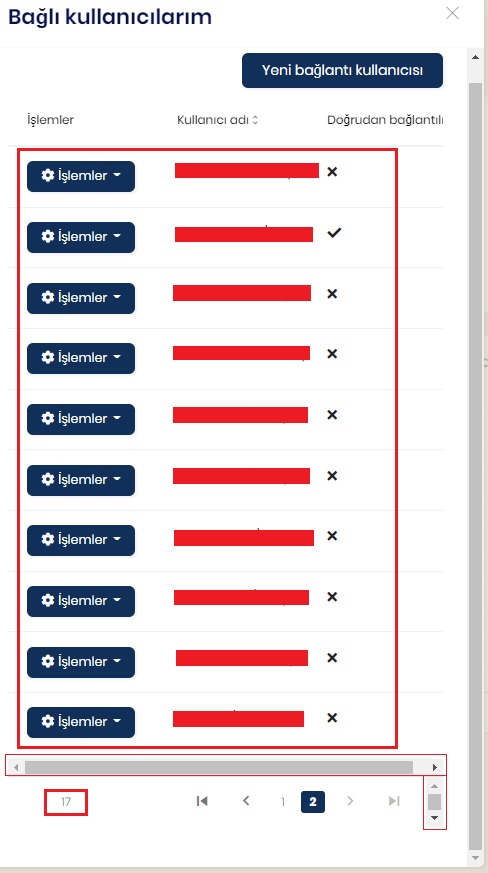
AppContext.SetSwitch("Npgsql.EnableLegacyTimestampBehavior", true);Link User paging is not working ? I cannot see second page on users altough I switch the second page. Although it should show last seven records on second page , it still shows first 10 records. Also in Turkish link users page comes with two meaningless scrolls.
Note:I think it is a bug , so I have written same issue in bugs&issues but I didn't get any answer from support about it.
I created entities with Abp Suite. I am trying to post entity with postman. But I got above error although name has value in json. If I remove [Required] exception losts.
public class ServiceBalanceChangeReasonCreateDto
{
    [Required]
    public string Name { get; set; }
}
public virtual async Task<ServiceBalanceChangeReasonDto> CreateAsync(ServiceBalanceChangeReasonCreateDto input)
{
...
...
}
EDIT : This error occurs on all Required usages in CreateOrUpdate..Dtos (all AppService methods) we got this error in all enviroments(debug,stage and prod)
Does ABP(Angular) UI have a functionality after click on a button (save,load,delete) gives processing information and block some part of page with a spinning animation?
public void RemoveEmptyStrings()
{
    // Look for changes
    this.ChangeTracker.DetectChanges();

    // Loop through each entity
    foreach (var entity in this.ChangeTracker.Entries())
    {
        // Use reflection to find editable string properties
        var properties = from p in entity.Entity.GetType().GetProperties()
            where p.PropertyType == typeof(string)
                  && p.CanRead
                  && p.CanWrite
            select p;

        // Loop through each property and replace empty strings with null
        foreach (var property in properties)
        {
            if (string.IsNullOrWhiteSpace(property.GetValue(entity.Entity, null) as string))
                property.SetValue(entity.Entity, null, null);
       }
    }
}









