normally it's being redirected to MVC login page when the response_type=code
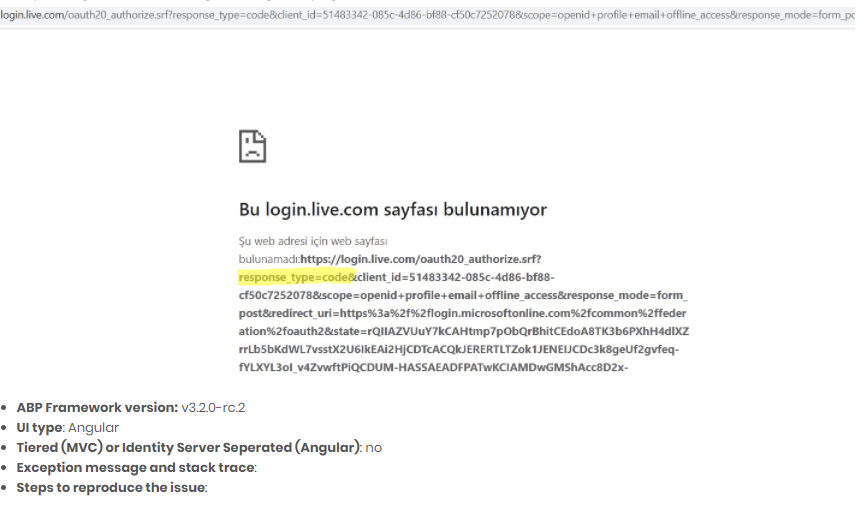
And you shouldn't change Angular UI code, because in this scenario, MVC Login page is being used.
hi sorry, we missed this question. @gterdem did you understand the issue?
found this https://github.com/MicrosoftDocs/azure-docs/issues/24673#issuecomment-462876182
hi I just checked what you want, and it's not implemented yet. it's on the roadmap.
so you cannot add a navigation property to another entity by using entity extension feature.
alternatively you can add CountryId to the IdentityUser entity and override the User Edit Form.
I uploaded User create, edit, index pages https://drive.google.com/file/d/1oURFFVMBcHHg73I-zxUBbRw-M9nUxDR7/view?usp=sharing
if you override the cshtml files and javascript files and put them in the shown location in your web project as embedded source, then you'll be overrided these files
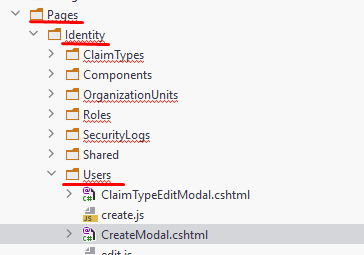
also see how to override a UI https://docs.abp.io/en/abp/latest/UI/AspNetCore/Customization-User-Interface
still couldn't succeed? mail to info@abp.io
this may help you https://docs.abp.io/en/abp/latest/Customizing-Application-Modules-Extending-Entities
can you try to remove single quotes for module parameter like abp generate-proxy -m danh-muc
@trendline, this package comes with 3.2.X-RC version. It seems like you are using MVC version. Did you run yarn and gulp?
thank you. we have created an internal ticket (3456)
yes you can publish the application to any number of servers. license check is done only in development mode.
@Daniel, I created a new topic for this, can you write your finding under this topic, https://support.abp.io/QA/Questions/434/UserId-and-Username-is-null-in-Logout-action
Refer https://support.abp.io/QA/Questions/282#answer-fa14a68a-9fdf-7465-ce2d-39f7c1ad0319









